AI Support Migration Checklist: What to Test Before You Switch
An AI support migration checklist: keep the helpdesk, tickets and macros, rebuild the escalation rules and tone, then run both agents for one to two weeks.
Summarize with AI
The test is four numbers, measured on both agents over the same live tickets: automated resolution rate, escalation rate, CSAT on AI-handled tickets, and time to first response. Capture them on the agent you have before you connect anything to your helpdesk. Run the new one in the background until the sample means something.
Start with our vendor selection checklist if you are still choosing a replacement. If you have not added AI to your helpdesk at all, read the guide to adding it to the helpdesk you already run.
Contract terms vary, so read your order form before you plan any of this.
Switching AI support agents at a glance
| What you keep | Your helpdesk, whether that is Zendesk, Intercom, Freshdesk, Gorgias or HubSpot, plus the tickets, the macros, the views and the reporting your team already runs on. |
| What you rebuild first | The behavior layer: escalation rules, tone and guardrails. Until that is done, the new agent is being scored without your rules in it. |
| What the parallel run is | The new agent drafts an agent-only note on live tickets. Nobody outside your team sees anything it writes. |
| Window | One to two weeks of representative traffic. |
| Sample size | Every live ticket in that window. At a thousand tickets a month, that is roughly 230 to 460 tickets to compare the two agents on. |
| Pass condition | The new agent clears the numbers you wrote down first, on all four. |
| Rollback point | CSAT on AI-handled tickets falling below your baseline, or escalation rate rising above it. Reverting is a toggle, because you have not switched the old agent off yet. |
| What it costs while both run | Both sides bill. Intercom charges $0.99 per Fin outcome, Gorgias charges $0.90 per automated interaction past its allowance on Pro, and our own entry plan is $199 a month after a 30-day trial. |
What goes on an AI support migration checklist?
Work down this list in order, and keep the old agent switched on until the last line.
- Record your baseline on today's agent: the four numbers, over a stated period, before you connect anything.
- Export the old agent's analytics and your ticket history while you still have admin access (the dashboards leave with the old agent).
- Find the notice period and renewal date in your order form.
- Copy every escalation rule, tone rule, guardrail and exact-wording answer out of the old admin screens into one document.
- Install the new agent from your helpdesk's marketplace and leave it drafting private notes only.
- Connect your help center and your historic tickets (we take the last 5,000 by default).
- Rebuild the behavior layer from that document, and decide which actions need a person to approve them.
- Batch-test your fifty hardest questions before the new agent sees a live ticket.
- Pick one channel and one to two normal weeks for the overlap (no quiet periods), and set a spend limit on the old agent.
- Run both on the same live tickets, with one agent replying and the other drafting notes.
- Compare the four numbers on those tickets, with the ticket count next to every rate.
- Cut over one channel at a time, and cancel the old agent once the last channel has run clean.
Why do AI support switches go wrong?
Most of the damage on the switches we see comes from three places:
- Nobody writes down the before-numbers, so there is nothing to compare against.
- Someone scopes the knowledge and forgets the behavior layer.
- The old agent gets canceled before anyone can tell whether the new one is better.
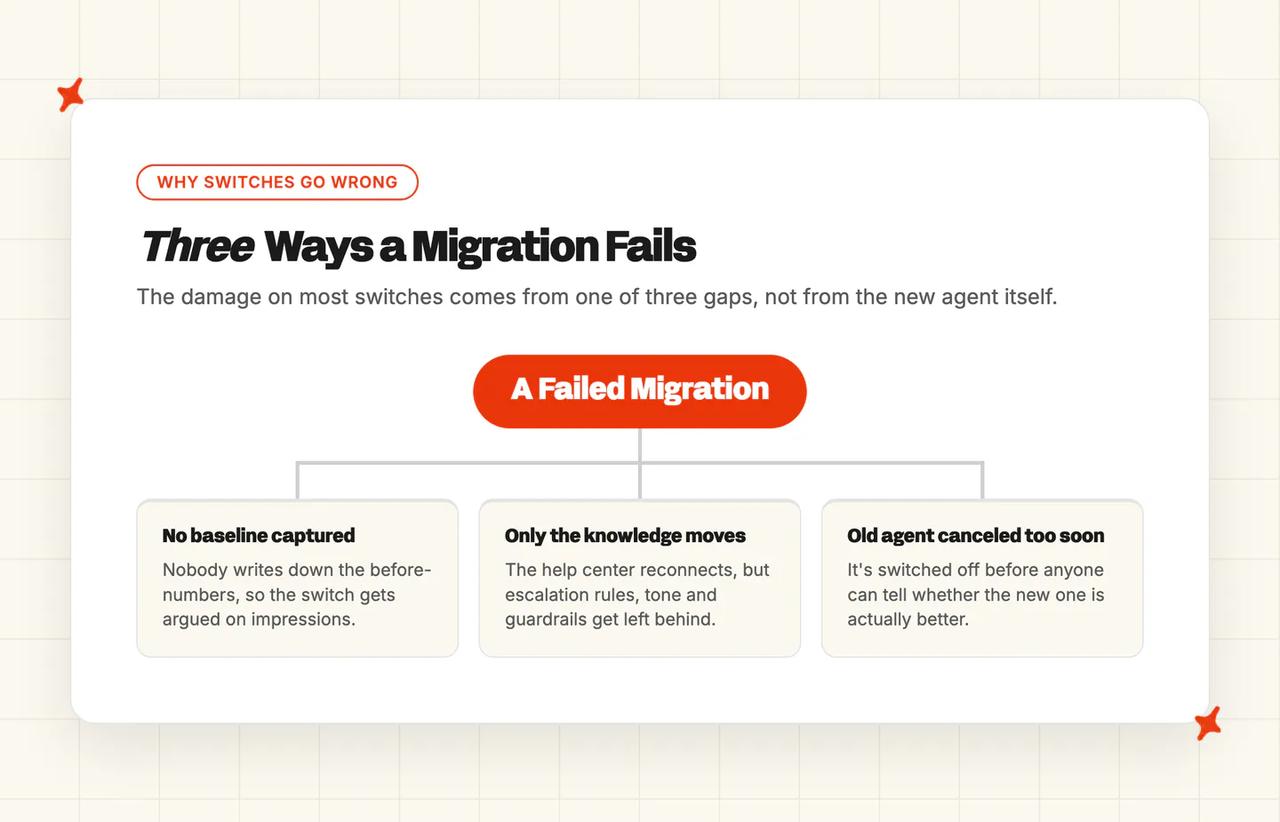
Skip the snapshot of where you are today and the switch gets argued on impressions. The person who signed it off has nothing to show for the money three months later. I watch for the same split on every migration call: the part teams budget for takes an afternoon, and the part they do not budget for is the one with a deadline.
Knowledge reconnects, and your help center gets read in place, with nothing for you to move. The escalation logic, the tone rules, the guardrails and the exact-wording answers export nowhere, because access to the old admin screens ends when the contract does.
The fear usually lands on the knowledge base, the half that does not move. A support leader mid-switch, asking someone who had already done it:
"when you switched off Intercom, what did you move to and how painful was the knowledge base migration specifically? That's one of our bigger concerns" — u/Old-Source2534, r/SaaS
Your help center and your helpdesk both stay exactly where they are. The usual migration advice does not apply here: it assumes you are moving a help center into new software, swapping the helpdesk underneath it, or scoring tools you have not bought yet.
We leave canceling the old agent until last. Cancel it sooner and there is no way back.
In a single month we watched four companies move off their AI support vendor, and the invoice was what pushed every one of them out. That same invoice pressure is driving the wider shift to agentic support across the market.
When a team moves to us, the baseline is the first thing we ask for, before anything is connected. Your VP will ask for it later, when they want to know what the money bought.
What has to be in place before the comparison is fair?
The knowledge reconnects in an afternoon. The behavior layer has to be rebuilt by hand.
| Asset | Status | What it actually means | Comparison invalid if you start first? |
|---|---|---|---|
| Helpdesk and tickets | Keep | Nothing about the desk moves. The new agent installs from your helpdesk's own marketplace and replies in the same inbox. | No |
| Macros and saved replies | Keep | They carry on working for your human agents either way, and they export cleanly on most platforms, so they are good material for building the new agent's knowledge. | No |
| Historic tickets | Keep | The new agent trains on your last 5,000 historic tickets by default, pulled through the same connection. No manual export. | No, though a fair comparison wants it done first, or the new agent is answering from the help center alone |
| Knowledge sources | Rebuild (fast) | It reconnects your help center in place, and that takes about fifteen minutes on every platform we cover. | Yes. An unconnected agent fails questions it would otherwise have answered |
| Escalation and routing rules | Rebuild | Escalation logic has to be written again in the new tool's own handover and escalation settings. | Yes. An agent with no escalation rules either over-escalates or under-escalates, and both distort the result |
| Tone and guardrail config | Rebuild | Written again as plain-language rules. In our dashboard each entry stays under 75 words, with up to 30 per category, so a hundred fussy rules get consolidated into a much shorter list. | Yes. Until it is done you are scoring an unconfigured agent |
| In-product analytics history | Lose | The old agent's dashboards leave with the old agent, so export anything you need before your access lapses. | No, though it is the reason the baseline step exists at all |
The behavior layer costs the most time, and my shortcut for it is an AI browser agent. Point it at the old admin screens in read-only mode and have it compile every rule verbatim into one document. Expect 90 to 200 items, so the job becomes reviewing a couple of hundred lines. Never hand over credentials.
Log in to the old tool yourself, then give the browser agent the prompt I use. It copies what the screens show. Deciding which rules still earn a place in the new agent stays with you.
I am moving off [old AI agent, e.g. Intercom Fin] to a new AI support agent. I am logged in to its admin screens in this browser tab.

Work read-only. Do not click Save, Publish or Delete, do not toggle anything, and do not change any setting. If a page asks you to log in, stop and tell me.

Visit every settings screen that controls how the AI behaves: instructions or guidance, tone and style, escalation and handover rules, routing, guardrails and blocked topics, custom or exact-wording answers, and any actions or workflows it can run.

Copy every rule you find, word for word, into one table with these columns:
1. Where it lives (screen name and URL)
2. Type (tone, escalation, guardrail, exact answer, action, other)
3. The rule, verbatim
4. When it applies (channel, audience, trigger or time)
5. Notes (anything you could not read or were unsure about)

Do not summarise, merge or reword any rule. If a rule is cut off, or you could only see it by saving something, write "not captured" and move on.

At the end, list every screen you visited and how many rules you took from each, so I can check that nothing was skipped.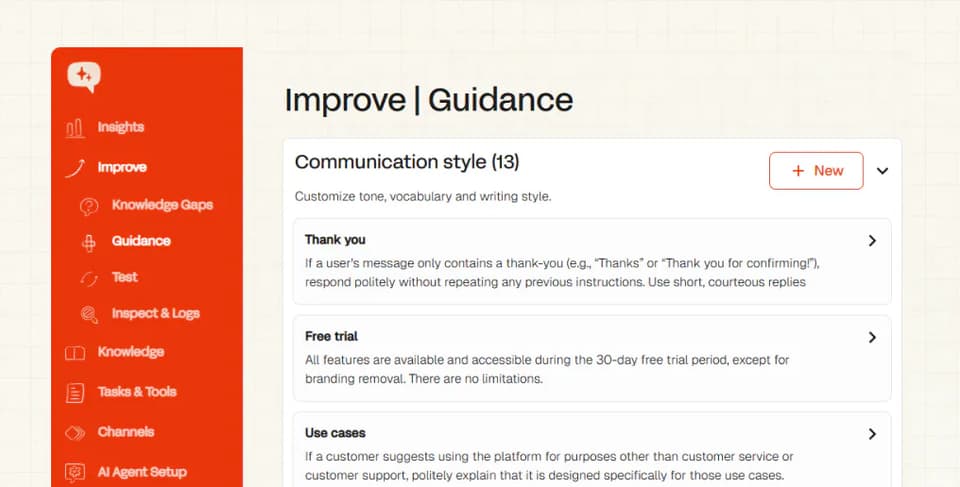
On our side, tone, escalation and handover rules go into Guidance, and exact-wording answers go into Custom Answers. Echo, our operator agent, drafts those entries from your document for a human to approve, and it reads screenshots of the old tool's screens.
What does it cost to run two AI agents at once?
Both vendors bill while both are running, so every extra day of overlap costs you money. Scope the overlap to one channel and keep it to one to two weeks of representative traffic. Set the spend guard on the agent you are leaving, and time the whole thing against your renewal date.
Every native helpdesk AI charges per outcome or per session, so the overlap shows up as a bill that moves with volume. Work that number out before the approval meeting. I use your busiest week for it, because that is the figure an approver challenges.
Intercom prices Fin at $0.99 per outcome, charged once per conversation however many questions get answered inside it. So two weeks of overlap costs whatever Fin usually handles in two weeks, at 99 cents each. Intercom also lets you set usage alerts and a hard limit on outcomes, and the same control exists on the standalone path. The limit only caps spend above your contracted amount.
Gorgias bundles the helpdesk and the AI into plans with a ticket allowance and an automated-interaction allowance. At a thousand tickets a month the lowest plan that covers you is Pro at $550 (2,000 tickets and 190 automated interactions); Basic caps out at 300 tickets. Past the allowance it is $0.90 per automated interaction, and Gorgias only counts an interaction as automated if no human replies within 72 hours, so you may see one more invoice after you think you are done.
On Gorgias, AI Agent can be switched on and off per channel: email, chat, SMS, Instagram and Messenger. Pick one channel and the double-billing shrinks to that channel's share of your volume.
Notice periods are the part I check first, so read your contract. A downgrade normally takes effect at renewal, an enterprise deal carries a written-notice period, and on Gorgias the AI line ends by turning auto-renewal off. Fin inside Intercom, HubSpot's customer agent and Zendesk's AI agents are platform features, so switching the deployment off stops the spend with no line item to cancel. Gorgias and Freddy have subscription lines that end with the billing cycle, so that date is your deadline. Our guide to migrating off Freddy AI sets out which Freddy add-on to cancel first.
You are entitled to take your ticket and conversation history out before you leave, typically as a CSV or JSON export or through the vendor's own data-export API. Your help center articles and macros usually export the same way.
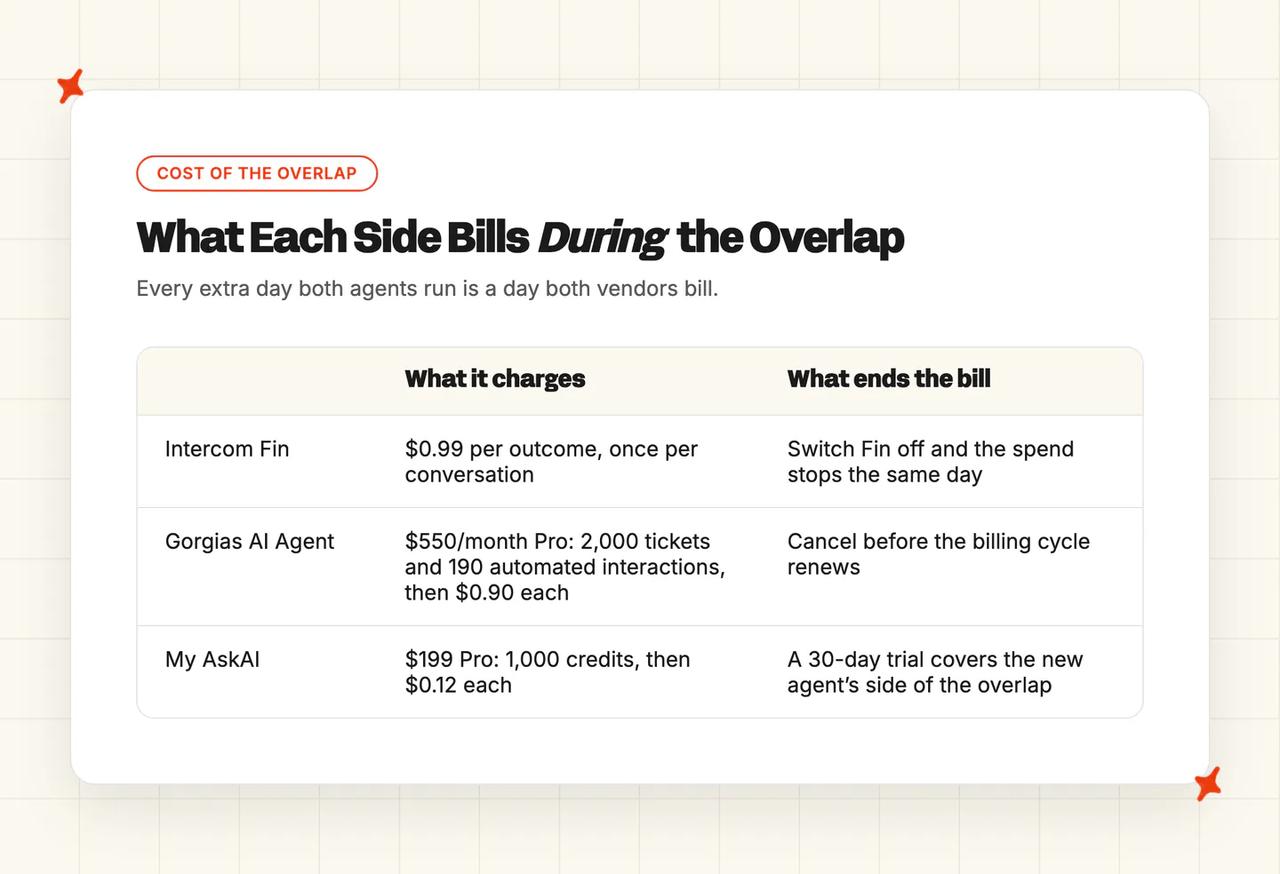
We charge for every ticket the AI works, resolved or not. The $199 Pro plan includes 1,000 credits, then $0.12 per credit, on top of the helpdesk seats you already pay for. Every plan starts with a 30-day trial, which covers the new agent's side of the overlap outright, so for those weeks only the incumbent's bill keeps running. Usage-based extras like tagging and translation are billed per use on every plan, and our ROI calculator is built for Zendesk, Intercom, Freshdesk, Gorgias and HubSpot switches, ready to take into the approval meeting.
How does the parallel run actually work?
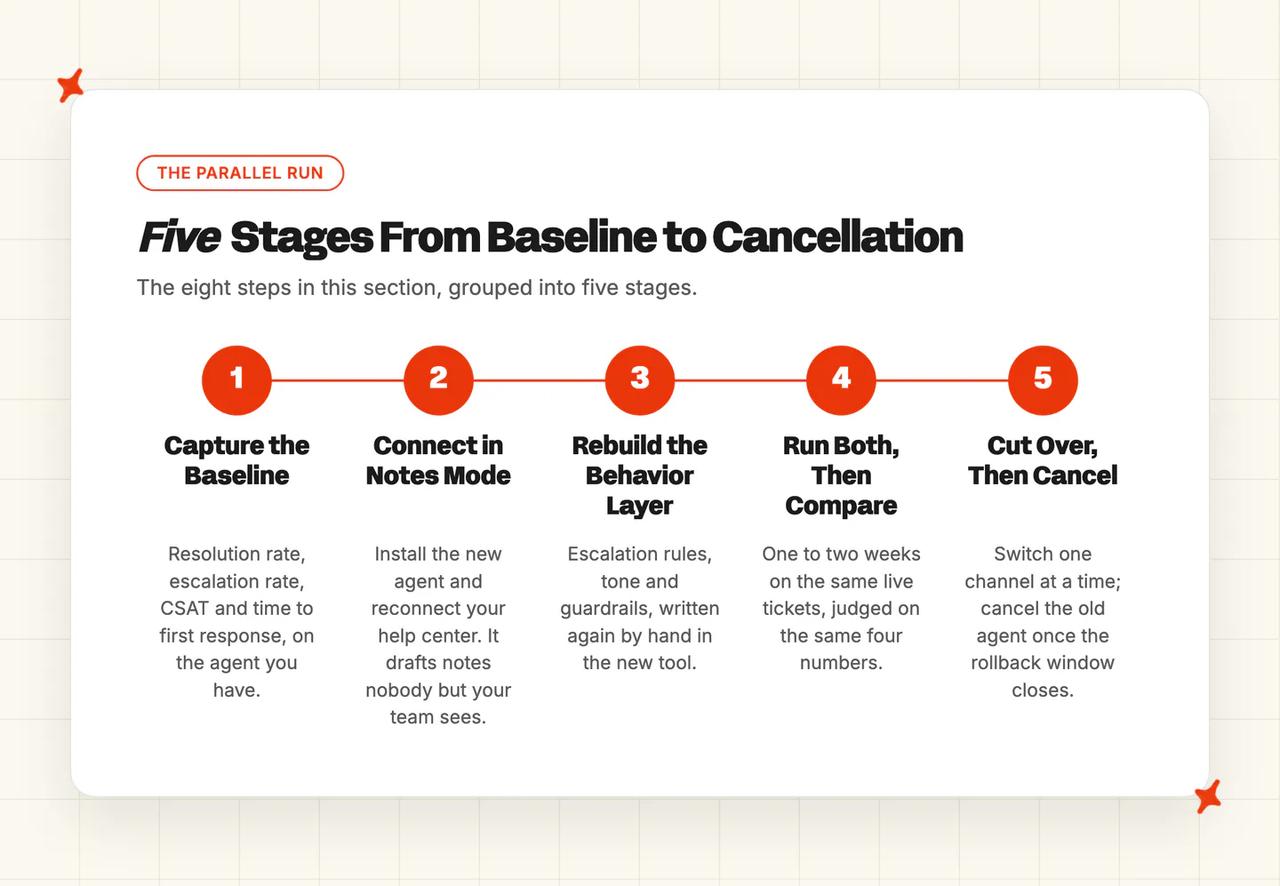
The new agent drafts notes on the same live tickets the old one answers, and no customer sees what it writes. The old agent stays switched on until the rollback window closes.
Step 1: Capture the baseline before you change anything
Write down four numbers on the agent you have, over a stated period: automated resolution rate, escalation rate, CSAT on AI-handled tickets and time to first response. This is the only number set you cannot recover later (the old agent's dashboards leave with it).
Step 2: Connect the new agent in notes mode
Install from your helpdesk's own marketplace where one exists. We list there, so the approval process is already cleared and there is less to go wrong. You need admin access to your helpdesk for about ten minutes.
On Intercom, Freshdesk, Gorgias, HubSpot and Zendesk Tickets, drafting a private note is already the default state, so there is nothing to configure. The new agent starts working on live tickets on day one.
Zendesk Messaging has no internal-notes mode, so validate on Zendesk Tickets first and swap Messaging over in one change. Freshchat needs Freddy switched off before connecting, and a Pro plan or above. Validate on the ticket channel beside it.
Step 3: Point it at the knowledge you already have
We read your help center in place, in about fifteen minutes. Your historic tickets connect the same way, 5,000 by default, and turn into roughly twenty grouped draft articles within about six hours, with no work from you.

Step 4: Rebuild the behavior layer
Escalation rules, tone, guardrails and the answers that must be worded exactly, all written again by hand. This is the slow part, and your access to the old tool ends when the contract does, so start now.
If the new agent will take actions, such as refunds, cancellations or order updates, decide upfront whether it acts on its own or drafts each one for a person to approve first. You can set it separately for each action, and on our side you can start with approvals and open autonomy up as trust builds.
Step 5: Run both on the same live tickets
One agent answers customers, the other drafts notes, and neither job swaps mid-test. Never let both agents reply directly on the same channel. The customer gets two different answers to one question, and your team hears about it from the customer. Running on live tickets turns up your awkward questions, the ones nobody thinks to write down.
Step 6: Compare on the same tickets
One to two weeks of representative traffic, on the four numbers from Step 1. Pick weeks that look like your normal ones (a week with your quiet period in it will skew everything).
Step 7: Cut over one channel at a time
Flip the new agent to direct replies on one channel and pause the incumbent on that same channel, in the same change window. I would watch that channel for a few days before you touch the next one. Rolling back is a toggle, because the old agent is still configured and switched on everywhere else.
Step 8: Cancel the incumbent last
Only once the rollback window has closed on every channel. Keep the old agent switched on until the last channel has run clean.
From the first day it drafts, our Self-Learning compares what it would have said with what your agent actually sent and turns the gap into draft knowledge articles, so you come out of the overlap with knowledge you did not have going in.
How do you know the new agent is actually better than the one you have?
At a thousand tickets a month the overlap gives you roughly 230 to 460 tickets to judge it on (fewer if you scoped it to one channel). Switch only when the new agent clears the old one on all four. If it does not clear them, you have lost only the cost of the overlap.
| Metric | How to measure it on both | Pass condition |
|---|---|---|
| Automated resolution rate | The share of AI-handled tickets that closed without a person stepping in, on the same tickets over the same weeks. | Clears the baseline you wrote down in Step 1 |
| Escalation rate | The share that reached a human. Report it alongside resolution, because a fall in one is not automatically a rise in the other. | At or below baseline |
| CSAT on AI-handled tickets | Scored on AI-handled conversations only, on both sides. | No fall against baseline |
| Time to first response | On AI-handled tickets, on both sides. | At or below baseline |
Use your own helpdesk's numbers instead of the vendor's headline figure. Every vendor counts its headline number differently, and resolution, automation, deflection and containment are four different things entirely.
Our definition is plain: a conversation counts as resolved when it was not escalated to a human. We have resolved more than 1,000,000 tickets. Our KPI guide and our resolution-rate benchmark study cover what a good rate looks like across the field. Your own baseline is the number that decides it.
Before any of that, test the new agent offline. Upload your worst fifty questions as a one-column CSV and run them as a batch. For every answer, we flag two things: whether a person would have had to step in, and whether the agent had enough material to answer at all. The results export as a file you can hand to your boss.
Report the resolution rate against your baseline with the ticket count in the same sentence. A rate with no sample behind it gets one question straight back: out of how many?
Revert at any point the numbers slip past the rollback point above. Nothing is canceled yet, so reverting costs you nothing. Keep the new agent's setup time out of the evaluation window. I start the clock on the first live ticket.
A losing week is only fixable if you know why one agent beat the other. Ask Echo why our agent gave an answer, why a ticket escalated or where the information came from, and it answers in plain language. Inspect and Logs shows the same trail per conversation: the sources used, the guidance followed and the reasoning behind a CSAT score. Insights scores 100% of the conversations we handle for AI CSAT and groups them by topic, so a bad week points at a subject.
When should you stay where you are?
Three cases where running the comparison is not worth what it costs you.
If your current agent clears the numbers, keep it. Look again at the next renewal: the baseline you capture now turns that comparison into a day's work.
Whenever that day comes, you only write the Guidance, Custom Answers and Tasks once. They stay with our agent and come with you if you later move between Zendesk, Intercom, Freshdesk, Gorgias and HubSpot. Every plan opens with a 30-day trial.
Whichever way the comparison goes, a switch puts your customer data in a new vendor's hands. We are SOC 2 Type II certified and GDPR compliant, and nothing you send us is ever used to train models or for anything beyond answering your own tickets.
FAQs
How long should I run a new AI support agent alongside my old one before switching?
How many tickets do I need to test an AI support agent on before I trust the result?
I stop trusting a resolution rate measured on fewer than about 200 tickets.
| Your monthly ticket volume | What one week gives you | What two weeks gives you |
|---|---|---|
| 500 | About 115 tickets | About 230 tickets |
| 1,000 | About 230 tickets | About 460 tickets |
| 2,000 | About 460 tickets | About 920 tickets |
| 5,000 | About 1,150 tickets | About 2,300 tickets |
At the low end, stretch the window before you trust the number. A hundred tickets is a week of traffic. The two-week cap is about cost, and a small team can decide to spend more to get a result worth acting on.
When should I roll back an AI support agent?
Revert if CSAT on AI-handled tickets falls below the baseline you captured, or if escalation rate rises above it, at any point in the window. Pausing the new agent is a toggle on the channel, and any of your agents can stop it drafting on a single conversation. Rolling back works because the old agent is still switched on.
Can I test the new AI support agent on a free trial before committing?
Yes. Every one of our plans starts with a 30-day trial, all features unlocked, unlimited tickets and no card, and signing up needs a business email. Because the trial covers the new agent's side of the overlap window, the overlap costs you roughly what you already pay.
Do I have to leave my helpdesk to switch AI agents?
No. The new agent installs into the helpdesk you already run: Zendesk, Intercom, Freshdesk, Gorgias or HubSpot. Your tickets, macros, views and reporting all stay exactly where they are.