



YOUR FRESHDESK MIGRATION
Your setup.
Carried forward.
Freddy AI 
- Freshdesk knowledge connected
- Freddy settings carried over
- Internal notes test ready
Our team24 hours
We move your Freddy AI setup to My AskAI in 24 hours. Keep your Freshdesk inbox and support content. Check the new answers before customers see them.
My AskAI helps you migrate from Freshdesk Freddy AI while keeping your Freshdesk tickets, solution articles, canned responses, and team. We carry over your AI settings and connect your knowledge. Test historic tickets, then compare internal notes alongside Freddy in Freshdesk. If you also use Freshchat, we plan its switch separately.
Same helpdesk
Your team can keep using the same tickets, canned responses, groups, and views. We connect My AskAI to Freshdesk and your solution articles, then set up the AI reply rules.
YOUR FRESHDESK MIGRATION
Freddy AI
Our team24 hours
YouGarden
66%
AI resolution with My AskAI
Customer story · Freshdesk
“The quality and consistency of responses are extremely high”
YouGarden evaluated Freddy AI, then chose My AskAI to replace Digital Genius in Freshdesk. The team chose to review internal notes for a month before turning on direct replies. We also helped build its connection to order data.
Done for you
Get your new AI ready to test in 24 hours. Take the time you need to feel confident before it replies to customers.
We review your Solution articles, Freddy persona, custom Q&As, workflows, and handover settings. You give us access; we take care of the setup work.
We connect your knowledge, carry over your settings, and prepare your ticket tests. The 24 hours starts when we have the access and details we need.
Review the results with us. Start with internal drafts, then choose the tickets or channels where My AskAI can reply directly.
We handle the setup, testing, and switch with you.
Keep the work you have done
Your Freddy persona, custom Q&As, and handover settings give us a clear starting point. We carry over that setup and rebuild the workflows your team relies on.
| Your Freddy AI setup | In My AskAI | We handle the move |
|---|---|---|
| Solution articles, URLs, and files | Connected knowledge | Connect your Freshdesk content and existing sources |
| Persona and additional instructions | Guidance | Carry over your tone, wording, and support rules |
| Custom Q&As | Custom Answers | Copy your approved question-and-answer pairs |
| AI workflows and connected apps | Tasks and Tools | Rebuild the steps and reconnect the systems you use |
| Fallback and handover settings | Escalation guidance and reply rules | Map when to answer and when to involve your team |
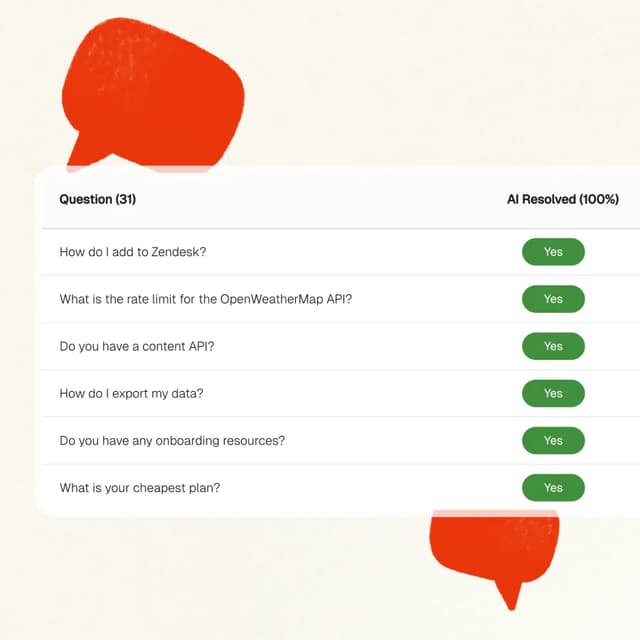
Test on your own tickets
Backtest My AskAI on historic Freshdesk tickets before it sends a customer reply. Compare the new answers with the ones your team or Freddy AI gave.
A controlled switch
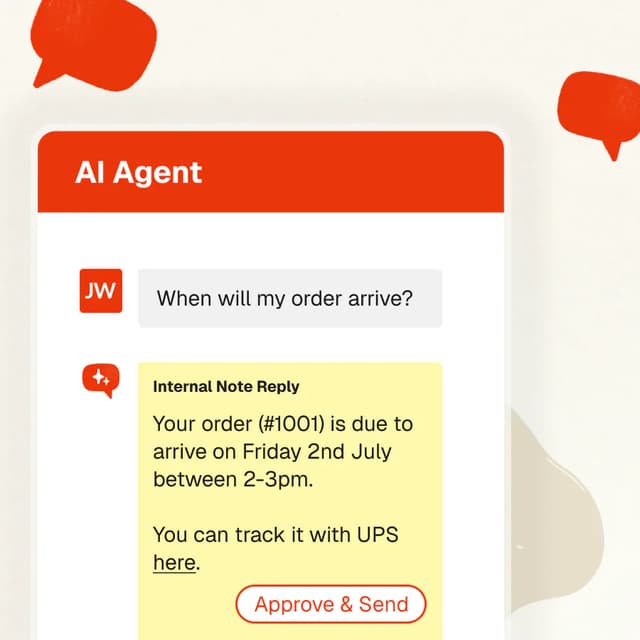
Keep Freddy handling customer replies in Freshdesk while My AskAI creates internal notes. Agents can compare answers, check the tone, and flag changes in their usual inbox.
This parallel notes test is for Freshdesk. If you use Freshchat too, we test first and turn Freddy off there before connecting My AskAI.
Estimate your monthly bill from your ticket volume, reply count and optional features. View the full cost breakdown before you start.


$709 / mo (-29%)
Save $291 / mo

$1,000 / mo
~$0.20 per ticket (session)
No. You keep Freshdesk, your ticket history, and the inbox your team already uses. My AskAI replaces the AI agent inside your helpdesk. We update the AI settings and routing as part of the move.
Once we have the access and setup details we need, we carry over your AI settings, connect your knowledge, and get My AskAI ready for testing within 24 hours. You choose when to enable direct replies. The setup review includes any custom tasks or channel-specific steps.
Yes. You can use a sample of past Freshdesk tickets to see how My AskAI would have answered. We help compare those replies with your previous answers, check handoffs and tone, and tune the setup. Historic tests show how it answers those questions; live results also depend on customer follow-ups and connected actions.
Yes, in Freshdesk. My AskAI drafts internal notes while Freddy continues to handle customer replies. Your team can check those notes without making My AskAI live. Freshchat follows a separate setup and launch plan.
That is our migration commitment. We work with you to match or beat Freddy AI on the quality and performance of your support replies. We agree what to measure, compare the same ticket sample, and tune the setup before you switch. You can review the answers and test results yourself.
We include them in the setup review. Freshdesk supports the parallel internal notes test described here. Freshchat needs Freddy turned off before My AskAI connects, so we plan that switch separately. Freddy Copilot and other Freshworks features have their own settings and subscriptions; we review those with you.
We help you change the AI reply settings for the agreed tickets or channels. We switch off the old AI replies for that same scope, check human handoffs, and monitor the first conversations. Keep your existing setup until the move is complete, then review any AI add-ons or contract terms separately from your Freshdesk subscription.
Bring your current setup. We will handle the move and help you test it.
30-day free trial. No credit card required.
