Zendesk AI vs Decagon AI agent: Features, Pricing, and Results (2026)
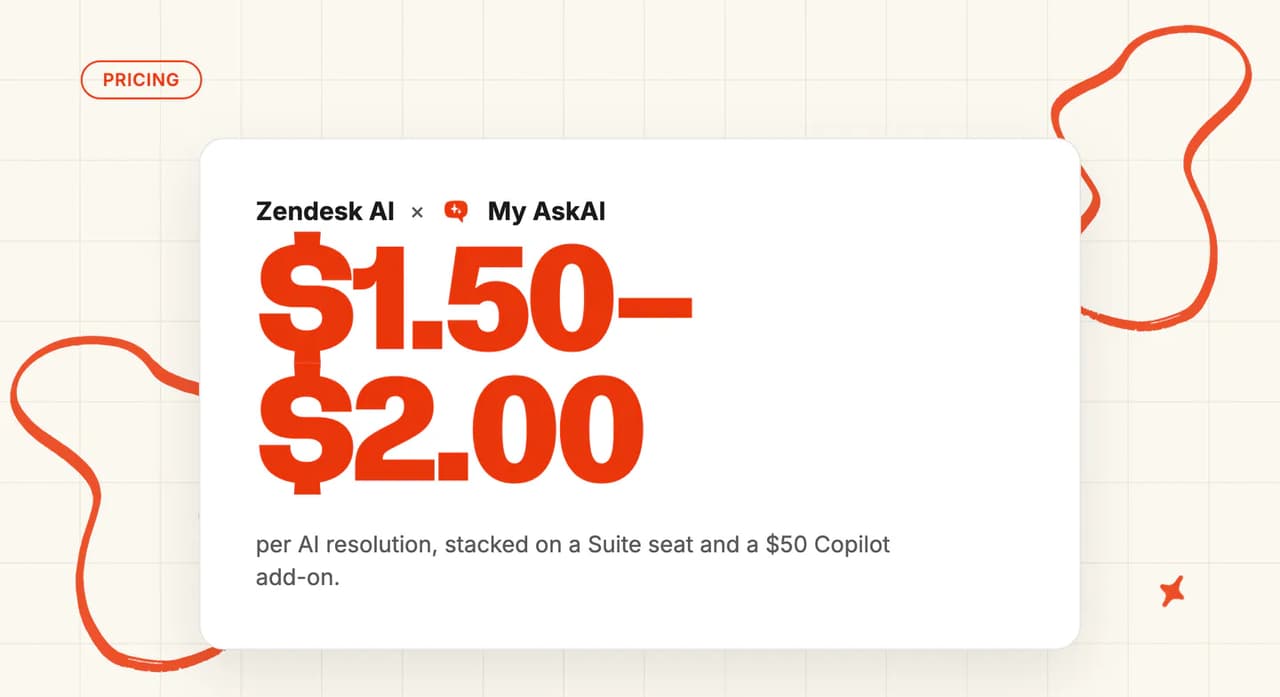
Zendesk AI lists $1.50 per committed automated resolution. Decagon publishes no price; Vendr's median is $432,750/yr. My AskAI: $0.10 a ticket.
Summarize with AI
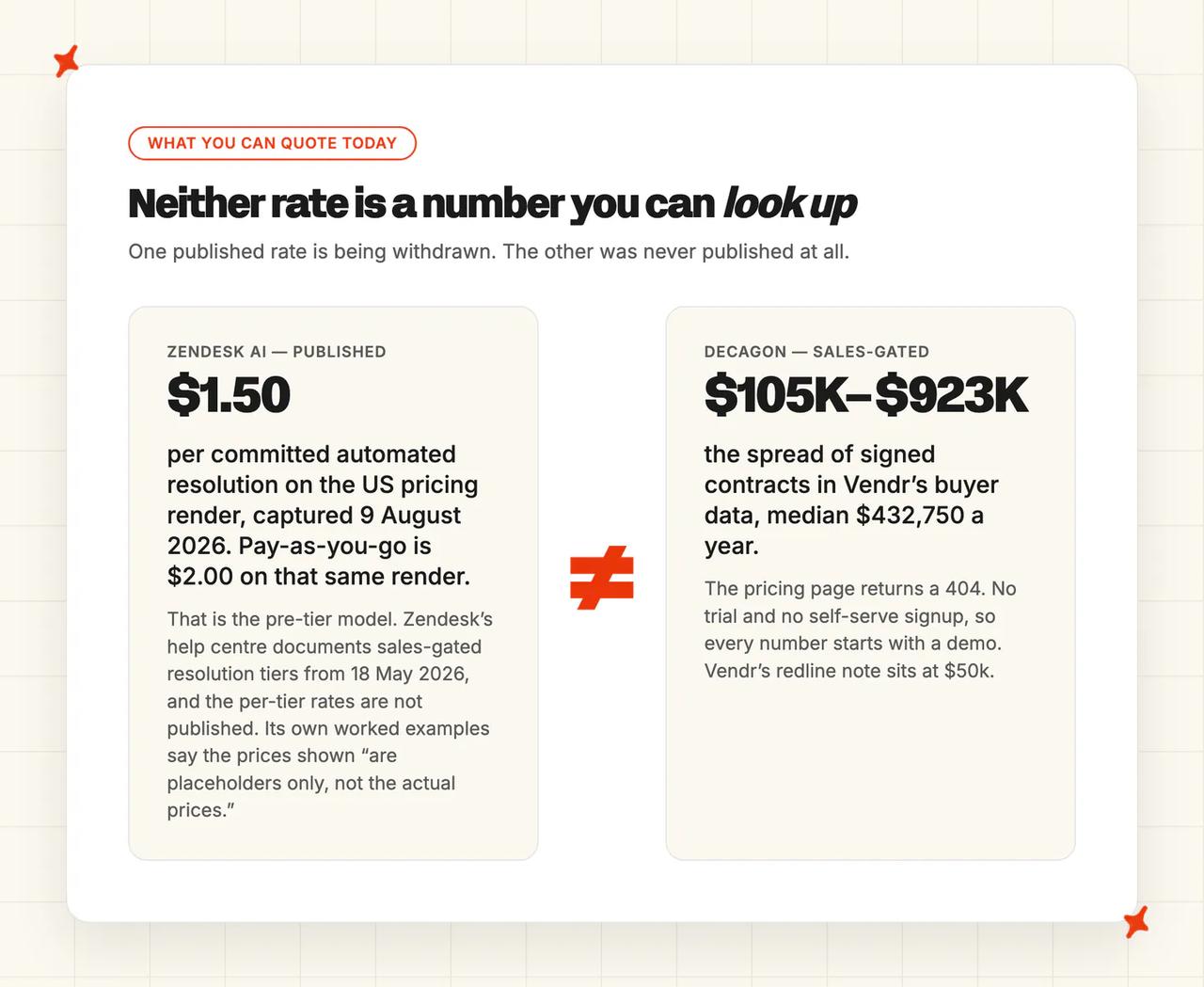
Zendesk vs Decagon is one published rate against one sales call. Zendesk's public pricing page carried $1.50 per committed automated resolution on its US render, captured 9 August 2026. Decagon's pricing page returns a 404, and Vendr's buyer data puts the median Decagon contract at $432,750 a year.
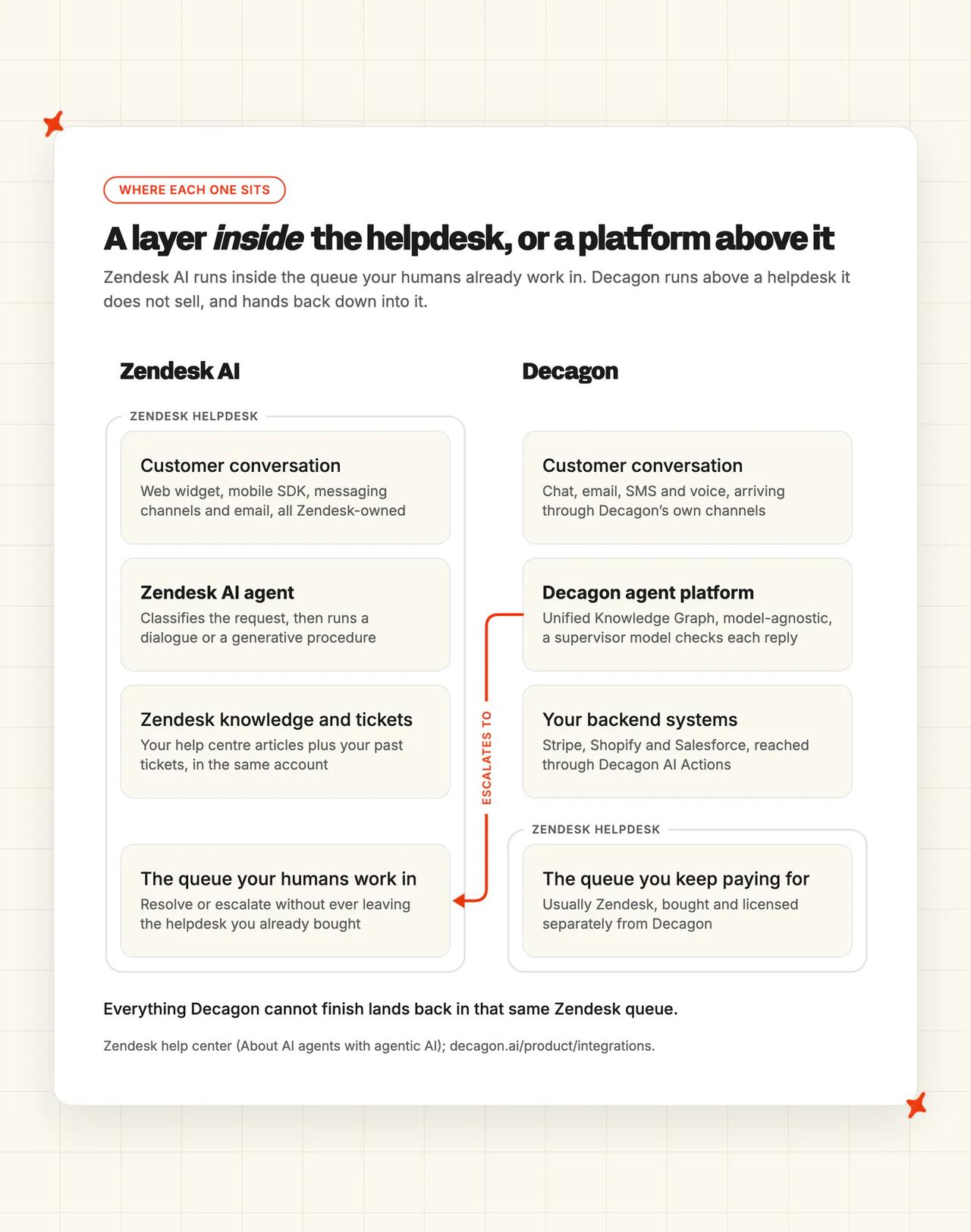
The two sit in different places. Zendesk AI is a layer inside the helpdesk you already run. Decagon is a separate agent platform that ships no helpdesk of its own, so it hands finished work back into whichever queue your team keeps working in (yes, Zendesk included).
That difference decides most of the cost question. A Decagon contract lands above the Zendesk bill you already pay, while Zendesk's agent is billed inside the plan you have. We work through price, features, security, data reach and answer quality in turn below.
Full disclosure before we start. I co-founded My AskAI, which sells an AI agent that competes with Zendesk's. Neither product scored below is ours.
Zendesk AI vs Decagon at a glance
| Zendesk AI | Decagon | |
|---|---|---|
| What it is | AI agent inside the Zendesk helpdesk | Separate agent platform, ships no helpdesk |
| Headline price | $1.50 per committed automated resolution (US render, 9 August 2026) | Pricing page 404s; Vendr median $432,750/yr |
| How you buy it | Self-serve; pre-tier rate, sales-gated tiers from 18 May 2026 | Sales call only; signed contracts run $105K to $923K |
| Best for | Teams already running Zendesk | Enterprise volume, systems no connector reaches |
| Not a fit for | Buyers who need tier rates before signing | Startups and smaller teams |
| Biggest limitation | Per-tier resolution rates are not published | Six-figure contract on top of Zendesk |
| Scorecard | 5 category wins of 11, 3 tied | 3 category wins of 11, 3 tied |
How are Zendesk AI and Decagon different from their old 'AI bots'?
Zendesk used to sell the fuller AI agent as a paid add-on. Its own upgrade guide now describes "unified AI agents as a standard part of your plan", with the separate AI agent - Advanced add-on no longer needed (the merge is why half the comparisons online still describe two). Its pricing page puts AI agents in "every Suite and Support plan, with pricing based on the successful outcomes they deliver", reasoning through multi-intent requests and generating procedures as it goes.
There is a clock on the old billing model too. Zendesk upgrades existing accounts onto the new resolution tiers after a transition period, with 30 days' notice before it happens. A grandfathered plan already has a migration date coming (you did not pick the date).
The technology underneath is bought in. Zendesk's AI agents are built on Ultimate, the AI agent platform it acquired in 2024, and the Forethought deal closed in late March 2026 (two acquisitions, sold under one brand).
Decagon's stack is its own, and its pitch is the Agent Operating Procedure, or AOP. You write the workflow in natural language. Decagon says AOPs let you set precise controls that way, giving "code-level control without needing to be a developer" (that is the marketing talking).
Decagon ships no helpdesk of its own. Its integrations page treats the help desk as somebody else's system, connecting the agent to "the systems your team already relies on, including CRMs, help desks, call centers, and knowledge bases".
Human handoff runs into a helpdesk you already pay for. Decagon names Salesforce, Intercom and Zendesk for ticketing, escalates live chat "across Zendesk Sunshine and Salesforce", and routes email "through Zendesk and Intercom".
So on this comparison, buying Decagon means keeping Zendesk and adding a six-figure contract above it. I would put both numbers on the same budget line before anyone signs.
Both review on G2:
| Zendesk for Customer Service | Decagon | |
|---|---|---|
| Rating | 4.3 / 5 | 4.9 / 5 |
| Reviews | ~6,000 to 7,100 | 18 |
| Reviews page | Zendesk for Customer Service on G2 | Decagon on G2 |
Zendesk has no standalone G2 page for its AI, so the 4.3 covers the whole helpdesk. Decagon's 4.9 covers the agent itself, so the two ratings are not measuring the same product.
We have full guides to the Zendesk AI agent and to Decagon elsewhere on the blog.
How does an AI customer service agent work in Zendesk?
Zendesk's agent runs a short loop. It classifies the request, then picks a dialog or a generative procedure. It pulls from your knowledge, then resolves or escalates.
The counting step is also the billing step:
"After a 72-hour window with no customer follow-up, a verification process is performed by a large language model (LLM) that evaluates the text of the conversation to confirm that the customer's request was satisfactorily resolved."
That is from Zendesk's help center. A resolution is a Zendesk model's judgment about your conversation, three days after it ended (not a human's, and not the customer's).
Capability is not identical across channels (email is the weaker of the two). Zendesk's own table says a messaging use case:
"can trigger a generative procedure or a dialogue"
An email use case:
"can trigger a generative procedure only."
One procedure runs per email reply. More can run across the chain. An email that mixes a knowledge question with a procedure request gets escalated.
Decagon works from a different starting point. It is model-agnostic, running OpenAI, Anthropic and Cohere models plus fine-tuned ones. A supervisor model checks for hallucination before a reply leaves (a second model marking the first one's homework).
Its knowledge comes from a Unified Knowledge Graph. It takes real actions through Stripe, Shopify and Salesforce with AI Actions.
For a Zendesk shop, everything Decagon cannot finish lands back in your Zendesk queue (one of the helpdesks it hands off into).
How can I use Zendesk AI or Decagon in my helpdesk?
Direct replies
Zendesk's agent answers in the web widget, the mobile SDK, SMS, email and web forms. On social it adds WhatsApp, Facebook Messenger, Instagram, LINE, X DMs, WeChat and Apple Messages for Business.
Quick replies degrade on WeChat, Instagram and X, and data capture is unsupported on social messaging. I would check both against your channel mix.
Decagon runs four channels: chat, email, voice and SMS, with memory carried across them. No social channel appears anywhere in its documentation, which is a real gap if your customers DM you.
Copilot replies
Zendesk Copilot sits in the Agent Workspace. It drafts replies, suggests macros and surfaces similar tickets.
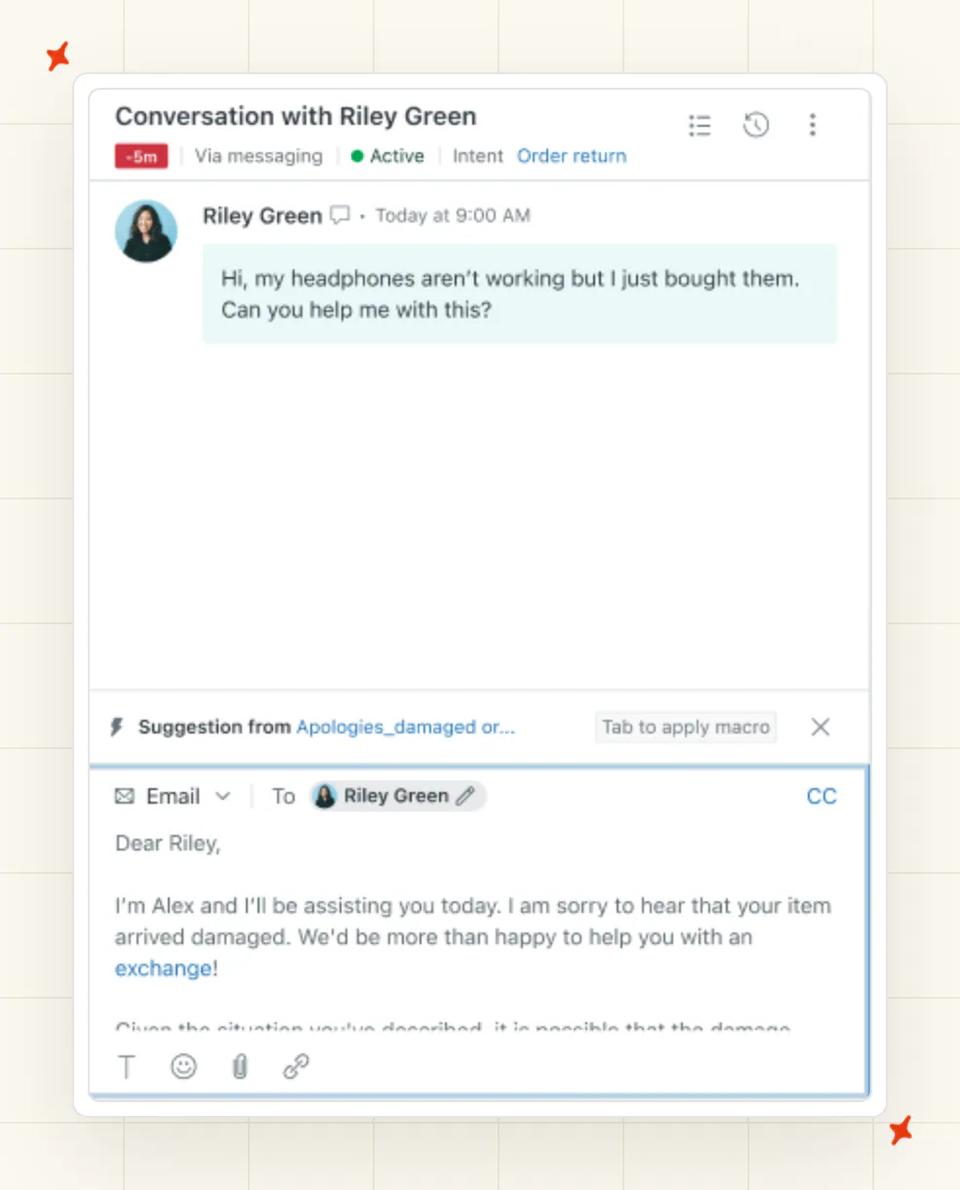
It is a per-seat add-on at $50 per agent per month on Zendesk's US pricing render. It is switched on by default during the trial. I keep an eye on that one, because on ten seats the copilot alone is $500 a month.
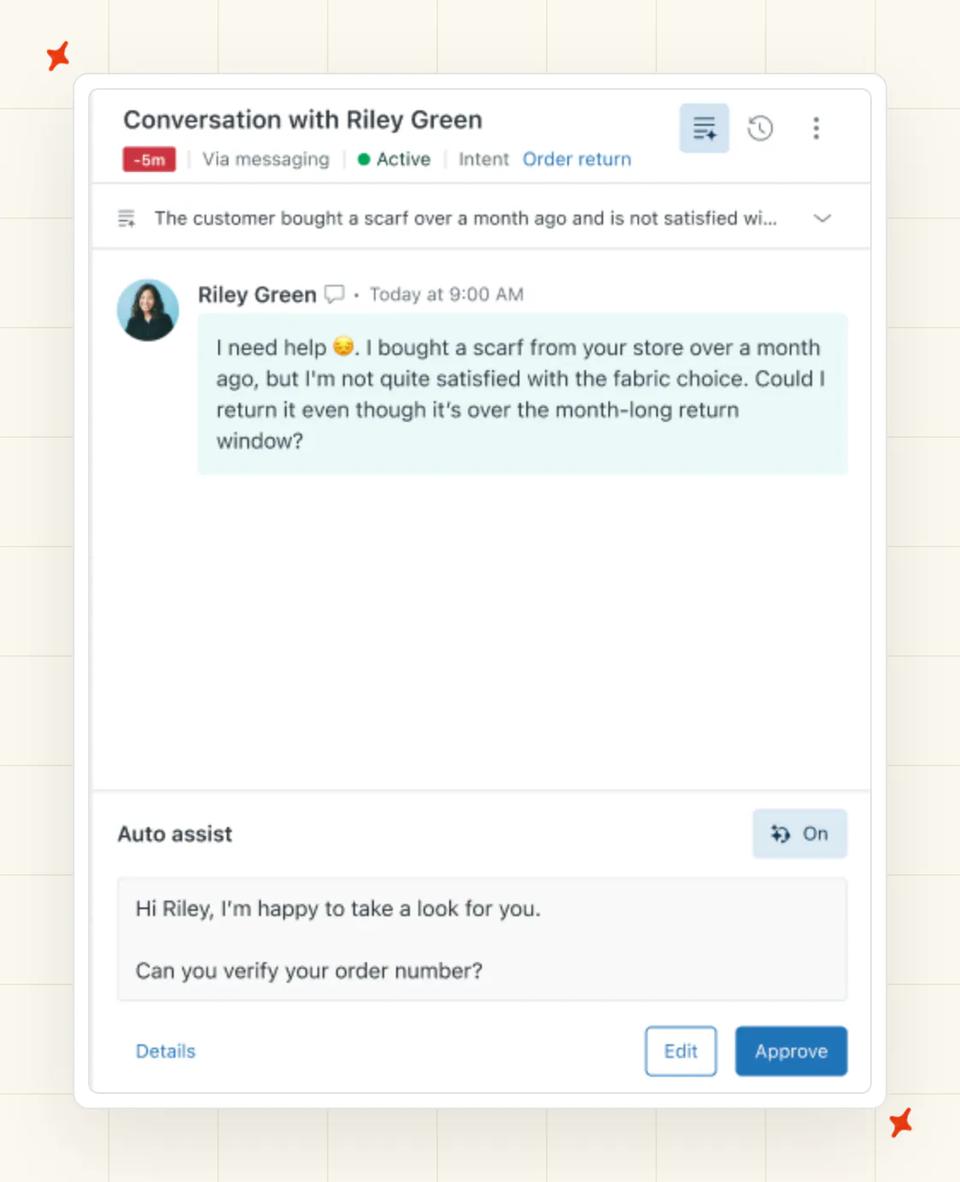
Decagon's equivalent is Agent Assist. Contrary Research describes it as running inside the customer's own ticketing platform, Zendesk among them, so a Zendesk shop keeps its agents in one window. I count that as a fair point in Decagon's column.

Voice
Decagon has the more finished voice product. Its marketing lists Voice 2.0 with sub-second latency and tunable tone and pronunciation. Add interruption handling and branded caller IDs (all vendor claims until you hear it live).
It connects through Amazon Connect, RingCentral or SIP. The Spring 2026 release added outbound calls, campaigns, callbacks and voicemail. Zendesk does voice through Talk and Amazon Connect, but its Voice AI agents are still in an early access program.
Decagon also picked up Five9 CX Marketplace accreditation in June 2026, a contact-center route Zendesk does not match here. If you run a phone-first team, that is where I would start.
| Channel | Zendesk AI | Decagon |
|---|---|---|
| Web widget | ✅ | ✅ |
| Mobile SDK | ✅ | Not documented |
| ✅ | Not documented | |
| Facebook Messenger | ✅ | Not documented |
| Instagram DM | ✅ (quick replies degrade) | Not documented |
| X DM | ✅ (quick replies degrade) | Not documented |
| LINE | ✅ | Not documented |
| ✅ (quick replies degrade) | Not documented | |
| Apple Messages for Business | ✅ | Not documented |
| SMS | ✅ | ✅ |
| ✅ (procedures only) | ✅ | |
| Voice, inbound | Early access only | ✅ |
| Voice, outbound | Not documented | ✅ |
Which is easier to set up: Zendesk AI or Decagon?
Zendesk's Getting started with AI agents is now one six-step flow. Zendesk's announcement of expanded AI agent access says setup "is moving to a guided, self-service setup flow for simpler use cases across email and messaging". Step three of those six is the Create an AI agent wizard, and that wizard has three screens of its own, ending on Test your AI agent.
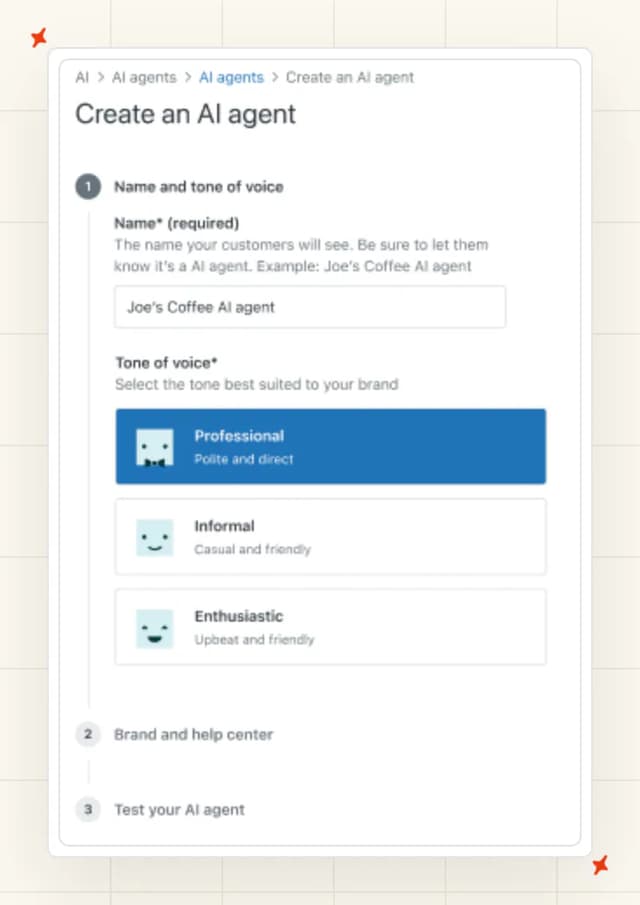
That removed the sales gate on agentic capability, which used to be the real barrier. There is a 14-day trial, and it defaults to Suite Professional. Copilot is switched on inside it (yes, including the part you pay per seat for later).
Getting it switched on is not the same as getting it good. Our Zendesk notes put a 5 to 10 agent rollout at 2 to 4 weeks, and $6K to $12K of professional services. Past 50 agents that stretches to 8 to 12 weeks.
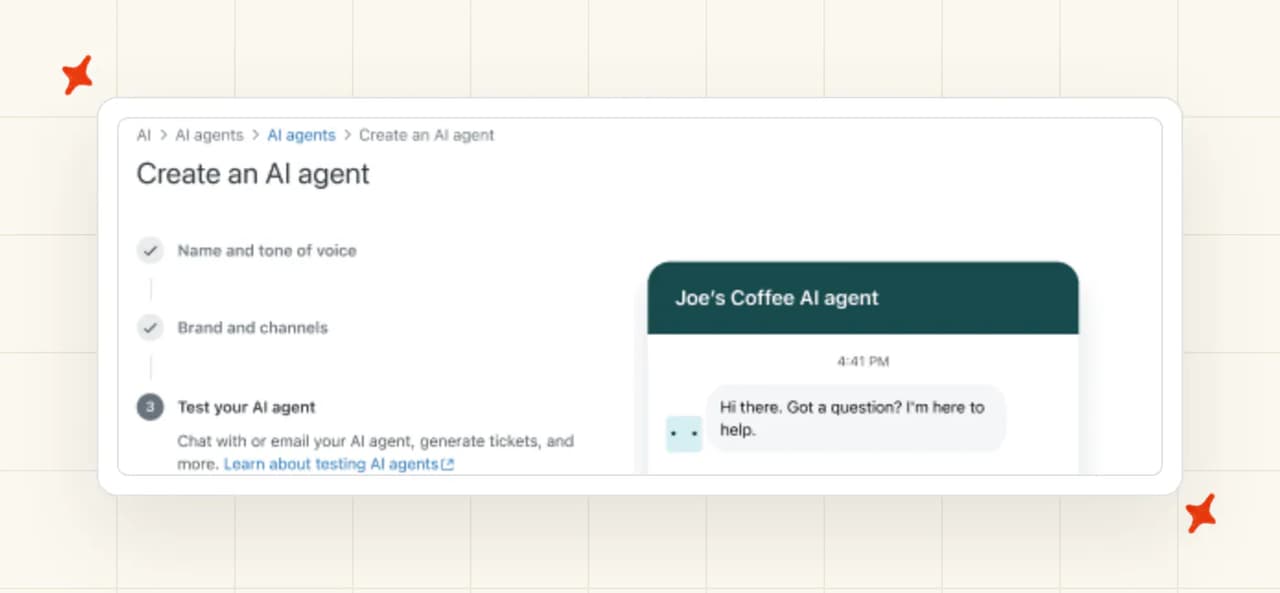
Pylon's implementation survey reports 73% of companies seeing implementations past four weeks. Most of that time goes into the dialog builder, the part of the product customers complain about most. So I would budget for the builder time, because switching it on is the easy part.
Decagon runs a six-phase onboarding on a roughly six-week timeline. Agent Product Managers and Forward-Deployed Engineers sit inside your team while it runs.
Co-founder Ashwin Sreenivas says in the OpenAI case study that core infrastructure can be up in days. G2 reviewers back a sub-week first deployment. My read: both numbers describe the plumbing going in.
There is no self-serve route to test any of that. Decagon's pricing page still returns a 404, and there is no trial. Its documentation sits behind a login.
You cannot read the manual before you sign.
One thing does shorten the path (the only thing on Decagon's side). Decagon's AWS Marketplace listing went live in July 2026. An enterprise on an AWS Enterprise Agreement can "apply existing AWS committed spend toward Decagon" and skip part of the procurement cycle.
| Getting started | Zendesk AI | Decagon |
|---|---|---|
| Self-serve signup | ✅ | ❌ (sales call first) |
| Free trial | ✅ (14 days, Suite Professional) | ❌ (demo only) |
| Public documentation | ✅ | ❌ (login-gated) |
| Guided setup you run yourself | ✅ (six steps) | ❌ (vendor-led, six phases) |
| Vendor staff embedded | Paid professional services, $6K to $12K | ✅ (Agent PMs and FDEs) |
| Time to a working rollout | 2 to 4 weeks on 5 to 10 agents | About six weeks |
| Procurement shortcut | Not documented | ✅ (AWS Marketplace listing) |
My AskAI installs into your existing Zendesk in about ten minutes, no developer needed, so you can evaluate us the same day.
How do Zendesk AI and Decagon differ in what they can be trained on?
'Static' content
Zendesk starts with your help center and ticket history. It then adds up to 50 external knowledge sources across SharePoint, Notion, Document360, Confluence and Google Drive.
Confluence syncs on a fixed 24-hour cycle, so a policy change waits a day (painful the day you change a returns policy). Direct PDF and DOCX upload is not supported. The documented workaround is converting to CSV, which is a chore when your policies live in documents.
Decagon's Unified Knowledge Graph spans Zendesk, Kustomer, Guru, Confluence and Contentful help centers, plus SOPs and Slack. One source serves every language, so a policy written in English takes effect globally. Decagon does not publish which file types it accepts, so I would put that question in the first call.
'Dynamic' content
Decagon reads Salesforce Customer 360, internal business APIs, and Shopify and Stripe, then acts on them.
On 5 August 2026 it added the capability that no helpdesk-native agent has:
"Today, we're introducing Browser Actions, a new capability that lets your Decagon agent access and complete tasks inside systems where there isn’t a traditional integration available."
That is from Decagon's own announcement, written by Bihan Jiang, Director of Product. The reasoning underneath it is the part worth reading twice:
"Many of the systems that run a business weren’t designed with APIs in mind. Internal claims systems, partner portals, vendor dashboards, and more often expose only a login screen and a set of buttons."
The agent logs in and clicks through those systems the way a person would. Decagon says it runs in a "secure, containerized, and fully audited sandbox", logging every step (their words; your reviewer will want a demo of it).
A helpdesk-native agent can only act through connectors its vendor built. Browser Actions is how Decagon reaches systems with none.
| Knowledge source | Zendesk AI | Decagon |
|---|---|---|
| Help center | ✅ | ✅ |
| Past tickets | ✅ | Not documented |
| Confluence, Guru, Notion | ✅ (Confluence on 24h sync) | ✅ (Confluence, Guru, Contentful) |
| Google Drive, OneDrive, SharePoint | ✅ | Not documented |
| Salesforce CRM records | Not documented | ✅ (Customer 360) |
| Shopify, Stripe | Not documented | ✅ |
| Internal APIs | ✅ (via Action Builder) | ✅ |
| Systems with no API | ❌ | ✅ (Browser Actions) |
| SOPs and internal procedures | ✅ (generative procedures) | ✅ |
| Direct PDF or DOCX upload | ❌ (CSV workaround) | Not documented |
Which has better answer quality, Zendesk AI or Decagon?
Decagon publishes an 80% average deflection rate and a 93% agent quality score. Its customer table puts Substack at 90%, Duolingo at 80% and Chime at 70% across chat and voice. Those are vendor-picked wins, so take them with a grain of salt.
Before you compare that to anything, read what Decagon counts. From its own glossary:
"A contact counts as deflected only when the underlying issue is actually resolved, not merely when the customer abandons the interaction before reaching a human."
"An automated workflow that resolves a billing question without escalation counts as deflected; a customer who closes the chat window does not."
That is stricter than most vendors use, and Decagon is one of the few putting it in writing. Its own G2 scores keep the balance (people rate the company higher than they rate the resolutions). Ticket Resolution comes in at 7.9 out of 10, its weakest category, against 9.7 for Quality of Support.
Decagon also publishes the reason it draws the line there:
"Chatbots fail because they are designed to prioritize deflection metrics over successful escalation paths, trapping frustrated customers in loops when they desperately need human assistance."
Zendesk markets 80%-plus too, while published Zendesk case studies compiled by Leafworks run 39% to 66%. Lorikeet documents a 40-person SaaS team that expected 60% and was at 23% six months in. So I would write the business case against the lower number.
Then Zendesk changed what it counts. Its own rationale for the new resolution tiers reads:
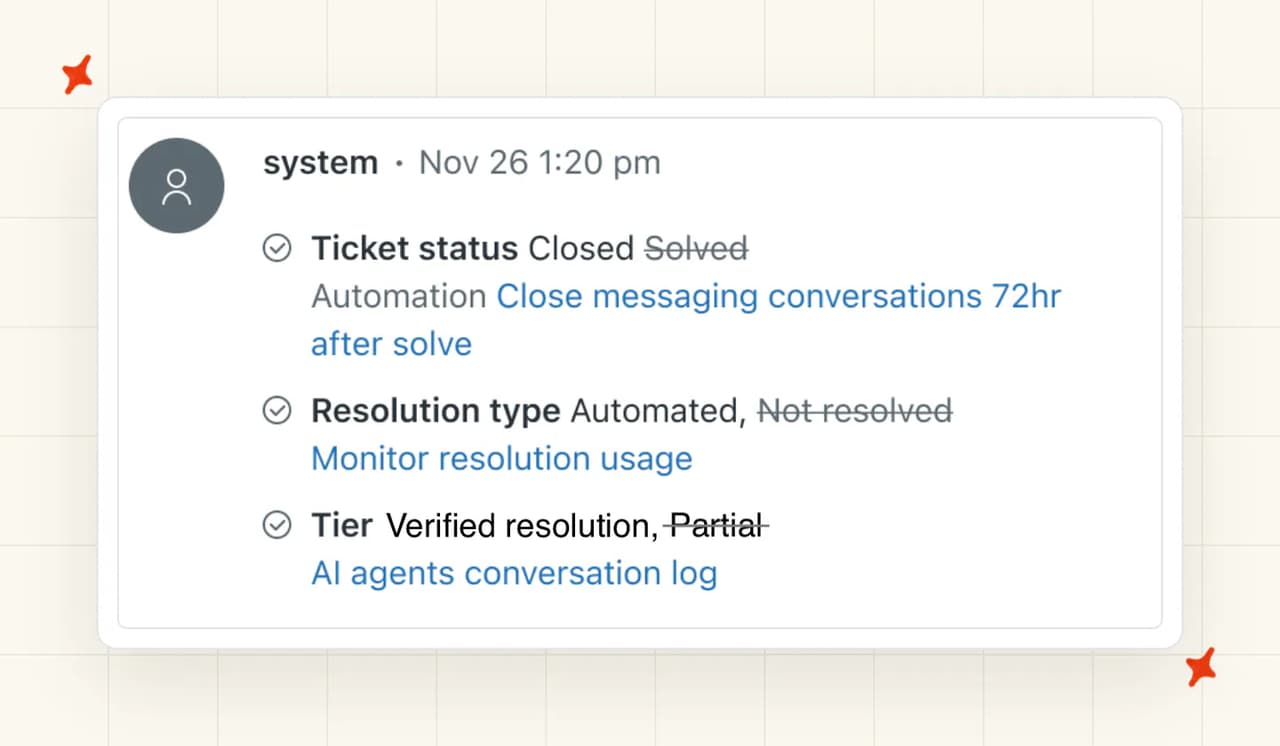
"In our current automation resolutions model, our usage reports didn't take into account resolutions that were partially automated. We only reported the results for fully automated resolutions."
A Zendesk resolution rate quoted after that migration measures something broader than one quoted before it. If a rep shows you a number, ask which model produced it.
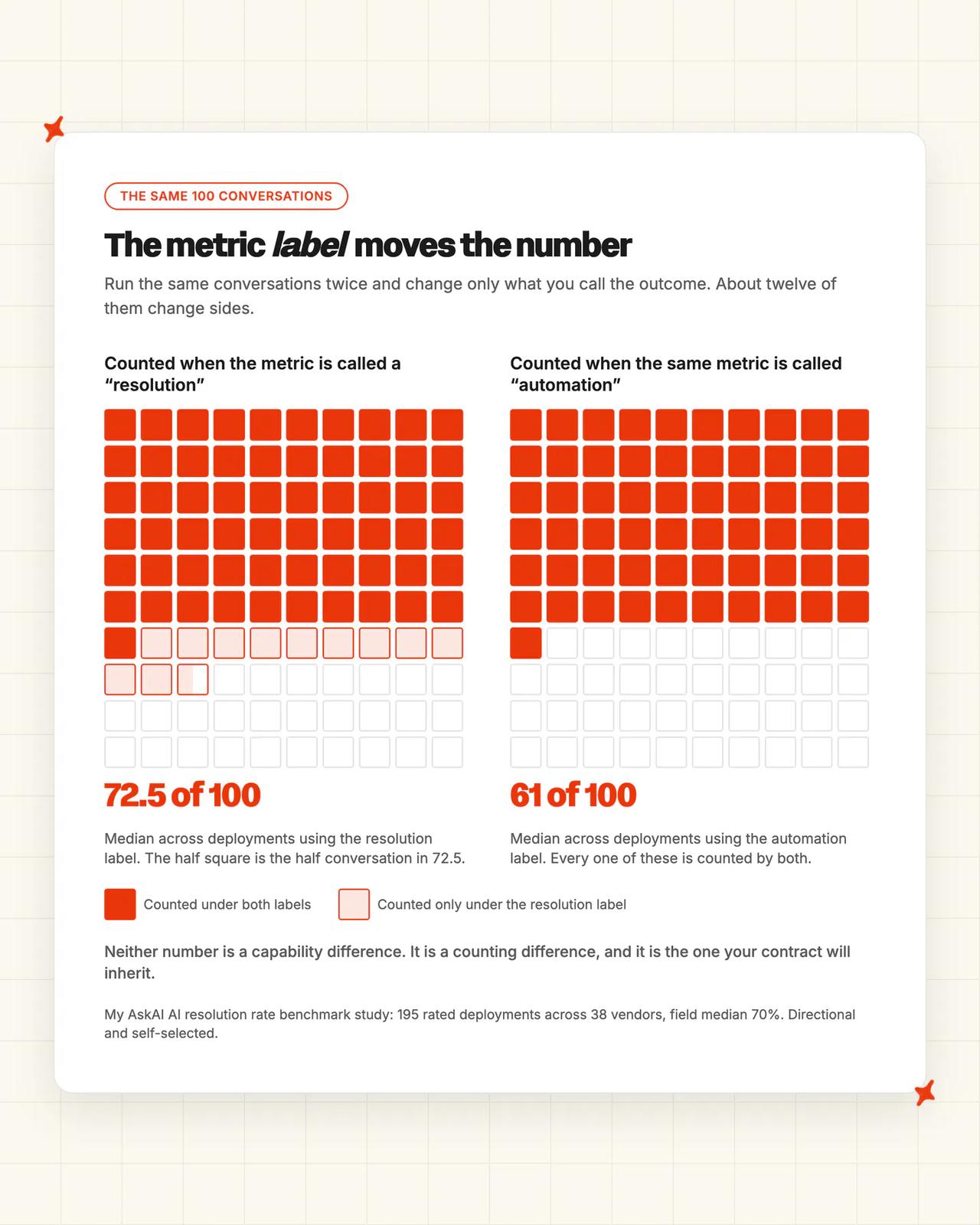
For where the field sits, our own AI resolution rate benchmark study covers 195 rated deployments across 38 vendors. The median is 70%, and the study is directional and self-selected.
The metric label moves the number more than capability does. Deployments labeled "resolution" run a median of 72.5%, and ones labeled "automation" run 61%.
So the useful question is which vendor gets to define the number in your contract. I would negotiate that definition before the rate.
Is Zendesk AI or Decagon easier to improve?
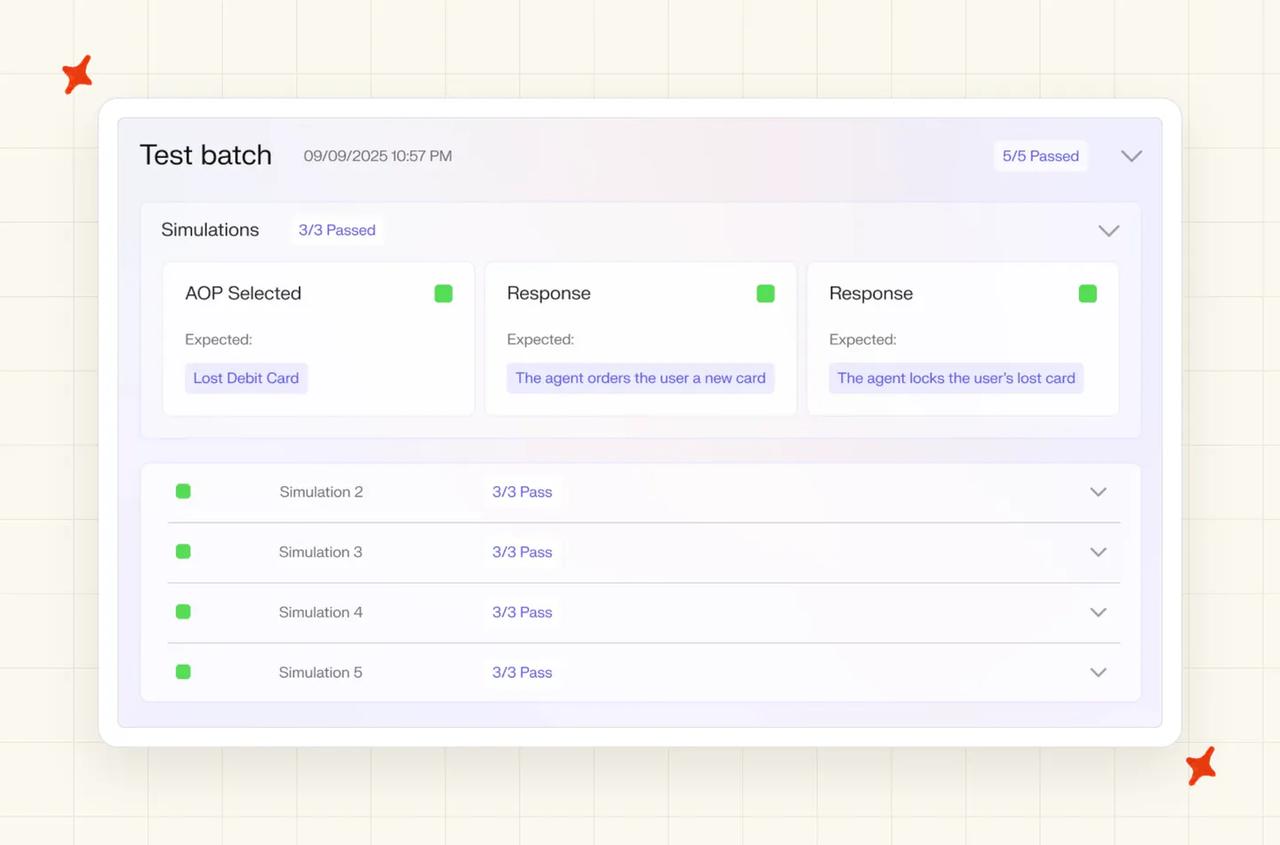
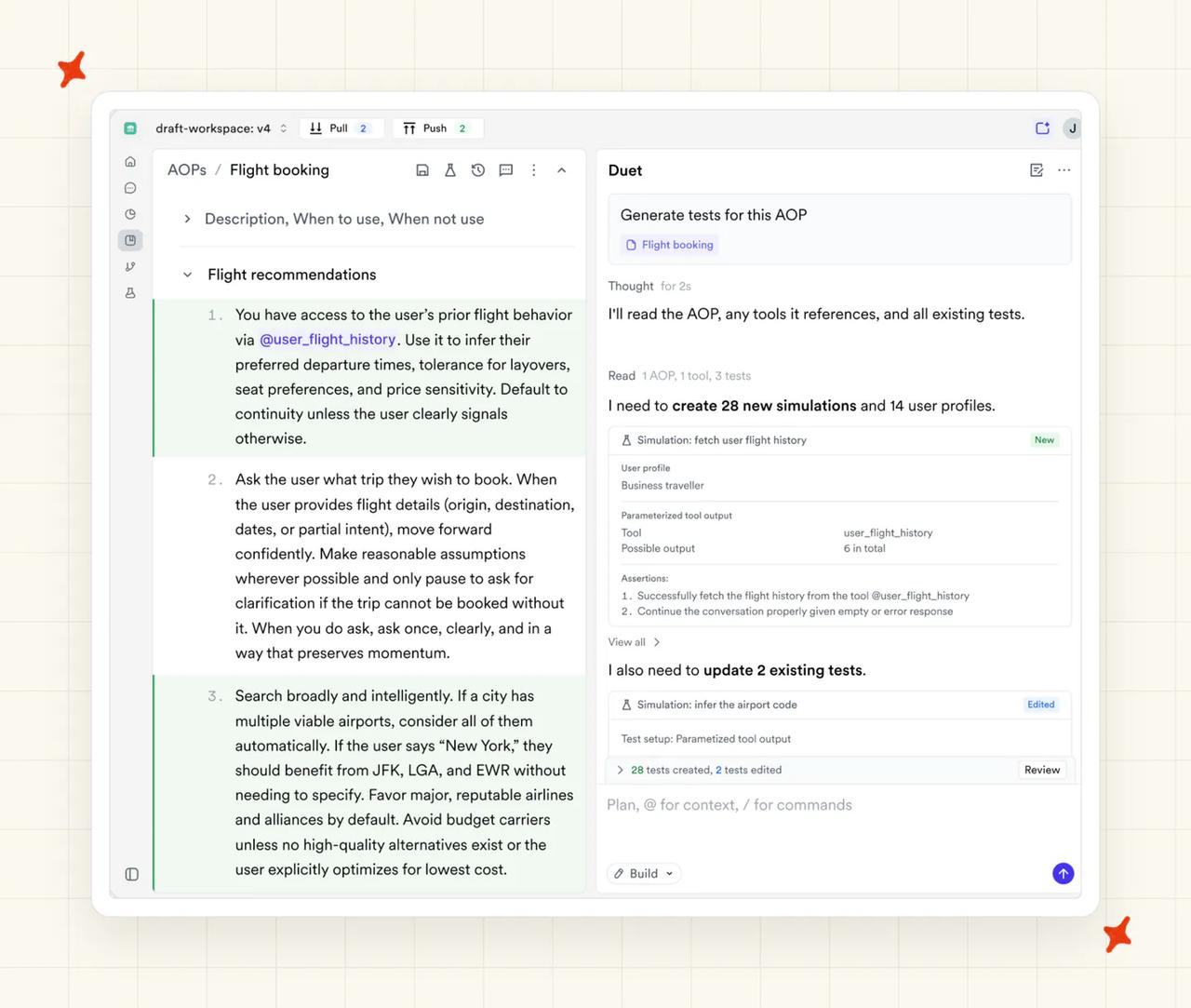
Decagon treats agent changes like code. In its own words, "every AOP, tool, and guideline edit is tracked as a versioned commit". Around it sit production and staging workspaces, diff review, rollback and release gates.
Experiments A/B test versions on live traffic. Simulations run AI-generated personas at the agent (a robot customer being difficult with your robot agent). Regression tests run against your historical transcripts.
Knowledge Suggestions reads conversations where customers "didn't find an answer" and drafts articles monthly from "real-world resolutions from your human agents".
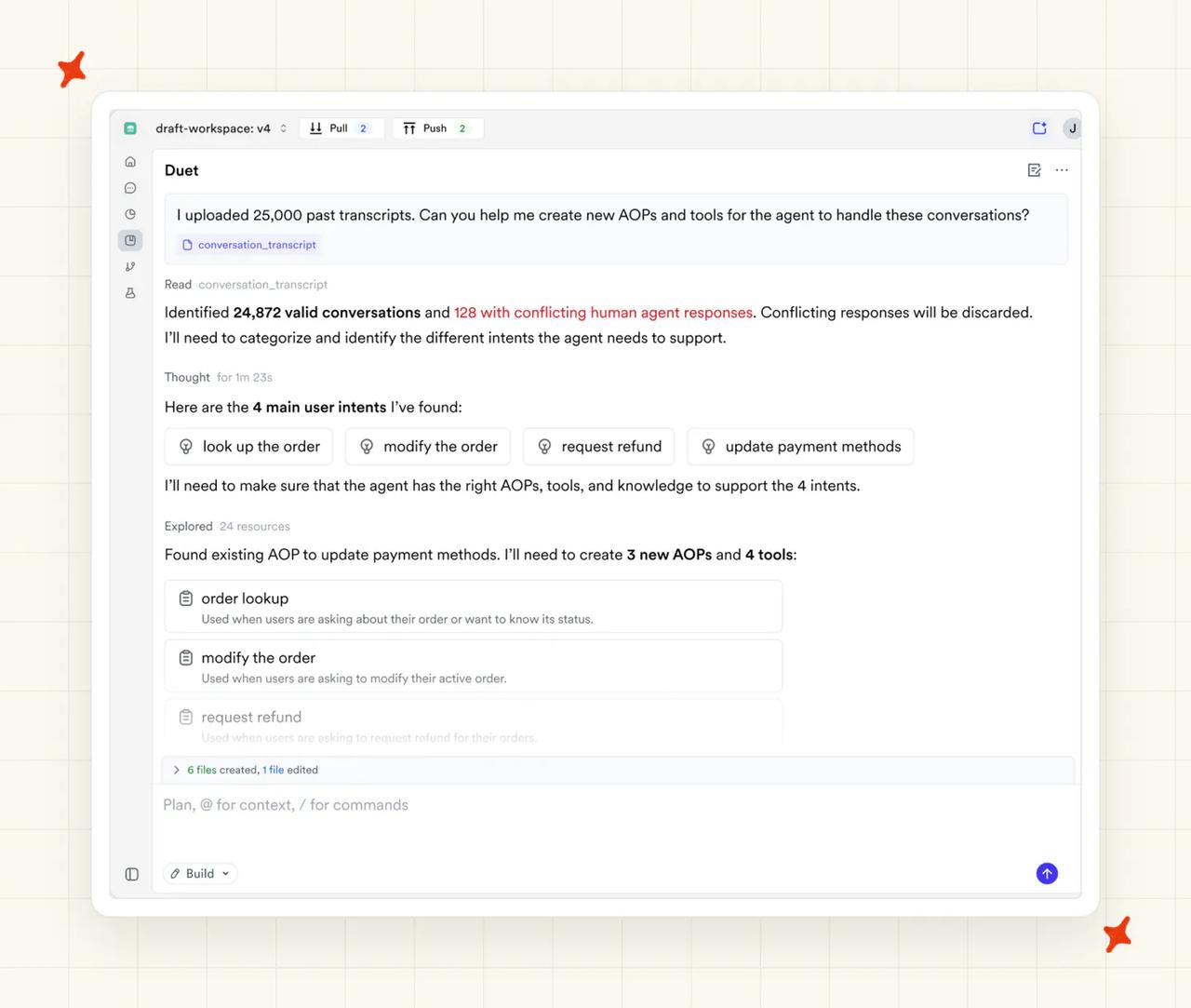
June added the piece that closes the loop. Duet Autopilot turns production signals into proposed agent updates. Each one runs through a test loop, then stops at a human approval gate (nothing ships without a person).
QA Hub, from May, adds the human review layer on top of Watchtower. It brings batches, custom rubrics, assignees and saved views.
Zendesk's side is real and narrower. Zendesk says Knowledge Builder went GA in November 2025 and reads the last 90 days of tickets. It drafts around 40 articles into the Guide CMS (drafts, so someone on your team still edits them).
The Automation Potential report ranks which intents are automatable. A separate gap report lists the questions the AI could not answer, and the Forethought-powered Resolution Learning Loop feeds outcomes back in.
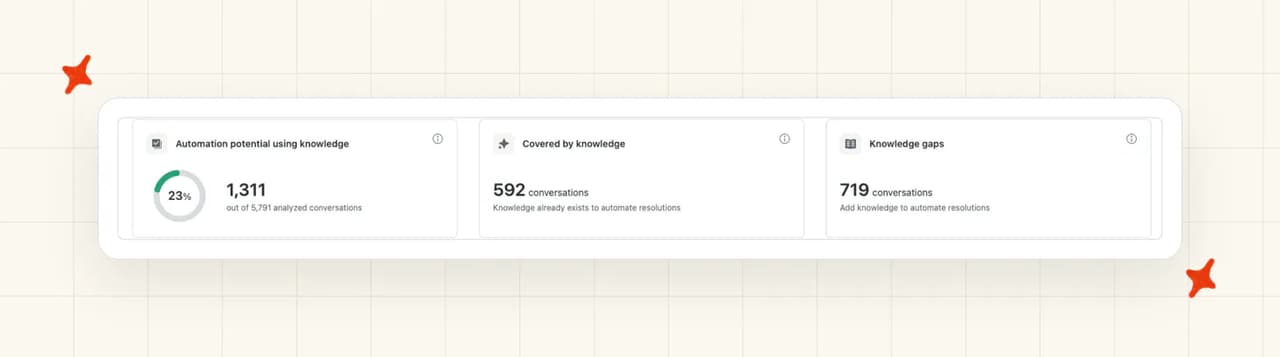
Zendesk's tooling drafts and ranks the help center articles the agent reads. Decagon's versioning, experiments and Autopilot loop change the agent, and that is where I score it highest in this comparison. Help center articles are work you were doing anyway.
Decagon does not get a free pass here. G2 reviewers report basic user roles, audit logs that lack depth, and an AI that feels like a black box when they ask it why. That is 18 reviews talking, so I would put the question to its reference customers.
Which has more features: Zendesk AI or Decagon?
Zendesk's inventory is long, and this list comes from its own product and pricing pages. AI agents, Copilot, App Builder, Action Builder, Knowledge Builder and intelligent triage sit at the core.
Around them sit Zendesk QA at $35 per agent per month, Tymeshift for workforce management and Explore for analytics. Zendesk's own count puts the marketplace at roughly 1,800 apps.
Decagon's set is shorter and aimed somewhere else (its own product pages are the source). AOPs come with an AOP Copilot and templates, and AI Actions handle refunds, order updates and identity verification.
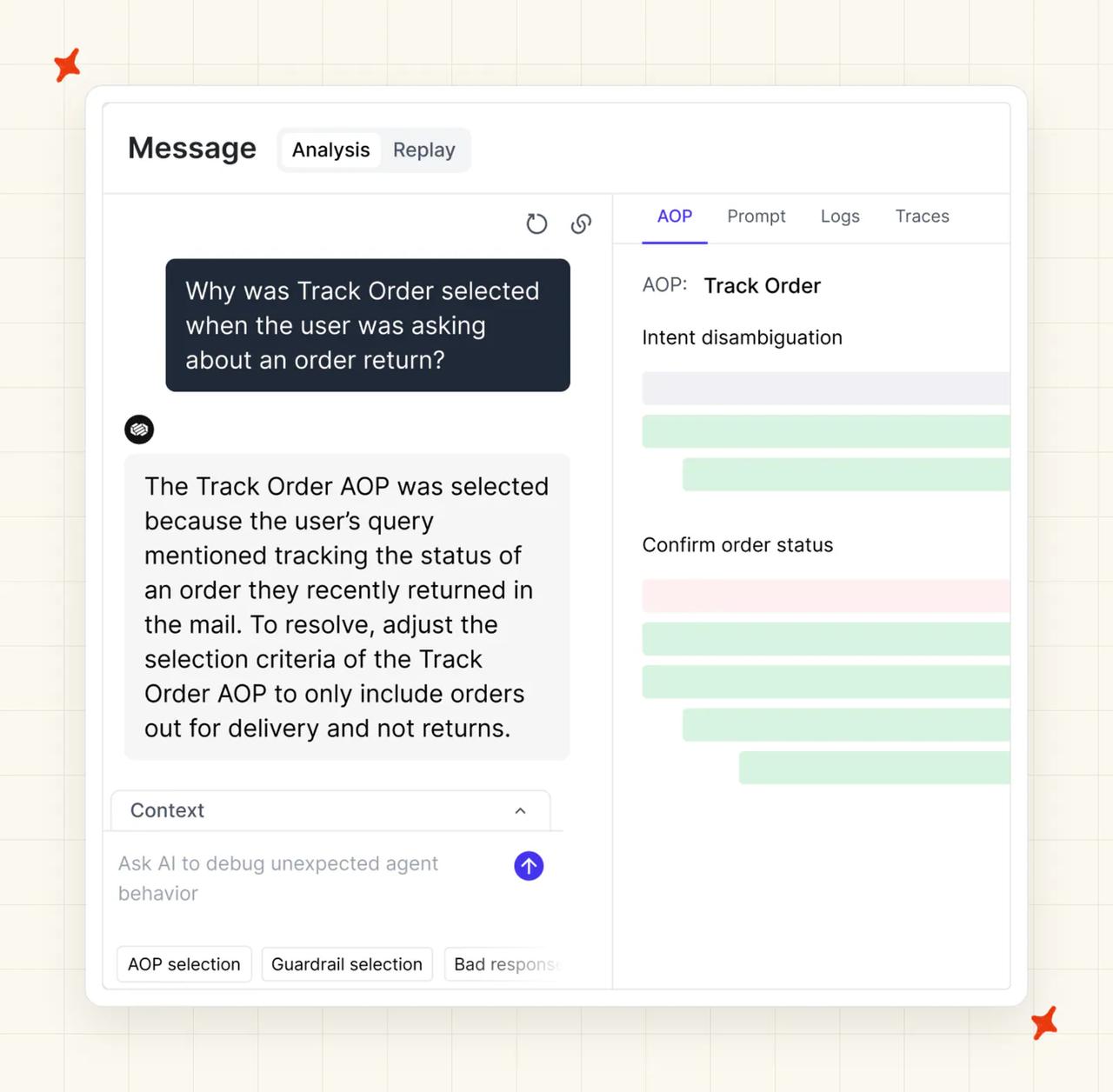
Watchtower does always-on review, and Trace View shows decision tracing. Ask AI queries conversation data in plain English.
Both are new, and I would ask for a customer already running them. Browser Actions landed on 5 August. Guided Discovery, from May, lets one AOP handle discovery, retention and expansion instead of one fixed path per intent.
That inventory reads differently when you are already a Zendesk customer. You already own the ticketing, the QA, the workforce management, the analytics and the marketplace (it came with the seats you already buy).
So Zendesk takes the row on raw count. Almost everything in Decagon's column is incremental to what you already have.
| Capability | Zendesk AI | Decagon |
|---|---|---|
| Customer-facing AI agent | ✅ | ✅ |
| Agent copilot | ✅ ($50/agent/mo) | ✅ (Agent Assist, in your helpdesk) |
| Ticket triage and routing | ✅ | Not documented |
| Always-on conversation QA | ✅ (Zendesk QA, $35/agent/mo) | ✅ (Watchtower + QA Hub) |
| Workforce management | ✅ (Tymeshift) | ❌ |
| Analytics dashboards | ✅ (Explore, HyperArc) | ✅ (Ask AI) |
| Helpdesk app marketplace | ✅ (~1,800 apps) | ❌ |
| Versioned agent changes | ❌ | ✅ |
| A/B experiments on live traffic | ❌ | ✅ |
| Simulations and regression tests | ❌ | ✅ |
| Actions in external systems | ✅ (Action Builder) | ✅ (AI Actions) |
| Actions in systems with no API | ❌ | ✅ (Browser Actions) |
| Proactive outbound agents | ❌ | ✅ |
How easy is it to customize Zendesk AI and Decagon?
Zendesk gives you the dialog builder for scripted paths, and generative procedures for policy the agent reasons over. Add persona controls, App Builder and Action Builder. All of it is self-serve, and the agentic AI documentation is public (read the lot without talking to anyone).
The catch showed up in setup. The builder is where implementation time goes, and the surface customers complain about most. You own the work.
Decagon's AOPs are written the way you would brief a new hire. The AOP Copilot turns a rough SOP into a production-ready one. Threaded comments added in July let a compliance reviewer flag a clause where it lives (no second document, no copy-paste).
The counter-read comes from a rival. Quiq's comparison argues that AOP and SDK work at Decagon and Sierra both bottom out in developer time, which stretches onboarding. That is a competitor talking about a competitor, so weigh it accordingly.
What about vendor lock-in?
Zendesk's AI agents are built against the Zendesk data model. The knowledge, the intents, the procedures and the reporting all assume Zendesk underneath. Moving helpdesk means rebuilding the agent (the bill nobody puts in the migration plan).
Zendesk has widened that, though. Its AI agents page now pitches Forethought as a cross-platform option:
"Extend self-improving AI agents beyond Zendesk into any other service environment - resolving requests autonomously wherever your teams and customers already operate."
That route is sales-gated behind a Forethought demo, so I would not treat it as available until your rep confirms it. Zendesk's own allowance documentation adds that "Forethought AI agents by Zendesk plans don't include a default resolution allowance."
So the coupling claim holds for Zendesk AI agents specifically. Forethought, sold under the same brand, sits outside it.
There is a second lock that existing customers already feel. New AI capability lands behind a Suite plus Copilot upgrade. I read the automatic upgrade onto the new resolution tiers, on 30 days' notice, as a migration you do not schedule.
Decagon's lock-in is just as heavy. Contracts are annual by default, and the low end of the public band is around $105,000 (that is the floor of the band). Your team now runs two tools where it ran one.
Decagon has no listing in the Zendesk Marketplace, the Intercom App Store or the AppExchange. Every helpdesk integration is a direct API connection your engineers own (and maintain, forever).
Decagon is on AWS Marketplace and the Five9 CX Marketplace. Both are procurement rails, and neither puts an install button inside your helpdesk.
Leaving Zendesk also means re-plumbing Agent Assist into whatever replaces it, because it runs inside your ticketing platform rather than Decagon's.
For a reader weighing that, My AskAI runs inside the Zendesk you already have. Our trained agent moves across Zendesk, Intercom, Freshdesk, Gorgias and HubSpot, so changing helpdesk later does not mean rebuilding it from scratch.
Do Zendesk AI or Decagon have any other AI features?
Tagging
Zendesk says intelligent triage reads every incoming ticket for intent, sentiment, language and entities, across roughly 150 detected languages. It writes them onto the ticket as fields you can route and report on. Copilot then adds suggested first replies, ticket summaries, writing assistance, macro suggestions and similar-ticket lookup.
Triage is the feature I would expect to pay back first. Routing and reporting get better in the first week, well before anyone can measure a resolution rate.
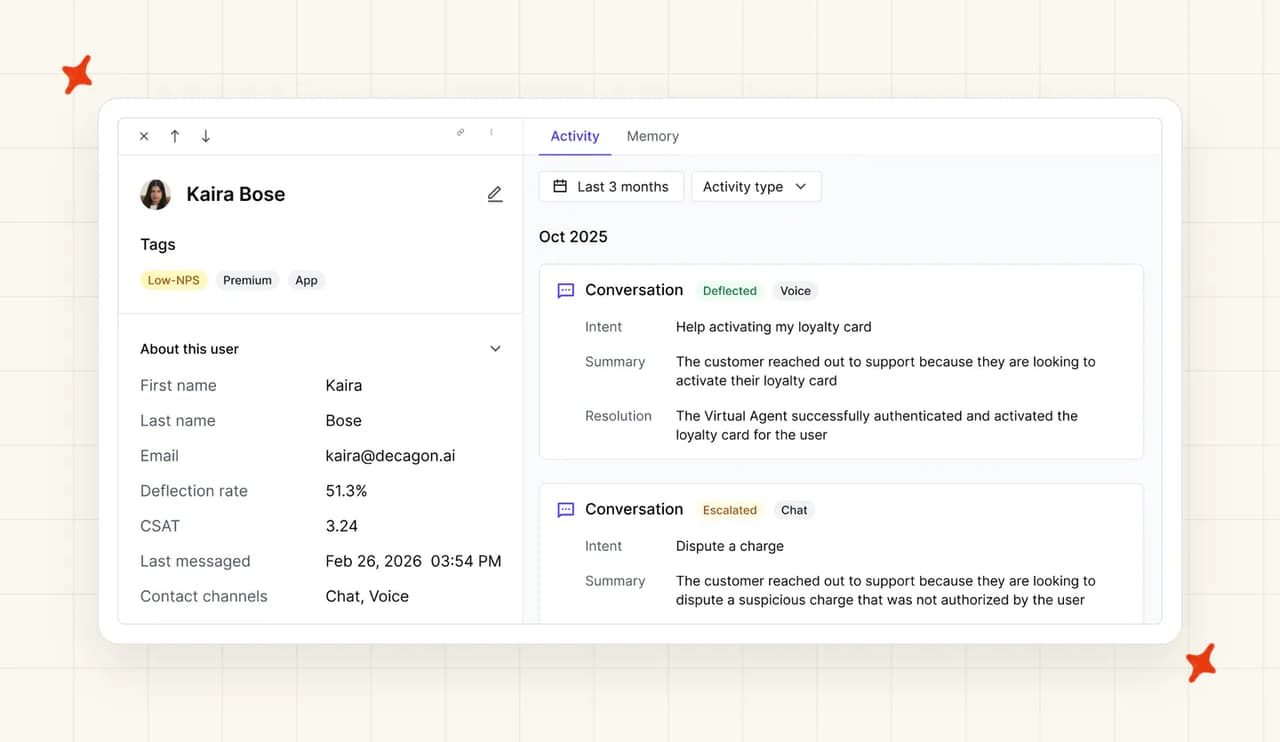
Decagon has no ticket-field equivalent, because it has no tickets. Watchtower is the nearest thing on its product pages. It reviews every conversation against custom rubrics, monitors sentiment, detects fraud mentions and regulated complaints, and raises compliance alerts.
Agent translation
Zendesk says its AI agents cover 80-plus languages. It also adds AI translation for help center articles, so your knowledge base goes multilingual without a translation vendor (and its invoice).
Decagon claims any language, served from a single knowledge base, which removes the per-market maintenance problem. The confirmed figure is 15 languages in the Rituals Cosmetics deployment. There are no published per-language quality benchmarks, so treat "any language" as untested breadth for now.
I would ask for a demo in your second and third languages. That is where we usually see the quality drop show up.
Help center quick answers
Zendesk puts generative search and Quick Answers into the help center and the Agent Workspace, free for end users. A customer searching your knowledge base gets a written answer at the top of the results.
Decagon has no help center product, so there is nothing on this line. By its own product pages, Ask AI lets your team query conversation data in plain English. Trace View shows why a given reply happened.
I score this row on the questions that never become tickets. Help center quick answers deflect them before a conversation starts, and they never show up in anyone's resolution rate.
What about security, is Zendesk AI more secure than Decagon?
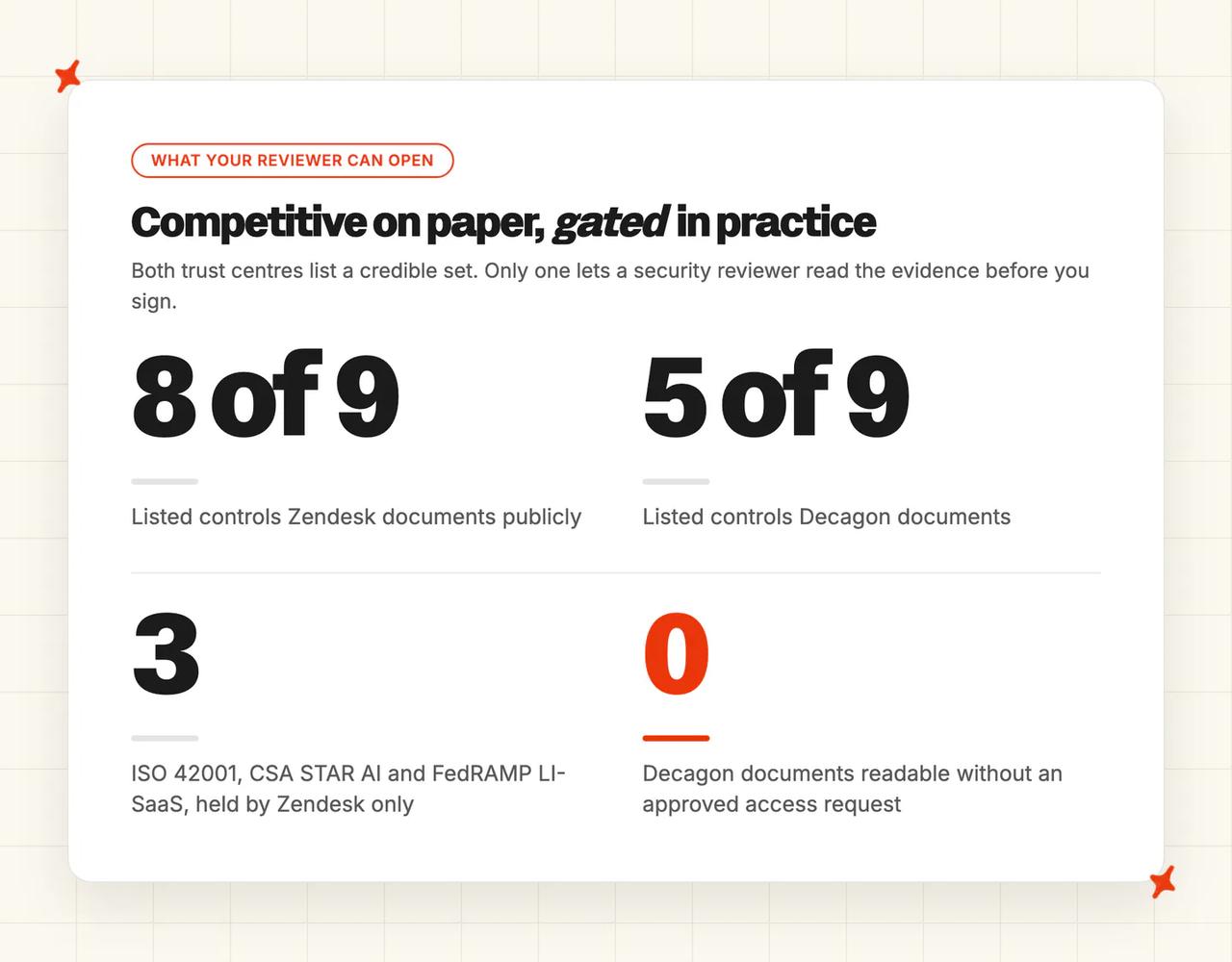
Zendesk's trust center lists SOC 2 Type II, the ISO 27001 family, ISO 42001 and FedRAMP LI-SaaS. It also carries Cyber Essentials Plus, CSA STAR AI Levels 1 and 2, PCI-DSS, HIPAA with a BAA, and HDS. On its UK render Zendesk claims a first:
"CSA STAR AI Levels 1 & 2 certify advanced cloud security and AI governance practices, with Zendesk proudly being the first in the industry to achieve this recognition."
Underneath the badges it publishes the operational detail a reviewer asks for. Data residency covers the US, Europe and Asia Pacific, and service data is encrypted with AES-256 at rest. Penetration testing is annual and third-party, and OpenAI runs under zero data retention.
Decagon's list is competitive. Its trust center carries SOC 2 Type II, GDPR, CCPA, HIPAA, EU AI Act, ISO 27001:2022 and PCI DSS 4.0.1.
The document list runs to two SOC 2 reports, an ISO certificate and an October 2025 pentest. There is a SIG Lite from May 2026 too (the short-form questionnaire your reviewer would otherwise send). Subprocessors are published, LLM providers run at zero-day retention, and Google DLP auto-redacts PII.
If you compared Decagon to Intercom Fin, PCI DSS 4.0.1 was Decagon's certification advantage there. Against Zendesk it disappears, because Zendesk holds PCI-DSS too.
Access is where the difference shows up in your review. Every Decagon document sits behind a request-access control, and its documentation site is login-gated.
I would hand this difference to your security reviewer early, because it decides how much of the review you can do before you sign. Zendesk's help center and trust center are fully public, and Decagon's documents need an approved request first.
| Certification or control | Zendesk AI | Decagon |
|---|---|---|
| SOC 2 Type II | ✅ | ✅ |
| ISO 27001 | ✅ | ✅ (27001:2022) |
| ISO 42001, AI management | ✅ | Not documented |
| CSA STAR AI Levels 1 and 2 | ✅ | Not documented |
| FedRAMP LI-SaaS | ✅ | Not documented |
| PCI-DSS | ✅ | ✅ (4.0.1) |
| HIPAA | ✅ (with a BAA) | ✅ |
| EU AI Act statement | Not documented | ✅ |
| Documents readable without a request | ✅ | ❌ |
Zendesk vs Decagon: which costs more?
The pricing model
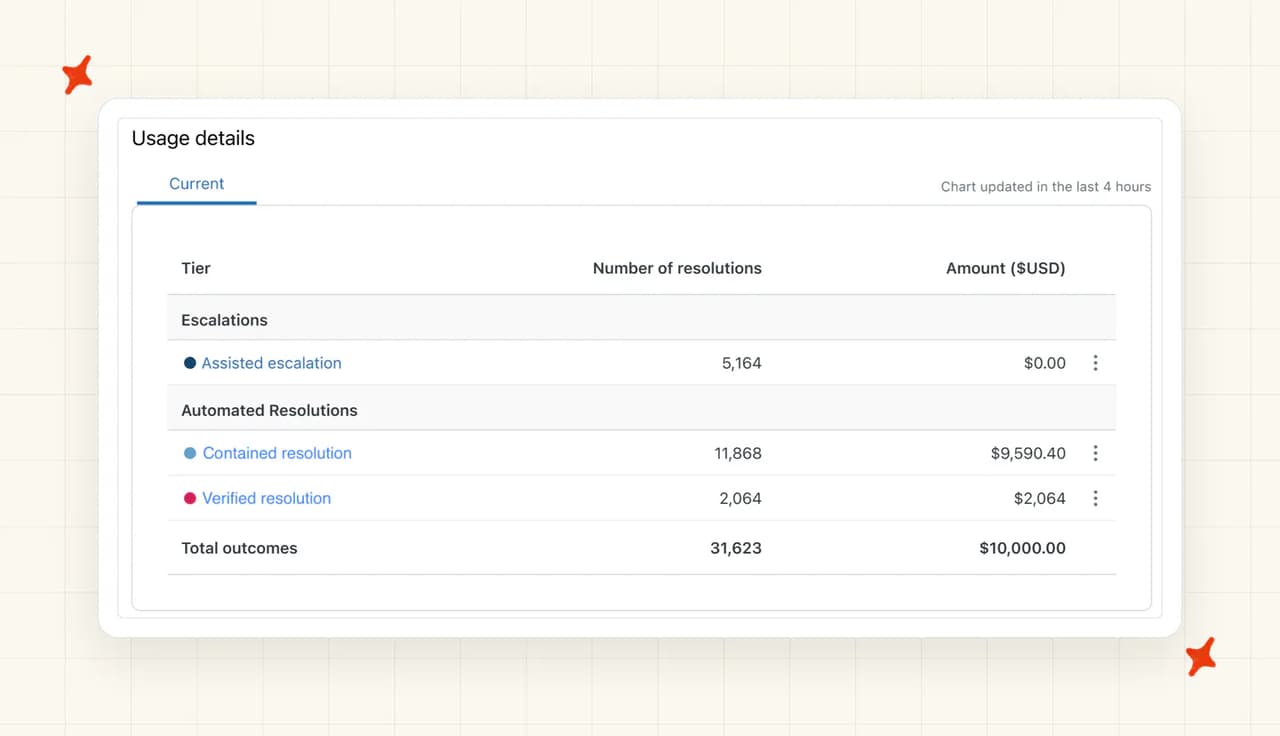
Zendesk changed its billing unit three months ago. Its help center dates the new tiers to 18 May 2026.
The single Automated Resolution became three tiers. On Assisted escalation, "The AI agent contributed to the interaction before a human agent completed the resolution."
On Contained resolution, "The AI agent handled the interaction to completion without the customer requesting further assistance." On Verified resolution, "The AI agent successfully resolved the interaction."
Assisted escalation is the new tier. I would expect it to grow the reported count fastest.
Those tiers draw on an allowance denominated in dollars, where the old model counted resolutions. I would put that switch in front of whoever owns the bill.
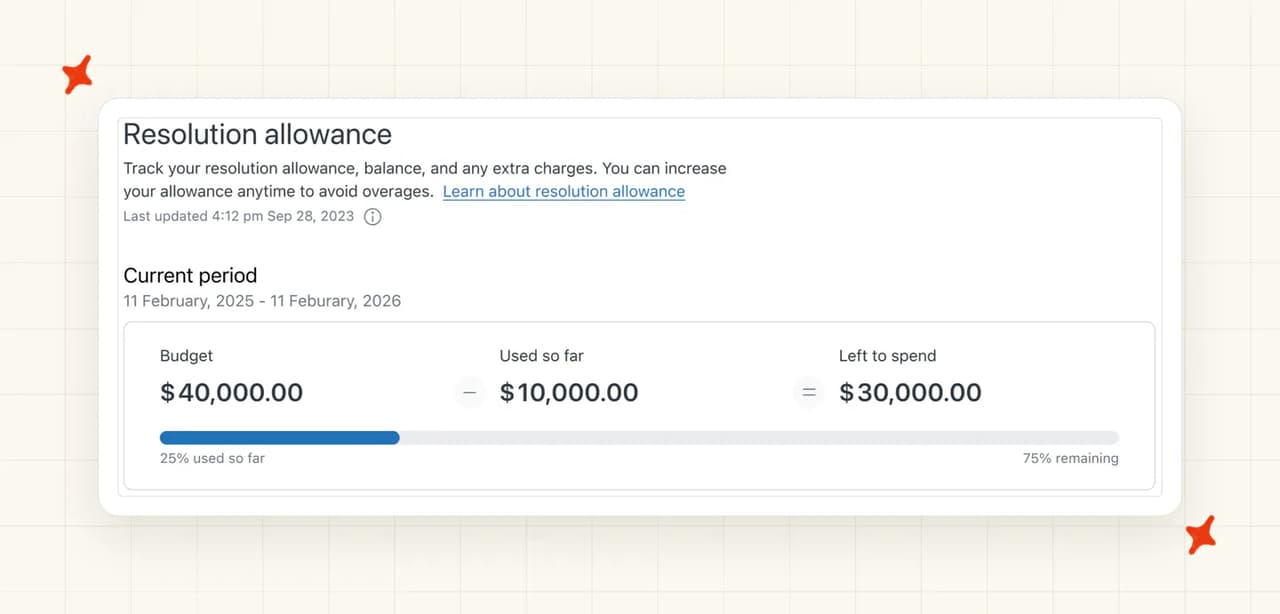
Zendesk's allowance documentation puts it at $2 per agent seat per month on Suite Team. It is $5 on Growth and Professional, and $10 on Enterprise and Enterprise Plus. There is a hard ceiling on top: "The maximum allowance per year for all plans is $5000." Unused allowance does not roll over.
Zendesk has not published the per-tier rates, and I would not sign without them. Of its own worked examples it says:
"The prices shown in these examples are placeholders only, not the actual prices."
Migration is staged, and "Zendesk will provide a 30 day notice with the planned upgrade date."
There is also a contradiction live on Zendesk's own two pages. The tiers article says Assisted escalation and Contained resolution do not draw on your allowance. The allowances article says "You can use this allowance for any automated resolution tier."
Both pages are live with the contradiction on them. I would get it in writing, which tiers draw on the allowance and at what rate, before you sign anything.
Meanwhile the public pricing page still sells the old model. Committed resolutions are $1.50 and pay-as-you-go is $2.00 on the US render captured 9 August 2026. Two Zendesk billing models are running in parallel, and which one you are on depends on whether your account has been migrated.
I wrote up what that change does to a billable resolution when it landed.
On Decagon's side there is no price on its own site. Its pricing page returns a 404, there is no trial, and there is no self-serve signup. Decagon points buyers at its AWS Marketplace listing to "see deployment options, pricing, and how to apply your existing AWS spend commitments toward Decagon".
Every number therefore comes from a sales conversation. Decagon offers per-conversation and per-resolution models, and Contrary Research reported in December 2024 that most of its customers were on the per-conversation one. Our own pricing research puts the qualification bar around 300,000 conversations a year.
The overall cost
Take ten agents on Suite Professional running 1,500 automated resolutions a month. Seats at $115 each come to $1,150, and Copilot at $50 an agent adds $500.
Suite Professional bundles 10 resolutions per agent per month, so 100 are included. The other 1,400 bill at the $1.50 committed rate, which is $2,100. That lands at roughly $3,750 a month, or about $45,000 a year (before anyone opens a Decagon contract).
Those US figures are Zendesk's USD pricing render on 9 August 2026. Its UK render reads £1.50 and £2.00 on the same rows, and which one you see follows your location. Check which render you are quoted from.
Decagon has no equivalent number to publish. The best public read is Vendr's marketplace data (buyer-side data from signed contracts).
Vendr gives a "Median contract value $432,750 per year", a low of $105,000 and a high of $923,183. Its floor note reads "Redline threshold estimate is $50k."
For scale, the same source puts Zendesk's average contract at $166,093.
One buyer put the floor in plain terms:
"the product is genuinely impressive, but it seems designed for larger companies. The pricing discussion quickly moved into enterprise contracts and custom quotes, which put it outside the range of a lot of startups and smaller teams."
That is a buyer on r/AI_Customer_Support in July 2026. I would take that floor as your real entry price, because Vendr's redline note sits at $50k.
Decagon's $432,750 median lands on top of the $45,000 Zendesk bill you were already paying. Decagon has no helpdesk, so your humans still need somewhere to work.
The $1.50 to $2.00 list rate is negotiable, and word-on-the-street is that teams at scale reach around $0.70 per resolution. Zendesk's own model decides what counts as a resolution, so ask how it classifies one before you agree a rate.
My AskAI sits on the third-option side of that ledger, at about $0.10 per ticket from $199 a month. That is an AI charge against AI charges, and our trial is 30 days with everything unlocked and no card.
Conclusion - should I choose Zendesk AI or Decagon?
For most teams reading this, my answer is Zendesk AI. It is already in your account, the rate is still published, and you can have it answering tickets this week. Decagon flips that when your volume is enterprise and the agent has to act inside systems no connector reaches.
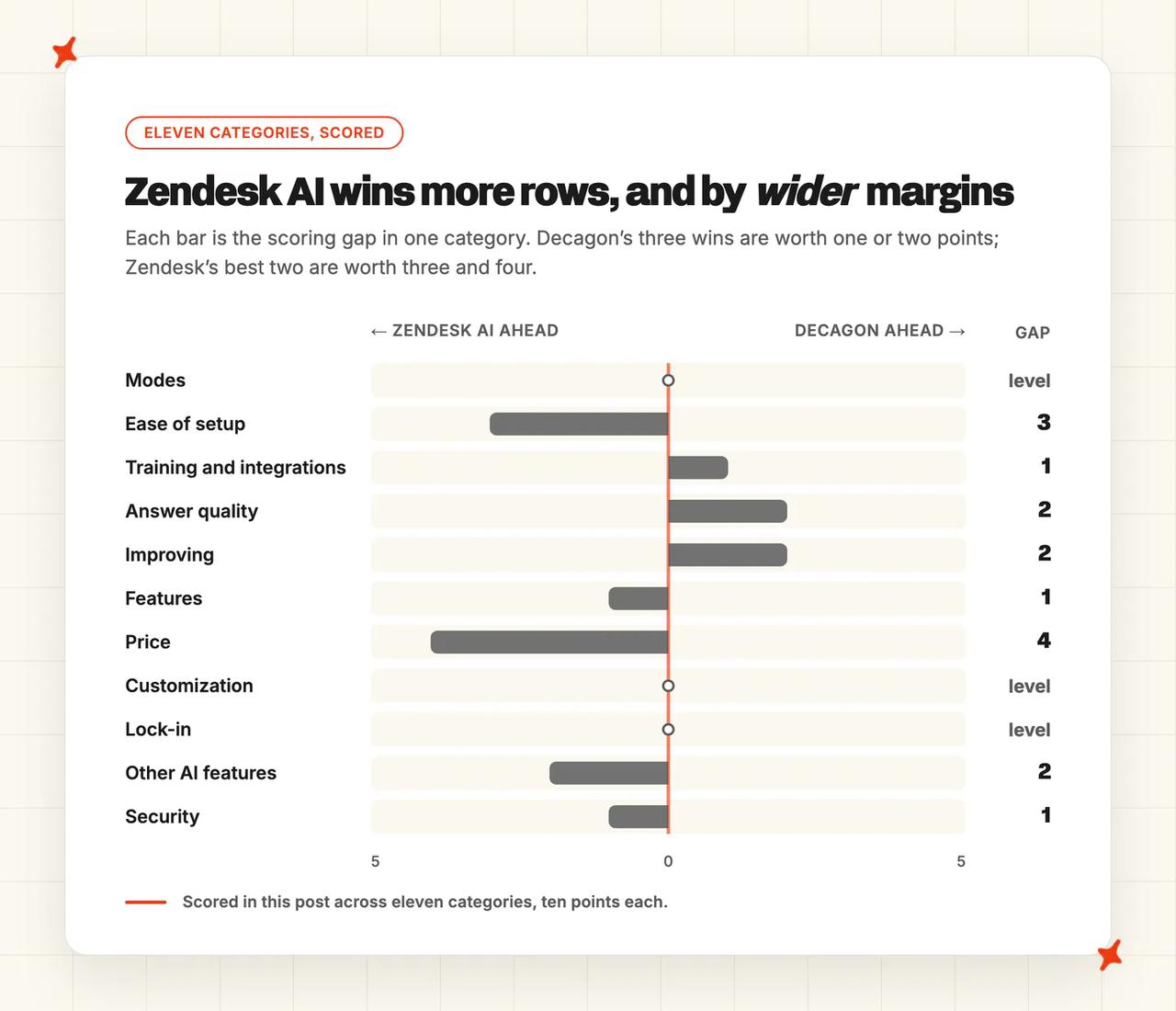
The eleven categories, scored:
| Zendesk AI | Decagon | ||
|---|---|---|---|
| Modes | 8/10 | 8/10 | Tie |
| Ease of setup | 7/10 | 4/10 | Zendesk AI win |
| Training/Integrations | 8/10 | 9/10 | Decagon win |
| Answer Quality | 6/10 | 8/10 | Decagon win |
| Improving | 7/10 | 9/10 | Decagon win |
| Features | 9/10 | 8/10 | Zendesk AI win |
| Price | 7/10 | 3/10 | Zendesk AI win |
| Customization | 8/10 | 8/10 | Tie |
| Lock-in | 4/10 | 4/10 | Tie |
| Other AI features | 9/10 | 7/10 | Zendesk AI win |
| Security | 9/10 | 8/10 | Zendesk AI win |
Zendesk AI takes five rows, Decagon takes three, and three are level. Decagon's three sit where an enterprise buyer evaluates: data reach, published answer quality against a stricter definition, and improvement tooling no helpdesk-native agent matches.
The Lock-in row is a tie, and a deliberate one on my part. Zendesk couples the AI to its data model, and Decagon hands off into a helpdesk it does not sell. Both bills are hard to walk away from.
There is a third route worth a demo. My AskAI runs inside your existing Zendesk, on a core per-ticket rate that stays level as resolution climbs.
The vendor across the table might be Intercom or Sierra instead. Our Zendesk AI versus Intercom Fin and Zendesk AI versus Sierra comparisons are the closer matches there. Our Zendesk AI alternatives roundup and our Decagon alternatives roundup cover who else is worth an hour.
FAQs
Can Decagon replace Zendesk AI inside Zendesk?
Decagon replaces the AI layer and leaves the helpdesk where it is. It ships no helpdesk of its own, so human handoff runs into the one you already pay for, whether that is Zendesk, Salesforce or Intercom. Its Agent Assist copilot runs inside that ticketing platform.
A Zendesk shop that buys Decagon keeps paying for Zendesk seats underneath the Decagon contract. I would model both lines together before taking the meeting. Our guide to moving off Zendesk AI lists the contract lines to read before you cancel.
What can each AI agent be trained on?
Zendesk starts with your help center and ticket history, then adds up to 50 external knowledge sources (SharePoint, Notion, Document360, Confluence and Google Drive). Confluence syncs once a day, and direct PDF or DOCX upload needs a CSV workaround.
Decagon's Unified Knowledge Graph pulls help centers, Salesforce Customer 360, internal APIs, Shopify, Stripe, SOPs and Slack. Browser Actions extends that to systems with no API at all. Decagon does not publish which file types it accepts.
I would test the file-type question against your own policy library first. That is usually where the answers live.
How long does setup take, and do we need developers?
Zendesk is a guided six-step self-service flow on a 14-day trial, and no developer is needed to switch it on. Our Zendesk notes put getting it good at 2 to 4 weeks for a small team. Past 50 agents, that stretches to 8 to 12 weeks or more.
Decagon runs a six-phase onboarding of about six weeks, with its own Agent Product Managers and Forward-Deployed Engineers embedded. There is no self-serve path and no trial. Enterprises already on an AWS agreement can shorten procurement through its AWS Marketplace listing.
On both sides, I would plan for the calendar time to go into writing and cleaning the knowledge the agent reads.
Zendesk vs Decagon: how do the pricing models differ, and what might we actually pay?
Zendesk bills per automated resolution on top of seats and publishes the rate. Decagon sells annual enterprise contracts and publishes no price on its own site, so its band comes from Vendr.
| Zendesk AI | Decagon | |
|---|---|---|
| Pricing model | Per automated resolution, plus seats, migrating to sales-gated tiers | Per conversation or per resolution, annual enterprise contract |
| Headline rate | $1.50 committed, $2.00 pay-as-you-go on the US render, 9 Aug 2026 | No pricing page (the URL 404s) |
| 10 agents, 1,500 resolutions a month | ~$3,750/mo, ~$45,000/yr | No comparable quote; Vendr median $432,750/yr |
| Free trial | 14 days, Copilot included | None, demo only |
Two things change that picture. Zendesk's list rate is negotiable, and at scale I have heard of teams reaching around $0.70 per resolution. A Decagon contract also sits on top of your Zendesk bill, which it does not replace.
My AskAI is the per-ticket option here, at about $0.10 per ticket from $199 a month, comparing AI charge to AI charge.
Which one gets better faster once it is live?
Decagon, and the reason is who does the work. Its changes ship as reviewed, versioned commits, and its own engineers sit in your team through onboarding. A bad change can be tested and rolled back without a release cycle.
Zendesk hands you the controls. A Zendesk account improves at the speed your team writes help center articles and edits dialogs, usually a monthly rhythm.
I would budget for a named owner on the Zendesk side. Without one, the tooling sits unused and the rollout stalls.
Can they handle multilingual support and agent translations?
Zendesk says its AI agents support 80-plus languages, detects roughly 150 through intelligent triage, and will AI-translate your help center articles. Decagon claims any language from a single knowledge base, so one policy update propagates everywhere at once.
The confirmed count is 15 languages in the Rituals Cosmetics deployment, with no published per-language benchmarks. I would ask for evidence in the languages you actually sell in.
How do Zendesk AI and Decagon compare on security and compliance?
Zendesk holds SOC 2 Type II, the ISO 27001 family, ISO 42001 and FedRAMP LI-SaaS. It adds Cyber Essentials Plus, CSA STAR AI Levels 1 and 2, PCI-DSS, HIPAA with a BAA, and HDS. It publishes residency, encryption and pen-test detail openly (no request form).
Decagon holds SOC 2 Type II, ISO 27001:2022, PCI DSS 4.0.1, HIPAA, GDPR, CCPA and an EU AI Act statement. PCI-DSS is held by both, so it is not a differentiator here.
The practical gap is access. Zendesk publishes its security documents openly, and every Decagon document needs request-access approval first. Our own reviewers hit that gate before anything else.
Does either one offer a free trial?
Zendesk gives you 14 days, defaulting to Suite Professional with Copilot switched on. You can start without talking to anyone. Decagon has no trial and no self-serve signup, and its documentation is login-gated.
If evaluating before buying is part of your process, Zendesk gives you 14 days and Decagon gives you a sales call.