ProProfs Help Desk: Complete Guide to Features, Pricing & Limitations (2026)
ProProfs Help Desk starts at $19.99 a user a month billed yearly, and AI Lite stops at 50 drafted replies. My AskAI starts at $0.10 a ticket.
Summarize with AI
ProProfs turns up on a helpdesk shortlist because it's cheap, and on the surface it does everything.
You've got a spreadsheet open, a Zendesk quote in another tab at four times the price, and a nagging feeling that something this cheap has a catch in it somewhere. In my experience the catch is usually a feature gate you can live with. Here it's a number that decides how much support you're allowed to do in a month.
I'm Mike, co-founder of My AskAI. We help 200+ ecommerce and SaaS businesses run AI customer service inside the helpdesk they already own, so I spend most of my week reading vendor price cards and working out what a real month costs.
By the end of this you'll know whether the caps bite at your volume, what the bill comes to at 1,000, 10,000 and 50,000 tickets a month, and which team should still buy this.
ProProfs Help Desk at a glance
| Fact | Detail |
|---|---|
| What it is | Standalone shared-inbox helpdesk with an AI layer |
| Headline price | $19.99 per user/month billed yearly, $39.99 monthly |
| Free plan | Yes, forever: one agent, 100 tickets a month |
| Ticket cap | Every plan: 1,000 / 6,000 / 15,000 / 60,000 a month |
| AI included | From Essentials, capped at 50 drafted replies a month |
| G2 rating | 4.7/5 from 18 reviews |
| Best for | Small teams buying their first helpdesk |
| Not a fit for | Spiky volume, deep integrations, security reviews |
| Biggest limitation | No published overage policy for the ticket caps |
| Our verdict | 6/10 |
What is ProProfs Help Desk?
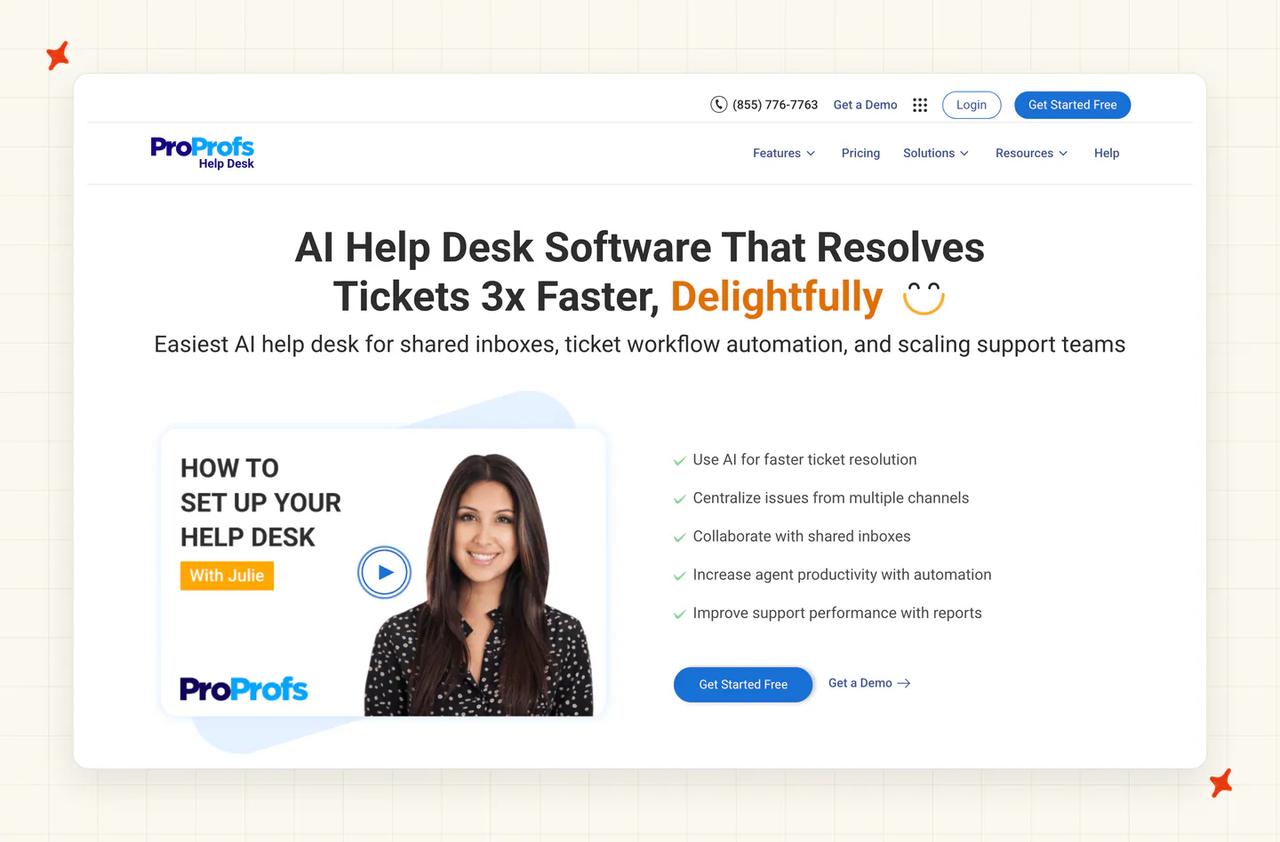
The homepage leads with "AI Help Desk Software That Resolves Tickets 3x Faster, Delightfully", and the subhead sells it as the "Easiest AI help desk for shared inboxes, ticket workflow automation, and scaling support teams". In practice it's a shared-inbox ticketing product with its own agent interface, a branded customer portal and a reporting layer.
ProProfs Help Desk is a platform you migrate onto, with its own ticketing engine underneath. Whatever else is on your shortlist, you're really comparing it with Zendesk, Freshdesk and Zoho Desk, and the bill includes the ticketing platform itself.
G2: ProProfs Help Desk scores 4.7/5 from 18 reviews on G2. "The best part of being associated with ProProfs is that they offer incredible support. Unlike other help desk companies that reply on self-service or email, you can call their team anytime and have a meaningful interaction." via a G2 reviewer (SEO Expert).
Help Desk is one app in a wide catalog (fifteen or so products, depending on how you count the retired ones). ProProfs also sells Knowledge Base, Live Chat, Survey Maker, Qualaroo, Quiz Maker, Training Maker, BIGContacts CRM, Picreel, Project and several more, all of it trading as Batia Infotech out of Santa Monica and Delhi-NCR.
That catalog is where the AI marketing gets slippery. The AI chatbot and the self-service deflection belong to Live Chat and Knowledge Base, and both bundle upward into the Customer Delight Suite at "Starts at $499/month" on the pricing page.
On scale, ProProfs claims "Why 30,000+ Teams Choose ProProfs Help Desk" for this product and "Trusted by over 15 million people" for the whole suite. The 15 million figure belongs to every app together, so read it as a company-wide number.
How easy is it to set up ProProfs Help Desk?
ProProfs answers this on its own pricing FAQ: "Setting up the ProProfs Help Desk is easy. When you login to ProProfs Help Desk for the first time you can set up your shared inbox settings (e.g. help@, support@, etc.). As soon as your inbox is set up, you can begin processing tickets." That's a fair description of the first run.
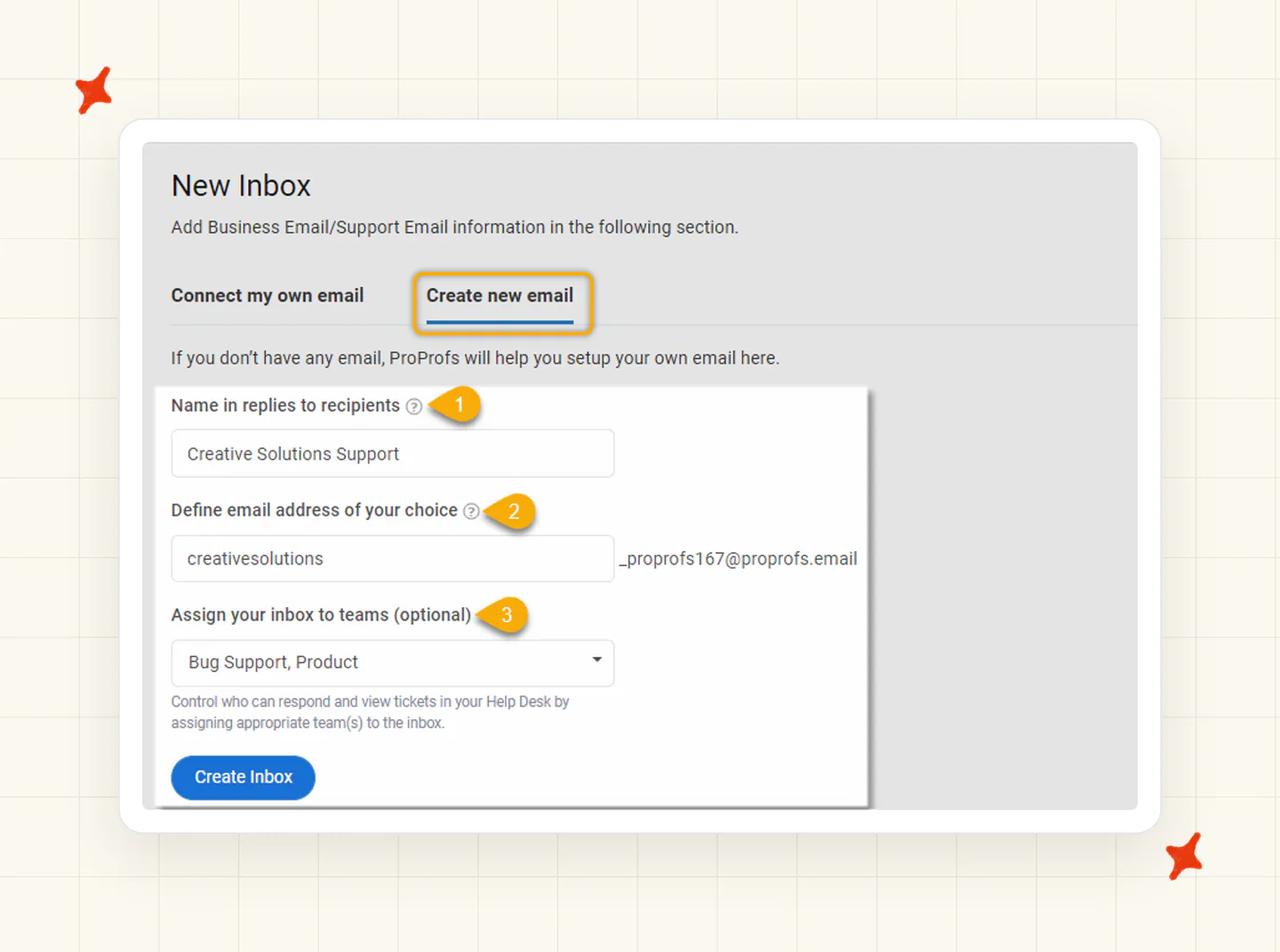
Signup is a three-step form with no credit card. From there the documented flow runs Settings, then Channels, then Inboxes, then "+New Inbox". You either forward your existing support address or create a ProProfs-hosted one, name the reply-from identity and optionally assign it to a team, all of it walked through in the setup docs.
The docs flag two pieces of friction themselves, which is more than I expected. Getting your replies to land reliably means SPF, DKIM and DMARC records. The help center describes generating CNAMEs to add to DNS "with your server team", then adds: "Please note that the feature is for our premium customers only."
The second one is smaller but permanent. Once you've created an inbox you're stuck with it: "Once you've created an inbox, you cannot delete it; you can only change its status."
The gap I didn't see coming is in the AI documentation. Across all eight help-center categories there's no article on training the AI agent, connecting a knowledge source, or testing the agent before you point it at customers. Getting Started is four articles, and the AI one covers replying to a ticket with suggestions.
Human support during onboarding is a real strength here, and reviewers praise it more than anything else. There's a phone line answered by "Real product experts" Monday to Friday, live chat promising a "Live agent, under 2 minutes", email inside one business day, and a deep help center. Dedicated onboarding managers and a session where your first inbox is "built with you" start at Business Complete Elite.
What channels does ProProfs Help Desk work in?
The features page sells "Omnichannel Support From One Unified Inbox" and lists Email, AI Chatbot, Knowledge Base, Instagram, SMS, Chat, Ticket Forms, WhatsApp and Facebook. The pricing page goes further at Elite, describing "your website chat widget, WhatsApp, Instagram DMs, Facebook Messenger, SMS, and Telegram, all flowing into a single unified operator inbox".
The same paragraph is printed under the ProProfs Live Chat heading of the Customer Delight Suite, so I'd read the Elite list with care. This is where each channel actually sits for the Help Desk product:
| Channel | Where it actually sits |
|---|---|
| Native, from the free plan up. The core product. | |
| Web and ticket forms | Native; embeddable forms from Business. |
| Customer portal | Native; branded portal for ticket status and history. |
| Live chat | Via the sibling ProProfs Live Chat product. |
| Knowledge base | Via the sibling ProProfs Knowledge Base product. |
| Documented in the help center's channels category. | |
| SMS | Via the Twilio integration, using your own Twilio account. |
| WhatsApp, Instagram, Telegram | Marketed at Elite and suite level through Live Chat. |
| MS Teams | Listed in site navigation as "MS Teams (Soon)". |
| Voice and telephony | Not offered. |
Chat reaches Help Desk as a hookup between two products. ProProfs' own integration page explains how it works: offline chat messages from your customers turn into tickets automatically, so the two products hand work to each other and chat stays an integration.
The plan gating is what I'd check against your own channel mix first. Social and messaging channels arrive at Business Complete Elite and above, so a team on Essentials is running an email helpdesk with forms and a portal, and nothing else.
What are the limitations of ProProfs Help Desk?
None of this appears on the homepage. I'd want all of it before signing anything.
Every plan caps monthly tickets
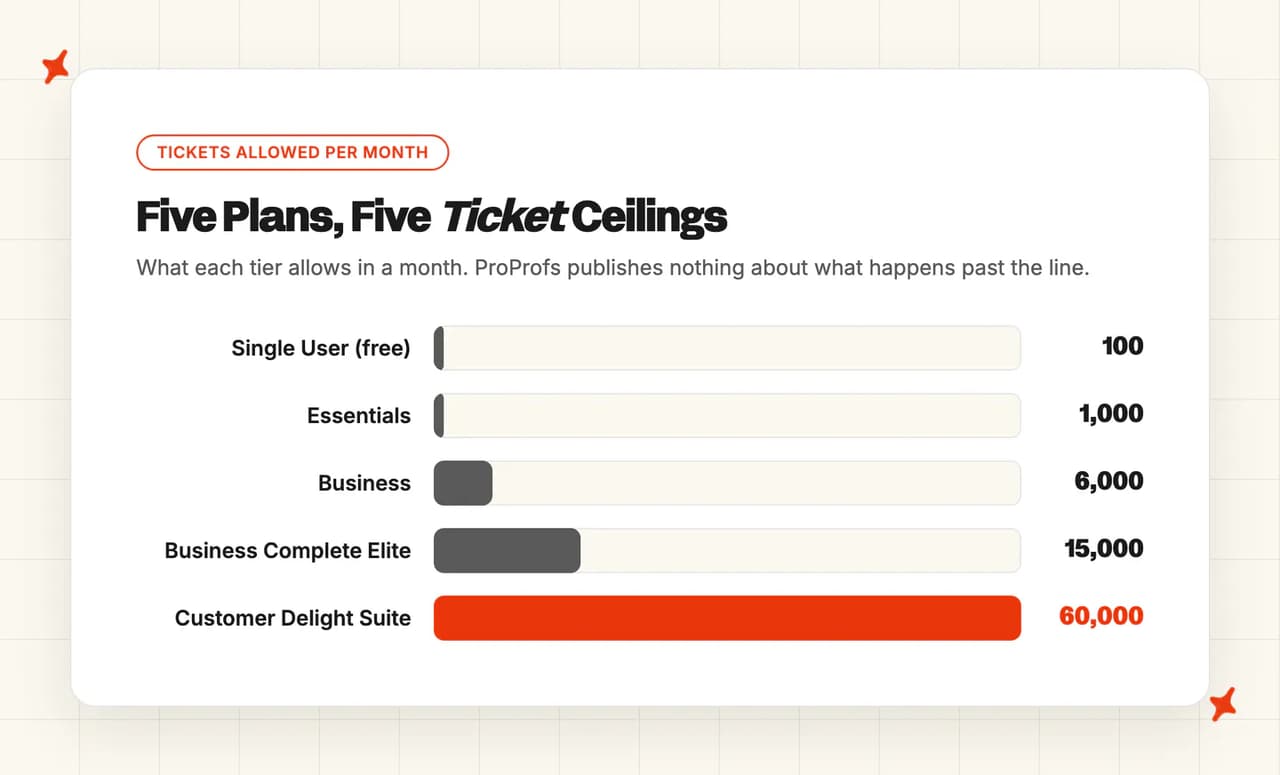
The pricing page sets the allowance tier by tier: "Email Ticketing (100 tickets/month)" on the free plan, "Essentials plan includes 1,000 tickets/month", "1 User, 6,000 tickets/month" on Business, "3 User Seats, 15,000 Tickets/mo, AI-First" on Elite, and "Unlimited users, 60,000 tickets/month" on the Customer Delight Suite. Seats and tickets are separate meters. For most teams the ticket one is what bites.
What happens at the cap is not documented
I'd expect a number here and ProProfs publishes none. The words "exceed", "overage", "over the limit", "additional tickets", "limit is reached" and "extra fee" appear zero times on the pricing page. The help center's entire Account and Billing category is one article about cancelling your account, and the terms and privacy policy are silent too.
The nearest thing to a rule I'd hold them to is Fair Use, clause 16 of the terms, where excessive usage "at Company's sole discretion, may be charged an extra fee or service may be permanently terminated or temporarily blocked." That clause is discretionary and unbounded, and a long way from a published overage rate.
You can't model your own bill from that. A published overage price, even an expensive one, would let you forecast a spiky month. Nothing published means the answer is a sales conversation you haven't had yet.
A cap changes how a team behaves before it changes the invoice, because someone has to start counting tickets. The month that hurts is usually the month volume spiked for a good reason: a launch, a sale, a press hit.
I'd model the next tier up as your real ceiling: 1,000 tickets on Essentials, 6,000 on Business, 15,000 on Elite.
AI Lite is capped at 50 drafted replies a month
On Essentials, the AI allowance is 50 AI-drafted replies a month, and ProProfs frames the tier itself as "Included in Essentials to give solo agents a taste of AI before upgrading." That's about two working days of a busy inbox, so I'd read it as a demo allowance rather than a working tool.
The marketing and the documentation describe different products
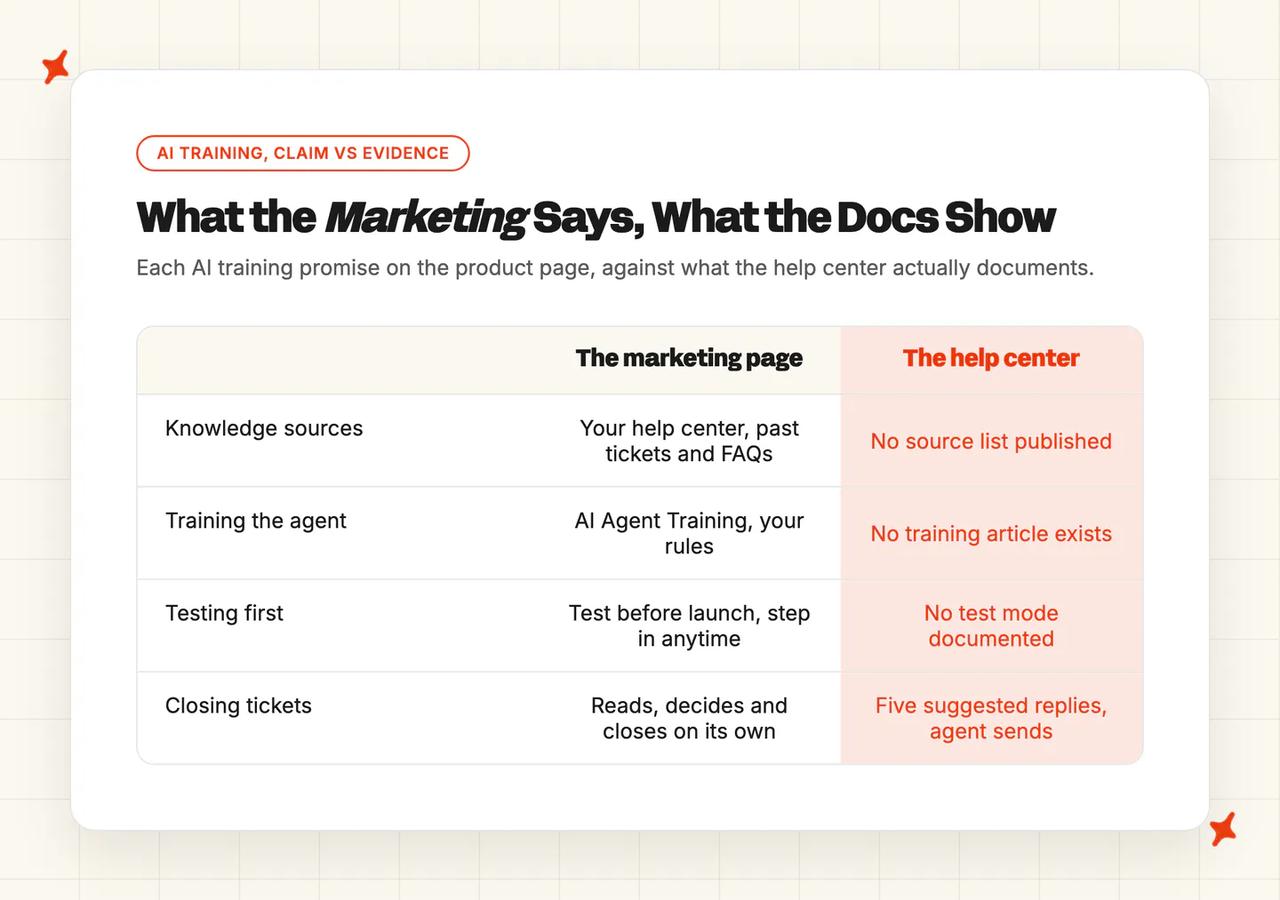
The AI Help Desk page sells AI Ticket Resolution as "Agentic AI reads, decides, and closes the repetitive tickets on its own", and AI Agent Training as "Point AI at your help center, past tickets, and FAQs. Test before launch, step in anytime. Your help desk, your rules."
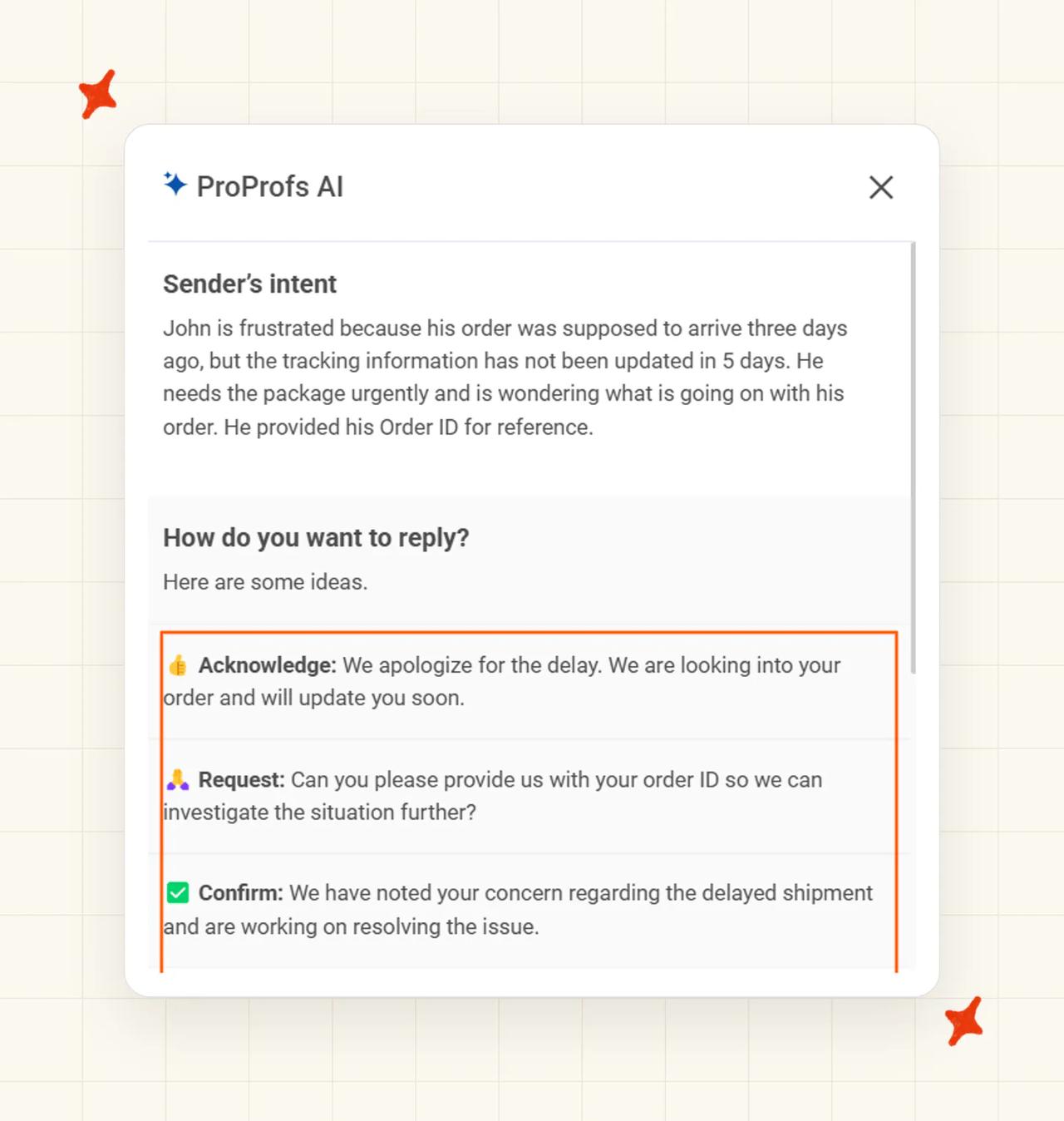
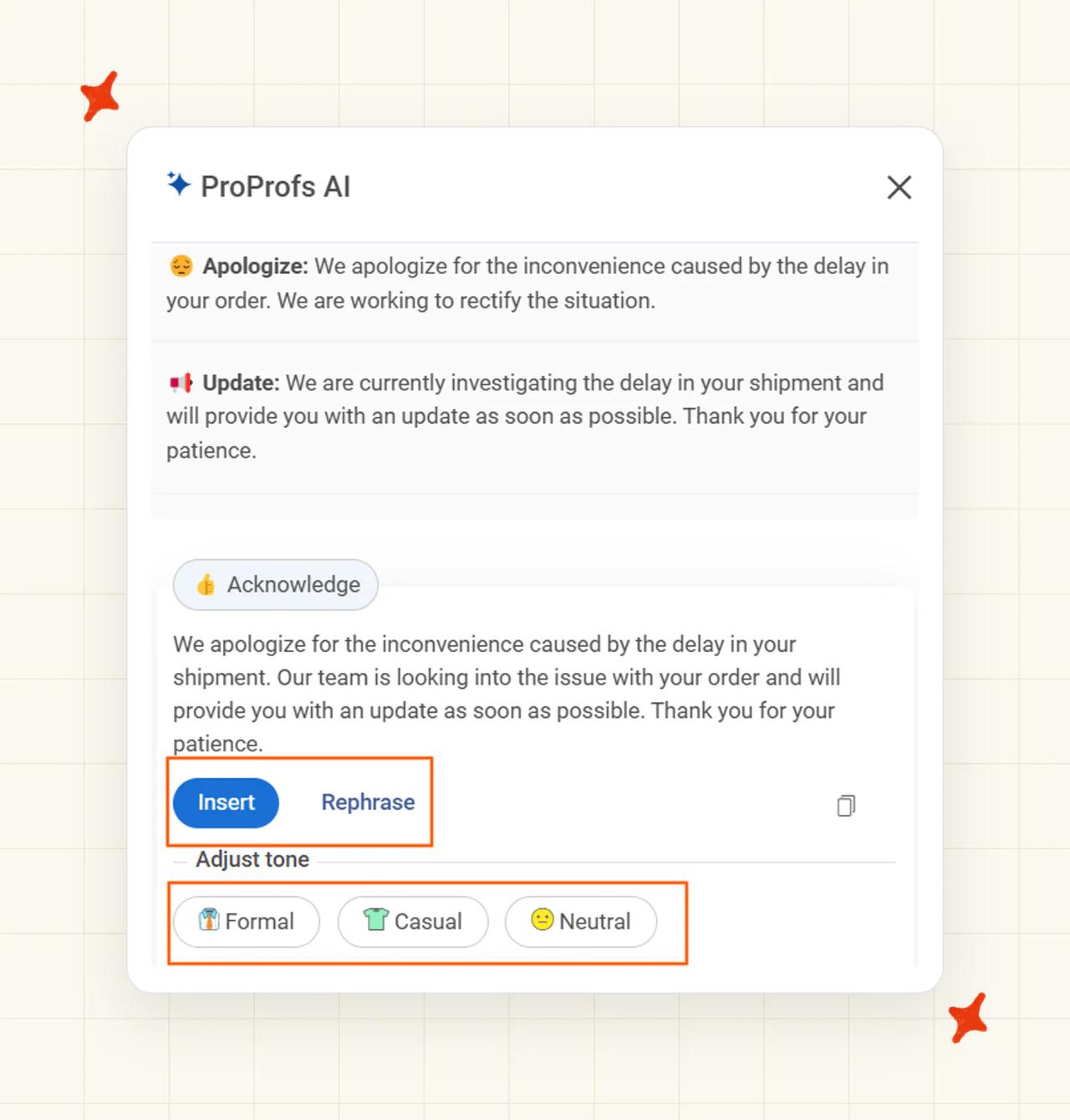
The help center's only article on the AI documents something much narrower (one article, in a help center of more than a thousand). It "analyzes customer queries and suggests smart responses" across five categories, Acknowledge, Confirm, Request, Apologize and Update, which an agent inserts, edits and sends. Nothing published documents knowledge-base grounding, an autonomous close, a training screen or a test mode.
An evidence gap isn't proof the capability is missing, and the docs may lag the product. But if autonomous resolution is why you're buying, ask for a live demo of a ticket closing with no agent involved before you sign.
Free and trial accounts grant an AI-training license
Clause 27a of the terms says that "For all User Content from free and trial accounts (both public and private), by using our Services you grant Company a perpetual, irrevocable, world-wide, royalty-free, and non-exclusive license to use such User Content even after account deletion", and the listed purposes explicitly include "(b) Training and improving AI models and machine learning systems".
The paid side is protected separately under 27b, where private paid content isn't used to train models other customers can reach. Both halves are true at once, and a trial run on real customer tickets falls under 27a. That's a clause I'd forward to whoever owns privacy at your company.
Three smaller gaps
- A shallow API: the developer docs document exactly four endpoints, create a ticket, update a ticket, retrieve a ticket list, and create a company and contact, plus webhooks and SSO. API and SSO are both Elite-gated, so building around ProProfs on a lower tier isn't an option.
- A free plan thinner than its own heading: the column is headed "Forever FREE account for a single user with all premium features!", then excludes the mobile app, advanced reports, ticket ratings, custom fields and filters, overdue time, API and SSO, advanced search, and integrations. Eight exclusions and a 100-ticket cap, contradicted by a heading on the same screen.
- No voice, no sandbox, no ITSM depth: no telephony product, no simulation environment to rehearse the AI against past tickets, and no CMDB, asset or change management.
A G2 reviewer put that last one well from the inside: "This tool is not a full-fledged ITSM tool. However, you can manage your basic IT ticketing needs with ease."
What knowledge sources can I train ProProfs Help Desk on?
The marketing is specific enough that I expected to find a how-to behind it. The AI Help Desk page says "Point AI at your help center, past tickets, and FAQs", and the features page repeats the promise with a "then test before launch" line.
The documentation doesn't follow it up. There's no help-center article on connecting, selecting, syncing or scoping a knowledge source for the Help Desk AI, no published file-type list, no crawler, no connector set for Confluence, Notion, Google Drive or SharePoint, and no article or page limits anywhere in the eight help-center categories. The one AI behavior that is documented works from the ticket text in front of it, suggesting a reply by intent category.
Knowledge lives in ProProfs Knowledge Base, a separate product, and the pricing FAQ notes that "Your Help Desk subscription also includes Knowledge Base."
The knowledge-grounded behaviors sit higher up the price card. KB auto-update, content-gap detection, "Learns from Every Chat & Ticket" and KB ticket deflection are all Customer Delight Suite features at $499 a month.
In a demo I'd push on that split. Everything documented at Help Desk level is drafting, and everything that grounds an answer in your knowledge and closes a ticket sits at suite pricing. Those are two different purchases with a $459 a month gap between them.
What features does ProProfs Help Desk have?
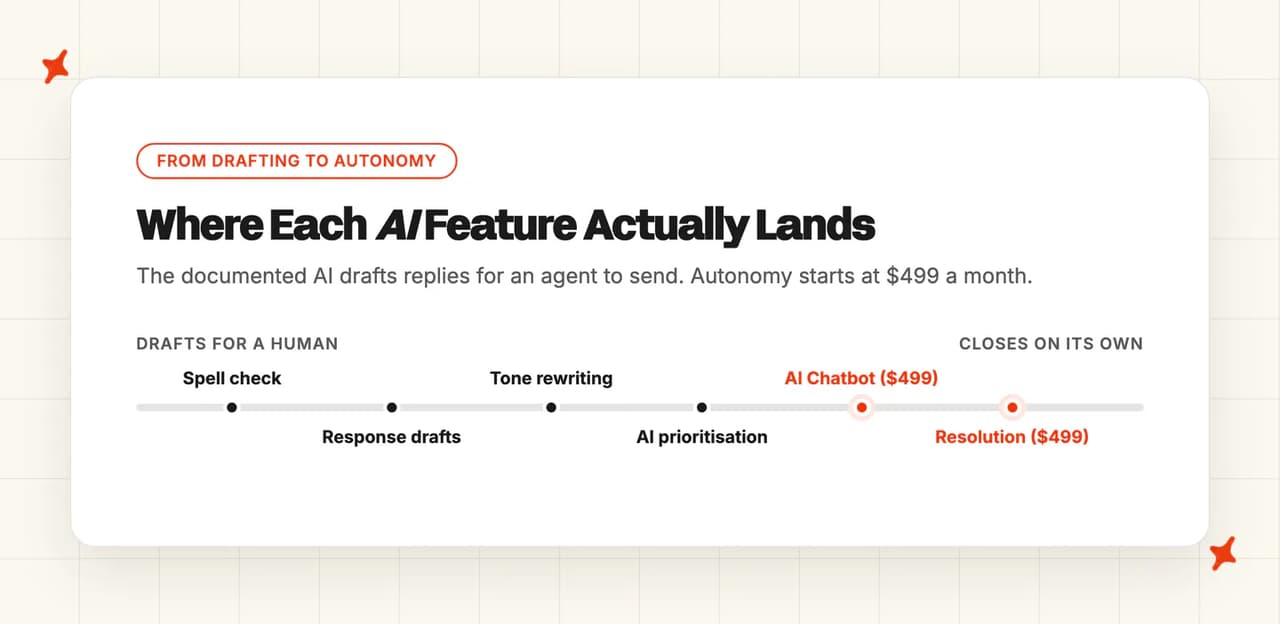
The AI splits into three layers, and only the top one closes tickets without an agent.
- Autonomous: AI Ticket Resolution, marketed as "Agentic AI reads, decides, and closes the repetitive tickets on its own", plus an AI Chatbot that is a Live Chat and suite capability at the $499 tier.
- Copilot: AI Response Suggestions across those five categories, AI Tone Adjustment, AI Response Refiner (tell it "Add the refund timeline" or "Make it shorter" in plain English) and AI Ticket Summarization. This is the layer with actual documentation behind it.
- Workflow: AI Ticket Prioritization using urgency, sentiment and customer history, round-robin auto-assignment, SLA management and escalations, parent and child ticketing, and AI Insights and Reports. Elite adds emotion and sentiment detection plus auto-redaction of card numbers and personal identifiers.
The tier split decides what you actually get. Free has no AI, and Essentials ("AI Lite") gives you 50 response drafts a month, ticket categorization and spell check.
Business adds a first-response generator and tone rewriting, and Elite adds emotion detection and redaction. The Customer Delight Suite is where the autonomous claim, KB deflection, the 24/7 chatbot and agentic actions like creating CRM leads and triggering workflows all live.
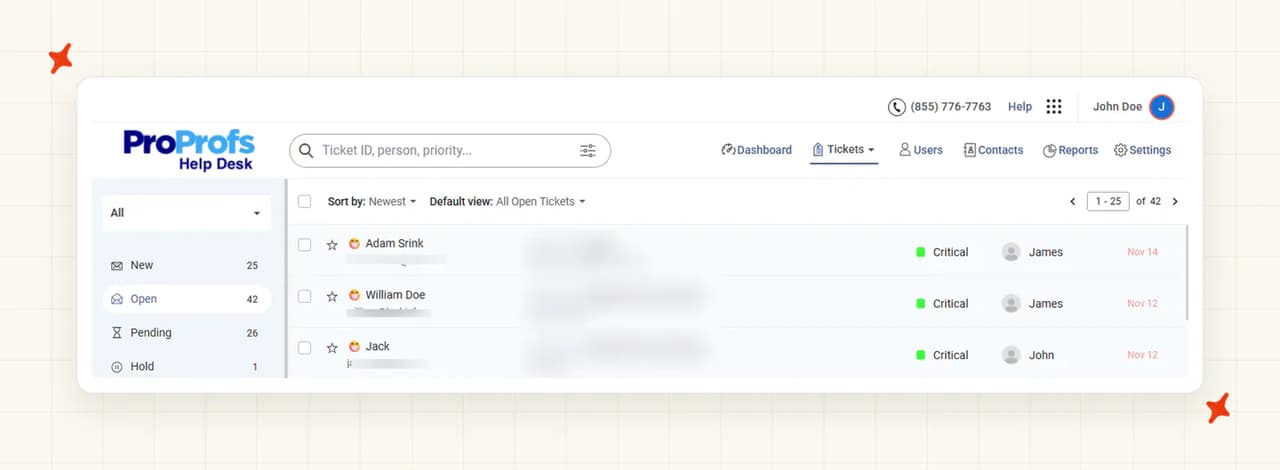
The conventional ticketing is the part I'd pay for here. It's why the product has customers. For the money it's deep: shared inboxes, unlimited inboxes from Business, parent and child tickets, merge and bulk operations, spam blocking, a Vault for recovering deleted tickets, shared ownership across teams, agent collision detection, internal notes with mentions, custom fields, labels, filters, custom statuses and priorities, business hours, automated follow-ups and post-ticket surveys.
Reporting is similarly full: ticket-volume trends, agent performance, first-response time, custom-field and child-ticket reports, ratings, overdue reports and scheduled email delivery, with NPS tracking, custom dashboards and a real-time agent leaderboard at Elite. Customization covers your logo, a branded portal on your own domain, custom ticket forms, and white-labeling to remove the "Powered by ProProfs" mark for $300 a year.
How do I improve ProProfs Help Desk responses?
There's no "improving accuracy" or "AI best practices" article in the help center's eight categories, and no documented path from an agent's corrections back into the model. Instead there's a per-reply human loop.
You open the ticket, click the ProProfs AI icon, review the suggestions by category, and edit (all of it inside one ticket). The docs describe the refinement step as letting agents "tweak, rephrase, or adjust AI-generated replies for better alignment with your communication style".
The Response Refiner takes plain-English instructions and Tone Adjustment shifts the register in a click. Both edit one reply, and the next ticket starts from scratch.
Nothing at Help Desk level tells you what your knowledge is missing. For that I'd be looking at ProProfs Knowledge Base at the suite tier, where the pricing page promises to "Detect patterns in resolved tickets and automatically suggest new knowledge base articles" and to "Identify every question your knowledge base can't answer before customers complain."
The improvement path is real but indirect. You improve ProProfs' AI by improving the knowledge base, and the tooling that tells you what to improve is a $499 a month feature.
Two measurement surfaces are native here, and I'd turn both on. Sentiment analysis records a beginning score and a current score per ticket on a 0 to 100 scale with emoji in the ticket list, so a manager can see whether conversations are improving or getting worse. Automated post-ticket CSAT surveys and dashboards run from Essentials up.
Don't buy this one expecting set-and-forget. A product whose only lever is per-reply editing won't get better on its own, so someone on your team has to own the knowledge base, with the hours in the week to do it.
What resolution rate can I expect from ProProfs Help Desk?
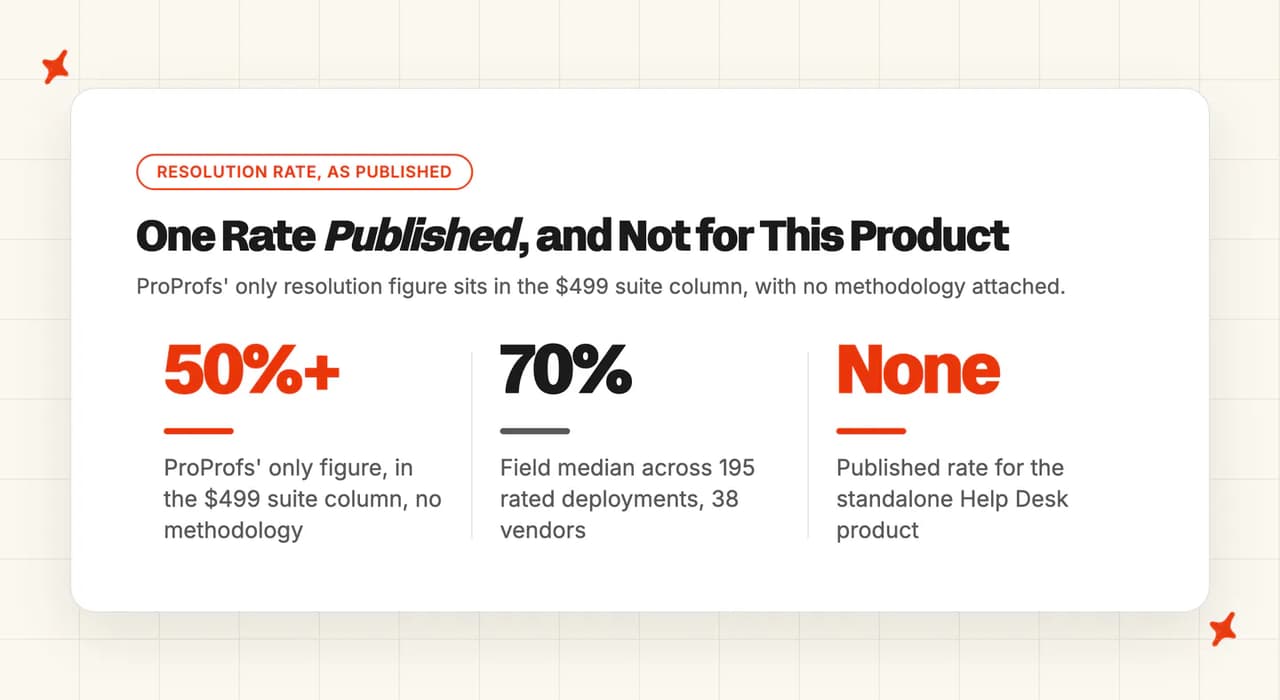
The suite column of the pricing page carries it in full: the AI "reads every incoming ticket, finds the right answer from your knowledge base, responds to the customer, and closes the ticket, without any agent involvement", above the headline "AI Resolves 50%+ Tickets".
There's no methodology behind it, no sample size, no named customer and no date on the product pages, the AI page, the homepage or the case studies, so it's a number to take with a grain of salt. It's also scoped to the $499 product, and the helpdesk you'd buy at $19.99 or $29.99 a seat carries no published figure at all.
The other numbers ProProfs publishes measure different things, and buyers read them as resolution rates anyway. "Resolves Tickets 3x Faster" and "50s avg. first response time" are speed claims.
"80% reduction in manual work" and "Automation Saves Agents 2 Hrs a Day" are effort claims, and the "reduce tickets by up to 80%" line is a self-service deflection claim about the Knowledge Base product.
The only named customer outcome is a speed number too. Steve Organek, founder of the ecommerce retailer Shavershebang, is quoted on the AI page saying "We went from 48-hour response times to under 4 minutes, without hiring a single extra agent."
That's a response-time result. It says nothing about what share of tickets the AI closed.
For field context, and only as context, our own AI resolution rate benchmarks put the median at 70% across 195 rated deployments spanning 38 vendors, with a P25 of 56% and a P75 of 80%. It's an aggregate and not a per-vendor comparison, every vendor defines its own metric so the label moves the number more than capability does, and published figures are self-selected marketing wins, so the true field average is likely lower.
When any vendor says "resolved", ProProfs included, find out what event is being counted: a ticket the AI closed, a ticket that never reached an agent, or a customer whose problem was actually solved. ProProfs publishes no definition for its 50%+ figure, which is exactly why you can't line it up against anyone else's.
What AI model does ProProfs Help Desk use?
The only first-party statements about the AI are legal ones. The terms say "AI features may be powered by third-party AI service providers. These providers process data on our behalf and are bound by data processing agreements consistent with applicable law."
The same document takes a wide swing at scope, covering "artificial intelligence (AI), machine learning, natural language processing, automated content generation, and autonomous AI agents across all current and future ProProfs products and platforms", including agents that can "execute multi-step tasks, trigger workflows, process transactions, initiate refunds, modify records, and interact with third-party systems on your behalf." That clause reserves room to build. It doesn't describe what ships today.
On training, the privacy policy is clear and reassuring: "We do not use your personal data to train third-party AI models." It also reserves the right to use "de-identified or aggregated data that no longer identifies you" to improve ProProfs' own AI features.
A security reviewer will ask you for technical disclosure that ProProfs doesn't publish: no model selection for customers, no published architecture, no versioning policy, and a subprocessor list you can only get by emailing support. I'd get that list into a sales call early.
What languages does ProProfs Help Desk work in?
There's no multilingual page, no language-configuration article in the help center, and no "supports N languages" claim anywhere on the ProProfs Help Desk site. Its G2 product profile lists a single entry under languages supported: English.
In the Acer case study, the customer describes "the ability to set up custom fields and support multiple languages, including Chinese, which is especially helpful since we are based in Taiwan." A customer saying it themselves carries more weight with me than a line on a features page.
The sibling Live Chat product does offer automatic translation, and the suite chatbot is described as understanding natural language with no scope attached. If multilingual support is a requirement for you, this is a question for their sales team, because the website won't settle it.
How secure is ProProfs Help Desk?
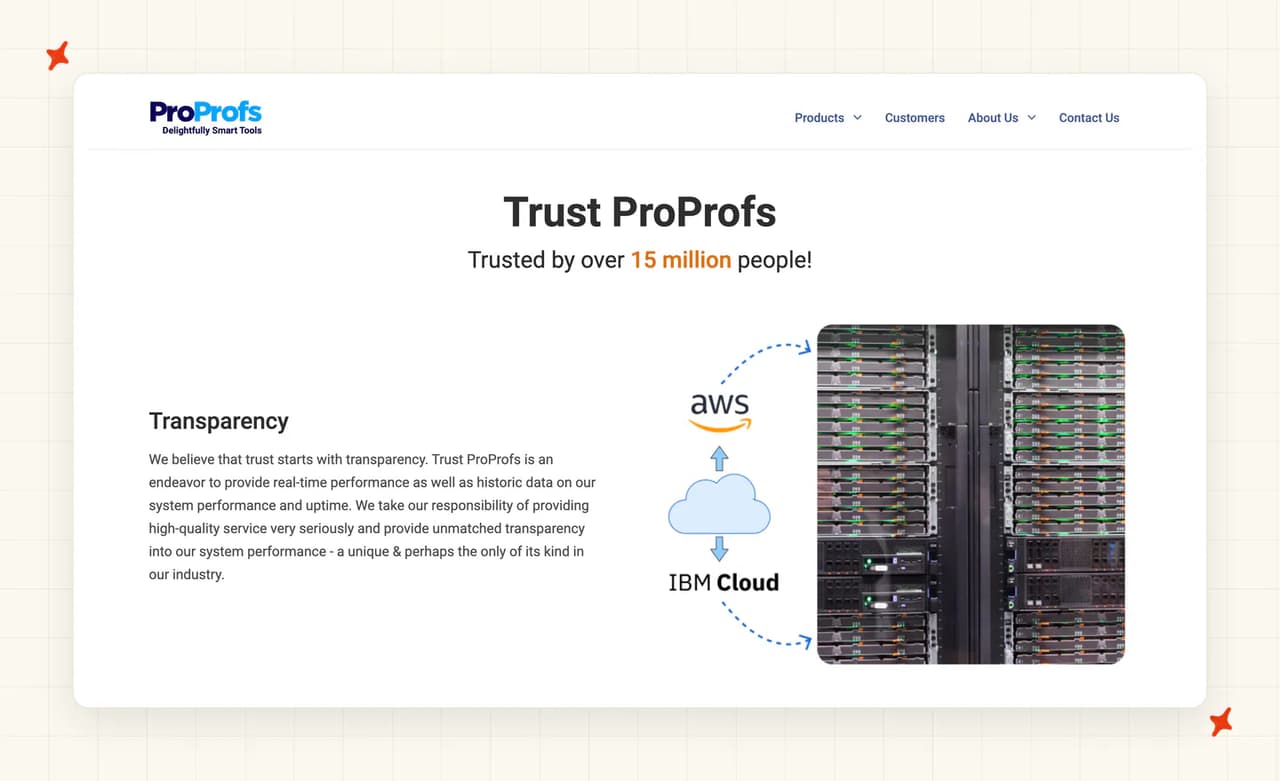
The Trust page puts the SOC 2 claim like this, verbatim: "Servers are hosted with AWS and IBM. They both have SOC2 Type 2 reports and provide all the physical security protection measures".
That's a statement about Amazon and IBM. Your cloud provider's SOC 2 isn't your vendor's SOC 2, and in my experience the two do very different jobs in a security review. The Elite tier separately advertises "AES-256 encryption at rest and TLS in transit, SOC2-aligned operational controls, and regular penetration testing", where "aligned" is carrying a lot of weight.
The list ProProfs does publish is long, and I'd hand most of it straight to a security reviewer. Data centers in Dallas and Northern Virginia, hosting on AWS and IBM, Cloudflare at the edge with WAF and DDoS mitigation, TLS in transit, periodic scans for SQL injection and cross-site scripting, third-party audits covering the OWASP Top 10, daily local and remote backups on all plans, biometric access and CCTV at the facilities, SSO and SAML with Active Directory, Okta and Azure AD at Elite, IP restrictions, two-factor authentication, and a standard GDPR data processing agreement on every paid plan. Data portability is covered too, with CSV, Excel and API export.
The list a regulated buyer will ask for is not published in their public materials: a SOC 2 report for ProProfs itself, ISO 27001, HIPAA or a BAA, PCI DSS, a public trust portal with live control status, EU or other non-US data residency, penetration-test dates or attestation letters, and a public subprocessor list (that one is available on request). The controls may all be in place. You just can't verify them from the website.
Retention is set out at clause 29 of the terms (read it if you're the one signing). Paid accounts keep private content for 30 days after a subscription expires. Free accounts are treated differently: on deletion or twelve months of inactivity ProProfs "may, at its sole discretion" either delete the content or retain it "in anonymized, aggregated, or identifiable form for service improvement, analytics, AI model training, product development, and other business purposes."
That connects back to the clause 27a license covering free and trial accounts. If your security reviewer is going to look at anything here, it should be that clause alongside the trial you're about to run on real customer data.
Who is using ProProfs Help Desk?
Acer America Corporation is the real one, and a good reference at that. Acer needed cost reporting across repairs, replacements and spares on a wide product line, and in the customer's own words: "We have about 2,600 operators using ProProfs Help Desk, and we are happy with the ability to set up custom fields and support multiple languages, including Chinese, which is especially helpful since we are based in Taiwan." Their headline line is "ProProfs has a great solution with excellent service."
The ticketing engine scales a long way past the SMB budget it's sold at.
Adobe appears in the case study index too, but that story is about ProProfs Knowledge Base powering the Adobe Primetime help center alongside Adobe's own Zendesk account, and the study says so: "We also liked how seamlessly ProProfs integrates with Zendesk." Adobe kept Zendesk, so that isn't a Help Desk win.
The same applies to MilitaryCruiseDeals, HorseSaddleShop, Lazy Cloud, Touro College, the Nebraska Department of Health and Human Services and OpenCart, which are Live Chat or general-suite stories. Cisco, Dell, Sony, Yale, Duracell, Nissan, Zoho and Thermo Fisher appear as logos, with Duracell and Nissan each carrying a single suite-level line and no product named.
A suite vendor's logo wall is not product proof. Acer is your reference, and the rest is evidence that ProProfs the company is well established, which it is.
How much does ProProfs Help Desk cost?
Retired ProProfs seat prices are still in circulation, on third-party listings and underneath the ones the pricing page displays. Everything below is the live price on ProProfs' own pricing page and checkout today.
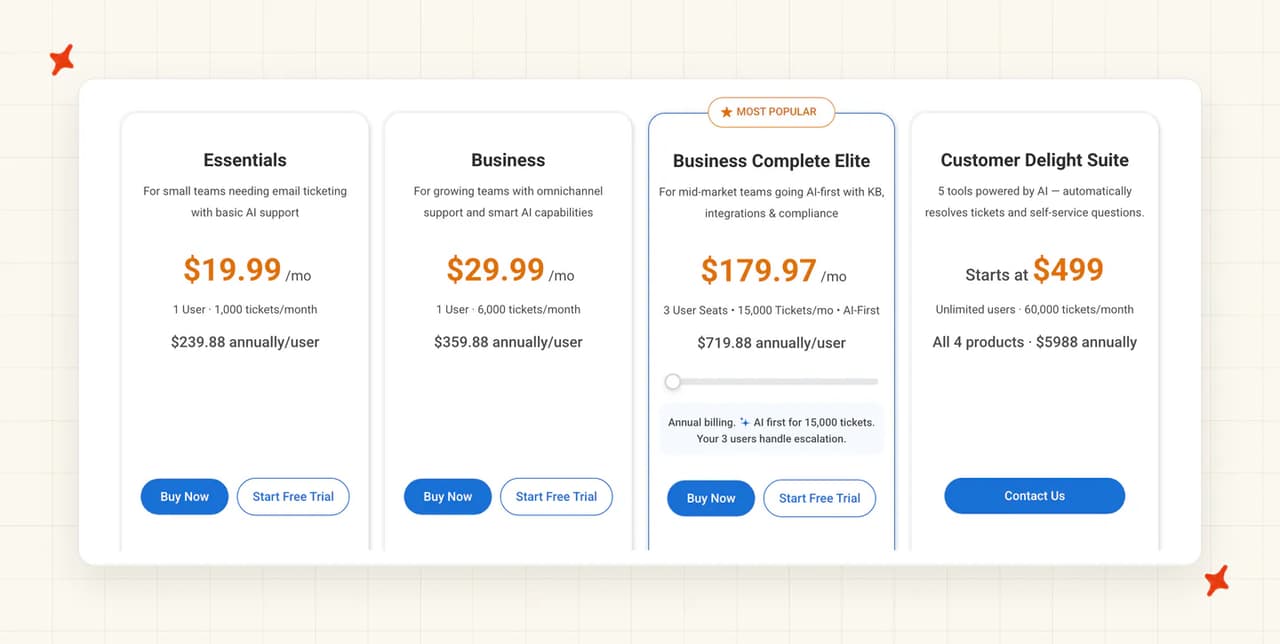
The seat meter
| Plan | Monthly billing | Annual billing, per user/month | Annual per user | Tickets/month | Users |
|---|---|---|---|---|---|
| Single User (Free) | $0 | $0 | $0 | 100 | 1 agent, forever |
| Essentials | $39.99 | $19.99 | $239.88 | 1,000 | from 1 |
| Business | $49.99 | $29.99 | $359.88 | 6,000 | from 1 |
| Business Complete Elite | annual only | $59.99 per seat, 3-seat minimum | $719.88 | 15,000 | 3 to 15 seats |
| Customer Delight Suite | from $499 | from $499 | $5,988 | 60,000 | unlimited |
The annual discount is a real 50% on Essentials and Business, and the checkout prints both sides of it: "Annually Save 50%, $19.99 per user/month" against "Monthly, $39.99 per user/month". Elite and the Suite cost the same either way, and Elite is annual billing only.
I'd check Elite's 3-seat floor before you budget for it. The tier reads as $59.99, but the smallest purchase is three seats at $179.97 a month. That's the real entry price for the AI-first tier.
Its own positioning line says as much: "AI first for 15,000 tickets. Your 3 users handle escalation."
Elite then scales on ticket volume. The slider runs from 15,000 to 75,000 tickets a month and adds a seat per 5,000 tickets, so 15,000 tickets is 3 seats at $179.97 and 75,000 tickets is 15 seats at $899.85. Add-ons are light: the White Label Package is $300 a year to remove "Powered By" links.
I'd want the billing mechanics in front of me before signing: a 15-day money-back guarantee on everything, cards only with no PayPal, checks accepted over $3,000 with a $100 processing fee, cancellation by email, and a chargeback fee of $25. Failed payments retry three times over ten days, then suspend, then downgrade or delete after ten more.
The ticket meter
Each seat price carries a ticket allowance: 100 free, 1,000 on Essentials, 6,000 on Business, 15,000 on Elite and 60,000 on the Customer Delight Suite. Add users and the allowance doesn't move (a second agent buys you more capacity to answer, but not more tickets you're allowed to receive). Per-agent helpdesks usually price the seats and leave your ticket volume alone.
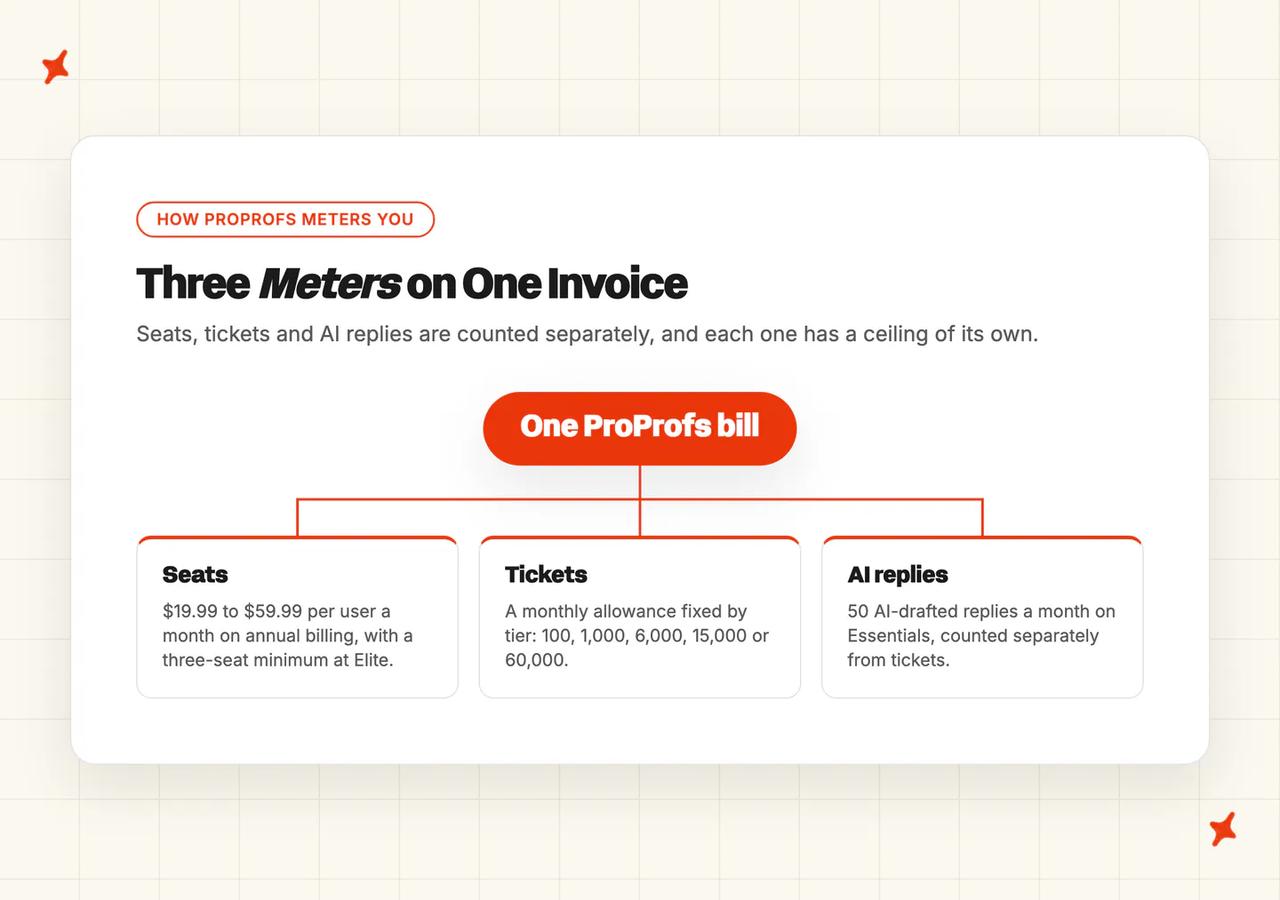
ProProfs doesn't publish what crossing that allowance costs, or whether tickets queue, stop or carry a fee. Anyone telling you it forces an upgrade is guessing, because ProProfs hasn't said. If your volume is anywhere near a cap, I'd get that answer in writing from their sales team before committing to a year.
What ProProfs costs at 1,000, 10,000 and 50,000 tickets a month
| Monthly tickets | Cheapest plan that covers it | Cost on annual billing | What that means |
|---|---|---|---|
| 1,000 | Essentials, 1,000 cap | $19.99/user/mo, $239.88/user/yr | Sitting exactly on the line; one busy month puts you over it |
| 10,000 | Business Complete Elite, 15,000 cap | $179.97/mo for 3 seats, $2,159.64/yr | Business's 6,000 cap does not reach; the 3-seat Elite floor covers 15,000 tickets, and each agent beyond adds $59.99, annual only |
| 50,000 | Elite slider at 10 seats, or the Suite | about $599.90/mo, or from $499/mo | The Suite is cheaper than the Elite slider here and unlocks the chatbot and KB deflection |
Show your finance lead the 50,000 row, because the ladder flips over there. Work the published slider (one seat per 5,000 tickets at $59.99) and 50,000 tickets is 10 seats at $599.90 a month, while the Customer Delight Suite covers 60,000 tickets from $499 with unlimited users. Past roughly 50,000 tickets you pay less for more product, which is a strange thing to find on a price card.
The pricing criticism on record comes from a G2 reviewer, and the second half of it is as even as the first:
"When starting up, it takes a while to understand their pricing model. Once you add all the modules, it can get costy. When compared to competitors though, not that much." via a G2 reviewer (Chief Marketing Officer).
That last clause is why this product keeps making shortlists.
Does ProProfs Help Desk have a free trial?
The free plan is real and permanent: one agent, 100 email tickets a month, at $0 forever. It also excludes the mobile app, advanced reports, ticket ratings, custom fields, overdue time, API and SSO, advanced search and integrations, so read it as a solo founder's inbox. It doesn't preview the paid product.
Every paid tier carries a "Start Free Trial" button next to "Buy Now", and the pricing FAQ confirms the no-card part: "No, you do not need to provide us with your credit card details when you sign up for the trial account."
How long the trial runs is harder to pin down. ProProfs doesn't state it on the pricing page, the signup flow, the help center or the terms. The only statement of trial length anywhere on the site sits inside a commented-out block in the pricing page's own markup, reading "You can try the Essentials and Premium plans for a 15-day free trial period with full-feature support", alongside a second hidden entry about switching between "the Free, Essentials, and Premium plans".
Both hidden entries name a "Premium" plan that no longer exists, so they're leftovers from an older price card. The accurate answer is that ProProfs doesn't publish a trial length, and 15 days is a guess pulled from retired copy.
The 15-day money-back guarantee is a separate thing, and that one is documented properly: "Our 15-days money-back guarantee means in case you cancel your subscription within 15 days of signing up, you will not be charged anything as well as you'll get your money back." If you're going straight to a paid plan, that's the real safety net here.
One caveat before you load a trial account with real tickets. Trial and free accounts fall under that clause 27a license, which is perpetual, irrevocable, survives account deletion, and explicitly includes AI model training. If your tickets contain customer data, have that conversation with whoever owns privacy at your company first.
Is ProProfs Help Desk worth it?
I'm not going to argue with a bundled suite on price. At $19.99 a user billed yearly this is a lot of software. Which of the two verdicts applies to you is mostly about your ticket volume.
The meter is what to check on this one, before the unit price. A per-resolution AI charges you more as it gets better, which is its own problem. ProProfs bills per seat with a ticket allowance, and nothing is published about what sits on the other side of that hard line.
If you're earlier in the evaluation and want a neutral way to score this against the rest of the market, our vendor selection checklist covers the questions worth asking, and AI customer service pricing models covers what capped, per-seat, per-conversation and per-resolution billing each do to a growing bill.
What are the pros and cons of ProProfs Help Desk?
Pros
- A cheap entry point with a real forever-free tier: $19.99 per user a month billed yearly on Essentials, and $0 forever for a single agent at 100 tickets a month, with deeper ticketing than the price suggests.
- A broad AI surface for the money: eight named AI capabilities spanning resolution, summarization, response suggestions, tone adjustment, refinement, prioritization and insights, starting from the entry paid tier.
- Suite bundling that removes vendors from your stack: Help Desk sits alongside Live Chat, Knowledge Base and Survey Maker, and the pricing FAQ confirms "Your Help Desk subscription also includes Knowledge Base."
Cons
- Every plan caps monthly tickets, and the consequence is unpublished: 100, 1,000, 6,000, 15,000 and 60,000 a month, with no overage rate, grace allowance or block statement anywhere on the pricing page, in the help center's billing category, or in the terms.
- Growth arrives as a plan jump: 10,000 tickets a month skips Business entirely and lands on Elite, whose 3-seat floor is $179.97 a month, annual billing only, before any agents beyond the third.
- AI Lite is closer to a demo than a working tool: 50 AI-drafted replies a month on Essentials, framed by ProProfs itself as a "taste of AI before upgrading."
- The marketing promises more than the docs describe: "Agentic AI reads, decides, and closes" on the product page, against a help center whose only AI article documents five categories of suggested reply with a human on the send button.
- Thin published integration and security evidence: about eleven third-party integrations against a "40+" claim across two lists that contradict each other, and a Trust page whose SOC 2 belongs to AWS and IBM, its hosting providers.
FAQs
What kind of support does ProProfs offer?
Phone, live chat, email and a big help center. The phone line is answered by product staff Monday to Friday, 8am to 6pm EST, live chat promises a live agent in under two minutes and runs 24/7, email replies come within one business day, and there's a deep help center behind all of it. Dedicated onboarding and an account manager start at Business Complete Elite.
What is the best help desk software?
There's no single answer. The right helpdesk depends on your ticket volume, your channel mix, the integrations you need and the compliance bar you have to clear, and those four things eliminate most of the market before you ever look at a feature list. Our vendor selection checklist walks through the questions in order.
Is AI replacing the IT help desk?
It isn't replacing the help desk, though it now handles a large share of the first-line queue. Across our benchmark corpus of 195 rated deployments spanning 38 vendors, the median AI-handling rate is 70%, though every vendor defines that metric differently. On ProProfs specifically, what the documentation describes is an AI that drafts a reply for a human to send.
How do I add AI to my customer support without replacing my helpdesk?
Use an AI agent that installs into the helpdesk you already run. My AskAI works inside Zendesk, Intercom, Freshdesk, Gorgias and HubSpot, so your agents, macros, tags, routing rules and reporting all stay where they are, and the AI answers in the same inbox. Setup takes about 10 minutes, and you can run it in internal-note mode first so it drafts alongside your team without a customer seeing anything.
How much does AI customer support software cost?
It depends entirely on how the vendor bills you. ProProfs bundles AI into a seat price from $19.99 a user a month with a ticket allowance attached, per-resolution vendors charge $0.49 to $0.99 every time their AI closes something, and per-ticket vendors like us charge per ticket whether the AI succeeds or not (roughly $0.10 a ticket on helpdesk chat).
| Metering model | What you're billed for | Published rate |
|---|---|---|
| Seat plus ticket allowance | Each agent, inside a monthly ticket cap | ProProfs, from $19.99 a user billed yearly |
| Per resolution | Each ticket the AI closes | $0.49 to $0.99 |
| Per ticket | Each ticket the AI handles, resolved or not | Around $0.10 on helpdesk chat |
AI customer service pricing models breaks down what each one does to your bill as you grow.
What's the difference between AI chatbots and AI agents for customer support?
A chatbot follows a script you built and answers what it was told to answer. An AI agent reads the ticket, finds the answer in your knowledge, writes a reply in your voice and hands over when it can't help.
The third level up is agentic actions, where the AI calls your systems to issue the refund or change the order itself. ProProfs' tiers map onto this neatly: drafting at the bottom, autonomous resolution and agentic actions in the $499 suite.
What resolution rate should I expect from AI customer support?
Our benchmark corpus puts the median at 70% across 195 rated deployments and 38 vendors, with a P25 of 56% and a P75 of 80%. It's an aggregate with no per-vendor score inside it, vendors define the metric differently, and published numbers are self-selected wins so the real average is likely lower. Full data on the benchmarks page.
Can I set up AI customer support without any coding?
Yes, for the standard setup with any of the main vendors. On ProProfs, inbox setup is self-serve, though the email authentication records need someone with DNS access. On our side, connecting My AskAI to Zendesk, Intercom, Freshdesk, Gorgias or HubSpot and pointing it at your existing knowledge takes about 10 minutes with no developer; you only need engineering when you want the AI calling your own APIs.
What are the best AI support tools for a team of 5 to 20 agents?
At that size, ticket volume is the constraint that shows up first, so I'd start there. A team doing 10,000 tickets a month is already past ProProfs' Business allowance and onto Elite, which starts at $179.97 a month for three seats and adds $59.99 for each agent beyond that, so a ten-agent team pays for ten seats. On a per-agent helpdesk the seat count barely moves the bill, so price the tickets first, then add the seats your team actually needs.
Which AI customer service agents learn from past tickets?
Most vendors market it and fewer document it. ProProfs advertises pointing the AI at "your help center, past tickets, and FAQs" but publishes no article on how to connect or scope any of it. My AskAI trains on your last 5,000 historic tickets by default (more on request), drafting knowledge articles from them for your review, and Self-Learning keeps doing it afterwards by comparing the AI's draft with what your agent actually sent.
What happens when I hit my ProProfs Help Desk ticket limit?
ProProfs doesn't publish an answer. There's no overage rate, grace allowance, hard-block statement or forced-upgrade statement on the pricing page, in the help center's Account and Billing category, or in the terms of service.
The only adjacent clause is the discretionary Fair Use policy at clause 16 of the terms. If you're buying near a cap, I'd get the answer from their sales team in writing.
Does ProProfs Help Desk integrate with Zendesk or Intercom?
No. ProProfs Help Desk is a helpdesk you migrate onto rather than something that sits on top of one, so there's no Zendesk or Intercom connector. Its published third-party integrations are Salesforce, HubSpot, Asana, ClickUp, Jira, Shopify, BigCommerce, Facebook, Twilio, Slack and MS Dynamics, about eleven in total across two published lists that don't match each other.
Is ProProfs Help Desk SOC 2 compliant?
Not that it publishes. The SOC 2 Type 2 sentence on the ProProfs Trust page describes AWS and IBM, its hosting providers, and the Elite tier claims operational controls it calls "SOC2-aligned", which is a different claim from certified. ProProfs publishes no SOC 2 report of its own, and no ISO 27001, HIPAA or PCI DSS certification appears in its public materials.
Does ProProfs Help Desk have a free plan?
Yes. The Single User plan is free forever for one agent at 100 email tickets a month (yes, even the ticketing core). It's headed "all premium features!" but excludes the mobile app, advanced reports, ticket ratings, custom fields and filters, overdue time, API and SSO, advanced search and integrations.