HappyFox: Complete Guide to Features, Pricing & Limitations (2026)
HappyFox sells five separately priced AI products. HappyFox AI starts at $14 an agent and Autopilot at 2¢ an action. Cost math vs our $0.10 a ticket on Scale.
Summarize with AI
HappyFox AI customer service is a set of add-on products from HappyFox, the help desk company that says it serves over 12,000 companies in 70+ countries. I think it suits support, IT and HR teams that want their ticketing and their AI from one vendor, and that are happy to add the AI one product at a time. The AI works inside the HappyFox help desk, so a team on another helpdesk has to move before it can use most of it.
HappyFox tends to reach a shortlist by one of two routes. Either your team already works its tickets there and someone has spotted the AI tabs on the pricing page, or you're choosing a help desk and want the AI on the same contract.
HappyFox charges $14 an agent a month for its entry Copilot tier, as little as 2¢ for each successful Autopilot action and $0.33 for each conversation its Chatbot resolves, so the cost depends on which products your team switches on. By my sums, a 20-agent team handling 10,000 tickets a month pays about $2,060 a month for the help desk, the Copilot and Autopilot together, if Autopilot takes two actions per ticket at 2¢ each.
I'm Mike, co-founder of My AskAI. We build an AI agent that works inside the helpdesk you already run for 200+ ecommerce and SaaS businesses, so I'm not a neutral party here. What follows comes from HappyFox's pricing pages, product pages, help center and published customer stories.
HappyFox at a glance
| Fact | Detail |
|---|---|
| What it is | Help desk with separately priced AI products |
| Headline price | Help desk from $24/agent/mo annually; AI from $14/agent/mo |
| G2 rating | 4.5/5 from 137 reviews |
| Best for | Teams wanting help desk and AI together |
| Not a fit for | Teams keeping a different helpdesk |
| Biggest limitation | Most AI works only on HappyFox's help desk |
| Our verdict | 6/10 |
What is HappyFox?
HappyFox is a ticketing platform. Its menu splits into three lines: support products (the Help Desk plus its AI), sales and marketing tools, and IT service management with a Service Desk, Assist AI and Workflows.
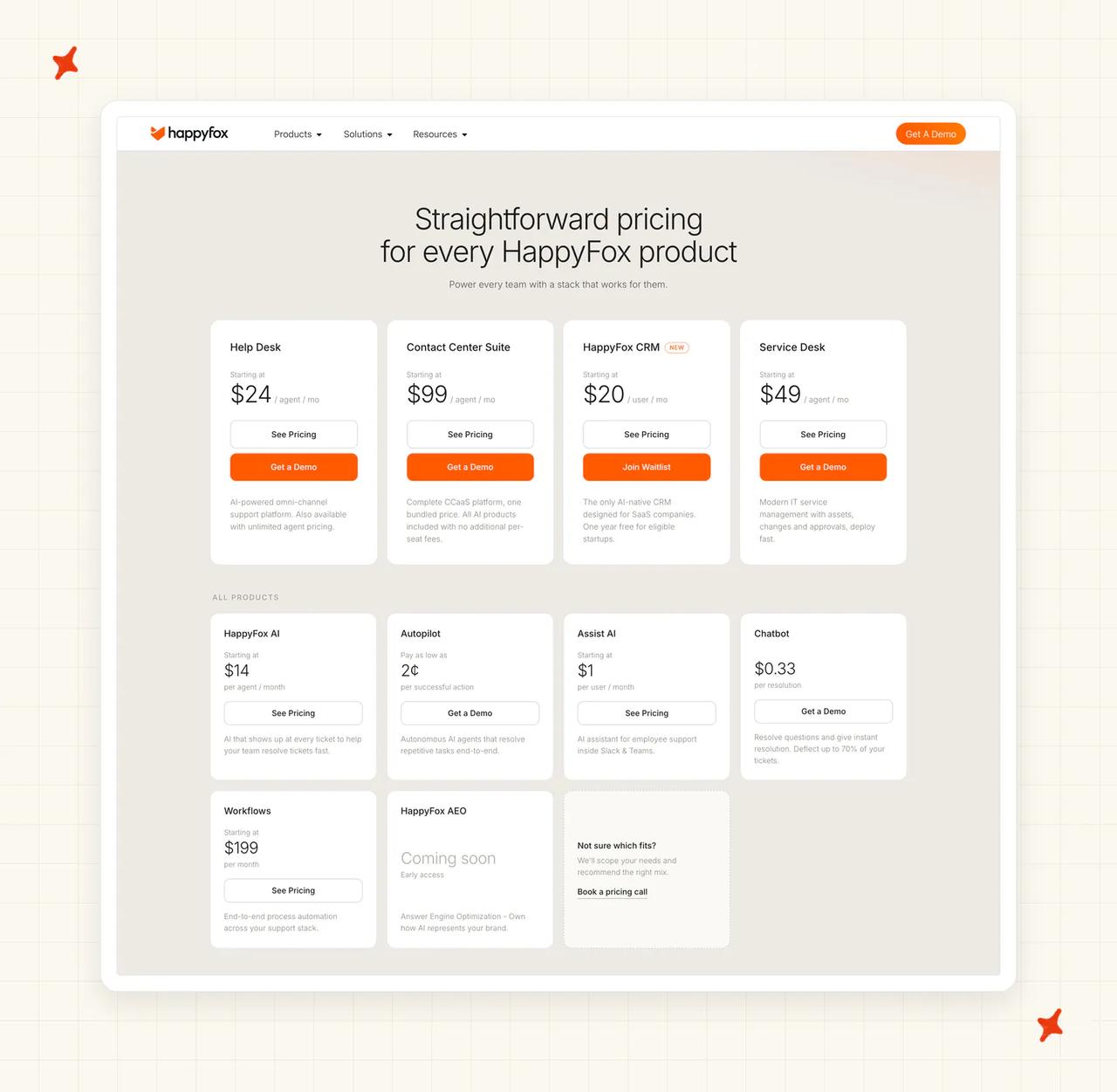
The AI is a separate set of products on top of the Help Desk, and in support-team terms I count five of them:
- HappyFox AI - the agent-facing suite, with ticket summaries, suggested replies, a writing assistant, urgency flags and AI-drafted help articles
- Autopilot - AI agents you hire from a marketplace to act on tickets behind the scenes, such as flagging duplicates or spotting churn risk
- Chatbot - a customer-facing bot for your website, in-app widget, WhatsApp, Slack and Microsoft Teams
- Assist AI - an assistant that answers employee IT and HR questions inside Slack and Microsoft Teams
- AI Contact Center - voice support with AI transcripts and summaries logged to tickets
HappyFox's pricing page puts the model this way: "These are separate products with their own pricing, so you only pay for what you use". They install into the Help Desk, and HappyFox's sales team will bundle a mix for you.
Behind all of it is HappyFox Inc., whose CEO is Shalin Jain, according to its about page.
One help desk specialist reviewing HappyFox on G2 writes that people need to check AI responses before they are sent, and I agree. The help desk's score there is solid:
G2: HappyFox Help Desk scores 4.5/5 from 137 reviews on G2.
How easy is it to set up HappyFox AI?
If you already run the HappyFox Help Desk, setup happens one product at a time. Autopilot is the quickest, and its product page promises you can go "From Zero to Autopilot in Less Than a Minute."
I like how short the path in HappyFox's guide to hiring an AI agent is. Anyone with the Manage Autopilot permission can follow it:
- Go to "Autopilot → AI Agent Marketplace" and browse or filter the agent cards.
- Click Hire on the agent you want, which opens its onboarding page.
- Choose Supervised Mode or Autopilot Mode, and pick the ticket categories the agent works on.
- Fill in any fields that agent needs, such as the target language for the Translation Agent.
- Check the preview, then click the Deploy Agent button.
You can hire several copies of the same agent (handy when different ticket categories need different settings). For a job no marketplace agent covers, the Autopilot page says: "Just ask us and our team will build it for you."
The other products take longer. HappyFox says most teams have the Chatbot fully deployed within one week, and it sells the HappyFox AI suite with what it calls consultative implementation, working with you to find where the AI helps most.
For a team not on HappyFox yet, setup starts with the move to HappyFox. The AI products work inside the HappyFox Help Desk, so a team on another helpdesk first moves its tickets, macros and workflows across. HappyFox lists migration assistance in its plan comparison. I would budget real time for that move before any AI goes live.
What channels does HappyFox work in?
The channels you get depend on which AI product you buy. The help desk itself lists omnichannel ticket creation on every per-agent plan, and each AI product then reaches a different set of places:
- Chatbot - website, in-app widget, WhatsApp, Slack and Microsoft Teams, with a one-click hand-off that creates a ticket
- HappyFox AI - AI Answers replies to customers in your support portal, and the Copilot works on tickets from every channel in the help desk
- Assist AI - Slack and Microsoft Teams, where the Assist AI page says it brings support "so employees never have to switch platforms"
- AI Contact Center - voice calls, logged to tickets with AI transcripts and summaries, plus SMS inside the ticket view
If you want AI that replies to customers, I think the Chatbot or AI Answers is the product to price. Autopilot's page says its "AI Agents work inside your help desk, performing actions behind the scenes rather than chatting with customers directly", so Autopilot does the ticket work behind them.
Not every help desk plan gets voice. HappyFox's usage pricing overview for the AI Contact Center lists it on the Team, Pro and Enterprise PRO plans, and leaves the Basic plan out.
What are the limitations of HappyFox AI?
Four things decide what you pay and what you can check: the AI lives inside HappyFox's help desk, each AI product has its own price, there is no published resolution rate, and answers depend on your knowledge base. The fourth comes with every AI support tool.
The AI works inside the HappyFox help desk
HappyFox AI "plugs right into your HappyFox help desk", Autopilot agents work inside it, and the AI Contact Center pricing page sells AI Contact Center, voice included, as an add-on for existing HappyFox Help Desk customers. If your tickets are in another helpdesk, using most of this AI means moving your help desk first.
Assist AI (HappyFox's employee IT and HR assistant) is the one exception. Its pricing page lists a link to an external ticketing system on its plans, so an IT team can run it from Slack or Teams against another ticketing tool.
Five AI products, five price lines
HappyFox AI is priced per agent, Autopilot per successful action, the Chatbot per resolution, Assist AI per user and the AI Contact Center per agent plus usage. Each line is published and, I think, fair.
To price the AI, list the products you will switch on and add up each line.
No published AI resolution rate
HappyFox publishes no AI resolution rate, so you learn yours by testing the AI on your own tickets.
Answer quality tracks the knowledge base
The AI answers from your help articles and ticket history, so gaps in that content become gaps in its answers. On G2, one reviewer of Assist AI notes that knowledge base query matching needs work, and one reviewer of the Chatbot describes a bot that picks up trigger words more than phrasing, so members end up with an agent. Two reviews are a small sample.
What knowledge sources can I train HappyFox AI on?
Each AI product answers from a slightly different pool of content. The Chatbot's Smart Knowledge Sync, on the Chatbot page, "Automatically pulls answers from your websites, PDFs, knowledge base articles, RSS feed, and help docs". HappyFox says it updates in real time when your content changes, and learns from your ticket history, knowledge base and real customer conversations.
The HappyFox AI suite adds AI Knowledge, which writes new content where the knowledge base has none. Its product page describes it this way: "Let AI analyze past tickets, identify content opportunities, and create initial drafts." Your team reviews each draft before it goes into the knowledge base. I think that review step is the right call.
Darwinbox, the HR software company, shows how that worked in practice. According to its HappyFox customer story, 30% of 100 AI-suggested articles were approved directly, against the 20% the team had expected.
Assist AI connects to the tools employees already keep answers in. Its plans list Okta, the HappyFox Help Desk, Confluence, SharePoint, GetGuru, Notion and Simpplr, so it can answer an IT or HR question from the page where that policy lives.
What features does HappyFox AI have?
HappyFox's AI fits the usual three layers of support AI, split across different products.
The customer-facing layer
The Chatbot handles conversations on its own and hands over when it should. Its features include contextual conversations, instant escalation to a person, custom guardrails, one-click ticket creation and CSAT collection, with reports on how many conversations it handles.
AI Answers does a similar job in your support portal. A customer types a question into the search box and gets a direct answer with its source, before they open a ticket.
The copilot layer
The HappyFox AI suite (priced per agent, from $14 a month) is for your agents. The AI Copilot gives ticket summaries and suggested replies, alongside a chat assistant and an AI Writing Assistant.
AI Resolve suggests a full resolution your agent can send, copy or discard. AI Urgency groups and prioritizes high-impact tickets as they arrive, so a site-down report does not wait behind password resets (my favorite of the lot, because a busy team feels it on day one). If the copilot idea is new to you, our explainer on what an AI copilot is covers the category.
The actions layer
Autopilot is the layer where HappyFox's AI changes tickets for you. Each agent waits for an event (a new ticket, a contact or agent update, or a ticket closing), checks its conditions, then acts by adding a private note, changing status or priority, adding tags or filling custom fields.
The Autopilot page lists agents such as the Duplicate Ticket Notifier, Custom Field Triage Agent, Missing Context Assistant and Churn Risk Detector. Ecommerce teams get agents like the Shopify Return Policy Checker and the BigCommerce Item Mismatch Checker Agent. That list is more specific than I expected from a help desk vendor.
Every agent runs in Supervised Mode, where a person approves each change, or in Autopilot Mode, where it acts on its own. I call that agentic AI at its simplest: software that takes actions, with or without a person signing off. Our guide to agentic workflows explains the idea in more depth.
Two more products extend the list. Assist AI answers employee IT and HR questions in Slack and Teams, and the AI Contact Center routes calls and removes card numbers and personal details from transcripts and summaries automatically.
How do I improve HappyFox AI responses?
I think the improvement loop is the best-designed part of HappyFox's AI, because it is built into Autopilot from the start. Its guide to agent modes says: "Newly hired AI Agents are set to Supervised Mode by default."
In Supervised Mode, agents suggest actions without applying them. The suggestions appear in an AI Agent Approvals box on the ticket, and anyone with reply permissions on that ticket can click Apply Updates or cancel. The same guide gives advice every team should follow: "Start new AI Agents in Supervised Mode to monitor their suggestions before switching to Autopilot."
Once agents are running, you review their work in two places. Every AI change has an AI Agent badge in the ticket timeline, and the activity page lists each action with its ticket, status and time, with reports on actions per agent.
On the customer side, the Chatbot's performance dashboards show deflection rates and conversation patterns, and point to topics your content does not cover yet. Custom guardrails let you keep the bot away from subjects it should not handle.
I like the logs and dashboards, but they only help if someone acts on them. Your products, policies and prices change, and the AI keeps answering from last quarter's articles until someone updates them.
What resolution rate can I expect from HappyFox AI?
HappyFox leaves out the number I want first from any AI vendor: the share of conversations its AI closes without a person.
HappyFox's headline AI figure comes from an AWS case study. After HappyFox moved its AI to Anthropic's Claude, it "boosted automated support ticket resolution by 40 percent and increased support agent productivity by 30 percent". That is a gain measured against HappyFox's previous AI.
The Chatbot page talks about deflection, which needs the same care. Deflection counts customers who did not open a ticket, while resolution counts customers whose problem the AI solved, so a customer who gives up counts toward the first figure only. Our explainer on containment, deflection and resolution sets out how each is counted.
Our AI resolution rate benchmark study puts the field median of published AI-handling rates at 70%. That figure describes the whole field, so it gives you no basis for comparing two vendors.
Vendors also count deflection, containment and resolution differently. Published figures are vendors' best cases too, so the average across the field is likely lower.
What AI model does HappyFox use?
I like that HappyFox is open about its model. The AWS case study says it chose Anthropic's Claude, and its CTO explains there that the choice meant HappyFox avoided sharing data with an outside AI vendor, because all data stays hosted within AWS.
The HappyFox AI page says "no customer data is ever used for training and nothing ever leaves our infrastructure", and Autopilot's FAQ makes the same promise for its agents: no ticket, message or customer data leaves your HappyFox account.
The technical name for the setup is Claude on Amazon Bedrock, meaning the model is hosted inside Amazon's cloud next to the rest of HappyFox's service. HappyFox's product pages describe that one setup (none of them mentions a choice of model).
What languages does HappyFox AI work in?
The Chatbot handles language on its own. Its page says: "Language detection is automatic. Users interact in their preferred language and the chatbot responds accordingly across all channels."
For tickets, Autopilot has a Translation Agent. You set a target language when you hire it, and it adds a private note with the translation so your agent can read the customer's message.
The help desk plans also list a multilingual agent portal and a multilingual knowledge base. The Chatbot, Assist AI and Autopilot pages give no list or count of languages, so my advice is to test your main languages during a trial.
How secure is HappyFox?
I rate security as one of HappyFox's strongest areas. The plan comparison lists SOC 2 Type II compliance on every plan, along with single sign-on, two-factor authentication, encryption at rest and in transit, and audit logs.
Healthcare teams get a dedicated HIPAA page describing HIPAA-compliant ticketing for patient inquiries, billing and internal IT. The Enterprise tier on the pricing page lists SOC 2, HIPAA and GDPR together, with SSO, custom data retention and dedicated support.
If your data needs to stay in Europe, an optional EU data center is available from the Team plan up ($69 an agent a month on monthly billing). HappyFox also has a GDPR page describing its updated terms and data-management tools.
The service is hosted on AWS, and the AI keeps customer data inside that setup. IP-based access restriction starts on the Pro plan.
Who is using HappyFox?
HappyFox's customer stories cover a wide spread of industries, and these three show the range.
Darwinbox, the HR software company, uses HappyFox for customer support and its AI-drafted articles. Its Head of Customer Excellence, Avinash Mugali, is quoted on the Darwinbox story:
"HappyFox's system uptime is superb. Despite adding many users and increasing complexity, it remains robust and scalable. We also experienced a 3X improvement in the first response time." Avinash Mugali, Head of Customer Excellence, Darwinbox.
Planned Parenthood uses HappyFox outside customer support. It replaced a six-year-old SharePoint workaround with HappyFox to run Facilities and Security requests across 17 health centers and 22 buildings.
At the small end, I like the story from web agency PDG+creative, which runs support for a large client base with a tiny team:
"Using HappyFox, we can now support our 200+ sites with a staff of three! Enough said." Matt Pendergraff, Creative Director/Principal, PDG+creative.
How much does HappyFox cost?
HappyFox prices the help desk per agent and each AI product on its own terms. I like that every price line is public, which saves you a sales call just to learn the basics.
HappyFox help desk plans
The help desk pricing page shows four agent-based plans (three priced per agent, plus a custom Enterprise PRO). The cards show annual prices by default, so here are the monthly-billing prices:
| Plan | Per agent per month, monthly billing | Notes |
|---|---|---|
| Basic | $29 | Capped at 5 agents |
| Team | $69 | No agent limit; EU data center option |
| Pro | $119 | No agent limit; IP-based access restriction |
| Enterprise PRO | Custom | Talk to sales |
On annual billing the same plans cost $24, $49 and $99 per agent a month, and the pricing FAQ says annual billing saves 20%. Larger teams can take an unlimited-agent plan instead, starting with Growth at $1,999 a month billed annually for 20,000 tickets a year. The pricing FAQ says these plans are "usually more economical and predictable" above about 20 to 25 agents.
HappyFox AI and Autopilot pricing
The HappyFox AI page sells HappyFox AI in three tiers, priced per agent per month:
| Tier | Per agent per month | What it includes |
|---|---|---|
| Standard | $14 | Agent Copilot, 500 interactions per agent |
| Premium | $29 | Copilot 2,000; AI Knowledge 500 tickets; AI Resolve 2,500 |
| Enterprise | $39 | Copilot 10,000; AI Knowledge 2,000 tickets; AI Resolve 10,000 |
Autopilot has the price line I like most, because you pay for the work its agents complete. The Autopilot page says: "Pay as low as 2¢ per successful action. Not per seat. Not per month." Your first $50 of credits is free, which HappyFox says covers up to 2,500 actions.
The Chatbot costs $0.33 per resolution, according to the pricing page. Our guide to per-resolution pricing explains how that model bills. Assist AI is priced per employee on its pricing page: $1 a user a month on Pro, $2 on Enterprise and $4 on Enterprise Plus.
The AI Contact Center has two routes (a full suite or an add-on) on its pricing page. The full suite starts at $99 an agent a month billed annually and bundles the help desk, voice, Autopilot, Chatbot, web messaging and AI Copilot, with voice minutes and AI usage charged separately. Existing help desk customers can instead add AI Contact Center, voice included, from $29 an agent a month plus per-minute voice usage.
One independent hands-on test gives this verdict on price:
"A powerful and easy to use system that isn’t as competitively priced as it once was" From an independent hands-on test of the help desk.
What do 10,000 tickets a month cost on HappyFox?
I've priced a team of 20 agents handling 10,000 tickets a month, billed monthly. The Team plan is the cheapest that covers 20 agents, because Basic stops at five. I've assumed two successful Autopilot actions per ticket, such as a triage note and a tag, at the lowest 2¢ rate.

| Option | How it is priced | Monthly cost |
|---|---|---|
| No AI (baseline) | Team plan, your 20 agents answer every ticket: 20 × $69 | $1,380 |
| + HappyFox AI Standard | Copilot for every agent, 500 interactions each: 20 × $14 = $280 | $1,660 |
| + Autopilot | 10,000 tickets × 2 actions × $0.02 = $400 | $2,060 |
The first row is the help desk you would pay for anyway. Adding the Copilot and Autopilot takes the bill to $2,060 a month, about $0.21 per ticket. In all three rows, your team answers every customer.
Customer-facing AI is an extra line on top: each conversation the Chatbot resolves adds $0.33. The unlimited-agent Growth plan does not fit this example, because 10,000 tickets a month is 120,000 a year, well past its 20,000-ticket allowance.
Does HappyFox have a free trial?
The pricing FAQ says every plan "starts with a 14-day free trial, no credit card required". You can upgrade at any time, and a downgrade takes effect at the end of your billing cycle.
Autopilot's first $50 of credits is free, up to 2,500 actions, which is enough to run a few agents in Supervised Mode on real tickets. The trial FAQ covers the help desk plans, so ask sales which of the other AI products you can switch on while you test.
In my view fourteen days is short for an AI test, so plan it before you sign up. Export last month's tickets, let an AI tool group them by topic in a few minutes, and pick 20 or 30 real questions to run through the AI in your first week.
Is HappyFox worth it?
For the team already on HappyFox, I think the AI is good value. A Copilot from $14 an agent and action-taking agents at 2¢ an action with an approval step make it cheap to try the pieces you need. IT admins in one r/sysadmin thread describe the help desk underneath as easy to use and good value.
My advice to a team settled on HappyFox, whose AI covers its questions, is to stay put. Its add-on AI is priced fairly for that team. I don't think moving helpdesks to chase a few extra points of automation pays back.
If you are still choosing a help desk, Zoho Desk, Freshdesk and Zendesk are the closest peers with built-in AI, and we have written a full guide to each. For a wider view, our roundup of the best AI help desk software compares the options side by side.
What are the Pros and Cons of HappyFox?
In my scoring, HappyFox is strongest on its product range and public prices, and weakest on fit and evidence.
Pros
- A broad AI lineup on one platform - HappyFox covers agent assist, action-taking agents, a customer chatbot, employee support in Slack and Teams, and voice, all on its own help desk.
- Autopilot priced by completed work, supervised by default - agents cost 2¢ per successful action, start in Supervised Mode and need a person to apply each change until you switch them over.
- Public prices and a no-card trial - every AI product has a published price, and every help desk plan starts with a 14-day trial with no credit card.
Cons
- Most AI works only on HappyFox's help desk - HappyFox AI, Autopilot, the Chatbot and the AI Contact Center add-on all run inside the HappyFox Help Desk, with Assist AI the exception.
- Five price lines to add up - each AI product is billed on its own basis, so a 20-agent team handling 10,000 tickets a month with the Copilot and Autopilot reaches about $2,060 a month before any Chatbot usage.
- No published AI resolution rate - HappyFox's headline figure is a 40 percent gain against its previous AI after a model change.
- Answers depend on your knowledge base - G2 reviewers of HappyFox's AI products describe query matching and trigger-word handling that need work.
Our rating of HappyFox
My 6/10 comes from four scores:
- Product, 7/10 - five AI products, an agent marketplace and a supervised mode, all documented in HappyFox's help center
- Price and trial, 7/10 - every AI price is public and the help desk has a 14-day no-card trial, though the total takes assembling
- Setup and fit, 6/10 - quick to switch on inside HappyFox, but most of the AI needs a move to HappyFox's help desk first
- Evidence, 5/10 - named customers with real figures, but no AI resolution rate
Scored on the sections above, from HappyFox's own pages; gaps are stated as gaps. Not higher because the limitations section found that most of the AI works only inside HappyFox's help desk. Not lower because the features section showed Autopilot agents that start supervised, with a person approving each change.
FAQs
What is HappyFox AI and what can it do?
HappyFox AI is the agent-facing AI suite inside the HappyFox Help Desk. It gives agents ticket summaries, suggested replies, a writing assistant, AI Resolve suggestions, AI Urgency flags and AI Knowledge article drafts. HappyFox also sells four more AI products, each priced separately on its pricing page: Autopilot, the Chatbot, Assist AI and the AI Contact Center. HappyFox bundles most of them in the AI Contact Center Suite.
What AI model does HappyFox use?
HappyFox's AI uses Anthropic's Claude, hosted inside Amazon's cloud (next to the rest of HappyFox's service), according to an AWS case study. HappyFox says customer data is never used for training and never leaves its systems.
Is HappyFox AI only available to HappyFox help desk customers?
Mostly, yes. The HappyFox AI suite, Autopilot, the Chatbot and the AI Contact Center add-on all work inside the HappyFox Help Desk. Assist AI (the employee IT and HR assistant) is the exception, because its pricing page lists a link to an external ticketing system on its plans.
Is HappyFox SOC 2 compliant?
Yes. HappyFox lists SOC 2 Type II compliance on every help desk plan in its plan comparison. The Enterprise tier also lists HIPAA and GDPR. An optional EU data center is available from the Team plan up ($69 an agent a month on monthly billing).
What is HappyFox used for?
HappyFox is used to run support tickets for customer service, IT, HR and other internal teams. Its products cover a help desk, an IT service desk, workflow automation and a set of AI products on top, and the HappyFox homepage links to each one.
Who owns HappyFox?
HappyFox is run by HappyFox Inc., and its about page names Shalin Jain as CEO. The same page says the company serves over 12,000 companies in 70+ countries.
How much does the HappyFox help desk cost?
On monthly billing, the help desk costs $29 per agent a month on Basic (capped at 5 agents), $69 on Team and $119 on Pro, with Enterprise PRO priced by sales. Annual billing brings those down to $24, $49 and $99. The AI products are priced separately, as the full help desk pricing page shows.
Which companies use HappyFox?
HappyFox's published customers include Darwinbox, Planned Parenthood and PDG+creative. Darwinbox reports a 3X improvement in first response time (quoted by its Head of Customer Excellence), and PDG+creative supports more than 200 sites with a staff of three. The rest are on HappyFox's customer stories page.
What is HappyFox Assist AI?
Assist AI is HappyFox's assistant for employee IT and HR questions, working inside Slack and Microsoft Teams. It connects to tools such as Confluence, SharePoint, Notion and Okta, and it can link to an external ticketing system. It costs $1 to $4 per user a month (by plan), according to the Assist AI pricing page.
What is HappyFox Autopilot?
Autopilot is HappyFox's marketplace of AI agents that act on tickets behind the scenes, such as flagging duplicates, detecting churn risk or translating messages. New agents start in Supervised Mode, where a person approves each change. It costs from 2¢ per successful action (your first $50 of credits is free), according to the Autopilot page.
Does HappyFox have a chatbot?
Yes. The HappyFox Chatbot answers customers on your website, in-app widget, WhatsApp, Slack and Microsoft Teams, learning from your knowledge base and ticket history. It costs $0.33 per resolution, and HappyFox says most teams are fully deployed within a week, according to the Chatbot page.
Does HappyFox have a free trial?
Yes. Every help desk plan starts with a 14-day free trial, and you do not need a credit card. Autopilot also has a free allowance (your first $50 of action credits), as the pricing page FAQ and Autopilot page describe.
What are the best HappyFox alternatives?
If you want a help desk with built-in AI, Zoho Desk, Freshdesk and Zendesk are the closest peers, and each sells AI as part of its help desk. If you want to keep your current helpdesk and add AI to it, an AI agent that installs into Zendesk, Intercom, Freshdesk, Freshchat, Gorgias or HubSpot, such as ours, avoids a help desk move.
How do I add AI to my customer support without replacing my helpdesk?
Choose an AI agent that installs as an app inside the helpdesk you already run. We install My AskAI from the marketplace of Zendesk, Intercom, Freshdesk, Freshchat, Gorgias or HubSpot in about 10 to 15 minutes, and it starts in internal notes mode so your team checks its drafts, while your tags, routing and reporting stay where they are.