How to Reduce Support Tickets: Audit the Repeats First
Most teams reduce support tickets by writing more help articles. That fixes one of the four causes of a repetitive ticket. Sort your repeats before you write.
Summarize with AI
Ask how to reduce support tickets and you get the same answer everywhere: write more self-service content, then put a bot on top of it.
Fluid Topics puts it as cleanly as anyone: self-service portals, AI search, chatbots and content analytics. Ask an AI assistant and you get the same list back.
That advice works on one kind of repeat ticket. In our experience three other kinds carry on arriving no matter how much you publish. So teams write twenty articles, watch volume barely move, and conclude that AI doesn't work on their tickets.
Start with a diagnosis instead. Sort your repeats by why they repeat, then kill them in the order that returns the most agent hours.
I'm Mike, co-founder of My AskAI. We help 200+ ecommerce and SaaS businesses run AI customer service inside Zendesk, Intercom, Freshdesk, Freshchat, Gorgias and HubSpot, and our agents have now resolved over 1,000,000 tickets.
I've sat on rollout calls where the Monday trawl through hundreds of repetitive, not-always-polite tickets was the thing the team wanted gone most. At Swytch that band is now over 4,050 tickets a month the team never sees.
Why doesn't writing more help articles reduce your ticket volume?
The self-service case is a strong one, so take it at its strongest. Userpilot argues that most tickets come from product failures rather than support problems, which is a sharper claim than the usual one. There is even a version of this aimed at internal IT, where the answer is to upskill the people raising the tickets.
Each of those positions treats a repeat ticket as one thing (which is where we part company).
A Gartner survey of 5,728 respondents found that 73% of customers use self-service at some point in their journey. Far fewer finish the job there.
"Only 14% of customer service and support issues are fully resolved in self-service, according to a survey by Gartner, Inc. Even for issues that customers describe as "very simple", only 36% resolve fully in self-service." — Gartner
We get more use out of the breakdown underneath that 14%, because it splits the failure into two different problems.
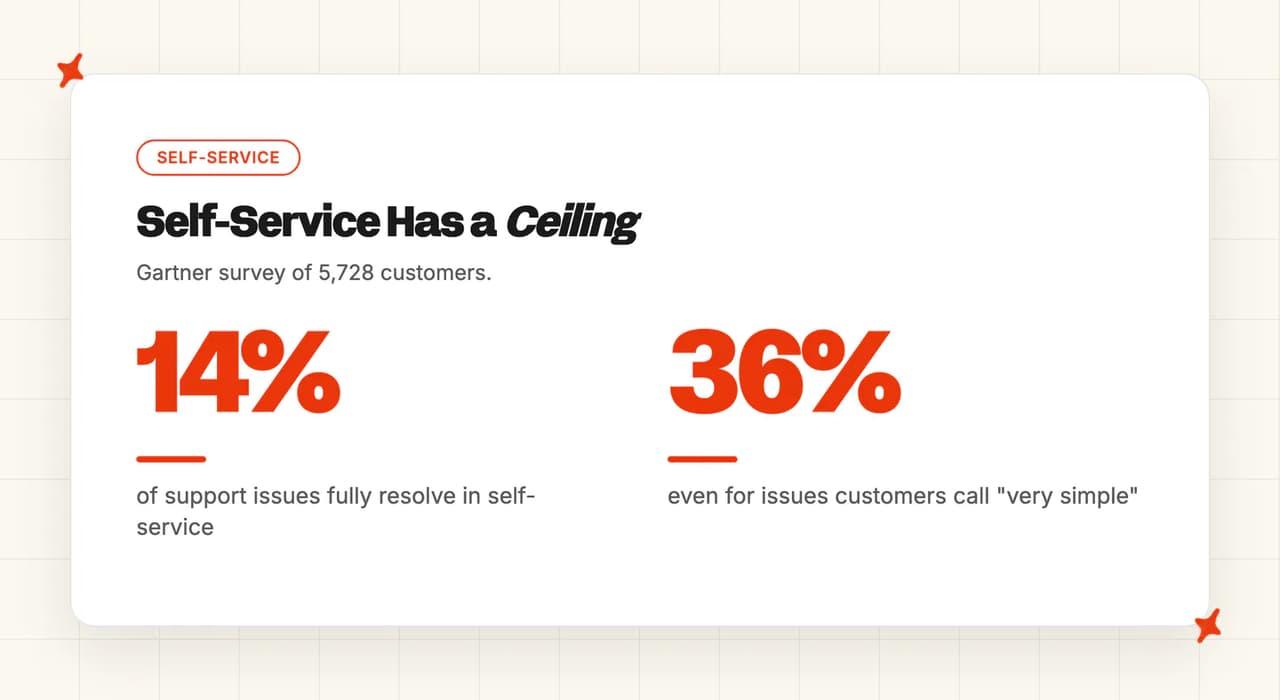
"the most common reason for self-service failure was that in 43% of cases, customers couldn't find content relevant to their issue" — Gartner
In the same research, 45% of customers who started in self-service said the company didn't understand what they were trying to do. Those are two distinct failures wearing one label.
The first is a content problem (fixable with a keyboard). The second is a knowledge of this customer problem, and it takes a connection to the system that holds the answer.
The same blind spot runs right through the r/SaaS thread on reducing ticket numbers. It has seventeen replies, and every substantive one proposes the same remedy.
"Start making a knowledge base with the answers you often give." — u/benpricedev, r/SaaS
We say much the same thing to customers on day one. Not one reply in that thread asks what kind of repeat the founder is drowning in.
What are the four causes of a repetitive support ticket?
We call these the Four Causes of a Repeat Ticket. They split by where the answer lives, because that decides who owns the fix.
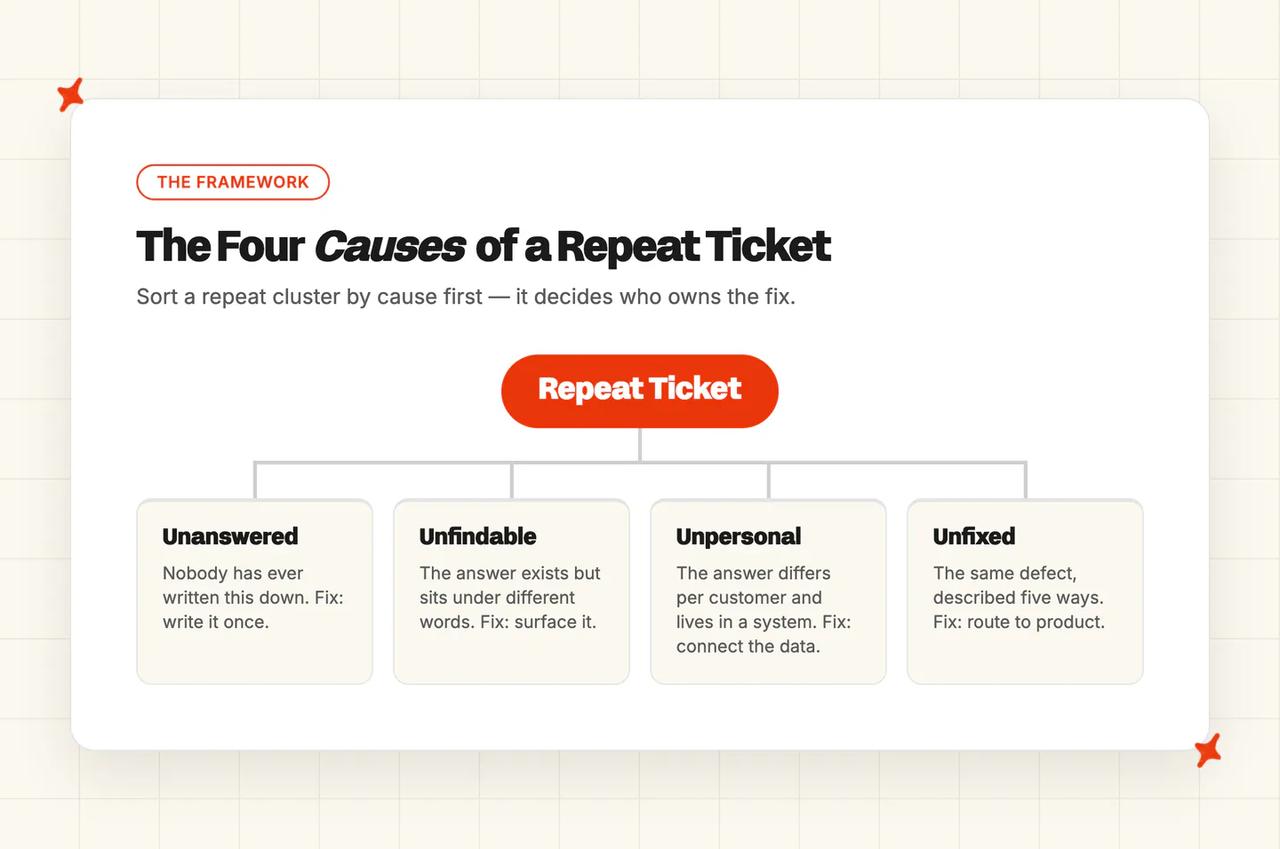
| Cause | The cluster looks like | Diagnostic test | Owner | The fix |
|---|---|---|---|---|
| Unanswered | Nobody has ever written this down | Search your own help center as the customer phrased it, and nothing comes back | Support content | Write it once |
| Unfindable | The answer exists and customers still ask | The answer sits under different words, or three clicks deep | Support content plus surfacing | Put the answer where the question is asked |
| Unpersonal | "Where's my order", "what plan am I on" | The answer is a row in your order or billing system, different for every customer | Support plus engineering | Connect the data |
| Unfixed | The same defect, described five ways | The ticket is a symptom and the customer did nothing wrong | Product or ops | Fix it upstream |
Unanswered: nobody has ever written it down
Run the test first. Search your own help center using the customer's exact words (their spelling, their phrasing), and see whether anything relevant comes back. If nothing does, you have found the one cause the standard advice was built for.
This is the boring-but-effective cluster, the cheapest and fastest to kill. Write the answer once, connect it to whatever answers your customers, and the cluster shrinks within days. Even teams with no help center at all can start here.
Our Train on Historic Tickets feature drafts starter articles from your past tickets. By default it works over your last 5,000.
Unfindable: the answer exists and customers still ask
Here the article is live, accurate, and invisible. Your customer searched for my parcel hasn't arrived and your article is called delivery exceptions policy. Or the answer sits three clicks into a portal nobody opens.
Publishing more content makes this cluster worse, because it adds noise to a search that already fails. The fix here is surfacing.
Put the answer where the question is asked, inside the chat or the ticket reply. We read Gartner's 43% as almost entirely this cause and the one above it.
Unpersonal: no article can answer it
Three questions, one problem: where is my order, what plan am I on, why was I charged twice. Each has exactly one right answer, and it lives in a row of your order or billing database.
This is where Gartner's other number lands, the 45% who felt the company didn't understand what they were trying to do. To kill this cluster you connect the system that holds the answer. Ours is User Data, a read-only API connection.
It lets the AI look up the live record before it replies. Our Shopify connector does the same out of the box, for orders, products and customers.
Order status is the biggest single member of this family. If order chasing is the biggest thing your team handles, our separate walkthrough on reducing WISMO tickets goes deeper on that cluster.
Unfixed: the same defect, described five ways
One defect can arrive as five separate tickets from five customers. The onboarding email lands in spam, the discount code fails at checkout, the export button times out on large accounts. Nobody did anything wrong except you.
Support cannot fix this cluster (and in our view should not try). Deflecting it is worse than leaving it alone, because a deflected defect ticket removes the signal that the defect exists.
Chattermill makes the same argument from the product-feedback side: the teams that actually cut volume treat tickets as a quality signal. Route this cluster to product with the count attached, and count it as a win when it stops arriving.
Which repeats should you kill first?
Kill in order of hours returned, which means cluster volume multiplied by how long a human actually spends on each ticket (pull your own handling-time data for this).
Two clusters of the same size return different amounts of time. An unanswered cluster is a two-minute canned answer that the AI absorbs cheaply.
An unpersonal cluster is a five-minute lookup, a copy-paste and a reply, so killing it hands back far more time per ticket removed. An unfixed cluster returns no support hours at all, because the fix belongs to product.
We watch teams put in real effort up front, reach a rate they are happy with, then plateau. The next step means connecting an API, and that feels like a bigger job than writing another article.
A point of resolution won on help center knowledge buys you less than a point won on a task that does something for the customer. The bigger savings sit past that plateau, in the clusters nobody automated because they looked harder.
How do you automate L1 support and only escalate complex issues?
L1 is the unanswered, unfindable and unpersonal clusters once you have sorted them (whatever your routing rules call it). Those three are what an AI agent can carry.
A cluster escalates when it fails one of the diagnostic tests.
A cluster whose answer sits in a system you have not connected yet escalates until you connect it. A cluster that is really a defect escalates to product, since a senior agent cannot fix it either.
Anything with a judgment call in it escalates by design, because you chose that: refunds outside policy, an angry customer, a legal question. Once you have picked the cluster, our companion guide on how to automate customer service covers the build.
What does killing a repeat cluster actually look like in real rollouts?
Our rollouts go knowledge first, because it is fast, then live data, because that is where the hours sit.
| Swytch | RecruitCRM | YouGarden | |
|---|---|---|---|
| Helpdesk | Zendesk | Intercom | Freshdesk |
| Published rate | 81% AI deflection | 68% AI resolution | 66% AI resolution, peak 82% |
| Monthly volume | 4,050+ resolved by AI | ~1,088 conversations | ~12,000 tickets |
| Hours returned | Not published | 62 hours a month | 965 hours a month |
| Started with | Internal notes on top inquiries | Intercom help center | Freshdesk help center |
| Then connected | Category-by-category rollout | Live User Data over their API | Custom User Data API |
Swytch: 4,050+ tickets a month resolved entirely by AI
Swytch sell e-bike conversion kits and run support on Zendesk. Their reply times had crept up, with customers waiting days on very simple questions. They started with internal replies on their most common inquiries (notes only, nothing customer-facing), then expanded category by category as each one held up.
They now run an 81% AI deflection rate, with over 4,050 tickets resolved entirely by AI every month. Response times went from days to minutes, and reply times on automated inquiries dropped to zero.
"Our agents can now focus on what they do best - building relationships and solving challenging issues - without being bogged down by repetitive tasks." — Swytch team, in their My AskAI case study
RecruitCRM: 68% resolution and 62 hours back every month
RecruitCRM run an all-in-one SaaS platform for recruitment agencies: an applicant tracking system plus a CRM. They work in Intercom.
They connected their Intercom help center to us first, then synced their website and uploaded context files. Live User Data over their API came afterwards, so the AI could see a customer's plan, recent transactions and account events.
That order took them from around 35% at go-live to 68% AI resolution. They handle about 1,088 conversations a month, roughly 740 of which no human touches (at 75% AI CSAT). On a five-minute-per-ticket basis, that is 62 hours a month back.
YouGarden: 66% resolution and 965 hours back every month
YouGarden is a UK online garden center running on Freshdesk. Same order again: the Freshdesk help center first, then 3,000+ pages of their own sites via website sync.
Then a custom User Data API, built with us and their site builder, surfacing recent orders, purchases, tracking and delivery information. They ran our AI in Freshdesk Notes mode for a month before flipping it to direct replies, so the team could read every draft before a customer did.
They sit at 66% AI resolution, peaking around 82%, across roughly 12,000 tickets a month, with 78% AI CSAT. That returns 965 hours a month, about six full-time agents.
How do you reduce ticket volume without hiring more agents?
You take the repeats out of your team's workload instead. YouGarden's 965 hours a month is capacity nobody had to recruit for, on a headcount that did not move.
YouGarden runs at a lower resolution rate than RecruitCRM (66% against 68%) and returns sixteen times the hours.
Both numbers use the same five-minute basis, and the gap comes from volume and handling time. Rank those two by resolution rate and you put the 62-hour cluster ahead of the 965-hour one.
Our own AI resolution rate benchmarks show where these numbers land across our customer base.
What to do this week
Three actions. All of them work in any helpdesk, on your own export, before you buy anything.
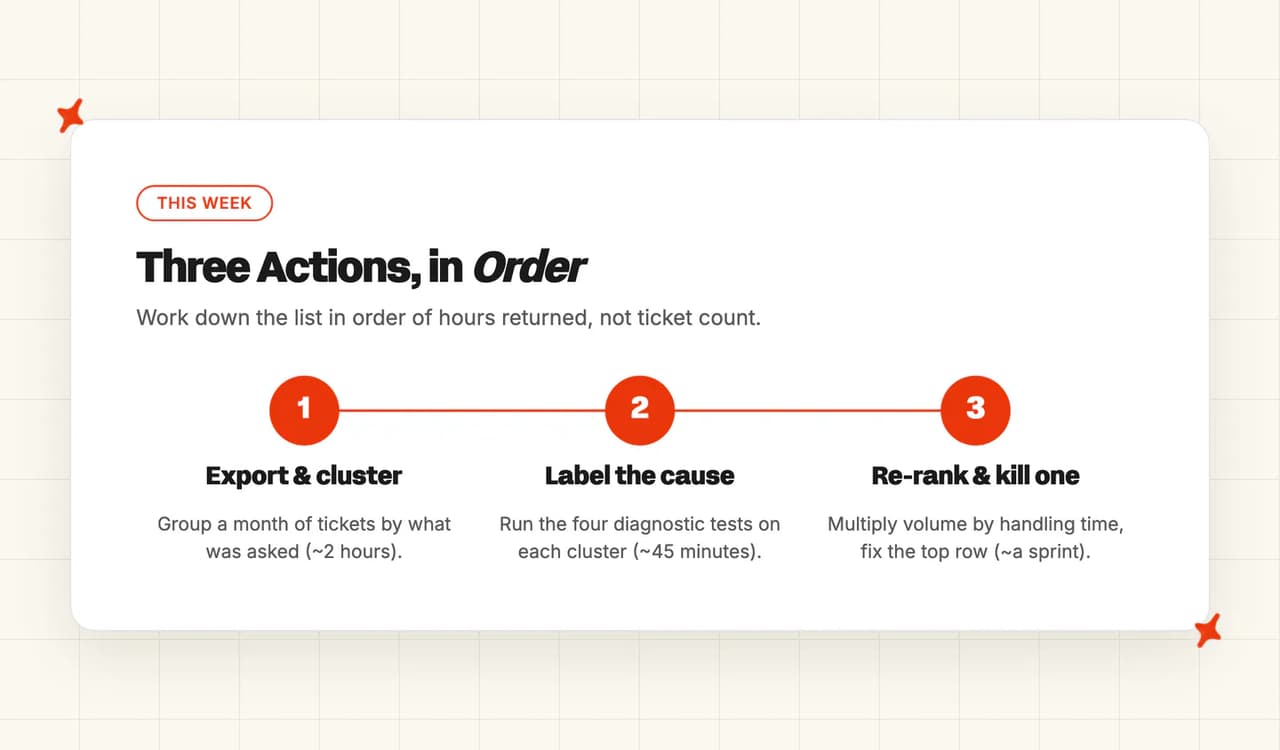
- Export a month and cluster it (~2 hours). Group by what the customer actually asked. Your own tags encode how you route work, which is a different question, so leave them out of this pass. Outcome: your top ten repeat clusters, ranked by volume.
- Label each cluster with its cause (~45 minutes). Run the four diagnostic tests, one cluster at a time. Outcome: you know which clusters are content work, which are engineering work, and which belong to product. If you want the labeling done for you on an ongoing basis, our Tagging feature classifies each incoming message natively inside Zendesk, Intercom, Freshdesk, Freshchat and Gorgias, and Self-Learning drafts the article for anything in the unanswered pile.
- Re-rank by hours returned and kill one (~a sprint). Multiply each cluster's volume by its handling time, then take the top row. Our own case studies use five minutes a ticket as the basis, so that is a reasonable starting multiplier if you have nothing better. Outcome: one cluster gone, and a measured before-and-after you can take to your next review.
How do I get an AI to label my ticket clusters for me?
Action two is the step an AI assistant can shorten for you. Paste your cluster list and your help center titles into this prompt and it will run the four diagnostic tests, then rank what it labels by the hours each cluster returns.
You are helping me triage a month of customer support tickets.

Here are my top repeat clusters, each with its monthly volume and my
average handling time for that kind of ticket:
[paste your clusters, e.g. "where is my order - 412 tickets - 5 min"]

Here is what my help center currently covers:
[paste your article titles, or the URL of your help center]

For each cluster, do four things.

1. Label it with one of the Four Causes of a Repeat Ticket:
   - Unanswered: nobody has written the answer down anywhere.
   - Unfindable: the answer exists but sits under different words, or too
     many clicks deep.
   - Unpersonal: no article can answer it, because the answer is a row in
     an order, billing or account system.
   - Unfixed: the ticket is a symptom of a defect and the customer did
     nothing wrong.
2. Say which test led you to that label, quoting the cluster wording I gave you.
3. Name the owner: support content, support plus engineering, or product.
4. Work out hours returned per month as volume x handling time.

Then rank every cluster by hours returned, highest first, and tell me
which one to start on and why.

Where my input does not let you decide between two causes, write
"unverified - run the help center search test" instead of guessing.
It only sees whether an article exists, so treat its unfindable calls as a shortlist for you to check rather than a verdict.
Our guide on how to automate customer service lays out the knowledge, data and action work in the order it lands.
When is a repeat ticket not worth deflecting?
Take a very high deflection number with a grain of salt. You could hit 100% tomorrow by making it impossible to reach a person, and that number would be counting every customer who gave up. Support leaders call that abandonment.
"people are literally saying 'i tried to get help and just gave up.' that's not deflection, that's abandonment dressed up in a metric." — u/escalation_queen, r/CustomerSuccess
CMSWire has argued for years that deflection should be a result rather than a goal. HelpSite draws the line at the escape route: whether the customer could still have reached a human if they had wanted to. If you want the metric itself pulled apart, we have a separate explainer on what deflection rate measures and how it differs from containment and resolution.
Two of our own customers sit low on purpose. Inspire Uplift, an ecommerce marketplace on Zendesk, runs at 21% AI resolution, and that is exactly where they want it.
Their escalation guidance deliberately routes most tickets to a human. The AI's job there is to draft, tag and hand over cleanly, and closing the ticket is the human's.
Sofar Sounds, who run intimate live-music events, sit at 26%. That is around 195 tickets a month resolved by AI and around 555 escalated to a person with full context (at 85% AI CSAT). Their product is a room full of people, so they want a person answering.
Then there is the unfixed cluster. Deflecting that one does active harm, because the volume is the evidence. Kill the ticket and you have deleted your own bug report.
The takeaway
Reducing support tickets starts with a diagnosis. Ours is the Four Causes: unanswered, unfindable, unpersonal, unfixed. Each one has a different owner and a different fix.
Sorting by ticket count tells you which clusters are loudest and nothing about which fix they need.
Then kill in order of hours returned. It is why one of our customers at 66% gives back sixteen times the hours of another at 68%.
If you do one thing this week, label a month of your own tickets by cause. It takes an afternoon, it costs nothing, and it will change which project you start next.
Swytch went from reply times measured in days to minutes once the first clusters stopped landing on their team. If you want to watch the AI run against your own tickets, our free trial is 30 days, all features, no card. Setup takes about ten minutes.
FAQs
How do you reduce support ticket volume?
Start by sorting your repeats by cause before you sort them by count. Every repeat cluster is unanswered, unfindable, unpersonal or unfixed, and each one has a different fix and a different owner.
Publishing more articles only touches the first two, which is why a Gartner survey of 5,728 customers found only 14% of issues fully resolve in self-service. Once the clusters are labeled (an afternoon's work), work down them in order of agent hours returned.
How do you reduce customer support tickets without hiring more agents?
The capacity comes from volume that never reaches an agent. YouGarden handles around 12,000 tickets a month on Freshdesk and gets 965 hours a month back. That is about six full-time agents' worth of capacity they never had to hire.
The lever is the unpersonal cluster, where connecting live order and account data lets the AI answer questions no article could. We have a fuller piece on scaling support without hiring if headcount is the argument you are having internally.
Can AI ticket deflection handle repetitive tickets on its own?
It handles two of the four causes very well on its own. Unanswered and unfindable clusters are what a well-fed AI agent is best at, since both are knowledge problems.
The unpersonal cluster needs your systems connected before the AI can answer at all, and the unfixed cluster belongs with product, since deflecting it hides the defect. Our separate explainer covers what deflection rate actually counts, and why a very high one deserves a second look.
How do you reduce repetitive customer support questions?
Group a month of tickets by what the customer asked, then run our four diagnostic tests on your biggest clusters. Search your help center in the customer's words to separate unanswered from unfindable. Check whether the answer is a row in a system to spot unpersonal.
The cluster where the customer did nothing wrong is your unfixed pile (send that one to product). The r/SaaS thread on this question shows what happens without that step: seventeen replies, all recommending a knowledge base before anyone asks what kind of question is repeating.
Which AI tool auto-resolves repetitive customer support tickets?
Whatever you pick has to cover three of the four causes, because the fourth one is a product job rather than a tool job. That means training on your help center and your past tickets for the unanswered and unfindable clusters, and a read-only connection to your order or billing system for the unpersonal one.
We built My AskAI to do both from inside Zendesk, Intercom, Freshdesk, Freshchat, Gorgias and HubSpot, so a resolved ticket never leaves the helpdesk your team already works in.
What should you look for in an AI support bot for high ticket volumes?
At high volume the constraint stops being knowledge and becomes live data, since the biggest clusters are usually order, billing and account questions no article can answer. YouGarden runs around 12,000 tickets a month on Freshdesk and gets 965 hours back, and the custom API connection is what unlocked most of that.
Look for native placement in the helpdesk you already run, a read-only connection to your own systems, and a way to see which clusters are still repeating (our Insights and Tagging surfaces do that job).
Can you automate repetitive support tickets without switching helpdesk?
Yes, and no migration is involved. My AskAI runs natively inside Zendesk, Intercom, Freshdesk, Freshchat, Gorgias and HubSpot, either through the helpdesk's own approved marketplace app or over its API.
Swytch stayed on Zendesk, RecruitCRM stayed on Intercom and YouGarden stayed on Freshdesk when they moved to us. Your macros, tags and routing rules stay where they are.
How long does it take to see support ticket volume drop?
The knowledge clusters move first, usually within days of connecting your help center. RecruitCRM went from around 35% at go-live to 68% AI resolution as they worked through a weekly review and then connected live user data.
YouGarden ran a month in Freshdesk Notes mode, with the AI drafting replies for agents to check, before switching it to answer customers directly. How fast you get there is mostly a question of how conservative or bullish you want to be, and our guide on how long an AI rollout takes walks through the usual pace.