How to reduce customer support costs (without gutting CSAT)
Cutting agents saves this quarter and bills you later in churn. To reduce customer service costs, cut demand and unit cost first: every lever, ranked.
Summarize with AI
Somewhere above you, someone has asked for the cost-to-serve number to come down. The standard playbook is sitting right there: freeze hiring, outsource the queue, push harder on deflection. Six months later the tickets are still arriving, they just wait longer, and the saving has come back as repeat contacts and churn.
I'd frame the problem differently. Your support cost is three numbers multiplied together: how many tickets you get (demand), what each resolution costs (unit cost), and how much support you offer (capacity). You can cut all three, but only capacity cuts move the cost onto your customer.
I'm Mike, co-founder of My AskAI. We run AI support agents inside Zendesk, Intercom, HubSpot, Freshdesk and Gorgias for 200+ ecommerce and SaaS businesses, and our agents have resolved over 1,000,000 tickets. In the rollouts below, cost per resolution fell while AI CSAT sat between 86% and 97%.
Why is "cut the support team" the most expensive saving you'll ever make?
The standard advice is a list. One widely-read guide counts nine strategies (auditing costs, consolidating tools, self-service, automation, agent training and smarter routing among them). None of them come ranked by what each lever does to CSAT.
The question people take to forums is sharper. One Quora thread asks how businesses cut support costs without touching the experience, and another asks whether cost can come down while service improves. Both are really asking which levers won't backfire.
I'd start with what the team costs, because it explains the temptation. A fully-loaded, in-house US support agent runs $55,000 to $80,000 a year, and labor is the largest expense in any cost-per-contact model. The same 2026 benchmarks put a blended support contact at $5 to $9, with email tickets at $6 to $11 and voice calls at $9 to $16.
Headcount is the biggest number on the budget, and cutting it produces an immediate, visible saving. Then it hits the other two numbers. Fewer agents means the same demand lands on less capacity: queues grow, first replies slow down, and frustrated customers either contact you again (which adds demand) or leave.
Leaving is the expensive part. Zendesk's own benchmark data has 73% of consumers switching to a competitor after multiple bad experiences, and more than half switching after just one. That cost lands in churn and win-back spend, off the support budget entirely, which is why a capacity cut can look like a win right up until the retention numbers arrive.
Klarna is the public version of this story, and the example I'd send anyone whose board is pushing for support layoffs. In February 2024 they announced their AI assistant had handled 2.3 million conversations in its first month, two-thirds of all their customer service chats, with resolution times down from 11 minutes to 2 and an estimated $40 million profit improvement for 2024. The unit-cost cut worked.
Then a capacity cut got stapled to it: a hiring freeze and a shrinking support team. By May 2025, CEO Sebastian Siemiatkowski was telling Bloomberg that the cost-cutting had gone too far, that some of the output was what he described as "lower quality", and that Klarna was hiring human agents again:
"From a brand perspective, a company perspective, I just think it's so critical that you are clear to your customer that there will always be a human if you want."
He went further in the same interview:
"Really, investing in the quality of human support is the way of the future for us."
The AI kept its job; the reversal was on the capacity side. Klarna kept the cheaper resolutions and rebuilt the team.
Our customers who get this right treat the AI as a way to stop scaling tier-1 hiring while keeping the people they have. For our ecommerce customers that tends to mean a flat agent count through peaks like Black Friday, because the AI flexes with demand and the humans keep the judgment calls. The saving shows up as hires you never have to make.
What are the three ways to cut support costs (and which one hurts CSAT)?
Every lever you'll ever be pitched (self-service, chatbots, outsourcing, tighter routing, closing the phone line) is one of three cuts, which is why I call this the three-cut rule. Rank the cuts by dollars saved per point of CSAT put at risk and you get the same order every time: demand first, unit cost second, capacity last.
| Cut type | The levers | Cost saved | CSAT risk | Time to impact | When to use |
|---|---|---|---|---|---|
| Demand cuts (fewer tickets) | Help-center fixes, product fixes at the ticket source, proactive updates (order tracking, status pages) | Real but bounded: a live contact averages $8.01 vs roughly $0.10 for self-service (Gartner, 2019) | Low, usually positive | Weeks | First, always |
| Unit-cost cuts (cheaper resolutions) | AI resolution of the repetitive tail with a real escalation path; AI tagging and copilot drafting for the human queue | The biggest absolute saving: an email ticket costs $6-11 with a human, cents to low dollars with AI | Low if you measure resolution; high if you measure deflection | 2-6 weeks | Second, on your top repetitive ticket types |
| Capacity cuts (less support) | Headcount cuts, outsourcing, closing channels, contact friction | Real and immediate | Highest of the three (this is the lever Klarna walked back) | Immediate | Last, after the first two have shrunk the queue |
Demand cuts: fewer tickets arrive
Demand cuts are the boring-but-effective option: the cheapest ticket is the one that never gets created. Gartner's 2019 poll put a live service contact at an average of $8.01, against roughly $0.10 for self-service. The 2026 benchmarks tell the same story: $0.10 to $0.60 per successful self-service resolution.
The same Gartner data carries the cap, though: 70% of customers try self-service first, and only 9% fully resolve there. A demand cut trims the repetitive tail; it can't abolish contact. And forcing it (burying the contact button, gating the human behind forms) is contact friction, a capacity cut.
Demand falls when you fix the help-center article behind your biggest repeat question, fix the product flow generating the tickets, and get ahead of the questions you can predict (for ecommerce, that's shipping status). Klarna's press release carries a demand-cut detail too: a 25% drop in repeat inquiries, driven by more accurate answers.
Unit-cost cuts: each resolution gets cheaper
This is the biggest absolute saving, and the one where the measurement decides whether CSAT survives. The lever is AI resolution of the repetitive tail: the majority of tickets that repeat, answered instantly, with a real escalation path for everything else.
I'd anchor expectations on the field data: across 195 rated AI deployments covering 38 vendors, the median AI-handling rate is 70%, with the middle half of deployments landing between 56% and 80%. Take those as directional, because the deployments are self-reported and skew toward teams doing well. Our own customer base runs a 72% resolution rate on a rolling 30-day basis.
Getting there is real work, but it's front-loaded. Knowledge alone (your docs, your help center, your resolved tickets) gets 40-70% of tickets handled. Connecting user data such as order status or plan details adds 15-50% depending on the business, with ecommerce at the top end.
Letting the AI take actions adds another 5-20%. Any product promising autopilot here is overselling. You do the work once (connect the data, define the action, set the guardrails) and it applies to every ticket after that.
The pricing meter decides who captures the saving. Per-resolution vendors charge each time the AI succeeds: Intercom's Fin runs at $0.99 per resolution, and HubSpot's Breeze at $0.50 per resolved conversation.
Zendesk publishes its own rate on its pricing page: $1.50 per automated resolution on commitment, or $2.00 pay-as-you-go. As your AI improves on those meters, the bill goes up.
And most of what raises a resolution rate is your own team's work: the knowledge, the guidance, the connected data. A per-resolution meter charges you for improvements you built yourself, a pricing argument I've made at length on LinkedIn.
Operators have noticed too. The OP of a r/B2BSaaS thread on outcome-based pricing:
"Customers love the idea in theory: pay for value delivered, not usage. But in practice? Budget unpredictability, lack of control over outcomes and all the complications when customers don't fully follow through on their side."
The flat alternative is per-ticket: about $0.10 a ticket, whatever the outcome. At 10,000 tickets a month that lands around $1,299 all-in on our Scale plan, and the effective cost per resolved ticket falls as the AI improves: $0.26 per resolved ticket at a 50% resolution rate, about $0.17 at 75%. It's the one meter where getting better makes the unit cheaper.
That per-ticket model is ours (the figures above are our published rates, and you can check them against your own volume). If you want to test the unit-cost math on your own queue, the 30-day free trial has every feature unlocked and unlimited tickets, with no card required.

One measurement rule keeps a unit-cost cut safe: track resolution rather than deflection. Deflection counts conversations that never reached a human, whether or not the customer got an answer. Resolution is stricter: the customer got what they came for.
You could run a "perfect" 100% deflection rate by making it impossible to speak to anyone! Any vendor can post a 90% number if the humans are hard to reach, a point I've made before about resolution-rate theater.
A unit-cost cut measured on deflection is a capacity cut in costume, and it fails the same way: the cost lands on the customer and comes back as churn.
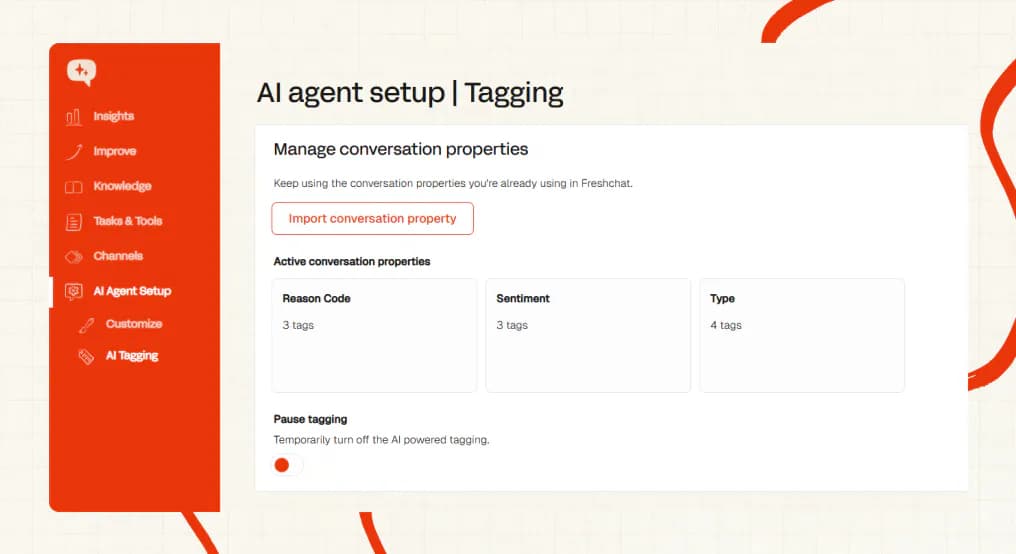
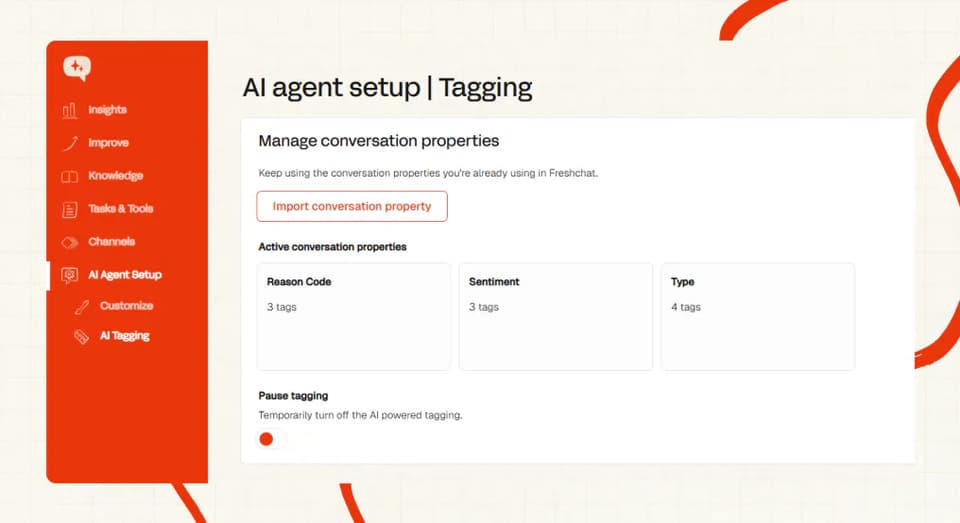
The human side of the queue has unit-cost levers too. AI tagging classifies every ticket by what the message says, the moment it arrives (natively on Zendesk, Intercom, Freshdesk and Freshchat), so nobody spends their morning sorting a queue.
Copilot drafting turns each human reply into a review-and-send, and I'd point nervous teams here first: the humans get faster without the AI answering anyone directly. TravelJoy and Edel Optics both run tagging-based triage alongside AI resolution.
Capacity cuts: you offer less support
The savings here are real and immediate, which is why the playbooks lead with them. Headcount cuts, outsourcing, closing a channel, adding contact friction: each one lowers spend this quarter. Each one also transfers work to the customer, and I read the Zendesk switching stats as the price list for that.
Outsourcing is a capacity swap more than a straight cut. Helpware's published BPO pricing has offshore support at $7-16 an hour against $28-42 onshore, and outsourced per-resolution rates of $1 to $7 with the industry average near $4. Those savings are real, and a trained, embedded BPO team can hold quality.
The risk side comes from the same vendor's page:
"The cost of quality failure typically exceeds the rate differential within 12 months."
That's Helpware, a BPO provider with every reason to sell you the swap, saying it on their own pricing guide. I'd take the warning seriously.
BPOs staff tier-1, and tier-1 is what AI absorbs first. Once the repetitive tail is automated, offshore teams get less necessary, escalations move in-house, and replies speed up. Run the unit-cost cut first, and you may find there's nothing left worth outsourcing.
What do the three cuts look like in real rollouts?
These are My AskAI customers, so the numbers come from our dashboards and the published case studies. All four run on Zendesk, and every one held or improved CSAT while the cost per resolution fell.
Edel Optics: 150 hours a month back at 92% CSAT
Edel Optics sells eyewear across Europe and handles 4,000+ tickets a month. Resolution sat at 20-30% until they connected live order data through the User Data API; it now sits at 75-79%, with a 92% AI CSAT measured across 4,067 tickets.
The setup is demand and unit-cost work all the way down: help-center knowledge, live order lookups, and AI tagging for triage, with certain tags blocked from AI replies so sensitive tickets route straight to a human. That block list is a detail I'd steal even if you never use us: what the AI leaves alone is a cost control too. The result is roughly 150 hours of agent time back every month.
TravelJoy: 80% resolution where the previous AI managed 24%
TravelJoy is a SaaS platform for travel advisors, running 2,500-2,700 tickets a month through Zendesk. They'd already tried Zendesk's own AI agent and were getting 24%; with us they run at 80% AI resolution, an AI CSAT of 86% (last 30 days), and 193 hours saved a month. Their Head of Customer Service, Alan Pugh:
"Our experience with My AskAI has been nothing short of transformative. In comparison to Zendesk's AI agent, we're now achieving an impressive 76% AI resolution rate, versus just 24% before. The dramatic improvement has elevated the overall level of service."
Apartment List: 97% CSAT at 76% resolution
Apartment List is a rental marketplace doing about 1,582 tickets a month. The AI resolves 76% of them and holds a 97% AI CSAT, worth roughly 101 hours a month. If automation made support feel worse, this is the account where I'd expect it to show first; instead it's the highest CSAT figure in this post.
GiveCard: the same pattern at low volume
GiveCard is a fintech disbursement platform at around 255 tickets a month. The AI resolves 95% of tickets at a 90% CSAT and returns about 20 hours a month.
The pattern repeats beyond Zendesk too. A baby-textiles retailer selling across six European markets runs 72% AI resolution at a 94% CSAT on Gorgias (about 59 hours a month back), and a global sportswear brand on Freshdesk runs 95% at a 90% CSAT, worth around 422 hours a month.
The same dashboards show the CSAT ceiling moving with the queue. Honeygain runs a passive-income app whose support queue is heavy on ban appeals and payout questions, customers often hearing an answer they don't want. Their AI still returns 507 hours a month at a 78% CSAT, and for that category I'd rate the 78% harder-earned than a softer queue's 90%.
Hours are the cost proxy in every one of these. Multiply them by your own loaded hourly rate for the dollar figure. Working out that rate takes about 30 minutes.
What should you do this week?
None of this needs a vendor, a committee or a quarter. In order:
- Compute your cost per resolution (~30 minutes). Fully-loaded team cost divided by resolved tickets. A US support rep averages $46,017 a year on Indeed's salary data, and benefits make up roughly 30% of total compensation, so a loaded agent runs about $60-66k. Use resolved tickets as the denominator (a ticket that comes back was never resolved), and check the result against the $5-9 blended cost-per-contact benchmark or Gartner's cost-benchmark research. This is the number every later decision needs.
- Tag last month's tickets by type (~2 hours). You're hunting the repetitive majority. A spreadsheet works; if you're on Zendesk, Intercom, Freshdesk or Freshchat, AI tagging can do the classification automatically. You'll know your top three repeat drivers by lunch.
- Ship the one fix that kills your biggest repeat driver (a sprint). Sometimes it's a help-center article, sometimes a product fix, sometimes a proactive email. Watch that ticket type's volume over the next month; the drop is your first demand cut. And if you have no help center to fix, Train on Historic Tickets drafts starter knowledge from your last 5,000 historic tickets by default (more on request), so missing docs stop being the blocker.
- Pilot AI resolution on one ticket type, with escalation on (1-2 weeks). Measure resolution rate and CSAT side by side; a pilot that reports only one of the two tells you nothing. Expect 40-70% handled from knowledge alone, against a field median of 70%. If the pilot is with us, the 30-day trial covers it end to end without a card.
- Only then model capacity (~1 hour). With demand down and unit cost down, work out what the remaining human queue needs. In the rollouts above, the answer was the team they already had, minus the next hire.
If you'd rather not build the spreadsheet yourself, our ROI calculator runs the cost-per-resolution math with your numbers, and the method works whichever vendor you end up picking.
How do I get AI to run the three-cut math for me?
For a head start on steps 1 and 2, paste the prompt below into ChatGPT, Claude or Gemini. It works your own numbers through the three-cut rule: your cost per resolution, your top repeat drivers, and every measure you're weighing sorted into demand, unit-cost or capacity cuts. It can't see your queue or your CSAT history (no prompt can), so I'd treat the output as a first draft to check against your helpdesk data.
You are helping me reduce customer support costs using the "three-cut rule":
every cost lever is one of three cuts, ranked by dollars saved per point of
CSAT put at risk.
- Demand cuts (fewer tickets arrive): help-center fixes, product fixes at the
  ticket source, proactive updates. Low CSAT risk. Do first.
- Unit-cost cuts (each resolution gets cheaper): AI resolution of the
  repetitive tail with a real escalation path, plus AI tagging and copilot
  drafting for the human queue. Low risk if measured on resolution rate
  rather than deflection. Do second.
- Capacity cuts (less support offered): headcount cuts, outsourcing, closing
  channels, contact friction. Highest CSAT risk. Do last, after the first two
  have shrunk the queue.

My context:
- Fully-loaded monthly support team cost: [number]
- Resolved tickets per month: [number]
- Ticket volume by type (top 5-10 types with rough monthly counts): [list]
- Helpdesk: [e.g. Zendesk / Intercom / Freshdesk / Gorgias / HubSpot]
- Cost measures I'm considering or being pushed toward: [list]

Produce:
1. My cost per resolution (team cost divided by resolved tickets), checked
   against the $5-9 blended cost-per-contact benchmark.
2. My top three repeat ticket drivers and the single cheapest demand cut for
   each (help-center fix, product fix, or proactive update).
3. Each measure I listed classified as a demand, unit-cost or capacity cut,
   re-ordered so capacity comes last, with the CSAT risk stated for each.
4. The two numbers to track weekly during any change: resolution rate and
   CSAT, side by side.
For anything you can't determine from my context, write "unverified, check
your own helpdesk data" instead of guessing.
When does the three-cut rule not apply?
Under about 500 tickets a month, your cost problem lives somewhere other than support. GiveCard shows the pattern working at 255 tickets a month, and the 20 hours back are real. At that volume, plan choice and seat hygiene on your helpdesk bill move the P&L more than any automation project.
In high-touch B2B, where support drives retention and expansion revenue, capacity is the product. The three-cut math still describes your costs, but the capacity floor is a strategic choice, and no benchmark can set it for you (that one needs your retention data). AI changes the mix in these teams: the repetitive tail goes to the AI, and the humans keep the harder, higher-value work, at a higher intensity than before.
If you've over-hired, a capacity cut is legitimate. Sequence it after the demand and unit-cost cuts have shrunk the queue, though, or you'll cut into the muscle Klarna spent 2025 hiring back.
And outsourcing done well (a trained, embedded BPO that knows your product) can hold CSAT. It ranks last on risk, and only on risk; the quality-failure caveat from Helpware's own numbers is the thing to price in before you sign.
The takeaway
Support cost is three numbers: demand, unit cost, capacity. The first two can be cut with CSAT holding or rising; the third makes your customers pay for your saving. Klarna ran that experiment in public across 2024 and 2025.
The three-cut rule orders the work: rank every lever by dollars saved per point of CSAT put at risk, and capacity lands last every time. Across our named rollouts, that ordering returned 20 to 193 hours a month with AI CSAT between 86% and 97%.
Your first move costs 30 minutes: fully-loaded team cost divided by resolved tickets. If the number surprises you (it usually does), Apartment List's rollout is the proof the fix works, and the ROI calculator will tell you what it's worth on your queue.
FAQs
How to reduce customer service costs?
Cut demand first: help-center fixes, product fixes at the ticket source, proactive updates. Then cut unit cost: AI resolution of the repetitive tail, with tagging and copilot drafting for the human queue. I'd only touch capacity once the queue has shrunk.
Gartner's 2019 numbers put a live contact at $8.01 against roughly $0.10 for self-service, which is why demand cuts come first. The two moves that hurt CSAT are headcount cuts and making yourself hard to contact. Klarna walked the first one back in public during 2025.
How do I reduce cost to serve?
Start by measuring it: fully-loaded support cost divided by resolved contacts. Blended industry benchmarks sit at $5-9 per contact, with email tickets at $6-11. Then apply the three-cut rule: reduce how many contacts you get (demand), reduce what each resolution costs (unit cost), and leave capacity alone until the first two have done their work.
How much can AI reduce customer support costs?
Across 195 rated AI deployments covering 38 vendors, the median AI-handling rate is 70%; the sample is self-reported, so treat it as directional. Knowledge alone gets 40-70% of tickets handled, connected user data adds 15-50%, and AI actions another 5-20%. In our rollouts that translated to real hours: Edel Optics gets about 150 hours a month back, TravelJoy 193, and Apartment List 101, with AI CSAT between 86% (TravelJoy's last-30-days figure) and 97%.
How do I automate customer support without losing the personal touch?
Track resolution instead of deflection, and keep the human easy to reach; those two decisions do most of the protecting. The AI takes the repetitive tail, and your people take the conversations that need judgment; one customer described the setup to us as a shield for their team. Apartment List runs 76% AI resolution at a 97% CSAT, and Klarna's CEO landed on the same rule after their reversal: be clear with customers that there will always be a human if they want one.
How do I measure the ROI of AI customer support?
Monthly tickets × AI resolution rate × your fully-loaded cost per resolved ticket, minus the all-in AI cost. The fully-loaded number comes from salary data ($46,017 average for a US rep, plus roughly 30% for benefits). Our ROI calculator runs it with your inputs in a couple of minutes.
How much does AI customer support software cost?
There are three meters. Per-resolution runs $0.99 on Intercom's Fin, $0.50 on HubSpot's Breeze, and a Zendesk-published $1.50-2.00. Per-session pricing has Freshworks' Freddy at $0.49 and Dixa at €0.35 a conversation.
Flat per-ticket, which is ours, is about $0.10 a ticket. At 10,000 tickets a month and a 50% resolution rate, the stacks land around $1,299 flat, roughly $6,650 on Fin, and $9,500-10,500 on Zendesk depending on packaging, so model all three against your own volume before picking.
How to reduce customer service response time?
Put an AI front line on the repetitive tail and first response goes to instant for the majority of tickets, around the clock. Swytch came to us with reply times creeping up on simple questions; after the rollout they described the difference as immediate, with routine queries answered on the spot. For the escalated queue, track time-to-first-human-response; overall first-reply time stops telling you much once the AI answers instantly.