How to Build the Business Case for AI Customer Service (and Get It Approved)
Most AI customer service proposals stall on the ROI number. The business case that gets signed is a document, not a number. Five parts, one page you forward.
Summarize with AI
If you run a support team and you want an AI agent approved, the work in front of you is a document, and the savings sum is one page of it. Most people build the business case as a cost-per-ticket calculation, and that math holds up (our ROI calculator does exactly that sum). A support leader can do it in an hour. The proposal stalls anyway.
We hear the same three questions come back in the meeting: what happens to headcount, what a customer sees when the AI gets something wrong, and what you will do if the number misses. Five things have to exist before anyone signs:
- a baseline pulled from your helpdesk
- one before-and-after monthly cost table
- your objections written down with the answers
- a rollout plan with exit criteria
- one page your sponsor can forward upward without editing it
We call that set the Approval Pack, and this post is how you build each part.
I'm Mike, co-founder of My AskAI. We help 200+ ecommerce and SaaS businesses run AI customer service inside Zendesk, Intercom, Freshdesk, Gorgias and HubSpot, and our agents have now resolved over 1,000,000 tickets. I see both halves of this: the trial goes well, and then a month later the person who ran it takes the case upstairs.
Why do most AI customer service proposals stall?
I've sat in on the call where the champion has every number and still leaves the room without a decision.
The cost-per-ticket view is mostly right: take your current cost to serve a ticket, multiply it by the volume an AI agent can take off your team, and you have a saving. Put that next to the vendor's price and you have your payback period.
KPMG's guidance on AI business cases points out what we see in practice: organizations commonly start implementing AI without knowing exactly what it will yield, so a team that has done the sum is already ahead of most. MIT Sloan's steps for finding a use case work the same way: break the job into tasks, count every cost of automating them, then pilot.
If you have not done that sum yet, our guide to calculating AI customer service ROI has the formula and a worked example, and our AI support agent ROI calculator does the same job with your figures in it. Bring the answer with you.
The break comes in the first few questions back. You arrive with a credible saving and get asked three things: whether you are cutting heads; what a customer sees on the day the agent answers badly; and what you will do if the resolution rate arrives at 40% when you modeled 70% (our benchmark dataset puts the field median at 70%, so the model was fair).
All three are outside the calculation you brought, so the meeting ends with a request for more detail and the case waits a quarter for the next budget conversation. I'd add all three answers to your pack before you walk in: the room will not wait for a second meeting to hear them.
The independent data confirms what we see on our rollouts: a Gartner analysis of 432 customer service AI use cases, reported by CX Dive, found that only a quarter of them produce a return. Another quarter produce negative returns, 11% break even, and 42% fall into a band where support leaders say they do not know what value was produced. Your case is in that last band until you can show otherwise. We build the success metric into the pack from day one, so the quarter-one checkpoint has a number to measure against.
Those same teams were running close to five AI use cases each and putting around 13% of the function's budget behind them, and 56% of service leaders expect their incentives to be tied to AI outcomes. Your CFO has read some version of these numbers.
An industry analyst quoted in the same article names the cause directly.
"Too many AI rollouts begin with pressure to demonstrate a credible AI strategy to the board, rather than with a clearly defined business problem." Julie Geller, principal research director at Info-Tech Research Group, speaking to CX Dive
On the rollouts we run, the trial usually goes fine, and then the case waits for weeks while somebody writes the document that should have come first. Write it first, while the trial is still running.
The Approval Pack: the five parts of a business case that gets signed
The Approval Pack is a morning's work, and most of that is pulling numbers you already own; hand the ticket sorting to whichever AI tool you have open and it is less. Each part answers a different person in the room. Bring only the savings figure and you have an answer for finance and for nobody else.
The pack we hand teams has five parts, and each one pulls its numbers from a different place.
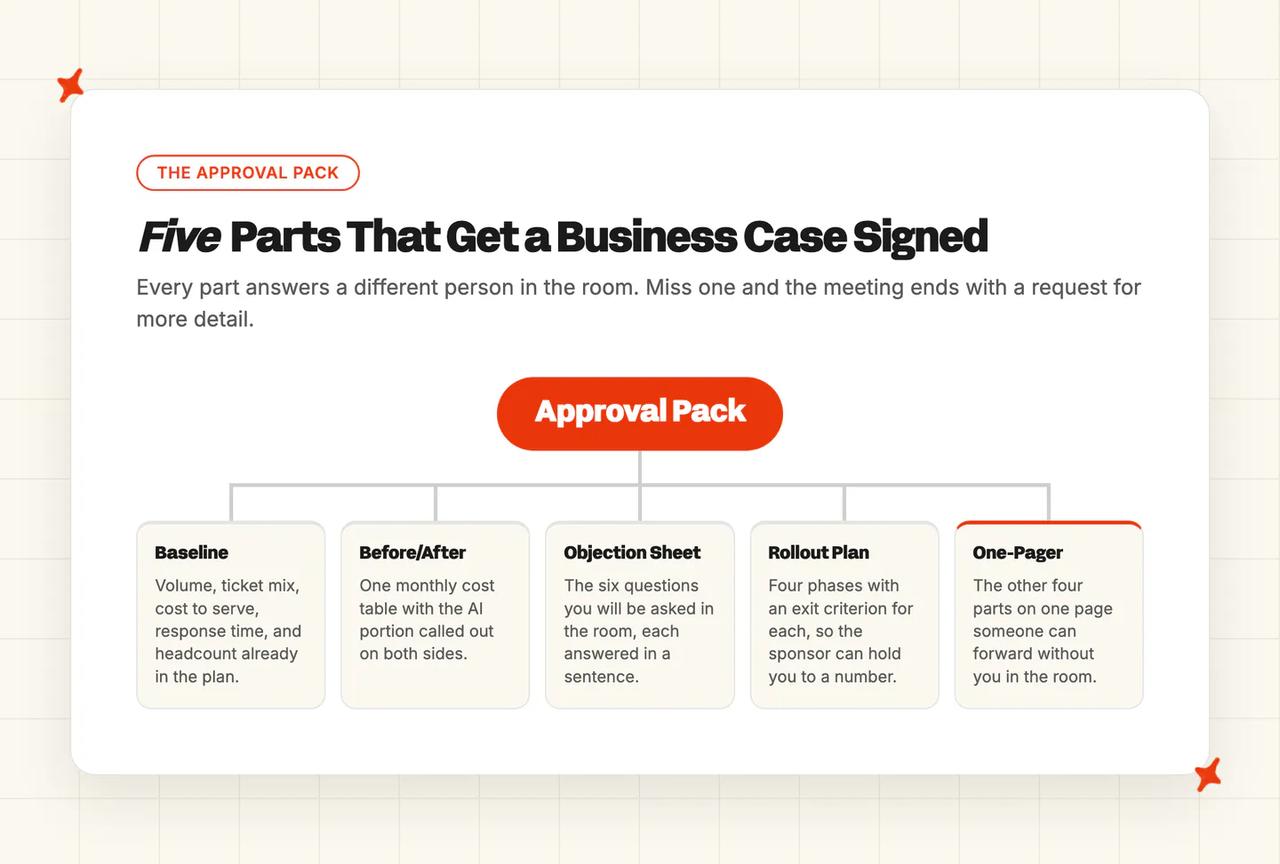
| Part | What it answers | Where the number comes from | How long it takes |
|---|---|---|---|
| The Baseline | What support costs you today, and what it will cost as you grow | Your own helpdesk reports | An hour |
| The Before/After | What changes on next month's bill | The Baseline, plus published vendor pricing | Half an hour |
| The Objection Sheet | The questions you will be asked in the room | You, writing your answers down | Half an hour |
| The Rollout Plan | What happens in which week, and how you will know it is working | Your vendor's onboarding, plus your own review time | Fifteen minutes |
| The One-Pager | All of the above, on a page someone can forward without you | The four parts above | Ten minutes |
The worked examples follow one team at 4,000 tickets a month, already paying for AI bundled with their helpdesk and deciding whether to switch. If you are buying for the first time, every part still applies, with one row fewer in the Before/After table.
Component 1: The Baseline
Five numbers, all already inside your helpdesk, and we cannot pull any of them for you. Pull them before you talk to anybody, because every other part of the pack is assembled from them.
- Monthly ticket volume - decides whether the saving is worth the internal process at all.
- The split by ticket type - decides your realistic ceiling, because the share of your volume that's the same handful of questions is roughly the share an AI agent can take.
- Your current cost to serve a ticket - decides what every point of resolution rate is worth to you in money.
- First response time and resolution time - decides what "better" means to your customers, which is the service half of the case.
- The headcount already in next year's plan, including seasonal peak cover - decides what you're actually comparing against, since your benchmark is the cost of the hire already in your plan.
Those five go straight into our AI support agent ROI calculator, which has a version for each helpdesk we run inside. Save the output: when somebody changes an assumption, you will want the original numbers to compare against.
Component 2: The Before/After
Build the Before/After as one table, monthly figures only. Leave the annual number out, since anybody in the room can work it out and it only widens the table.
The figures here are for our example team at 4,000 tickets a month on Zendesk. The last column says where each number came from, because a rate you can cite and a figure you assumed get challenged very differently in the room. Swap in your own and the same five rows still apply.
| Line item | Today, per month | After, per month | Where the number comes from |
|---|---|---|---|
| Helpdesk seats for eight agents | $552 | $552 | Zendesk Suite Team, $69 an agent a month |
| AI on the current helpdesk plan, billed per resolution | $2,340 | $0 | Zendesk's published $1.50 a resolution, worked below |
| My AskAI on Pro, billed per ticket | $0 | $679 | Our published rates, worked below |
| Overflow cover through an outsourced team at peak | $1,500 | $500 | The example team's own estimate |
| The tier-one hire in next quarter's budget | $3,400 | $0 | The example team's own estimate |
| Total | $7,792 | $1,731 | — |
Two of those rows come off a published rate card and two are the team's own numbers, and we separate them because the room challenges each kind differently. The seats are Zendesk Suite Team at $69 an agent on monthly billing, the cheapest Suite plan that covers this team. The AI row assumes the bundled agent resolves 40% of the 4,000 tickets, which is 1,600 resolutions; eight seats include 40 of those, and the remaining 1,560 bill at Zendesk's published committed rate of $1.50 each (its pay-as-you-go rate is $2.00, which would add $780 a month).
The overflow and hiring rows are estimates, and yours will be different. Put your outsourcing invoice and your fully loaded cost of a tier-one hire in their place.
The overflow row shrinks rather than disappearing because the repeated questions are the ones our agent takes first, so what is left at peak is the harder work you still want a person on. The hiring row goes to zero because that hire was in the plan to absorb volume the agent now absorbs.
The helpdesk seat row is identical on both sides, since both options need the helpdesk you keep paying for; you are comparing the AI portion only.
The My AskAI line uses our published rates: Pro is $199 a month with 1,000 credits, then $0.12 a credit. A typical email ticket uses about 1.5 credits, a chat ticket one, so an even mix across 4,000 tickets a month comes to roughly 5,000 credits, or $679. Pro is the cheapest plan that covers this volume, and it includes five team seats; if more than five of your team need their own My AskAI login, Scale is $499 with 2,000 credits and then $0.10 a credit, or $799 a month at this volume. Usage features like Tagging, Tasks, Actions and Live Translation are priced separately.
You pay per ticket, resolved or not, so our resolution rate never inflates your bill. Finance cares which of those two prices you sign up to, since a per-resolution price rises every time your agent gets better. Our post on AI customer service pricing models covers why the two sides price differently. Before you commit, our 30-day trial gives every feature, unlimited tickets and no card, so you can check the right-hand column against your real volume.
Component 3: The Objection Sheet
Write these before you book the meeting, since each one is a sentence somebody will say in the room and each answer is about twenty words.
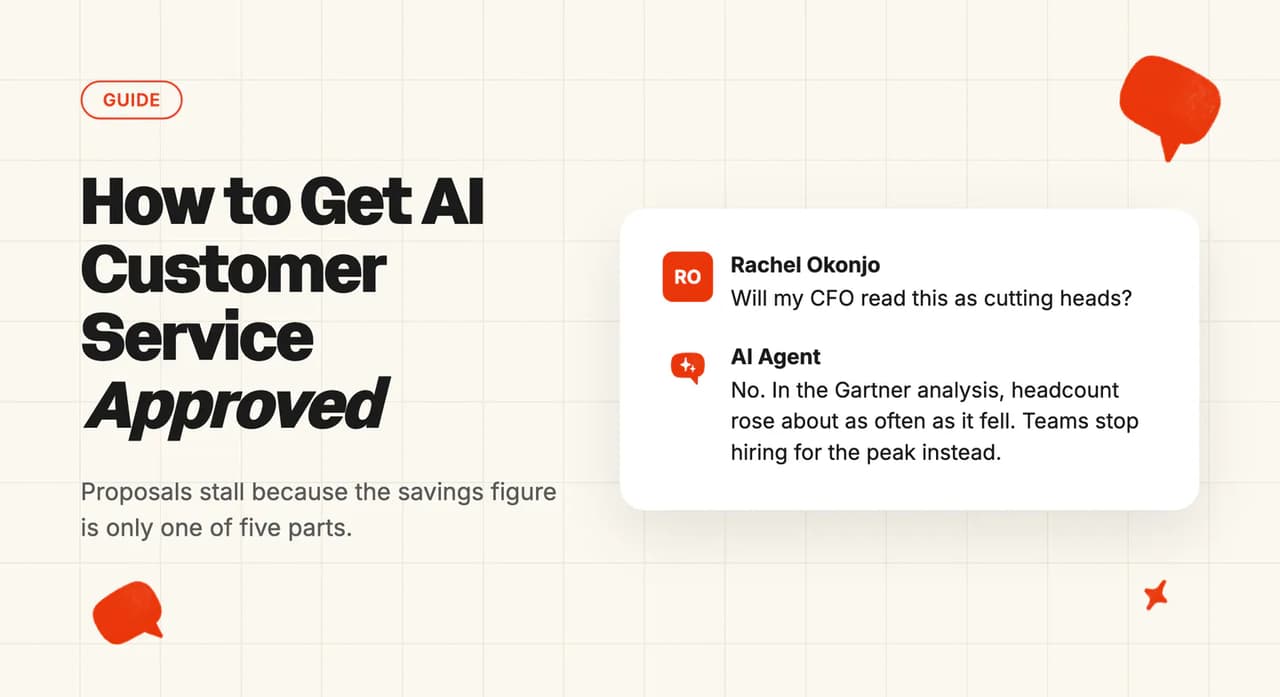
- Are we cutting heads? No. Companies stop needing to hire as many as they scale, and stop hiring for the seasonal peak, while the people you already have stay where they are. The same Gartner analysis found headcount increases and decreases running about a quarter each way. CX Dive adds that businesses adopting AI are also hiring new specialist roles to manage it.
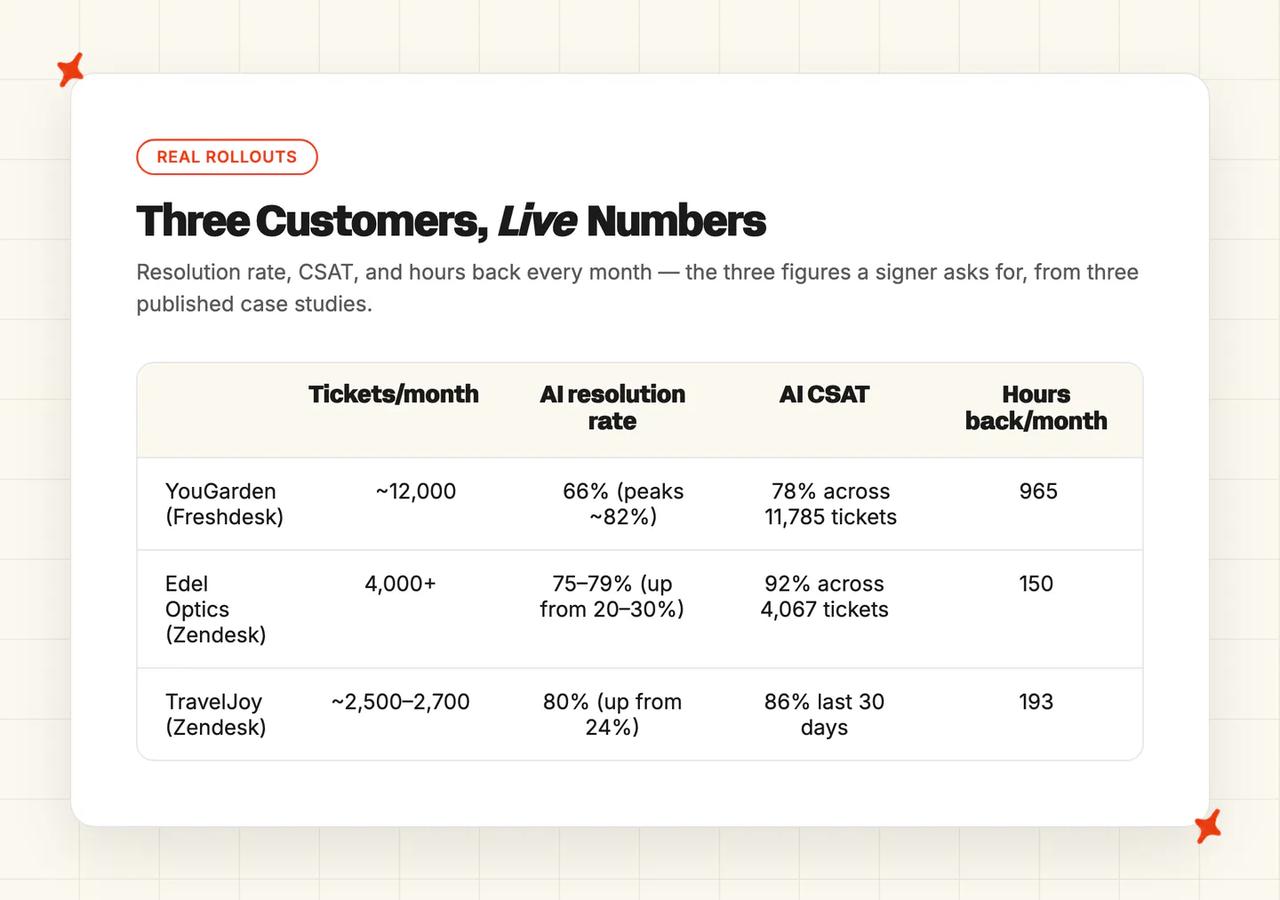
- What if CSAT drops? Answer with numbers from teams like yours. Edel Optics recorded 92% AI CSAT across 4,067 tickets, TravelJoy 86%, and YouGarden 78% across 11,785 tickets, each of them a published case study you can forward.
- Can we predict the bill? You do not know how many replies you'll send next month, or what resolution rate you'll run on day one, and a price on either is a price you cannot forecast. Ask each vendor what happens to your bill as the agent improves, and pick the one whose answer is nothing changes. Our post on the hidden costs of AI customer service covers the rest.
- What if we miss the resolution rate we modeled? Most of the rate comes from knowledge coverage, usually 40-70%. Connecting customer and order data adds roughly 15-50% more, and letting the agent take actions adds a further 5-20%. Each block is more work than the last, so commit to the first and stage the rest. Our AI resolution rate benchmark study is the fairest number to quote as a target.
- What will security and legal ask? Where customer data goes, who can see it, and how you turn it off. Answer at that level, get your vendor's security documentation in front of them early, and keep the detail out of this document. Our post on AI customer service security and compliance covers what to expect.
- How do we know it isn't just making things up? Your team can ask Echo why the agent gave any answer and which source it used, any time after the fact. That check stays inside your team, because we built Echo for the operator. Give that answer before hallucination risk becomes a reason to wait.
Six fits on one sheet, and if you cannot answer one of them in a sentence, that is where we focus the rest of the work before the meeting.
Component 4: The Rollout Plan
Use weeks, because a fixed date ages badly and invites an argument about the calendar. Each phase needs an exit criterion, which turns a promise to monitor into something your sponsor can hold you to. We run four phases.
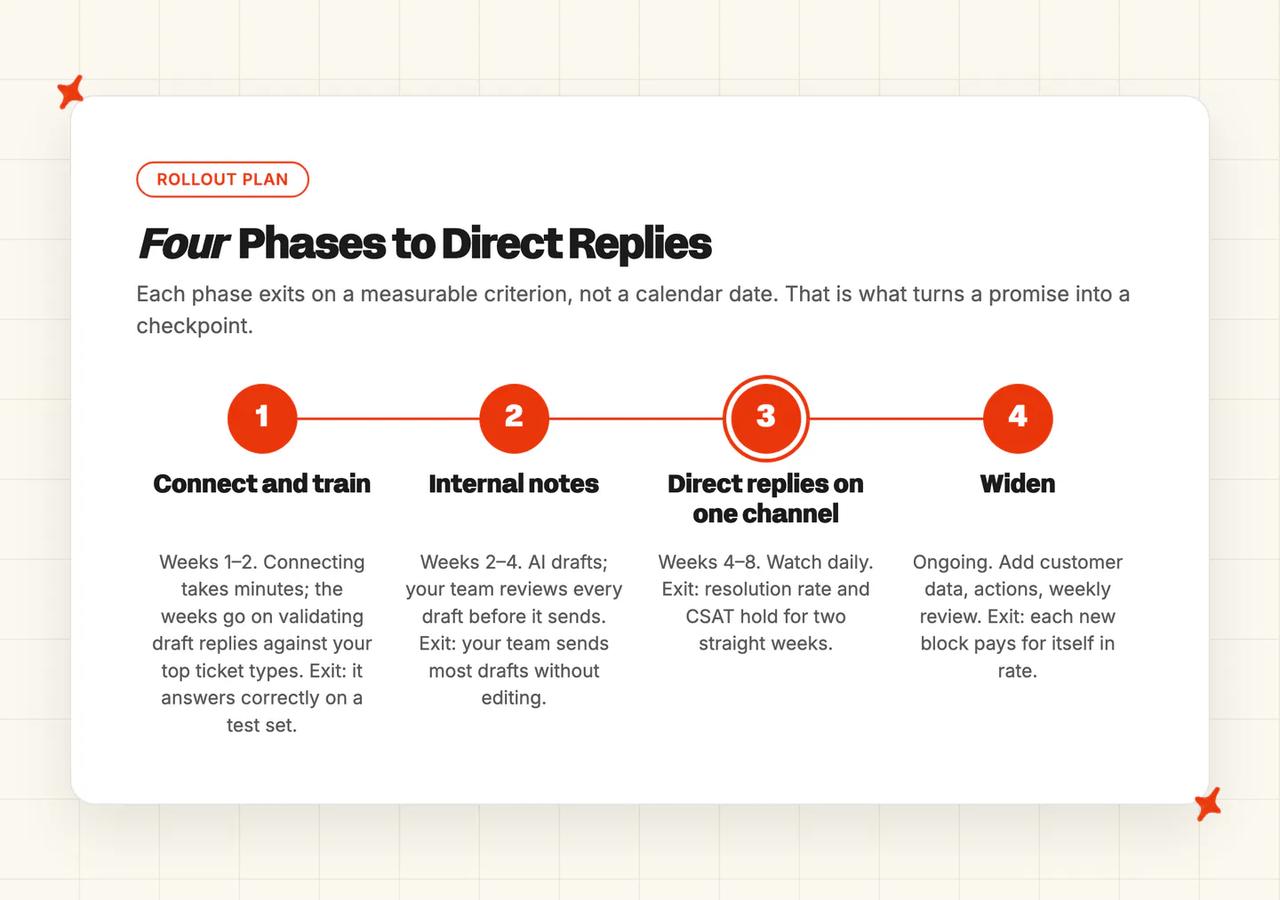
| Phase | Weeks | What your team does | Exit criterion |
|---|---|---|---|
| Connect and train | 1 to 2 | Connecting takes minutes, so these weeks go on validating draft replies against your top ticket types | It answers your top ticket types correctly on a test set |
| Internal notes | 2 to 4 | The AI drafts, one of your team reviews every draft before it sends | Your team sends most drafts without editing them |
| Direct replies on one channel | 4 to 8 | Let it reply on chat or on one ticket type, watch daily | Resolution rate and CSAT hold for two straight weeks |
| Widen | Ongoing | Connect customer and order data, add actions, review weekly | Each new block of work pays for itself in rate |
You can run the first phase before your help center is ready. Train on Historic Tickets builds starter knowledge from your last 5,000 support tickets by default, more on request, so even a blank slate has something for the agent to learn from.

Our rollouts usually run in that order. YouGarden and Edel Optics both moved from note mode to direct replies as confidence grew, and Edel Optics' rate lifted from 20-30% to 75-79% once customer data was connected. TravelJoy went direct on chat from day one and kept the AI in notes mode on email by choice.
We see the owner load at around half an hour a week, held by somebody who understands your customers. A support lead can do it without a technical background. Self-Learning works from the start, so the agent is already collecting the questions it could not answer while your owner reviews them.
The last line of this plan is what you commit to proving after go-live, and when. Our post on measuring the ROI of AI customer support covers how to check that once you're live, against what you promised here.
Component 5: The One-Pager
We compress the other four parts into one page, because your sponsor will forward it to somebody who wasn't in the meeting. Write it last, in six lines.
| Line on the page | What goes in it |
|---|---|
| The ask | One sentence. The vendor, the monthly cost, the start date in weeks. |
| Why now | The three Baseline numbers that justify it, including the hire already in the plan |
| The money | The before and after monthly total, with the AI portion called out |
| The two objections | The two most likely to come back, each with a one-line answer |
| The first checkpoint | A number of weeks from start, and the number you will report at it |
| If it does not work | What you switch off, what it costs to stop, and what you keep |
If somebody reads that page cold and still knows what they are approving, the pack is done. If they have to come back and ask you something, fix that line before the meeting.
How do you get AI to draft the one-pager for you?
Editing a draft is faster than staring at an empty page, so hand the first version to whichever AI tool you already have open. Paste the prompt below with your numbers in the brackets, then correct what comes back; I cut the adjectives it reaches for about the technology, and any number it has filled in that I did not give it.
You are helping me write a one-page business case to put an AI support agent in front of my CFO. I run customer support. Use only the numbers below, and where one is missing, write [MISSING: what to pull and where from] instead of estimating it.

My baseline:
- Monthly ticket volume: [your monthly ticket volume]
- Share of volume that is the same handful of repeated questions: [your repeat share as a percentage]
- Current cost to serve a ticket: [your cost to serve one ticket]
- First response time and resolution time: [your two times]
- Headcount already in next year's plan, including seasonal peak cover: [your planned hires]

Cost today, per month: [paste your rows for helpdesk seats, any AI you already pay for, outsourced overflow and the hire in the plan]
Cost after, per month: [paste the same rows at the new vendor's published rates]

Write one page, six lines, in plain business English:
1. The ask: the vendor, the monthly cost, the start date in weeks.
2. Why now: the three baseline numbers that justify it, including the hire already in the plan.
3. The money: the before and after monthly total, with the AI portion called out.
4. The two objections most likely to come back, each answered in one line.
5. The first checkpoint: how many weeks from start, and the number I will report at it.
6. If it does not work: what I switch off, what it costs to stop, and what I keep.

No adjectives about the technology. Every claim traces to a number I gave you.
On our onboarding calls, the teams who arrive with the pack already written spend that first call on the rollout instead of on the document.
What do real AI customer service rollouts look like?
A signer will ask what an AI rollout looked like somewhere else, and three of our customers have published the figures they ask about. A resolved ticket, in our definition, means the AI handled it end to end, without a human drafting or approving the reply and without escalating it to a person. Agree that definition before anyone quotes a rate at you.
YouGarden: 965 hours back a month, and the peak that got absorbed
YouGarden sell plants and garden products online, and their support volume swings hard with the seasons. They run around 12,000 tickets a month through Freshdesk, where their AI resolution rate is 66% and peaks around 82%, giving them 965 hours back a month and 78% AI CSAT across 11,785 tickets. They came to us after their previous AI vendor stopped improving.
Those 965 hours are the seasonal cover they did not have to buy. Their head of customer service described the change like this.
"My AskAI has fundamentally changed how we support our customers. The quality and consistency of responses are extremely high, and it's allowed us to scale support without compromising the experience we're known for at YouGarden." Mamunur Rahman, Head of Customer Service at YouGarden, in their case study
Edel Optics: 92% AI CSAT across 4,067 tickets
Edel Optics sell eyewear across Europe and run 4,000+ tickets a month on Zendesk, which makes them our closest match to the worked example above. Their AI resolution rate is 75% to 79%, up from 20% to 30% before their customer data was connected, and they get 150 hours back a month.
Their AI CSAT is 92%, across 4,067 rated tickets in the same rollout that lifted their resolution rate.
TravelJoy: from 24% to 80% on the same helpdesk
TravelJoy build software for travel advisors and handle roughly 2,500 to 2,700 tickets a month in Zendesk. They had already tried the AI bundled with their helpdesk and were at 24% resolution when they came to us. On My AskAI they run at 80%, with 193 hours back a month and 86% AI CSAT over the last 30 days, 77% across the year.
This is the closest proof we have for a team replacing an AI they already pay for. They kept the same helpdesk and swapped the AI agent, and the resolution rate more than tripled. Their head of customer service wrote this in their case study, when they were running at 76%.
"Our experience with My AskAI has been nothing short of transformative. In comparison to Zendesk's AI agent, we're now achieving an impressive 76% AI resolution rate, versus just 24% before. The dramatic improvement has elevated the overall level of service." Alan Pugh, Head of Customer Service at TravelJoy, in their case study
We publish all three case studies in full, and you are welcome to forward them with your pack. Each one has a named company and a job title against the numbers.
What to do this week
None of this needs a vendor on the call, and an AI tool will do most of the sorting for you.
- Pull last month's tickets and split them by type - half an hour if you export the raw list and let AI group it. You will end up with the share of your volume that is the same handful of questions, and every other number in the pack rests on it.
- Put the five baseline numbers into the calculator - ten minutes. Use the version we built for your helpdesk, and save the result, because you will be asked to rerun it with a different assumption. You end up holding a payback period and a monthly saving figure you can defend.
- Build the before and after table for one month - half an hour. Monthly figures, the cheapest plan that covers your volume on every row, and no annual column. You end up with a single monthly delta the signer can read off one row.
- Write the Objection Sheet before you book the meeting - half an hour. If any answer takes you more than a sentence, you have found the part of your case that needs work.
Do all four in the week you decide to look at AI support, before you take a vendor call from us or from anybody else. The saving starts the month the agent goes live.
By the end of that week you have the Baseline, the Before/After and the Objection Sheet; the Rollout Plan comes from whichever vendor you shortlist. The One-Pager is ten minutes of copying, because every line on it already exists somewhere in the other four.
We can help with the Before/After and the Objection Sheet: the calculator is free, and our rates are published.
When is a business case for AI customer service not worth making?
If you handle a few hundred tickets a month, or your ticket mix has almost no repetition in it, the work of building and defending this case costs more than the saving returns. The gain comes from volume of repeated questions, and if the same questions do not come back there is nothing for the agent to get good at. That is a volume problem, so revisit it once your ticket count grows.
A thin help center is a fine place to begin, because our agent trains on your last 5,000 historic tickets and your articles can catch up later.
A deliberately low resolution rate can also be the right answer, and a signer who was promised 80% and then sees 25% will feel misled even when the rollout is working perfectly. Inspire Uplift run at 21% across roughly 6,100 Zendesk tickets a month at 66% AI CSAT, and Sofar Sounds run at 26% on around 750 tickets a month at 85% AI CSAT. Both suppress resolution on purpose, using escalation guidance to push whole categories of ticket to a human. We built both rollouts around routing each ticket to whoever can answer it best.
Two more costs belong in the version you present. The human half of the job gets harder, because the easy tickets stop arriving and your team is left with the difficult ones. Somebody also has to own the agent as a real slice of their role (worth naming who before you go live).
Somebody has to teach the agent your products, your policies and your edge cases. You do it once, though, and it then applies to every customer you have.
A business case is still worth making for a team doing thousands of repeated tickets a month, and both of those costs change what you should promise in the room. Commit to a range you can hit and you stay credible at the first checkpoint.
We will tell you to wait when your volume or your ticket mix says so, because a rollout that starts too early tends to be one we lose within a quarter.
The takeaway
Most AI support proposals arrive as a saving and a vendor name, then stall in the meeting. The five parts of the Approval Pack fix that, because each one answers a different person in the room: the Baseline, the Before/After, the Objection Sheet, the Rollout Plan and the One-Pager.
If you do one thing this week, pull the five baseline numbers out of your helpdesk: monthly volume, the split by ticket type, your cost to serve a ticket, your response and resolution times, and the headcount already in the plan. An hour of work gives you every input our pack needs. It also moves the meeting off the vendor and onto your own numbers.
When you get to the point of testing the numbers, our 30-day trial gives you every feature with no card. YouGarden, Edel Optics and TravelJoy all publish the numbers behind their rollouts.
FAQs
How do I build a business case to replace our current AI support vendor?
The most useful comparison we see teams make is a measured resolution rate on the same ticket set, where the denominator is identical on both sides. Use the same five-part Approval Pack, with one change in the Before/After table. Keep your helpdesk seat cost identical on both sides and compare the AI portion only, so the room can see exactly which line moves. Your strongest evidence is your trial, so run the new agent against the same tickets your current one handles and put the two resolution rates side by side.
What should a customer service leader put in front of the CFO to get an AI agent approved?
What stops most packs in the room is a missing answer to "what do we do if it misses." That answer belongs on page one of the One-Pager, the fifth part of the Approval Pack. Six lines: the ask, the three baseline numbers that justify it, the before and after monthly total, the two objections most likely to come back with their answers, the first checkpoint stated in weeks, and what happens if it does not work. Everything else in the pack is the supporting evidence behind those six lines, attached for anyone who wants to read further.
Will AI replace customer service?
It changes which tickets reach a person. What we see across our customers is that teams stop scaling tier one and stop hiring for seasonal peaks, while the people they have move onto the harder tickets. The independent picture matches: in the Gartner analysis reported by CX Dive, organizations increasing headcount roughly matched those reducing it. CX Dive adds that businesses are also hiring new specialist roles to manage the AI.
How much does AI customer support software cost?
Most pricing comes down to per ticket or per resolution, though a few vendors bundle AI into the seat price or an annual license instead. Our Pro plan is $199 a month with 1,000 credits included and $0.12 a credit after that, which works out around $0.12 for a typical chat ticket and $0.18 for a typical email ticket, with usage features such as tagging and actions priced separately. Per-resolution vendors charge you more as their agent improves, so the same volume costs more next year than it does this year. Our post on AI customer service pricing models compares the models properly.
What resolution rate should I expect from AI customer support?
The field median across 195 rated deployments from 38 vendors in our benchmark dataset is around 70%. That is the number to put in your plan. Published vendor figures skew high, because a vendor publishes its best rollouts. Your ceiling depends mostly on how much of your volume is repeated questions, which is why the ticket split in the Baseline is the number the rest of the case rests on.
Which companies use AI for customer service?
Plenty of names you would recognize, and a few of ours that publish their numbers. YouGarden run around 12,000 tickets a month on Freshdesk, Edel Optics 4,000+ on Zendesk, and TravelJoy roughly 2,500 to 2,700 on Zendesk. Inspire Uplift and Sofar Sounds are two more of ours, both running deliberately low resolution rates for reasons they publish.
How to evaluate AI customer service tools: what should I look for?
Pricing is what usually separates a shortlist, because two vendors with near-identical feature lists can bill you very differently. Start with the three questions that sort the field quickly. Can you forecast your usage of whatever unit you are billed in, does your bill rise as the agent gets better, and how far up the ladder from knowledge to customer data to actions can the tool take you? Add your security requirements and the helpdesk you already run, and most shortlists resolve themselves in a week.