10 Best Zendesk Alternatives in 2026 (Competitors Ranked and Priced)
Leaving Zendesk costs about what arriving cost. Ten Zendesk alternatives and competitors, whole helpdesks, scored out of 80 and priced, plus when to stay.
Summarize with AI
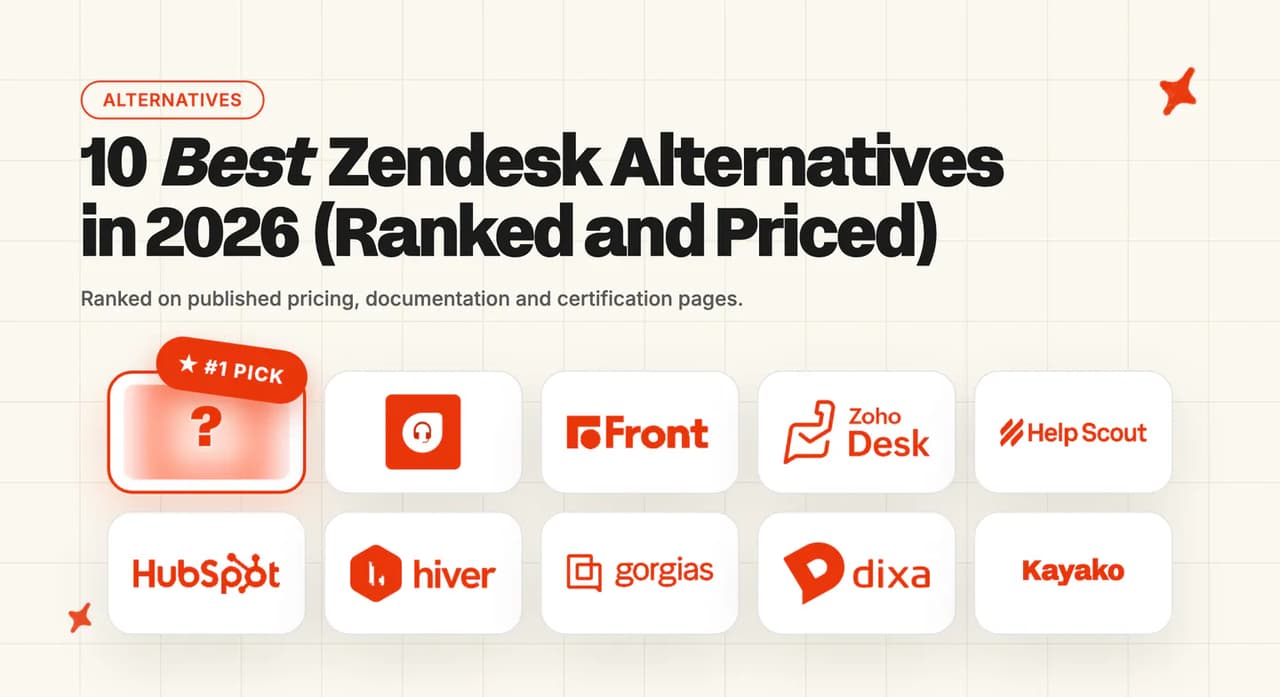
The renewal quote landed. Or the automated resolution line on the invoice did, and it was bigger than the seats. Either way, "look at Zendesk alternatives" is now a task with your name on it. Ten helpdesks here clear the bar on published evidence, Intercom highest at 72/80 and Freshdesk the value answer at 64/80, and the catch worth knowing up front is that eight of the ten bill their AI agent as a separate line you have to price yourself (Zoho Desk and Hiver bundle it in the plan).
So I scored ten helpdesks a Zendesk team can actually move onto: Intercom, Freshdesk, Front, Zoho Desk, Help Scout, HubSpot Service Hub, Hiver, Gorgias, Dixa and Kayako. Each one is marked on eight criteria, ten points apiece, for a score out of 80.
Prices come from each vendor's published pricing page. Every pricing model is also dropped into one monthly number at the same volume, which is the comparison I put in front of a CFO.
Two things to settle first. If you want to replace Zendesk Sell, that is a CRM question, and if you mean Zendesk Chat, that is a live chat question. This post is about Zendesk Support and Zendesk Suite, the ticketing platform your agents sit in all day.
And if the helpdesk itself is fine, and the sting is the automated resolution line, you probably do not need a new helpdesk at all. Our roundup of Zendesk AI alternatives covers that route, so this page will not re-argue it.
Are there real alternatives to Zendesk?
Zendesk got expensive because the AI is charged on top of the seats, and because the rate per automated resolution is the part that moves when your volume moves.
The headline numbers I work from are $1.50 per automated resolution on a committed plan and $2.00 pay-as-you-go. Monthly allowances do not carry over, and the maximum allowance per year across all plans is $5,000.
Zendesk also runs two billing models side by side right now, which is why two customers on the same product describe the bill to me in completely different ways. Its own documentation is direct about the newer one, in the article describing the tiers:
"This article describes the automated resolution tiers that were introduced on May 18, 2026"
And about who stays on the older one, in the allowance article:
"Customers who are on this platform remain so until they move to resolution tiers."
The second trigger is the migration you already paid for once. A Zendesk implementation runs four to eight weeks, and professional services on a serious rollout start around $5,000 and climb well past $50,000. By my arithmetic, leaving costs about what arriving cost.
The people who have actually made this call disagree. One operator in an r/SaaS thread on this exact question put the case for staying:
"There's other options, but I've not found one that is as good as Zendesk. I've implemented freshdesk, salesforce service cloud, JIRAs service desk and none of them come close to Zendesk." — /u/new2thishtorw
Another in the same thread made the arithmetic argument for standing still:
"it will always be cheaper and less headaches than moving off, no migration of data etc" — /u/saasae2022
One argument is about quality, the other about switching cost. Which of the two you are actually paying for is what decides it.
How do the 10 Zendesk alternatives compare?
Every criterion is scored out of 10. The Overall is the sum of that vendor's own eight cells, and the percentage is that sum over 80. I ordered the columns left to right by Overall.
| Criterion (scores out of 10) | Intercom | Freshdesk | Front | Zoho Desk | Help Scout | HubSpot | Hiver | Gorgias | Dixa | Kayako |
|---|---|---|---|---|---|---|---|---|---|---|
| Ticketing and agent inbox | 10 | 10 | 8 | 10 | 8 | 8 | 6 | 8 | 8 | 8 |
| Setup and migration off Zendesk | 4 | 2 | 8 | 2 | 8 | 2 | 6 | 2 | 4 | 4 |
| Native AI agent | 10 | 8 | 6 | 8 | 6 | 8 | 6 | 8 | 6 | 8 |
| Channels | 10 | 10 | 8 | 10 | 6 | 8 | 6 | 8 | 10 | 4 |
| Knowledge and training sources | 10 | 8 | 6 | 8 | 8 | 8 | 6 | 8 | 6 | 6 |
| Security and compliance | 10 | 8 | 8 | 6 | 6 | 6 | 10 | 6 | 6 | 2 |
| Maturity and scale | 10 | 10 | 8 | 10 | 8 | 10 | 6 | 8 | 6 | 4 |
| Cost and pricing transparency | 8 | 8 | 10 | 8 | 10 | 8 | 10 | 6 | 8 | 2 |
| Overall (out of 80) | 72 (90%) | 64 (80%) | 62 (78%) | 62 (78%) | 60 (75%) | 58 (73%) | 56 (70%) | 54 (68%) | 54 (68%) | 38 (48%) |
| Entry price published | $39 seat/mo | $19 agent/mo | $25 seat/mo | $0, then $7 user/mo | $25 user/mo | $0, then $20 seat/mo | $25 user/mo | $40/mo | €89 agent/mo | not published |
I flag one cell outright. Kayako scores 2 on security because its published certification list is thinner than every other vendor here.
Setup and migration off Zendesk is the weakest-covered criterion on the board: only three vendors publish a Zendesk-specific route you can plan against.
How did I pick these ten?
Rule one: it replaces the whole of Zendesk Support. A chat widget with a bot attached is a different purchase.
Rule two: it publishes enough to be verified. Every score traces to a vendor's own pricing page, security page, documentation or customer page. Where a vendor publishes nothing on a criterion, I score the absence.
Rule three: the vendor appears on the shortlists buyers already see. Freshdesk, Help Scout, Zoho Desk, Intercom, Front, HubSpot Service Hub, Gorgias, Hiver and Kayako are the names that recur across the published Zendesk-alternative roundups. Most of them turn up again in our scored rundown of AI help desk software.
Rule four: it can run a support team at scale. A product that answers pre-sales chat and hands the rest to a human did not make my ten.
We build an AI layer that runs inside a helpdesk, so we are not one of the ten.
How did I compare them?
The eight categories are ticketing and agent inbox, setup and migration off Zendesk, native AI agent, channels, knowledge and training sources, security and compliance, maturity and scale, and cost and pricing transparency. Evidence comes from published pricing pages, security or trust pages, product documentation, help centers, customer stories, G2 reviews, and the AI agent's page where a vendor has one. Where a vendor publishes no figure on a category, the gap is what I score, and every score is relative to this set of ten rather than to the wider market.
Two vendors publish pages that disagree with themselves on a number that lands on your invoice.
The first is Zendesk's. Two billing models for automated resolutions are running in parallel on Zendesk's published pages at the same time, tiers and allowances, and the documentation confirms both. Zendesk's article on the tiers also records an exemption: "This tier does not count against your resolution allowance." Which model applies to you depends on when you signed and whether you have moved, so I never take a Zendesk AI quote at face value until the model is named on it.
The second is Intercom's. Its structured pricing data lists Essential at $39, Advanced at $99 and Expert at $139 per seat a month, while the rendered page shows $29, $85 and $132 billed annually. That is one price under two billing bases, and on their own terms both are correct. Ask which basis a quote uses before you compare it to anything.
Is Intercom a good Zendesk alternative?
Intercom is the closest thing on this list to a like-for-like replacement that also upgrades the AI, which is why the top of this table is not close. On the AI agent itself, Fin is the one to beat.
G2: Intercom Fin scores 4.5/5 from 3,901 reviews on G2, as of August 2026, the largest AI-agent review footprint in this set. Stephan W., Head of Support, writes that it "does a strong job handling common, repetitive questions with high-quality, on-brand responses", though the same reviewer notes "the pay-per-resolution approach makes costs hard to predict at higher volumes", via G2.
How does Intercom handle tickets and the agent inbox?
Intercom runs a messenger-first inbox with tickets layered on top, so conversations stay threaded from first contact to close. Agents get assignment rules, macros, side conversations and SLA targets. The workspace is built around the conversation, with the ticket record underneath it, and I give a Zendesk admin a week or so to stop fighting it.
How hard is it to migrate from Zendesk to Intercom?
This is Intercom's weakest criterion: it publishes no Zendesk migration guide at all. The move itself is common enough, but you will be planning yours from a sales conversation, with no public document behind it. Get that plan in writing before you sign.
What can Intercom's native AI agent do?
Fin answers autonomously across chat, email and the help center, escalates with full context, and runs Fin Tasks for multi-step actions. Its published rate is tied to an actual resolution, so I can price it against your volume instead of your headcount.
Which channels does Intercom cover?
Email, in-app messenger, live chat, WhatsApp, SMS, Instagram and Facebook, with phone through partners. The messenger is the strongest of the ten, and on a web or mobile product it is what puts Intercom at the top of my table.
What knowledge sources can Intercom train on?
Help center articles, public URLs, uploaded files, internal snippets and past conversations. Fin also keeps learning from the corrections your team makes, so answer quality tracks how well your help content is written. Tidy the help center before you switch.
How secure is Intercom?
The broadest compliance grid on this board covers SOC 2 Type II, HIPAA, ISO 27001, ISO 27018, ISO 27701, ISO 42001, AIUC-1, GDPR and CCPA, with a 99.8% uptime SLA. If your procurement team sends out a 200-row questionnaire, this is the vendor most likely to answer all of it.
Who is using Intercom?
Kalshi, Vanta and Glean are named on Intercom's customer hub. One thing I factor into a multi-year bet: Salesforce completed its acquisition of Fin, formerly Intercom, on 10 September 2026, a deal worth around $3.6bn that was announced in June, so the roadmap now sits with Salesforce.
How much does Intercom cost?
Intercom's pricing page lists Essential, Advanced and Expert at $39, $99 and $139 per seat a month in its structured data, and $29, $85 and $132 billed annually on the rendered page. Fin is $0.99 per resolution on top, and that last number is the one I watch, because it grows with you.
Read more: our complete guide to Intercom Fin, our roundup of the best Intercom Fin alternatives, our explainer on Intercom Fin pricing, and our My AskAI versus Intercom Fin comparison.
Is Freshdesk a good Zendesk alternative?
Freshdesk is the value play for a big team. It is the most familiar move for a Zendesk admin, it costs a third as much per agent, and no other vendor here hands you a meaningful block of AI sessions before the charging starts.
G2: Freshdesk scores 4.4/5 from 3,769 reviews on G2, as of September 2026. "For their AI, we need to pay extra, and because of that, we are not able to use it." via a verified G2 reviewer (mid-market, computer and network security).
How does Freshdesk handle tickets and the agent inbox?
Freshdesk is the most Zendesk-shaped product in this set, with ticket lists, views, canned responses, automations, SLA policies and collision detection. A Zendesk admin can rebuild the same workflow here in a week, and I found no shorter relearning curve on this list.
How hard is it to migrate from Zendesk to Freshdesk?
Access is the problem here. Its migration article redirects to a login page, so you cannot read the route before you become a customer. The import itself is well-trodden, so I want the rep to open that article and walk you through it live.
What can Freshdesk's native AI agent do?
Freddy AI Agent answers autonomously across chat and email from your knowledge base, and Freddy Copilot drafts and summarizes for agents. The first 500 agent sessions are included, after which sessions are charged in blocks of 100. That is two separate AI purchases, Agent and Copilot, and I model them as two lines.
Which channels does Freshdesk cover?
Email, chat, phone through Freshcaller, WhatsApp, SMS, Facebook, Instagram and a customer portal. Native voice is the standout here, and for a team with a phone line it is what decides this for me.
What knowledge sources can Freddy train on?
Knowledge base articles, public web pages, uploaded documents and custom Q&As. Solution articles can be scoped by folder, so you can keep internal runbooks out of the customer-facing agent. Set that up on day one.
How secure is Freshdesk?
Freshworks' security page documents SOC 2, ISO 27001 and GDPR coverage, with data residency options across regions. The FedRAMP authorization you may have seen referenced belongs to Freshservice, the ITSM product, so I do not count it on this row.
Who is using Freshdesk?
Freshworks' customer hub names Regal Cineworld Group, Creditsafe, Bangor Savings Bank and the Government of the Bahamas. Freshworks states it is "Trusted by 74,000+ Businesses Worldwide", which is the largest published customer count in this set.
How much does Freshdesk cost?
Freshdesk's pricing page lists Growth at $19, Pro at $55 and Enterprise at $89 per agent a month, billed annually. Freddy AI Agent is $49 per 100 sessions after the first 500, and Freddy Copilot is $29 per agent a month billed annually ($35 monthly). Add the Copilot line to your model early, because my $95 row above assumes you skip it. It is per agent, so it scales with headcount.
Read more: our complete guide to Freshdesk Freddy AI, our roundup of the best Freshdesk Freddy AI alternatives, our explainer on Freshdesk Freddy AI pricing, and our My AskAI versus Freshdesk Freddy AI comparison.
Is Front a good Zendesk alternative?
Front is the only product here that publishes an inconvenient truth about its importer. If your team hated the ticket metaphor, this is your landing spot.
G2: Front scores 4.7/5 from 2,509 reviews on G2, as of August 2026, the highest rating in this comparison. "I find the AI very helpful for composing emails, allowing me to sound more professional, friendly, or empathetic." via Cari, a customer service rep, on G2.
How does Front handle tickets and the agent inbox?
Front is a shared inbox that can behave like a ticketing system, with assignment, internal comments, tags, rules and SLA rules. One operator described the flexibility directly: "I like the flexibility how you can set it up as a ticketing system in the traditional way, but you can also set it up more in the shared inbox style as well."
How hard is it to migrate from Zendesk to Front?
Front's help center names "migration partners Help Desk Migration or ClonePartner" and says of its own Zendesk importer that it "is not actively maintained". So the supported route is a partner-led import, and I score the candor above the tooling.
What can Front's native AI agent do?
Front Copilot drafts replies, summarizes threads and suggests tags, with Smart QA scoring conversations and Smart CSAT inferring satisfaction without a survey. Front also publishes Autopilot, an autonomous omnichannel AI agent available as an add-on on all plans, billed per conversation at $0.05 for triage, $0.39 for a handoff and $0.89 for a resolution.
Which channels does Front cover?
Email, live chat, SMS, WhatsApp, Facebook, Instagram and voice through integrations. Front's strength is that every channel lands in the same collaborative thread, which matters more to me than the length of the list.
What knowledge sources can Front train on?
Help center content, past conversations and connected knowledge sources through its integrations. Front's knowledge model is shallower than the full-suite vendors above it, and the AI leans on your existing thread history. Check yours is worth leaning on.
How secure is Front?
SOC 2 Type II and ISO 27001, both stated at page level with no trust portal request needed. That is a narrower list than Intercom's, and enough for most mid-market procurement.
Who is using Front?
Front's customer stories name Uber Freight, Echo Global Logistics and GP Transco. The concentration in logistics and freight is real, and I read it as a good sign if that is your industry. Front has a long track record at scale in high-volume operations businesses, so that is the reference call to ask for.
How much does Front cost?
Front's pricing page lists Starter at $25, Professional at $65 and Enterprise at $105 per seat a month, billed annually. Copilot is $20 per seat, Smart QA is $20 per seat and Smart CSAT is $10 per seat, each on top. Add all three and you have roughly doubled the Starter seat, which is why my Front row above prices Copilot alone.
Read more: our complete guide to Front AI, our roundup of the best Front AI alternatives, our explainer on Front AI pricing, and our My AskAI versus Front comparison.
Is Zoho Desk a good Zendesk alternative?
Of the ten here, Zoho Desk is the closest match to Zendesk on core ticketing. It and Hiver are the two vendors on this list that include AI in the seat price with no per-resolution charge.
G2: Zoho Desk scores 4.4/5 from 7,903 reviews on G2, as of September 2026, the largest review count in this set by a wide margin. Reviewers describe Zia's generative features as "built right into Zoho Desk at no extra cost", with reply quality "heavily reliant on the completeness of the knowledge base".
How does Zoho Desk handle tickets and the agent inbox?
Zoho Desk has the deepest configuration set here, with multi-department ticketing, work modes, blueprints for process enforcement, SLA policies, macros and a customizable agent workspace. On the core job it matches Zendesk feature for feature more closely than anything else I looked at.
How hard is it to migrate from Zendesk to Zoho Desk?
Zoho publishes no Zendesk-specific migration document. Imports exist and partners run them, and there is no public route to plan against before you buy, so the timeline comes from a salesperson.
What can Zoho Desk's native AI agent do?
Zia handles ticket summarization, sentiment and tone analysis, reply assistance and an answer bot, and it is bundled into the plan. Zoho also publishes an Agent Store with pre-built agents and an Agent Studio for building more, with no pricing attached to either. A blank price means ask.
Which channels does Zoho Desk cover?
Email, live chat, telephony, WhatsApp, SMS, Facebook, Instagram, X and a self-service portal. The channel breadth is at the top of this table and it comes included in the plan, which is most of why I rate the value argument here.
What knowledge sources can Zia train on?
Knowledge base articles, community content and past tickets. Reply quality depends heavily on how complete your knowledge base is, which is true of every vendor here and most visible when the AI costs nothing extra.
How secure is Zoho Desk?
Zoho's published security page describes its ISMS, encryption and data center controls and refers to a separate compliance portfolio for named certifications. The security page itself does not list specific certifications. My first ask of the rep is that portfolio.
Who is using Zoho Desk?
Zoho's customer page has the full list, and the SysGroup story is the most detailed support-specific one published. Zoho's overall install base is among the largest in the category, and the product has a long track record at scale, so scale is not the risk on this row for me.
How much does Zoho Desk cost?
Zoho's pricing page lists Express at $7, Standard at $14, Professional at $23 and Enterprise at $40 per user a month on annual billing, or $9, $20, $35 and $50 month to month. A free plan covers up to three users, and Zia is built in from Professional with no per-resolution charge. On Express and Standard, the generative AI features need a separate OpenAI account, so that part of the bill comes from OpenAI. The pre-built agents in Zoho's Agent Store have no published price, which is why this row scores 8 rather than 10.
Read more: our complete guide to Zoho Desk, our roundup of the best Zoho Desk alternatives, our My AskAI versus Zoho Desk comparison, and our explainer on Zoho Desk pricing.
Is Help Scout a good Zendesk alternative?
Help Scout has the clearest published move off Zendesk in this entire set, and the calmest inbox.
G2: Help Scout scores 4.4/5 from 431 reviews on G2, as of September 2026. "Lately, we've been taking advantage of their newer AI features, which have become part of our regular process." via Noxy P., an operations associate, on G2.
How does Help Scout handle tickets and the agent inbox?
Conversations look like email to the customer and like a shared inbox to the agent, with assignment, saved replies, workflows and collision detection. One operator in the r/SaaS thread on Zendesk alternatives recommended it on exactly that basis:
"Check out helpscout. Very user friendly for both the customer service team member and the customer." — /u/crankyolditguy
How hard is it to migrate from Zendesk to Help Scout?
This is the best-documented migration I found here, and by some distance. Help Scout's own article walks the Import2 route and states the carve-out: "Rules, Macros, and Saved Replies will not be transferred". Budget a day to rebuild those by hand and the rest comes across.
What can Help Scout's native AI agent do?
AI Answers resolves customer questions from your docs site, while AI Drafts, AI Summarize and AI Assist work on the agent side. It is competent, and the thing reviewers keep asking for is a more autonomous agent.
Which channels does Help Scout cover?
Email, live chat through Beacon, Facebook, Instagram and WhatsApp on every plan, SMS through your own Twilio number, and a Docs knowledge base. There is no native voice. I count that the biggest gap against Freshdesk or Zendesk Suite. If you run a phone line, Help Scout is not your destination.
What knowledge sources can Help Scout train on?
Docs articles, websites, PDF, Word and Excel files, and Google Docs and Sheets, while training on past conversations is still marked Coming Soon. One claim that circulated about Help Scout is now out of date: it does support SLA-style targets through workflows.
How secure is Help Scout?
SOC 2 Type 2 covering Security and Availability, plus HIPAA with a signed BAA available. No ISO 27001 is published, which is the same gap I flag against Front.
Who is using Help Scout?
Help Scout's customer page names Brain FM, Litmus and George Washington University. Brain FM achieved a 95% happiness score with under-1-hour average response across 100,000+ users, Litmus recorded a 26% increase in new-customer retention, and George Washington University handles 80,000+ emails a year.
The mix skews toward software, education and subscription businesses with high email volume. Help Scout is a mature product with a smaller install base than the full-suite vendors above it.
How much does Help Scout cost?
Help Scout's pricing page lists Standard at $25, Plus at $45 and Pro at $75 per user a month on annual billing, or $30, $54 and $90 month to month. AI Answers is charged at $0.75 per resolution, and resolutions are capped at 200 per month unless you lift the limit. Treat that cap as your deflection ceiling, because my $500 row above assumes you have raised it.
Read more: our complete guide to Help Scout AI, our roundup of the best Help Scout AI alternatives, our explainer on Help Scout pricing, and our My AskAI versus Help Scout comparison.
Is HubSpot Service Hub a good Zendesk alternative?
HubSpot Service Hub is the obvious answer for exactly one kind of team, the one already paying HubSpot for CRM and marketing. Support data landing next to the deal record is the whole of the advantage. Take HubSpot CRM out of the picture and there is no case for it in my ten.
G2: HubSpot Service Hub scores 4.4/5 from roughly 1,000 reviews on G2, as of June 2026, and there is no standalone G2 listing for Breeze. HubSpot's full seller profile carries 4.4/5 across products.
How does HubSpot Service Hub handle tickets and the agent inbox?
Tickets are CRM objects, so every conversation carries company, deal and lifecycle context automatically. The agent workspace is the Agent Inbox, found under the Agents section of the HubSpot navigation.
How hard is it to migrate from Zendesk to HubSpot?
HubSpot publishes no Zendesk migration route, so you are planning from a partner quote or an import tool, with no documentation behind it. The CRM import path is mature and the helpdesk-specific one is undocumented, so get the partner named before you commit. An undocumented import worries me more here than on a generic swap, because the CRM context you are paying for is the last thing to land.
What can HubSpot's native AI agent do?
HubSpot's customer agent answers from your knowledge base inside the chat widget and the conversations inbox, and Breeze Assistant drafts and summarizes for agents. It is newer than the agents above it and the reviews say so. Trial it before you write it into a business case. I am not taking the newest agent on this board on trust.
Which channels does HubSpot cover?
Email, live chat, Facebook Messenger, WhatsApp, forms and calling. The channel list is solid, and the join with marketing and sales conversations is what you are really buying.
What knowledge sources can Breeze train on?
Knowledge base articles, website pages and connected CRM records. Grounding the agent in CRM data is the distinctive part. I cannot get that from a standalone helpdesk.
How secure is HubSpot?
A SOC 3 report is public and SOC 2 Type 2 is available under NDA. The ISO 27001 certificate in HubSpot's compliance materials belongs to the hosting provider, not to HubSpot itself, which is the same catch I flag on Kayako.
Who is using HubSpot Service Hub?
HubSpot's case study on Sticos, a Visma company, is the most detailed support-side example published. The broader install base is enormous and most public stories are CRM and marketing, so the reference call I ask for is a support-side one.
How much does HubSpot Service Hub cost?
HubSpot's service product page lists a free tier, Starter at $20 and Professional at $100 per seat a month, billed monthly. Additional core seats are $45 each, and AI credits are $10 per 1,000 a month. Count those extra seats before you model this, because $45 each sits on top of the plan.
Read more: our complete guide to HubSpot Breeze AI, our roundup of the best HubSpot Breeze AI alternatives, our explainer on HubSpot Breeze AI pricing, and our My AskAI versus HubSpot Breeze AI comparison.
Is Hiver a good Zendesk alternative?
Hiver is the smallest move on this list. It lives inside Gmail, so there is no new interface to roll out, and I found its security list unusually long for the price.
G2: Hiver scores 4.6/5 from 1,283 reviews on G2, as of June 2026. "It also includes useful AI features such as automation and analytics, though these feel relatively basic compared to more advanced AI-driven platforms." via Ronak S., a sales executive, on G2.
How does Hiver handle tickets and the agent inbox?
Shared mailboxes, assignment, status, tags, notes and SLA rules all render inside Gmail itself. One operator put the appeal simply: "It's built on top of Gmail, so if your team already lives there, it just feels natural." It stays an inbox.
How hard is it to migrate from Zendesk to Hiver?
No Zendesk-specific guide is published, but the move is structurally small. You are forwarding mail into shared mailboxes, with no ticketing schema to rebuild, so the practical time to live is short. That is the one genuine advantage I give Hiver over the full suites.
What can Hiver's native AI agent do?
Hiver has AI Agents for auto-responses, an AI Copilot for drafting, and AI Insights for summaries. Reviewers describe it as useful and light, and the AI agent is included from Growth, the entry tier. Price the business case on Growth.
Which channels does Hiver cover?
Email first, plus live chat, WhatsApp, voice and a knowledge base through its Omni plan. The email experience is excellent, and I read the other channels as competent. Do not let a demo sell you the Omni plan on those alone.
What knowledge sources can Hiver train on?
Knowledge base articles and past email threads. The corpus is narrower than the full-suite vendors, which suits a team whose institutional knowledge really does live in the mailbox. Mine does.
How secure is Hiver?
The strongest certification list relative to price in this comparison. Hiver's security center publishes GDPR, SOC 2 Type II, ISO 27001, CCPA and HIPAA, which is a list I am used to seeing on enterprise contracts.
Who is using Hiver?
Hiver's Flexport story is the most detailed, and Bynder, Conservice and Egnyte are also named. The install base skews toward operations teams inside larger companies, so I read the scale evidence here as departmental.
How much does Hiver cost?
Hiver's pricing page lists Growth at $25 annual or $35 monthly, Pro at $55 or $65, and Elite at $85 or $95 per user a month. The AI agent you actually want, AI Agents and AI Copilot, is already included on Growth, the entry tier. That is the number I price against. Elite adds AI QA on top, for teams that want scoring and coaching as well.
Is Gorgias a good Zendesk alternative?
Gorgias is the ecommerce specialist, and for a Shopify store it is the most relevant product on this page. It is also the one pricing model I found here that can charge you twice for the same resolved ticket.
G2: Gorgias scores 4.6/5 from 538 reviews on G2, as of June 2026. "Automated responses, intent detection, and macros allow teams to handle high volumes of inquiries quickly without sacrificing personalization." via Joana Angela N., a customer support agent, on G2.
How does Gorgias handle tickets and the agent inbox?
The inbox is built around the order. Agents see the customer's Shopify or BigCommerce history, and can refund, cancel or edit an order without leaving the ticket. Macros, rules, views and tags all work the way a Zendesk admin expects, so I found the retraining cost as low as anything on this list.
How hard is it to migrate from Zendesk to Gorgias?
No Zendesk-specific migration route is published. Gorgias documentation covers setup thoroughly but not the import, so your plan comes out of a sales conversation.
What can Gorgias's native AI agent do?
The AI Agent resolves order status, returns, cancellations and product questions autonomously, and on Shopify it can take actions: cancel, discount, apply. BigCommerce buyers get the inbox and AI answers but the automated order actions are Shopify-only. Intent detection and auto-tagging run underneath it. Acting on the order, and not only answering about it, is what I am scoring on this row.
Which channels does Gorgias cover?
Email, live chat, SMS, voice, WhatsApp, Instagram, Facebook and TikTok. The social coverage is the strongest here, and for an ecommerce team that is where the tickets arrive.
What knowledge sources can Gorgias train on?
Help center articles, store policy pages, uploaded documents, guidance and product catalog data. Catalog grounding is the ecommerce-specific piece: the agent reads the live product and order record, so it answers about the item the customer actually bought. Nothing else on my list does that.
How secure is Gorgias?
Gorgias publishes SOC 2 Type II, with HIPAA available on request only. Intercom and Hiver both publish more.
Who is using Gorgias?
The Orthofeet story records 56% automation inside two months, and Glamnetic and The Diamond Store are also named with revenue attached. The customer list is almost entirely direct-to-consumer retail, so I read the scale evidence as real but single-segment.
How much does Gorgias cost?
The ladder runs Starter at $40, Basic at $90, Pro at $550 and Advanced at $1,430 a month, with annual rates of $77, $471 and $1,227. Ticket overage is $0.40 each on Starter and Basic, $0.36 each on Pro and Advanced, and automated interactions are $1.00 each on Starter, $0.90 on Basic and Pro and $0.85 on Advanced above the plan's included allowance. An AI-resolved ticket draws down both the ticket allowance and an automated interaction, so the same resolution is charged twice. That is the line I model before anything else on this vendor.
Read more: our complete guide to Gorgias Automate, our roundup of the best Gorgias Automate alternatives, our explainer on Gorgias AI agent pricing, and our My AskAI versus Gorgias Automate comparison.
Is Dixa a good Zendesk alternative?
Dixa is the European answer. EU data residency is native, the conversation model is omnichannel end to end, and the per-conversation AI rate is the lowest I found published in this set.
G2: Dixa scores 4.2/5 from 391 reviews on G2, as of June 2026, the lowest rating in this comparison. "There is also a good range of AI support, which works particularly well with case summaries and translations." via a verified G2 reviewer (mid-market, wholesale).
How does Dixa handle tickets and the agent inbox?
Dixa treats everything as one conversation regardless of channel, with routing by priority, skills and language. Agents get a single timeline per customer across every channel, which suits retail teams handling the same person by phone and email in one afternoon.
How hard is it to migrate from Zendesk to Dixa?
There are getting-started docs and an onboarding team, but no published Zendesk-specific import route, so your plan comes from an implementation call. There is no self-serve trial either, so budget time for the sales process. Nothing Dixa publishes commits it to a migration scope, so my one condition here is that the scope goes into the contract.
What can Dixa's native AI agent do?
Mim resolves conversations autonomously, and the AI side also covers case summaries and live translation, which reviewers single out. Automation depth is the most common complaint reviewers raise, particularly inside the flow builder. Test it hardest before signing.
Which channels does Dixa cover?
Email, chat, voice, WhatsApp, SMS, Facebook and Instagram, all native. Native voice is the differentiator, and Dixa has the cheapest phone story I found on this board.
What knowledge sources can Mim train on?
Knowledge base articles, past conversations and connected content sources. The corpus is adequate. Check yours covers the questions you want deflected before you promise your board a target.
How secure is Dixa?
SOC 2 Type I and Type II, plus SOC 3, with EU data residency. There is no ISO 27001 in the published list, so do not assume one on a procurement form.
Who is using Dixa?
The Rapha story and the Oliver Bonas story are the most detailed, with Charles Tyrwhitt also named. The list is heavily UK and European retail, and those are established brands operating at real scale.
How much does Dixa cost?
Dixa's pricing page lists Growth at €89, Ultimate at €139 and Prime at €179 per agent a month on annual billing. Mim is €0.35 per conversation, the lowest published AI rate in this comparison. At 500 conversations that is €175, against $750 for the same volume on Zendesk's committed rate.
Read more: our complete guide to Dixa, our roundup of the best Dixa alternatives, our explainer on Dixa pricing, and our My AskAI versus Dixa comparison.
Is Kayako a good Zendesk alternative?
Kayako is the cost-reset play. It sells on a single per-resolution number and a bundled platform, and it withholds its platform price entirely. Nothing else on my board asks you to commit without a published number.
G2: Kayako scores 4.0/5 from 222 reviews on G2, as of June 2026, the smallest review footprint in this comparison. "I love how the AI helps us reply to tickets faster. The summaries and suggestions save a lot of time." via a G2 reviewer (customer care rep).
How does Kayako handle tickets and the agent inbox?
Kayako runs a conventional ticketing model with views, macros, SLA rules and a self-service help center. The AI Ticket Assistant lets an agent interrogate a ticket to surface details, and a self-learning mode trains on closed tickets. The feature set here is standard.
How hard is it to migrate from Zendesk to Kayako?
Its help center publishes a generic "Importing Your Data from Your Old Helpdesk" article, and there is no Zendesk-specific route and no published time to live. I will not put a business case on a generic guide with no time estimate.
What can Kayako's native AI agent do?
Kay answers autonomously, suggests responses to agents, and learns from resolved tickets. Kayako's own positioning is unusually blunt about the commercial model:
"Kayako One includes everything you need to run modern customer support—with Kay's $1/resolution AI always included."
Kayako also states that "Escalations to humans and simple deflections don't count." That second line decides what you are billed for.
Which channels does Kayako cover?
Email, live chat and a help center, with social through integrations. This is the narrowest channel list in my comparison.
What knowledge sources can Kay train on?
Help center articles and closed ticket history through self-learning mode. There is no published connector library for third-party document sources, which limits it if your knowledge lives in Notion or Confluence.
How secure is Kayako?
Kayako's security page publishes considerably less than every other vendor here. The certifications it lists (SOC 1, SOC 2, SOC 3, PCI DSS, ISO 27001 and related standards) belong to the data center facilities Kayako rents, not to Kayako itself. If you have a compliance requirement, ask for a certification report issued in Kayako's name before anything else.
Who is using Kayako?
Kayako's customer page names Trilogy, Khoros, Aurea, IgniteTech and Contently. Those names are concentrated in the ESW and Trilogy portfolio, which is the same corporate family as Kayako itself, so I treat the list as portfolio evidence. Colin Guilfoyle, SVP of Customer Support at Trilogy, is quoted as saying:
"We weren't buying a new interface. We were buying a cost reset."
How much does Kayako cost?
Kay is $1 per resolution and Kayako says the platform is included. The platform price itself is not published on any surface, there is no free plan, no trial and no self-serve sign-up, so every number you get comes out of a sales conversation. Ask for it in writing on the first call.
Is there a free or open-source Zendesk alternative?
The open-source route is real, and it comes up in the r/SaaS thread on Zendesk alternatives:
"There is an open source product called Zammad." — /u/Evoolo
Zammad is a mature, self-hostable helpdesk with ticketing, a knowledge base and multichannel support. I point chat-heavy teams at Chatwoot, the other serious open-source option, with a stronger chat and messaging model. Both give you the platform for the price of running it, and with both you buy the customer-facing AI agent separately.
On the hosted side, HubSpot Service Hub has the most usable free tier in this comparison: a real inbox, tickets and a knowledge base at $0. Zoho Desk also publishes a free plan for very small teams. Tidio and Crisp sit below all of this as chat-widget products with light ticketing, which is fine if your support volume is small and mostly pre-sales.
Before you pick a free option, do the arithmetic on the total bill. Self-hosting costs engineering time, and the AI you eventually add will be charged per resolution or per message by whoever supplies it, us included. Free platform plus paid AI is a sensible answer, as long as you price both halves. Skipping the AI altogether puts the volume back on your agents.
What do these actually cost at the volume you're running?
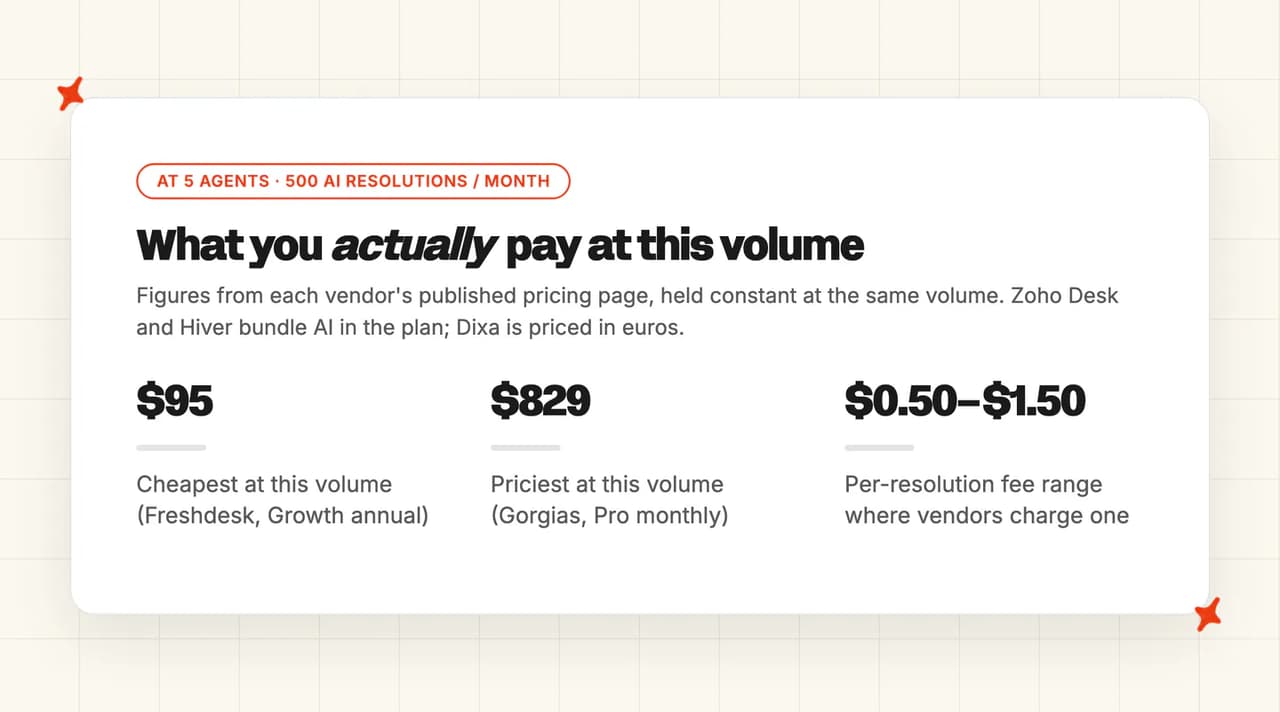
Every row below is priced on the lowest plan that covers this volume, using each vendor's own published figures. I held seat counts and AI resolutions constant so the pricing models are the only variable. Billing bases differ, so I state which one each row uses. HubSpot Professional also carries a mandatory $1,500 one-time onboarding fee, which sits outside this monthly view.
| Vendor | Plan priced | Seats at 5 agents | AI charge at 500 resolutions | Monthly cost at this volume |
|---|---|---|---|---|
| Freshdesk | Growth, annual | $95 | 500 sessions included (renewal period not stated on pricing page); $49 per 100 sessions beyond that | about $95 |
| Zoho Desk | Professional, annual | $115 | Zia included, no per-resolution charge | about $115 |
| Front | Starter plus Copilot, annual | $125 | $100 in Copilot seats | about $225 |
| Hiver | Growth, annual | $125 | included at this tier | about $125 |
| Help Scout | Standard, annual | $125 | $375 at $0.75 per resolution | about $500 |
| Intercom | Essential, structured-data basis | $195 | $495 at $0.99 per resolution | about $690 |
| HubSpot Service Hub | Professional, monthly | $500 | $220 at $0.50 per resolved conversation; 3,000 credits included | about $720 |
| Dixa | Growth, annual, euro-denominated | €445 | €175 at €0.35 per conversation | about €620 |
| Gorgias | Pro, monthly | $550 platform | $279 at $0.90 per interaction above the 190 included | about $829 |
| Kayako | Kayako One | not published | $500 at $1 per resolution | not published |
| Zendesk, for reference | Suite plus automated resolutions | your current seats | $750 at $1.50 committed, $1,000 pay-as-you-go | seats plus $750 to $1,000 |
The final number moves on the seat price, the AI rate and the annual ceiling. The first is that the seat price is now the small number. Freshdesk and Gorgias are within $460 a month of each other on seats, and I make the gap on the total more than $700.
The second is that per-resolution pricing takes over once volume rises. At 500 resolutions the spread between €0.35 and $1.50 is worth about $575 a month, which is more than most of these platforms cost on their own. That is the number I put in front of a CFO.

The third is what Zendesk charges. At $1.50 per automated resolution on a commitment, 500 resolutions is $750 a month on top of whatever you already pay for seats, and the annual allowance across all plans tops out at $5,000. Several vendors above resolve the same 500 tickets for less than that AI line alone.
The unit itself is not standard, so I do not compare two vendors on rate alone. Help Scout defines it as "A resolution is a single conversation that is resolved by AI Answers without human assistance." Kayako's test is that "A resolution is when Kay solves the customer's issue without human agent involvement", and Zendesk says paying per automated resolution means you "pay only for customer requests that were successfully resolved by an AI agent, without any escalation to a human agent." All three exclude escalated tickets, so the rate card only tells you half of what a resolution will cost you.
Should you actually leave Zendesk, or is it just the AI bill?
Write down what actually made you search. I get two answers to that.
One is the platform. Your team hates the interface, reporting will not answer the questions leadership asks, the admin burden is real, or you have outgrown the model. Those are platform problems and a migration fixes them. The ten vendors above are all credible destinations, and each one asks for a different trade: reporting depth, channel coverage or price.
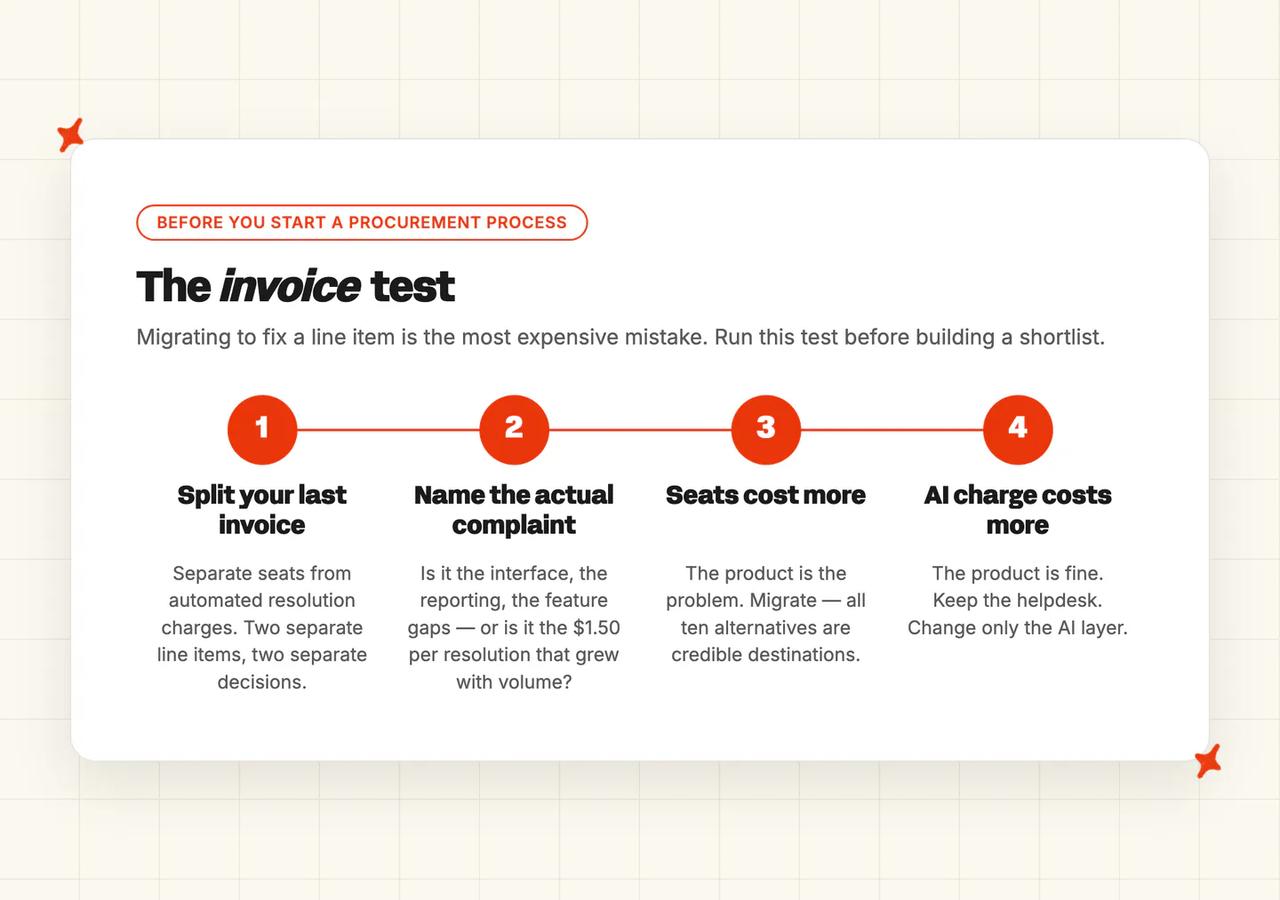
The other is the AI line item. The seats are fine, the workflows work, your agents are trained, and the thing that changed is that automated resolutions now cost $1.50 or $2.00 each on top of everything else. That second complaint is the one I take more seriously, because a migration will not fix it.

The distinction is worth money, because the migration is not free. Four to eight weeks of implementation, $5,000 to $50,000 in professional services on a serious rollout, retraining, and a spell where your reporting history is split across two systems. Spending that to fix a line item you could change without moving is the most expensive mistake I watch teams make.
Price the line item at the rate you can actually get. Per-resolution pricing is negotiable at volume, and about $0.70 a resolution is a level that gets agreed, so ask for it before you build a migration business case on $1.50.
So here is the test I use. Take last month's invoice and split it into seats and automated resolutions. Migrate when the seats are the bigger number and the complaints are about the product. When the automated resolution line is the bigger number and the product is fine, the answer is outside the ten vendors above, and our guide to migrating off Zendesk AI without leaving Zendesk covers that route.
Which Zendesk alternative should you actually pick?
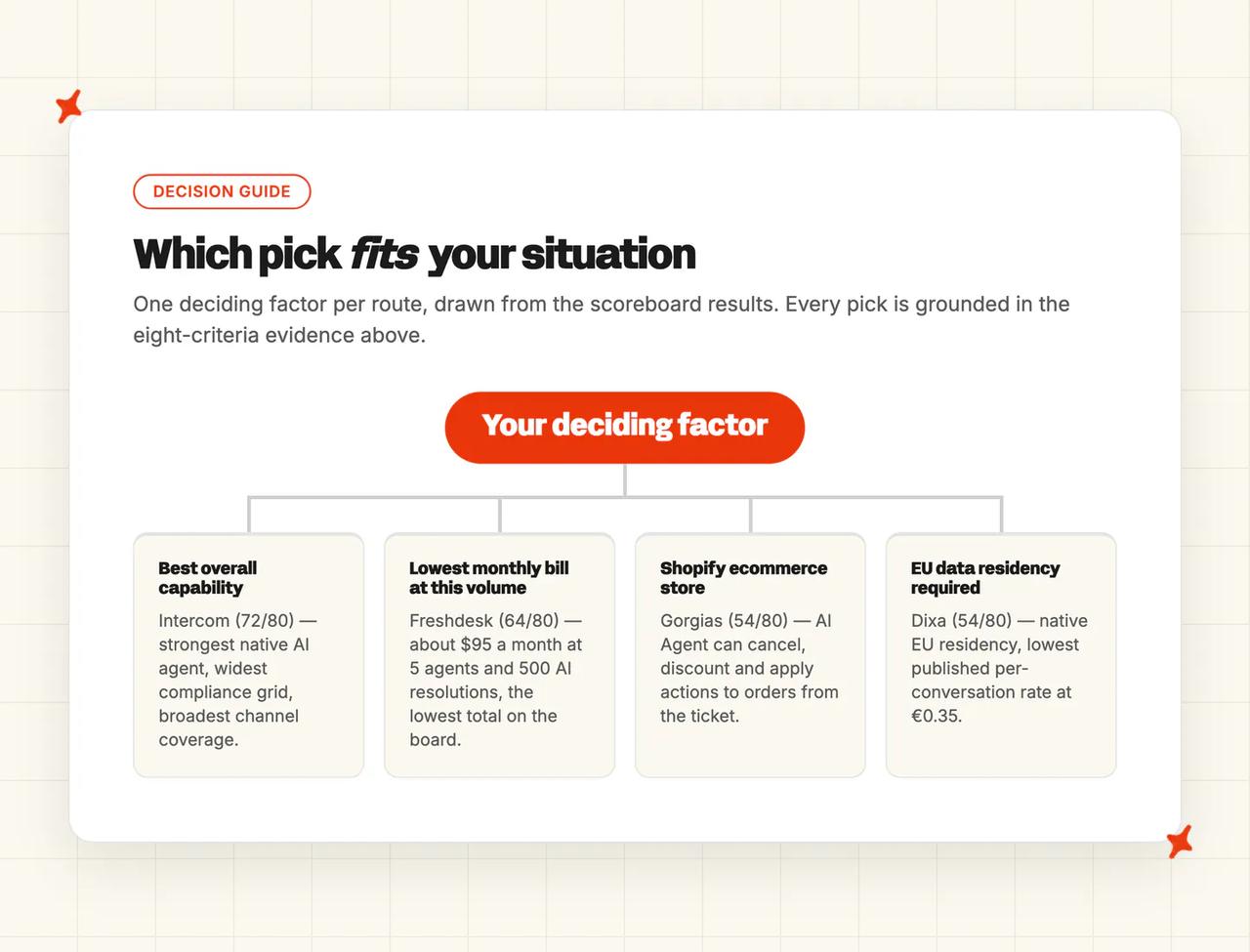
Intercom takes this comparison at 72/80. It has the strongest native AI agent in the set, the widest compliance grid, and the best channel coverage, and its only real weakness is that it does not publish a Zendesk migration route you can plan against. If you want the most capable destination and can absorb $0.99 per resolution, that is my pick.
Freshdesk at 64/80 is my value answer for a large team. Front at 62/80 and Help Scout at 60/80 are the two best-documented escapes for teams that never liked ticketing, and Zoho Desk, also at 62/80, is the closest match to Zendesk's ticketing with the AI included in the seat price.
Gorgias is the ecommerce answer, and its advantages only pay off on a store. Dixa is the European pick, and Kayako competes on one number, with the rest of its pricing behind a sales call.
All of those picks rest on the same prior question: is the helpdesk itself the problem, or is it the AI bill?
What if the helpdesk is fine and the AI bill isn't?
Sometimes none of these ten is the answer.
My AskAI is an AI layer that runs inside the helpdesk you already have. We work natively with Zendesk, Intercom, Freshdesk, Freshchat, Gorgias and HubSpot, and we sit alongside all of them. On Zendesk our ticket integration answers on the ticket itself, and our Zendesk AI ROI calculator takes your ticket volume and gives you the number before you talk to us. TravelJoy took this route on Zendesk and went from 24% AI resolution with Zendesk's own AI to 80% with ours.
We price per ticket, resolved or not. Pro is $199 a month for 1,000 credits and $0.12 a credit beyond that, Scale is $499 for 2,000 credits at $0.10, and Enterprise starts at $999. On helpdesk chat, two AI replies is one credit, which works out around $0.10 a ticket on Scale. On helpdesk email, the first reply is one credit and follow-ups are half.
Several capabilities are charged separately per use, on every plan including Pro: AI Tagging at $0.05 per attribute per ticket, AI Actions at $0.02, Tasks at $0.02 per step, Live Translation at $0.05 per ticket and Image Processing at $0.02. There is a 30-day trial with all features and no card required, so you can test it on your own tickets before we ever speak.
Intercom and Zendesk both publish broader compliance grids than ours. We hold SOC 2 Type II and GDPR, with HIPAA support and a signed BAA on our Enterprise plan, and we work in text channels. If your procurement form needs a longer list than that, or if voice is a channel you have to support, buy from the ten above.
If that route is the one your invoice points at, our roundup of Zendesk AI alternatives has the full comparison.
FAQs
Which is better, Zendesk or Freshdesk?
Freshdesk is the price answer, and Zendesk goes deeper on customization and reporting. Freshdesk starts at $19 per agent a month on annual billing and includes the first 500 Freddy AI Agent sessions before any per-session charge. Zendesk has the larger app marketplace, the deeper reporting and the broader certification set, so for a large team where seat cost dominates, Freshdesk wins, and for a complex enterprise rollout Zendesk still has more room.
Which is better, Zoho Desk or Zendesk?
Zoho Desk is the value answer and Zendesk is the enterprise one. Zoho bundles Zia AI into the plan with no per-resolution charge, covers more channels out of the box, and scores 62/80 here against a feature set that matches Zendesk closely on core ticketing. What you give up is a documented migration route, because Zoho publishes no Zendesk-specific import guide.
What is the best open source ticketing system?
Zammad is the strongest general-purpose option I found, with full ticketing, a knowledge base and multichannel support, and the r/SaaS thread on Zendesk alternatives names it directly. Chatwoot is the better choice if live chat and messaging carry most of your volume. Both are free to license and cost engineering time to run, and with both the customer-facing AI agent is a separate purchase, so budget for it before you call the stack free.
What is Zendesk usually compared to?
Zendesk gets compared to a different product depending on which complaint started the search: price, AI capability, or the weight of ticketing itself. Here are six of the ten, sorted by the axis each one is normally measured on, with my Overall score alongside.
| Compared against | The axis | Overall here |
|---|---|---|
| Intercom | AI agent capability | 72/80 |
| Freshdesk | Price | 64/80 |
| Front | Shared inbox instead of tickets | 62/80 |
| Zoho Desk | Bundled value | 62/80 |
| Help Scout | Lighter, calmer ticketing | 60/80 |
| Gorgias | Order context for ecommerce | 54/80 |
Is there a free Zendesk alternative?
Yes. HubSpot Service Hub has the most usable free tier in this comparison, with a shared inbox, tickets and a knowledge base at $0 and an upgrade path at $20 per seat a month. Zoho Desk publishes a free plan for very small teams, and on the open-source side Zammad and Chatwoot are free to license and self-host. In every case you pay for the AI agent separately, either per resolution or per message, so that is the number I model first.
What software is most like Zendesk?
Freshdesk and Zoho Desk are the closest by function, with the same views, macros, SLA policies and multi-department routing a Zendesk admin already knows. Intercom is the closest on capability, built around a messenger rather than a ticket list. Front and Help Scout are deliberately lighter and treat support as a shared inbox, and I put Gorgias in the ecommerce-specific slot with Dixa in the European one.
Which Zendesk alternative has the strongest security certifications?
Intercom, on the published evidence. It lists SOC 2 Type II, HIPAA, ISO 27001, ISO 27018, ISO 27701, ISO 42001, AIUC-1, GDPR and CCPA with a 99.8% uptime SLA, and Hiver is the surprise second with GDPR, SOC 2 Type II, ISO 27001, CCPA and HIPAA at a much lower price. Kayako is the one I check before shortlisting, because the certifications on its security page belong to its data center provider, not to Kayako itself.
How long does it take to migrate off Zendesk?
Plan four to eight weeks for a full migration, with professional services on a serious rollout starting around $5,000 and running past $50,000. The variable is documentation. Help Scout publishes an Import2 route and states that "Rules, Macros, and Saved Replies will not be transferred", and Front names migration partners while noting that its importer "is not actively maintained". Every other vendor here leaves the route to a sales conversation, which is the main reason I score migration lowest on the board.