My AskAI vs Dixa AI agent: Features, Pricing, and Results (2026)
My AskAI vs Dixa: Dixa meters Mim at €0.35 a conversation and makes you buy its whole helpdesk first. My AskAI is $0.10 a ticket on your existing stack.
Summarize with AI
Dixa's Mim only switches on once you have bought and migrated your whole team onto Dixa's platform. My AskAI adds AI to the helpdesk you already pay for. On the AI line alone that's about $0.10 a ticket against €0.35 a conversation, roughly 3.5 times the rate.
I'm Mike, co-founder of My AskAI. We help 200+ ecommerce and SaaS teams run AI customer service inside the helpdesk they already use, and between them our agents have resolved over a million tickets.
My bias is out in the open. I'll be just as clear about where Dixa is the stronger choice, because for a good number of readers it is.
What AI can I use to reply to customer support tickets: My AskAI or Dixa?
Both products put an autonomous AI agent on your front line to answer the repetitive questions your team is tired of typing. They're just built differently, and that difference is the whole decision here.
Dixa is two things at once. It's a full omnichannel helpdesk (voice, chat, email, WhatsApp, Messenger, SMS in one workspace), and it adds its own AI on top: Mim, the autonomous agent that resolves customer questions end to end, plus an AI Co-Pilot that drafts and summarizes for your human agents. Mim is good, and Dixa is a strong platform.
My AskAI is the other setup. It's a dedicated AI agent that lives inside the helpdesk you already run. You install it from the marketplace of Zendesk, Intercom, HubSpot, Freshdesk or Gorgias, point it at your knowledge, and it starts drafting and sending replies on the tickets you already have, at roughly $0.10 a ticket.
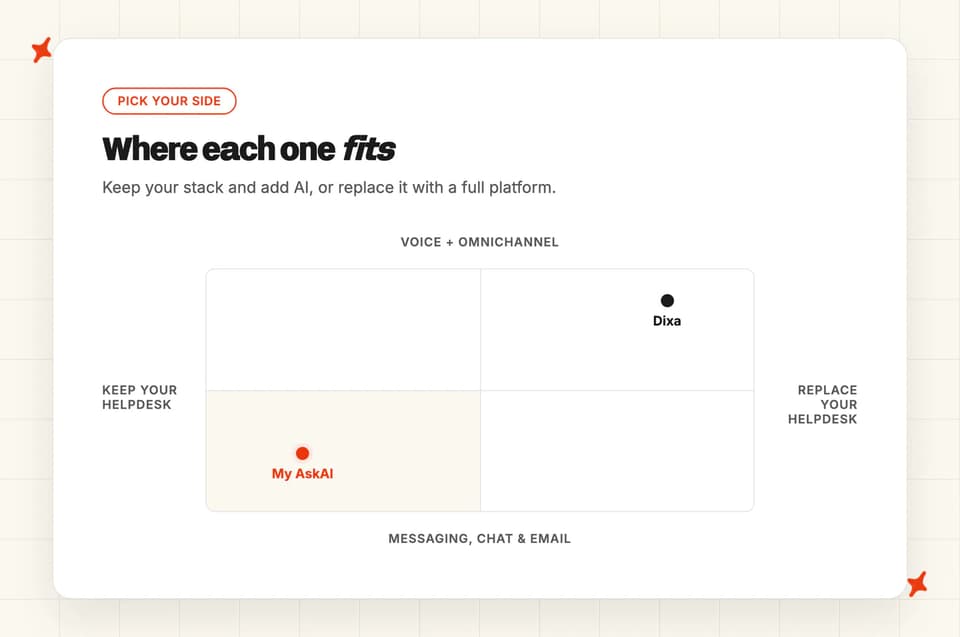
It replaces the native AI layer your helpdesk already has. Your helpdesk itself stays exactly where it is.
One thing up front: My AskAI does not integrate with Dixa. Our five native helpdesks are Zendesk, Intercom, HubSpot, Freshdesk and Gorgias, and Dixa isn't one of them.
So this is a stack decision. Our Intercom and Zendesk comparisons are like-for-like, the same AI in the same inbox; this one asks you to keep the helpdesk you run today and add My AskAI, or migrate onto Dixa and turn on Mim.
Both products review well on G2:
| On G2 | My AskAI | Dixa |
|---|---|---|
| Rating | 4.5/5 | 4.2/5 |
| Reviews | 21 | 391 |
| Reviews page | My AskAI reviews | Dixa reviews |
Dixa has a decade in the market, and the praise from its users is real. One G2 reviewer put it like this:
"Imagine every pain point you've experienced with Intercom, Zendesk, or similar platforms—now remove them. That's Dixa. It's agent-friendly, management-friendly, and provides easily digestible data. Their support team is outstanding."
On our side, a small-business G2 reviewer put it more bluntly:
"My AskAI handles about 95% of my tickets with better accuracy than human agents… Gorgias' own AI agent wouldn't work with my BigCommerce integration but My AskAI does."
So the question is which setup fits the way your team already works.
How does an AI customer service agent work: My AskAI vs Dixa?
Under the hood, both agents run the same core loop. You connect knowledge, the agent reads an incoming question, answers what it can from that knowledge, and hands off to a human (with a summary, so nobody repeats themselves) on the ones it can't.
Mim runs that loop inside Dixa. It retrieves from Dixa's own knowledge base to answer, and for commerce it does tool-use against Shopify and Magento to fetch live order data and take actions like refunds and cancellations.
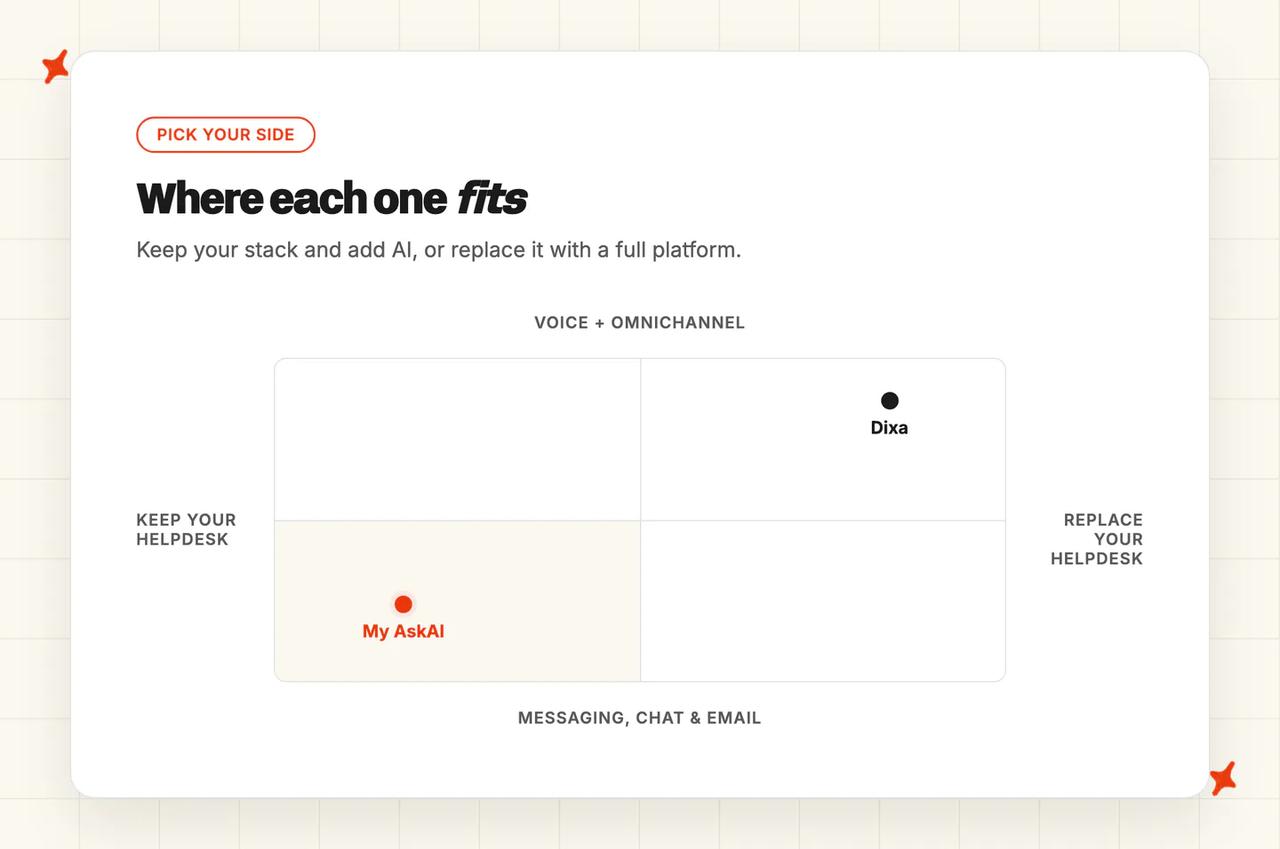
Because it lives in Dixa's unified workspace, the agent, the order history and the customer context all sit on one screen. That tight coupling is a strength, as long as Dixa is the platform you're running.
My AskAI runs the same loop inside your existing helpdesk. It resolves around 72% of tickets on a rolling basis across our customer base, uses a suite of models (OpenAI, Google and Anthropic depending on the task rather than a single LLM), and leaves your macros, tags and routing exactly where they are. After a handover, it reads what your human agent wrote and drafts new knowledge from it, so the resolution rate climbs week over week without anyone sitting down to retrain it.
The mechanics are close. Everything around the agent is where they diverge.
What are the different ways I can use an AI agent?
There's more than one way to put either agent to work, and the modes are where each side's personality shows.
Direct replies
The headline mode for both is the AI answering the customer directly. On My AskAI that happens inside your helpdesk's own chat, messaging or email channel.
On Dixa, Mim answers directly across the channels Dixa runs, which are chat, email, WhatsApp, Messenger and SMS. Both close the ticket end to end. Neither is a deflecting FAQ bot.
Copilot replies
Both agents also work behind the scenes, drafting a reply for a human to send so a person still hits the button. Dixa offers this as its AI Co-Pilot, with smart drafts, conversation summaries and suggested replies for the agent. My AskAI's copilot is the AI Copilot Chrome Extension: it drops the drafts into your agents' normal workflow with no per-seat charge.
Internal note replies
This one is a My AskAI habit I'd point any nervous team to. Before you let the AI talk to a single customer, you can run it in Internal Notes mode: it drafts a reply on every ticket as an internal note the customer never sees.
You sit it side by side with whatever AI you're using today, grade it for a week, and only then flip it live. It's about as close to a no-risk trial of an AI agent as I've found. Dixa doesn't offer the same "run it silently against live traffic first" mode.
Voice
Here's a clear Dixa win. Dixa has full native voice as a channel: browser-based VoIP, IVR built in the flow builder, callbacks, voicemail-in-queue, call recording, and coverage across 60+ countries. If phone is a real part of your support load, I'd look hard at Dixa here.
Dixa's AI, though, doesn't run on voice. Mim covers chat, email, WhatsApp, Messenger and SMS; the "AI" on the voice channel is transcription, Auto QA and rule-based IVR, with no LLM voicebot answering calls. My AskAI is built for the messaging, chat and email channels your helpdesk routes, so voice as a channel is squarely Dixa's territory here.
Which is easier to setup, Dixa or My AskAI?
This is the widest gap between the two, and it comes from their business models more than their engineering.
With My AskAI you sign up yourself, install the app in your helpdesk, connect your help center and any other knowledge, and you're drafting replies in minutes to hours. Teams switching from a native AI are usually fully live inside a day. There's no sales call in the way, and the 30-day trial means you do all of it (yes, even running the agent on your real tickets) before you've spoken to us or paid anything.
Dixa is the opposite by design: reaching Mim means adopting a whole platform, which is why everything starts with a sales-qualified demo. There's no self-serve path. Full platform onboarding runs 2 to 4 weeks (white-glove, often partner-led, with knowledge-base migration and integration setup), and Mim specifically is quoted at "days to two weeks" once the platform is in place.
Dixa is clear that the real work is the knowledge: their own guidance is that the main time investment is making sure your knowledge base is accurate before Mim starts handling live conversations.
Standing up a whole omnichannel platform costs this. It's a different commitment from switching on an AI layer over the stack you already run.
How do My AskAI and Dixa differ in what they can be trained on?
An AI agent is only as good as what it knows, so the sources each side can pull from do most of the work.
'Static' content
My AskAI connects natively to the places modern teams actually keep their knowledge: Google Drive, Notion, Confluence, SharePoint, OneDrive and Dropbox, plus your Zendesk, Intercom or Freshdesk help center (including behind-login articles), a Salesforce connector for knowledge pages, website sync, and direct PDF or DOCX upload. It can also train on your last 5,000 historic tickets by default (more on request), which is how a team with a thin help center still gets a useful agent from day one. And any source can be marked internal-only, so private runbooks power Copilot answers without ever surfacing to a customer.
Mim's static sources are narrower. It learns from Dixa's own knowledge base (Dixa Knowledge, built on Elevio), a public website crawl that stands up "in minutes," your configured policies and procedures, and PDFs a customer uploads inside a conversation.
What it doesn't have is native importers for Zendesk Guide, Confluence, Notion or Google Drive (an Elevio importer sits on the roadmap). If your policies live in Notion or Google Docs today, that's content Mim can't natively ingest without moving it into Dixa Knowledge first.
'Dynamic' content
This is where Mim earns real credit. Mim executes Shopify and Magento actions natively: it reads live order data and can process refunds, cancellations and shipping updates as part of a conversation, out of the box. For an ecommerce brand on Shopify or Magento, that native action depth is a genuine strength.
My AskAI covers live, per-customer data through its User Data API and a pre-built Shopify connector for order and product lookups, then takes action through Tasks and Tools (its agentic workflows). Those actions are a setup choice: you can have the AI action a refund fully autonomously, or set it to propose-then-approve so a human signs off first. Your call, per Task.
Here's the same thing as a table:
| Can be trained on / actioned | My AskAI | Dixa (Mim) |
|---|---|---|
| Help center / knowledge base | ✅ | ✅ |
| Past tickets (train from history) | ✅ | — |
| Notion | ✅ | — |
| Confluence | ✅ | — |
| Google Drive / Docs | ✅ | — |
| OneDrive / Dropbox / SharePoint | ✅ | — |
| Salesforce (knowledge pages) | ✅ | — |
| Shopify / Magento order actions | Shopify via connector + Tasks | ✅ (Shopify + Magento native) |
| In-conversation PDF upload | ✅ | ✅ |
| Mark a source internal-only | ✅ | — |
Which has better answer quality, Dixa or My AskAI?
This is the category where the straight answer is "they're close," and I'd be suspicious of anyone who told you otherwise.
Dixa markets Mim at "up to 80%" automation, and its published case studies land across a wide band (its flagship customer tink reports 0 to 59% email containment and 0 to 70% on chat, for example). Those are vendor-supplied self-service rates, so I'd take them with a grain of salt: deflection isn't the same thing as a confirmed resolution.
On the nuanced end, a Gartner Peer Insights reviewer is candid:
"The AI chatbot's answers may be perceived as a bit cold and straight to the point. It may have a hard time understanding nuanced language. Learning new functionalities takes time."
My AskAI runs around 72% resolution on a rolling 30-day basis across our customer base. We count a conversation resolved when the AI handled it without escalating to a human, which is defensible because we make escalation easy, so a number is never inflated by trapping a frustrated customer.
For context, and only for context, the field median for AI resolution sits near 70% across a 195-deployment aggregate. Treat that as directional: that 70% comes from many vendors with no My AskAI versus Dixa split; every vendor defines its own numerator (a "resolution" metric reads roughly 12 points above an "automation" one), and the teams reporting are self-selected. Both products sit in that same band, and in practice the number moves far more with the quality of your knowledge and the mix of your tickets than with the logo on the agent.
So I wouldn't decide between these two on a resolution percentage. On raw answer quality from a well-fed knowledge base, you'll get a good result from either.
Which AI agent is easier to improve over time: Dixa or My AskAI?
Both agents get better with use. The difference is how much of that improvement you do by hand.
Dixa's model is knowledge-base-first: where Mim escalates most tells you where your KB needs work, Mim re-syncs when you edit an article, and agents can update articles straight from a conversation. Dixa also has a promise/verification guardrail that flags when Mim commits to an action but doesn't follow through, which is a smart hedge against a hallucinated promise (I wish more agents did this). What it doesn't have is a thumbs-up/down feedback mechanism or a sandbox to replay Mim against historical tickets before go-live, so most of the tuning is you editing the knowledge base.
My AskAI leans on automation for the same job. Self-Learning drafts new knowledge every week by comparing the agent's answer to what your human actually sent after a handover, and Insights surfaces the topics and the questions the AI couldn't answer so you know what to write next.
Echo, the in-dashboard assistant, does the heavy lifting here: when you want to know why the agent said something, you ask it which knowledge source a reply came from and why a CSAT score landed, and it'll even write and merge a Guidance rule for you. For a team without a full-time automation owner, that's usually the point.
Both approaches work. Dixa's asks for a hand on the wheel; ours tries to keep improving while you're doing something else.
Which has more features, Dixa or My AskAI?
On raw surface area, Dixa is the bigger product, and it should be. It's a decade-old omnichannel platform.
Dixa gives you a unified Team Hub (order history and AI suggestions on one screen), intelligent routing by skill, language, VIP status and channel, a visual automation builder for IVR, SLAs and CSAT, native voice, multi-brand, and Auto QA that scores 100% of conversations (including calls, via transcription), well beyond the usual 2 to 10% sample. If your support spans phone and every social inbox and you want all of it plus scoring in one place, Dixa reaches ground My AskAI doesn't. The results can be real, too: tink went from 16 to 20 support FTEs down to 2 full-timers plus 4 students on Dixa's platform.
My AskAI's set is narrower and more support-AI-specific: Internal Notes mode, Tasks and Tools for agentic workflows (refunds, cancellations, lookups, run autonomously or propose-then-approve), Guidance for tone and escalation, self-learning, Insights that score 100% of conversations for AI CSAT, AI Tagging as a cost-control lever, multi-brand, live agent translation, image reading, spam filters and custom domains. The structural difference is that all of it works across Zendesk, Intercom, HubSpot, Freshdesk and Gorgias, with no platform to buy underneath it.
| Feature | My AskAI | Dixa |
|---|---|---|
| Direct replies | ✅ | ✅ |
| Copilot / internal-note drafting | ✅ | ✅ (copilot) |
| Internal Notes silent-testing mode | ✅ | — |
| Voice / phone channel | — | ✅ |
| Omnichannel routing (voice, social, SMS) | Via helpdesk routing | ✅ |
| Auto QA scoring on 100% of conversations | Insights (AI CSAT) | ✅ (incl. calls) |
| Agentic actions (refunds, cancellations) | ✅ (Tasks & Tools) | ✅ (Shopify/Magento) |
| Works across Zendesk, Intercom, HubSpot, Freshdesk, Gorgias | ✅ | — (Dixa only) |
| Train on past tickets | ✅ | — |
Is it easy to customize My AskAI and Dixa?
Both are no-code. The difference is how heavy the wheel is.
With My AskAI, the controls are yours to turn directly. Guidance lets you write plain-language rules for tone, terminology and when to hand off; Custom Answers pin the exact wording for answers that have to be exact; and per-tag reply control lets you set, for each class of ticket, whether the AI replies directly, drafts an internal note, or stays out entirely. You can change any of it yourself in a couple of minutes, and Echo will write the Guidance for you if you'd rather ask than click.
Dixa's customization sits in its visual automation builder, and reviewers rate it. One Capterra reviewer (a Director of Customer Care) described it well:
"Programming in Dixa is like programming in Visio. You do not need technical expertise to create a flow that will give your customers an outstanding experience."
That's a fair picture of both the power and the weight: it's a proper platform-configuration surface, so a change is often a flow to build rather than a single AI setting to flip. For a big managed rollout I'd call that a feature; for a team that just wants to tweak a handover rule on a Tuesday afternoon, I'd call it more machinery than they need.
What about vendor lock-in?
Lock-in rarely comes up in a demo. For my money it's where these two are furthest apart.
Because Mim only exists inside Dixa, choosing it means choosing Dixa as your whole helpdesk. That's an annual commitment, and the terms have teeth.
Dixa's own Terms of Service describe a "Minimum Commitment" that may not be reduced regardless of actual usage, and reviewers report what it looks like in practice. One G2 reviewer wrote:
"A software company operating in 2025 that enforces a one-year contract commitment, along with a three-month notice period for termination, appears to be adhering to an outdated business model. Similarly, the requirement to pay for a minimum of six agent licenses—regardless of actual usage—lacks flexibility."
Dixa no longer publishes a seat-minimum number on its pricing page, so treat the six-to-seven-seat figure as dated reviewer testimony. The structural point holds: a minimum commitment on an annual contract.
My AskAI is portable by design. It lives inside Zendesk, Intercom, HubSpot, Freshdesk or Gorgias, so you keep your existing stack, agents, macros, tags and routing.
And if you ever change helpdesk, the trained agent (your custom answers, guidance and tasks) moves across to the new one, so you're not rebuilding from scratch. There's no seat minimum and no annual lock-in, and you can start without a sales call.
Does Dixa or My AskAI have any other AI features?
Beyond the core agent, both carry a grab-bag of extra AI. Dixa's is wider; ours has a couple of sharp, support-specific edges.
Tagging
Both classify tickets automatically. My AskAI's AI Tagging runs natively inside Zendesk, Intercom, Freshdesk and Freshchat, reading the incoming message and sorting it against your existing tags (each tag expanded into a full definition you can review and edit, so the taxonomy stays consistent).
Because tagging is billed separately at $0.05 per tag, you can use it as a routing and spend lever: tag a class of tickets you don't want the AI to answer, pay only the 5 cents, and route those to a human without the conversation cost. Dixa auto-tags too, inside its Co-Pilot, as part of the platform.
Agent translation
Both translate. Dixa's AI Co-Pilot does real-time in and out translation for agents across 30+ languages.
My AskAI supports 95 languages auto-detected per message, and its Live Translation feature lets an agent read and reply to a customer in a language they don't speak (billed at $0.05 per ticket). Call this a genuine tie.
Sentiment, CSAT and Auto QA
Dixa's extra surface area shows here. This is a fair win for them. Dixa's Auto QA scores 100% of conversations, including phone calls via transcription, and benchmarks AI against human performance, with sentiment and CSAT prediction layered on top.
My AskAI's Insights score every conversation for AI CSAT and group them into topics, which covers the AI-ops picture well, but Dixa's QA suite reaches across the whole contact center, calls included. On breadth of quality analytics, Dixa takes this.
What about security, is Dixa more secure than My AskAI?
Security reviews for both come down to the same short checklist.
Both products are SOC 2 Type II certified and GDPR-compliant. My AskAI adds AES-256 encryption at rest, TLS in transit, isolated data per customer, and a firm commitment that your data is never used to train models; the full report and DPA are available under NDA on our trust report.
Dixa is SOC 2 Type II, certified in 2024, publishes a thorough subprocessor list (Azure OpenAI, Anthropic, ElevenLabs, AWS EMEA and others), and holds EU data residency in AWS Ireland, with TLS in transit. If your buyer needs data kept in the EU, that residency is a real Dixa advantage; note that Dixa's SSO and role-based access sit on its top Prime tier.
Here's the compliance grid at a glance:
| Compliance | My AskAI | Dixa |
|---|---|---|
| SOC 2 Type II | ✅ | ✅ |
| GDPR | ✅ | ✅ |
| EU data residency | — | ✅ (AWS Ireland) |
| HIPAA | — | — |
| ISO 27001 | — | — |
For most B2B SaaS and ecommerce teams, that top pair is exactly what the security review is checking for, and both products pass it.
Which costs more, Dixa or My AskAI?
Pricing is where the two philosophies are furthest apart, so here are the exact numbers.
The pricing model
Let me compare like with like: the AI charge against the AI charge.
My AskAI is $0.10 a ticket (every two AI replies is one credit; a typical chat ticket lands near $0.10, email near $0.15). You pay per ticket each time the AI works, whether or not it resolves, and your bill stays flat as the AI gets better.
Mim is €0.35 per conversation ("Updated July 2026" on Dixa's page: flat, usage-only, no per-seat component). The same holds on both sides: Mim also bills per unit. It charges the same €0.35 whether the AI resolves the conversation or hands it to a rep, exactly as My AskAI bills per ticket regardless of outcome.
Dixa argues for per-conversation over per-resolution pricing, and on that narrow point I agree with them; both of us avoid the per-resolution model where your bill rises as the AI improves. So the gap here comes down to the rate: €0.35 against $0.10, about 3.5 times. (Because a conversation Mim escalates still bills, Mim's effective cost per resolved conversation is around €0.50 at a 70% resolution rate.)
The overall cost
Run the AI line at volume and the rate is what moves the bill:
| AI charge, 10,000 tickets/conversations a month | My AskAI | Dixa (Mim) |
|---|---|---|
| Headline rate | $0.10/ticket | €0.35/conversation |
| Monthly AI line | ~$1,000 | ~€3,500 |
(EUR and USD are close enough to parity here that no conversion changes the picture; Dixa lists its own rate as a single $/€ figure.)
Then there's the structural cost that comes before you can turn Mim on at all, and it sits on top of the per-conversation rate, separate from it: to reach Mim you have to be a Dixa customer, which means platform seats at €89 (Growth), €139 (Ultimate) or €179 (Prime) per agent per month, billed annually, plus AI Co-Pilot at €39 per seat if you want the agent-assist side. Dixa's overage list puts Mim overage at €0.60 per conversation and inbound voice at €0.02 per minute. With My AskAI there's no equivalent platform to buy: you keep paying for the helpdesk you already run, and add the AI on top.
And you don't have to take my word for the math. My AskAI's 30-day free trial unlocks every feature with unlimited tickets and no card, so you connect your helpdesk, run the agent against your real tickets, and see your own resolution rate and cost before you commit. Dixa has no self-serve trial; its page routes you to "book a demo to discuss trial options," so the first time you see Mim work on your data is after a sales conversation.
Conclusion - should I choose Dixa or My AskAI?
If you already run Zendesk, Intercom, HubSpot, Freshdesk or Gorgias and you want AI on it this week, My AskAI is the pick, at a published $0.10 a ticket with no migration and no sales call. The one condition that flips it: if you're ready to replace your helpdesk outright and voice is central to your support, Dixa is the better home.
| My AskAI | Dixa | ||
|---|---|---|---|
| Modes | 8/10 | 7/10 | My AskAI |
| Ease of setup | 9/10 | 5/10 | My AskAI |
| Training/Integrations | 7/10 | 8/10 | Dixa |
| Answer Quality | 8/10 | 8/10 | Tie |
| Improving | 8/10 | 7/10 | My AskAI |
| Features | 7/10 | 9/10 | Dixa |
| Price | 9/10 | 5/10 | My AskAI |
| Customization | 8/10 | 7/10 | My AskAI |
| Lock-in | 9/10 | 4/10 | My AskAI |
| Other AI features | 7/10 | 8/10 | Dixa |
| Security | 7/10 | 8/10 | Dixa |
Read the scorecard and the split is a fair one. My AskAI takes six categories (modes, ease of setup, improving, price, customization and lock-in) and ties a seventh on answer quality. Dixa takes four where it's the stronger option: broader feature set including native voice, the extra AI surface with Auto QA on every conversation, its native Shopify and Magento action depth on the training axis, and EU data residency on security.
That isn't a clean sweep, and I wouldn't want it to be, because these two aren't really fighting over the same customer. Dixa is a full omnichannel platform with a good AI on top. We're an AI agent for the helpdesk you already run.
If that's you, My AskAI is who we built it for.
If a full platform is more than you need, it's worth seeing the wider field in our Dixa alternatives roundup. And if you're weighing the AI agents that layer onto your existing stack, our My AskAI vs Intercom Fin comparison covers the other end of this decision.
FAQs
Can My AskAI fully replace Dixa's Mim AI agent?
It replaces the AI layer while leaving the helpdesk in place. Because My AskAI doesn't integrate with Dixa, "replacing Mim" really means a stack decision. You keep the helpdesk you already have (Zendesk, Intercom, HubSpot, Freshdesk or Gorgias) and add My AskAI, dropping the Dixa-plus-Mim combination.
For the tier-1 job of reading tickets, answering the repetitive ones and escalating the rest, My AskAI does that end to end. It doesn't replace Dixa's platform breadth, native voice channel or omnichannel routing. Those stay Dixa's.
What can each AI agent be trained on?
My AskAI ingests a wider set of static sources and lets you mark any of them internal-only. Mim's edge is native ecommerce action execution.
| Source | My AskAI | Dixa (Mim) |
|---|---|---|
| Help center / knowledge base | ✅ | ✅ |
| Past tickets | ✅ | — |
| Notion / Confluence / Google Drive | ✅ | — |
| SharePoint / OneDrive / Dropbox | ✅ | — |
| Salesforce (knowledge pages) | ✅ | — |
| Shopify / Magento order actions | Shopify + Tasks | ✅ (native) |
How long does setup take and do we need developers?
My AskAI is self-serve and takes minutes to a few hours: sign up, connect your knowledge and helpdesk, and you're live, with no developer needed for a standard setup (only custom Tools or APIs need dev time, on your own schedule). Dixa is sales-led with no self-serve path: full platform onboarding runs 2 to 4 weeks, and Mim itself is quoted at days to two weeks once the platform is in place.
How do My AskAI vs Dixa (Mim) pricing models differ, and what might we actually pay?
Both are usage-based and both bill per unit regardless of whether the AI resolves the ticket, so the rate is where they diverge. My AskAI is about $0.10 per ticket; Mim is €0.35 per conversation. On top of Mim's rate you also need Dixa's platform seats to reach it.
| My AskAI | Dixa (Mim) | |
|---|---|---|
| Model | Per ticket | Per conversation |
| Headline rate | ~$0.10/ticket | €0.35/conversation |
| AI line at 10,000/month | ~$1,000 | ~€3,500 |
| Platform seats required first | No (keep your helpdesk) | Yes (€89 to €179/agent, annual) |
| Free trial | 30 days, all features, no card | No self-serve trial |
Can they handle multilingual support and agent translation?
Yes, both. My AskAI auto-detects 95 languages per message and adds a Live Translation feature so a human agent can read and reply in a language they don't speak. Dixa's AI Co-Pilot does real-time agent translation across 30+ languages, and Mim can retrieve from a knowledge base written in one language to answer a customer in another. On multilingual, they're even.
How do My AskAI and Dixa compare on security and compliance?
Both hold SOC 2 Type II and are GDPR-compliant, which meets most B2B SaaS and ecommerce security reviews. Dixa adds EU data residency in AWS Ireland, a real advantage if your buyer needs data kept in the EU. Neither carries HIPAA or ISO 27001, so if those are on your checklist, both would need a closer look.
Does Dixa's Mim work on voice or phone calls?
No. Dixa has an excellent native voice channel (VoIP, IVR, callbacks, recording, 60+ countries), but its AI agent Mim doesn't run on voice. Mim covers chat, email, WhatsApp, Messenger and SMS; on the voice channel the "AI" is transcription, Auto QA and rule-based IVR, with no LLM answering the call. If you need an AI answering live phone calls, neither product does that today.
Does each one offer a free trial?
My AskAI does: 30 days, all features unlocked, unlimited tickets, no credit card, so you can prove it against your real tickets before paying. Dixa has no self-serve trial; its pricing page routes you to book a demo to discuss trial options, so evaluation runs through a sales process.