Kayako Help Desk: Complete Guide to Features, Pricing & Limitations (2026)
The Kayako help desk bills its Kay AI agent $1 per resolved ticket. Its pricing page lists no Kayako One price. Cost math vs our $0.10 a ticket on Scale.
Summarize with AI
If Kayako is on your shortlist, you've probably already seen the price on its pricing page: $1 for every ticket the Kay AI agent resolves. Kay is part of Kayako One, a full help desk sold as one bundle, and it can also be installed on the Zendesk, Freshdesk, Intercom or Salesforce desk your team already works in. The page leaves you to work out the rest, because it lists no price for the help desk itself and has no free-trial or sign-up button.
Can Kay work on the desk you already use without a migration, and what does the rest of the bill look like once the platform, the rollout and the tickets Kay does not resolve are counted?
I'm Mike, co-founder of My AskAI. We build an AI agent that 200+ ecommerce and SaaS businesses run inside the helpdesk they already use, so I'm not a neutral party here. Everything about Kayako here comes from its website, its help center, its G2 page and the customer stories it publishes.
By my math, Kay's AI charge comes to between $5,000 and $6,800 a month at 10,000 tickets, depending on how many it resolves. Those two figures are Kay at a 50% resolution rate and at Kayako's published 68%, at $1 per resolved ticket.
Kayako at a glance
| Fact | Detail |
|---|---|
| What it is | Help desk with a built-in AI agent |
| Headline price | Kay $1 per resolution; Kayako One on request |
| G2 rating | 4.0/5 |
| Best for | One vendor for help desk, AI and rollout |
| Not a fit for | Buyers who need a Kayako One price |
| Biggest limitation | Pricing page: no Kayako One price or trial |
| Our verdict | 5.5/10 |
What is Kayako?
Kayako sells you one of two things, and the Kayako homepage sets out both in one line:
"Run Kayako One as your full, modern help desk — or implement the Kay AI Agent into the help desk you already use (Zendesk, Freshdesk, Intercom, Salesforce)."
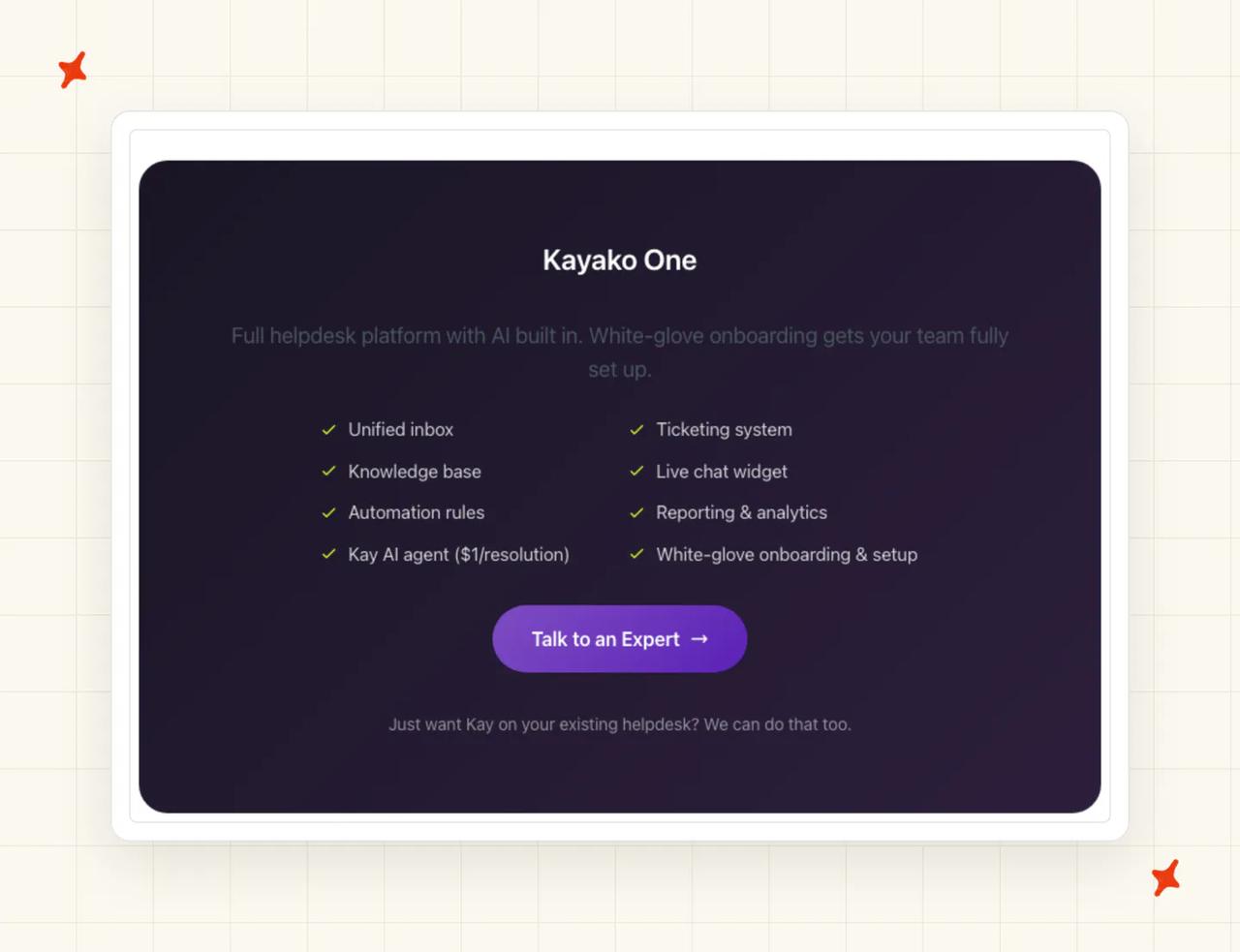
The full bundle is listed on the Kayako pricing page, and it covers the whole support stack:
- Unified inbox and ticketing - one place for every conversation, with a ticket for each request
- Knowledge base and live chat widget - a help center for customers and a chat window for your website
- Automation rules and reporting - routing and escalation rules, plus analytics on your team
- Kay AI agent - the part of Kayako AI customer service that answers and acts, billed at $1 per resolution
- White-glove onboarding - Kayako's team sets the platform up with you
If you only want the AI, the same page says "Just want Kay on your existing helpdesk? We can do that too." In Kayako's Contently story, Kay was plugged into Contently's existing helpdesk and searched Contently's knowledge base to compose its replies. Kayako says it is trusted by 300+ companies worldwide.
Kayako is managed by ESW Operations, LLC, according to its privacy policy. You will also see Kayako Classic mentioned, which is the older download and on-demand version of the product.
One G2 reviewer, a head of customer success, describes the help the AI gives agents:
G2: Kayako scores 4.0/5 from 222 reviews on G2. Etee D., a Head of Customer Success at a small business, wrote that the AI Suggested Responses are very helpful and that Self-Learning Mode learns from the team's closed tickets. The real surprise for this reviewer was the AI Ticket Assistant, which lets agents chat with a ticket to surface its key details.
How easy is it to set up Kayako?
The homepage says "the entire deployment is led by our experts", and the site's ways in are "Book Strategy Session" in the header, "Talk to a Pricing Expert" and "Request a Demo" on the pricing page, or a quick product tour.
Kay then goes live in stages, and Kayako's homepage describes the idea this way: "We don't hand you the keys and walk away. Our team rolls Kay out in three deliberate phases so it earns its way to autonomous resolution." The three phases are:
- AI Triage - Kay classifies, prioritizes and routes incoming tickets, so your team stops sorting by hand
- AI Answers - Kay drafts replies or asks the customer a follow-up question, starting with repetitive cases
- AI Continuous Learning - Kay hands edge cases to your agents and learns from how they resolve them
That order is sensible for a cautious team. You see Kay's judgment on routing before it writes a word to a customer, and it only takes on more once the earlier phase has worked.
On timing, Kayako's homepage says "Most teams are live in days". If you are moving from another help desk, Kayako's help article on importing data from your old helpdesk points you to an automated migration service it works with. Keeping your current desk and only adding Kay means there is nothing to migrate.
A managed rollout, as I see it, costs you some control. Kayako's team leads each phase and agrees its pace with you.
What channels does Kayako work in?
Kayako brings your customer conversations into one inbox, and its help center has a setup guide for each channel:
- Email - you add your support addresses so emails arrive as conversations
- Live chat - Kayako Messenger is a chat widget you configure and embed on your site
- X (Twitter) - you connect your company account to answer mentions and messages
- Facebook - you connect your Facebook page so its messages arrive in Kayako
Kayako markets Kay itself for live chat and email. Your agents also get mobile apps, so they can pick up conversations away from a desk.
The integrations page lists three groups of connections. Salesforce connects support and sales. Slack, Teams and WhatsApp handle alerts and collaboration, and Shopify, Stripe and Chargebee are there to "deflect “where’s my order?” and payment issues automatically."
What are the limitations of Kayako?
Kayako One is quoted by sales
The only price on the pricing page is Kay's $1 per resolution. The Kayako One card lists what the bundle includes and ends in a "Talk to an Expert" button, with no seat price, platform fee or plan tiers. So you cannot build a total cost for the full help desk before a sales call, and you cannot compare it line by line with the desk you run today.
No trial or sign-up on the main pages
Kayako's pricing page and homepage show no free plan, trial or sign-up form. We score Kayako 5/10 for price and trial because the pricing page has neither a Kayako One price nor a trial.
Kay answers from your knowledge base
Kayako describes Kay learning from your past tickets and your knowledge base: the Kayako help center on Kayako One or, as with Contently, the customer's own knowledge base. If your answers are in Notion, Confluence or Google Drive today, ask early how that content gets into Kay.
Security review takes more work than the homepage suggests
Plan for your security reviewer to ask for a SOC 2 report on Kayako itself before relying on the homepage's security list.
The customer stories with figures come from Kayako
The customer stories with outcome figures are all on Kayako's own site, so treat those numbers as Kayako's marketing. I would ask for a reference call with a customer your size.
What knowledge sources can I train Kayako on?
Kayako's AI chatbot page says "Our AI learns from your existing knowledge base and past tickets, so there's no lengthy training period."
The knowledge base is the center of it. The homepage describes a native help center that "answers customers directly and gives Kay the source material to resolve cases", and your team writes and publishes articles in Kayako's help center editor. Articles can be offered in more than one language (useful if Kay answers customers outside English).
Past tickets are the second source. Kayako's security and AI FAQ describes Self-Learning Mode, which "Learns from successfully closed tickets to improve future response suggestions for similar inquiries".
For actions, the pricing page says "If your system has an API, Kay can use it". That covers order lookups, refunds and account changes, as long as your systems allow it.
What features does Kayako have?
The autonomous layer
Kay is the AI agent that closes tickets on its own. The pricing page says "Kay processes refunds, creates accounts, sends return labels, and resolves issues end-to-end." The homepage adds that it can triage, draft replies, update data and close cases.
Kayako bills this part at $1 per resolution.
The agent-assist layer
For your human agents, Kayako's security and AI FAQ lists these tools:
- AI Suggested Responses - drafts reply options from your knowledge base, which agents can edit or send
- Self-Learning Mode - learns from closed tickets to improve future suggestions
- AI Ticket Summary - a one-click summary of a long conversation
- AI Ticket Assistant - lets agents ask questions about a ticket to find a detail fast
- AI Audio Transcription and Summary - turns audio attachments into searchable text
On AI ticket summaries and the AI assistant, Kayako's AI chatbot page says "These features are included in all plans at no extra cost". These tools support a human agent, and our guide to AI copilots covers how that compares with an AI that replies on its own.
Automation and workflows
The automation layer covers the standard help desk tools. Triggers and monitors route and update tickets when conditions are met, SLAs set first-reply and resolution targets by priority, and macros apply common replies and updates in one click.
Add the Shopify, Stripe and Chargebee connections and Kay can handle order and payment questions end to end. Our explainer on agentic workflows covers what that looks like in practice.
How do I improve Kayako responses?
I think the phased rollout is Kayako's main form of quality control. Kay moves up a stage once the current one is working, so any problem shows up while the stakes are still small.
After that, most of the improvement comes from your agents. Kayako's customer support AI page describes Self-Learning Mode this way: "When agents mark tickets as resolved, the AI captures that knowledge and improves its responses".
To watch how it is going, Kayako gives you Insights dashboards for conversations created, completed and customer satisfaction, plus custom reports for anything more specific. A report of unresolved cases older than a week is a good weekly check (it catches anything Kay handed back that nobody picked up).
If nobody updates the knowledge base when a policy changes, Kay keeps giving last month's answer.
What resolution rate can I expect from Kayako?
The pricing page shows a 68% AI resolution rate, and right next to it Kayako explains what it counts:
"A resolution is when Kay solves the customer's issue without human agent involvement—whether by taking action or providing an answer they confirm solves their problem. Escalations to humans and simple deflections don't count."
I like this definition, because it rules out counting a conversation as handled when the customer goes quiet. Our guide to containment, deflection and resolution explains how to compare two vendors' numbers.
Kayako's customer stories put numbers on this for individual teams:
- Contently - Kay resolved 68% of tickets autonomously, across a marketplace of enterprise brands and 165,000+ freelance creators
- IgniteTech - started Kay on one product's tickets, and within 90 days 68% of those tickets never touched a human agent
- Khoros - Kayako One went live on day one and was resolving 50% of tickets in the first week
Our AI resolution rate benchmark study puts the field median of published AI-handling rates at 70%, across 195 rated deployments from 38 vendors. That median comes with caveats:
- It describes the whole field and gives you no basis for comparing two vendors
- Vendors measure different things, so the figures are only a rough guide
- Published rates are vendors' best results, so the real average is likely lower
What AI model does Kayako use?
Kayako's security and AI FAQ says the company uses AI, including large language models, to support its customer service features. Those are the kind of AI models behind tools such as ChatGPT, and Kayako does not say whose models it uses.
The homepage adds a line about how Kay behaves: "Trained on your tickets, not on a generic model". As I read it, Kay's answers are meant to sound like your team's past replies, with your products and policies in them.
What languages does Kayako work in?
For the help desk, Kayako's languages article says "Your Kayako is now available in 44 languages, which you can enable and offer to your customers. These translations are in beta." I read "in beta" as a reason to check the translated pages yourself before customers see them. You switch languages on for customers and agents in the localization settings.
For Kay, Kayako's customer support AI page claims it "Responds instantly in 100+ languages". The same page says it detects the customer's language and translates your agents' replies, so an English-only team can answer in the customer's language.
How secure is Kayako?
Kayako's homepage lists its security credentials in one line:
"SOC 2 Type II, GDPR, SSO/SAML, role-based access, and audit logs built in from day one."
That means an independent security audit, EU data protection, company single sign-on, access by role and a log of who did what.
Kayako's help center answers the SOC 2 question more narrowly. Its article Is Kayako SOC2 or ISAE3402 compliant? explains that Kayako is hosted on Amazon Web Services, then says:
"Specifically for Kayako, the product does not have a SOC2, but the policies and procedures are materially consistent with the policies and procedures used by affiliates of the company to achieve a third-party audit report under recognized industry standards such as ISO 27001 and SOC 2."
The security page lists certifications held by the data facilities that host Kayako. A vendor's own SOC 2 report covers how the vendor handles your data, so ask for a SOC 2 Type II report on Kayako itself before you sign.
On GDPR in practice, Kayako's deletion article says conversations are not deleted automatically, so you set up retention and deletion yourself. Kayako's AI chatbot page also says it offers data residency options for EU customers.
Who is using Kayako?
Kayako names its customers and puts figures on each story. These three show the range:
- Trilogy - Kayako's story is titled "How Trilogy Eliminated 80% of Support Tickets and Saved $5M", over what it calls a 90-day transformation
- Khoros - moved from Salesforce to Kayako One and, in Kayako's words, cut "Their Spend by 450K and Backlog by 19%", with the backlog drop coming in 8 weeks
- Contently - scaled support for 165,000+ creators "Without Adding a Single Agent"
Trilogy's SVP of Customer Support, Colin Guilfoyle, is quoted on the pricing page:
"Kayako cut our ticket age from 18 hours to under 5 and half of those tickets disappeared entirely. We weren't buying a new interface. We were buying a cost reset."
Kayako also publishes stories from Aurea and IgniteTech on its customers page. Most of the named customers are software businesses.
How much does Kayako cost?
Kayako gives the AI a public unit price and quotes the platform (Kayako One) through its sales team.
Kay AI agent ($1 per resolution)
The pricing page leads with $1 per resolved ticket, and it is clear about when you pay: "Only when the ticket is fully resolved. No charge for escalations or partial resolutions."
Next to the price, Kayako adds "No seat fees. No setup fees. Just results." I take that line to describe the AI agent on its own, for example on the helpdesk you already run.
Kayako One platform
Kayako One is the full help desk, and the pricing page says it comes "with Kay's $1/resolution AI always included." There is no seat price or platform fee on the page, so you will get the total from Kayako's sales team.
What do 10,000 tickets a month cost with Kay?
Because only Kay has a public price, I've priced Kay on the helpdesk you already run. Your helpdesk seats are the same in every row, so they are left out. The assumptions:
- Volume - 10,000 tickets a month
- Human cost - about $7 for a person to handle one contact, the email figure from our support cost per contact benchmark
- Kay's price - $1 per resolution, with escalations free
| Scenario | Tickets Kay resolves | Kay charge | Tickets your team handles | Team cost at $7 | Monthly total |
|---|---|---|---|---|---|
| No AI (baseline) | 0 | $0 | 10,000 | $70,000 | $70,000 |
| Kay at 50% resolution | 5,000 | $5,000 | 5,000 | $35,000 | $40,000 |
| Kay at Kayako's published 68% | 6,800 | $6,800 | 3,200 | $22,400 | $29,200 |
Kay cuts the monthly bill at both resolution rates, because each resolved ticket swaps a $7 contact for a $1 one. I think Kayako's per-resolution price is one of the fairer ones, because escalations and partial resolutions cost nothing.

The Kay charge rises from $5,000 to $6,800 as Kay gets better. Most of what lifts a resolution rate is your team's work on knowledge, actions and tuning, so per-resolution pricing charges you more when that work pays off. Our guide to per-conversation vs per-resolution pricing goes deeper on when each model suits.
Does Kayako have a free trial?
Kayako's answer to "Can I try before committing?", on its AI chatbot page, starts with "Yes. Request a demo to see AI suggestions and summaries in action". So the answer there is a guided demo (a person shows you the product), and the pricing page backs that up with "Talk to a Pricing Expert", "Request a Demo" and a link to "Take a quick product tour". Kayako's guide to upgrading from Kayako Classic mentions a free trial: an expert can sign you up, or you can create one in the Kayako portal and ask Kayako's sales team to extend it.
Export last month's tickets, have an AI tool group them by question type (about half an hour's work), then ask Kayako to show Kay on your ten most common questions.
Is Kayako worth it?
I think Kayako's offer is easy to understand. You get a help desk, an AI agent with a strict published definition of success, and a vendor that does the setup for you.
If you want to move onto a new help desk and have someone else run the switch, Kayako One is built for that.
For buyers still comparing, Zendesk, Zoho Desk and Freshdesk are the closest help desk peers, and we have written a full guide to each. For a wider view, our roundups of Zendesk alternatives and the best AI help desk software compare the options side by side.
What are the Pros and Cons of Kayako?
Here is what works in Kayako's favor and what counts against it.
Pros
- A resolution-only AI price with a published definition - Kay costs $1 only when a ticket is fully resolved, and escalations and simple deflections do not count (see What resolution rate can I expect from Kayako? and How much does Kayako cost?).
- Two ways to buy - the full Kayako One help desk, or Kay on the Zendesk, Freshdesk, Intercom or Salesforce desk you already run (see What is Kayako?).
- A rollout run for you - Kayako's team takes Kay live in three phases (see How easy is it to set up Kayako?).
Cons
- No listed price for Kayako One, and no trial on the main pages - Kayako One is quoted by sales, and the pricing page offers a demo, a product tour or a call (see How much does Kayako cost? and Does Kayako have a free trial?).
- SOC 2 needs checking - ask for a SOC 2 Type II report on Kayako itself before you sign (see How secure is Kayako?).
- Kay learns from a knowledge base - if your answers are in Notion, Confluence or Google Drive, ask early how that content gets into Kay (see What are the limitations of Kayako?).
- Customer stories with figures come from Kayako - the outcome figures in the named stories are published on Kayako's site (see Who is using Kayako?).
How do we rate Kayako?
Kayako's overall 5.5/10 is the average of four scores:
- Product, 6/10 - a full help desk, an AI agent that takes actions and useful agent-assist tools, held back because Kayako's security and AI FAQ does not name the model provider behind Kay
- Price and trial, 5/10 - a clear $1 unit for the AI, against no listed Kayako One price and no trial on the pricing page
- Setup and fit, 5/10 - a managed rollout and the choice of Kay on your existing helpdesk, against a sales-led start for Kayako One and a SOC 2 question the security team has to settle
- Evidence, 6/10 - a strict, published resolution definition and named customer stories with figures, all published by Kayako
Scored on the sections above, from Kayako's own pages; gaps are stated as gaps. Not higher because, as the cost and security sections show, Kayako One has no listed price and Kayako's SOC 2 status needs checking before you sign. Not lower because the resolution section showed a strict, published definition of what Kay is paid for.
FAQs
What is Kayako's Kay AI agent and how much does it cost?
Kay is Kayako's AI agent. It triages tickets, drafts replies and resolves issues end to end, including actions such as refunds and account changes. It costs $1 per resolved ticket (escalations and partial resolutions cost nothing), according to the Kayako pricing page.
Can I use Kayako's AI agent on my existing helpdesk?
Yes. Kayako says you can implement the Kay AI agent into the help desk you already use, and names Zendesk, Freshdesk, Intercom and Salesforce on its homepage. Kayako's team leads the rollout, and there is no data migration when you keep your current desk.
What is Kayako One?
Kayako One is Kayako's full help desk bundle. It includes a unified inbox, ticketing, a knowledge base, a live chat widget, automation rules, reporting, the Kay AI agent and white-glove onboarding. Kayako's sales team quotes its price (there is no listed price).
What is Kayako Classic?
Kayako Classic is the older version of Kayako, sold as a download or on-demand service. Kayako still supports it (Classic customers do not have to upgrade), and its upgrade article explains how Classic customers move to the current cloud version through an automated migration.
How much does Kayako cost?
The Kay AI agent costs $1 per resolved ticket, and escalations are free. The Kayako One help desk has no listed price, so the full cost comes from a sales call. At 10,000 tickets a month, Kay's charge is $5,000 at a 50% resolution rate and $6,800 at Kayako's published 68%.
Does Kayako have a free trial?
The pricing page shows no free trial, free plan or sign-up form. The ways in it lists are a demo, a product tour, a pricing call or a strategy session. Kayako's guide to upgrading from Kayako Classic also mentions a trial you can create in the Kayako portal. I think it is worth asking Kayako whether that trial is open to new customers too.
What do Kayako's AI Suggested Responses, Self-Learning Mode and AI Ticket Assistant do?
AI Suggested Responses drafts reply options from your knowledge base for agents to edit or send. Self-Learning Mode learns from closed tickets to improve future suggestions, and AI Ticket Assistant lets agents ask questions about a ticket to find details fast. Kayako lists all three (plus AI Ticket Summary) in its security and AI FAQ.
What channels does the Kayako help desk support?
Kayako supports email, live chat through Kayako Messenger, X (Twitter) and Facebook, each with a setup guide in its help center. It also connects to Salesforce, Slack, Teams, WhatsApp, Shopify, Stripe and Chargebee through its integrations.
What resolution rate does Kayako's AI claim?
Kayako publishes a 68% AI resolution rate. It counts a resolution only when Kay solves the issue without a human agent, by taking action or giving an answer the customer confirms, and escalations and simple deflections do not count.
Is Kayako SOC 2 compliant?
Kayako's homepage lists SOC 2 Type II, while a Kayako help article says the product itself does not have a SOC 2 report and points to its hosting provider's reports instead. Ask for a SOC 2 Type II report on Kayako itself before you sign.
What are the best Kayako alternatives?
The closest help desk alternatives are Zendesk, Zoho Desk and Freshdesk, each with built-in AI, and we have written a full guide to each. If you want to keep your current helpdesk and add AI, we install My AskAI inside Zendesk, Intercom, Freshdesk, Freshchat, Gorgias and HubSpot, and it is charged per ticket.
How do I add AI to my customer support without replacing my helpdesk?
Choose an AI agent that installs into the helpdesk you already run, so your agents, routing and reporting stay in place. We install My AskAI into Zendesk, Intercom, Freshdesk, Freshchat, Gorgias and HubSpot from their app marketplaces, and it answers from your help center, documents and historic tickets. You can test it on your own tickets for 30 days free.