7 Best AI Chatbots for WooCommerce Stores in 2026
WooCommerce has no support inbox, and every AI chatbot reaches your orders a different way. 7 tools scored on order access, write-back and cost.
Summarize with AI
If your tickets already sit in a helpdesk, My AskAI is the pick here at 49 of 70, because it reads and changes orders in your own store and works inside the desk you run. Tidio takes 42 as the best-behaved WordPress plugin, and Chatwoot 40 for a store that wants everything on its own servers. Whichever you pick, check how it gets to your orders before you sign anything, because that step decides whether a "where is my order" question ever gets answered without a human.
You picked WooCommerce because you wanted to own the thing. Your hosting, your theme, your plugins, your data.
Then you went looking for an AI support agent and found a plugin directory full of entries, all claiming to work with your store, none of them telling you what "works with" actually means.
Full disclosure: I'm Mike, co-founder of My AskAI. We help 200+ ecommerce and SaaS businesses run AI customer service inside the helpdesk they already have. My AskAI is in the scoreboard below, and four of the seven rows go to another tool.
First, the six jobs an agent has to do inside a store you host yourself. Then seven tools scored against those six plus cost at 1,000 tickets a month, a scoreboard, the three ways this goes wrong once you are live, and a worked cost table you can take to whoever signs things off.
Quick answer: the best AI chatbots for a WooCommerce store
What does an AI chatbot actually need to work on WooCommerce?
"Supports WooCommerce" on a marketing page covers several separate capabilities, and a tool can cover one and skip the rest without technically lying.
Here is the spec I scored every vendor against.
1. It installs as a WordPress plugin, and survives your other plugins
Your store runs WordPress on your own hosting, so the agent lands next to a page-cache plugin, a consent banner, a theme JS bundle and a PHP version you picked.
Two questions settle this one: is there a maintained plugin in the WordPress.org directory (four of the seven below have one), or a script you paste into your theme? And does the vendor say which versions of WordPress it supports, so you can check that against your own install?
A plugin in the directory has been through WordPress.org's own plugin guidelines. A zip you download from a vendor's site has not.
2. It can pull up a customer's actual order
WooCommerce has a marketplace, and it is full of extensions you install into your own store. What it does not hand you is a chatbot that arrives with access to your orders already granted.
Your store will hand an order over to any tool you have approved. How you approve it is what varies: some send you into your own store to say yes, and others ask somebody on your side to create the access and paste it in.
This single component decides whether the agent can answer WISMO, which is the majority of your volume. I weight it heavily for that reason: a tool that syncs your catalog and stops there is answering product questions with your orders sitting untouched.
3. It speaks WooCommerce's own order statuses
WooCommerce has eight order statuses of its own: pending, processing, on hold, completed, canceled, refunded, failed and trash. Your admin screen relabels a couple of them, so pending shows up as "Pending payment".
Then your extensions add their own. A subscriptions, bookings or shipping plugin will introduce statuses that exist nowhere in core, and the agent needs somewhere to learn what they mean (a guidance note, a mapping table, something).
4. It writes back as well as reads
Refunds, cancellations and address changes all need the tool to change something in your store. A refund in WooCommerce is its own separate action, and flipping a status does not do it, so a tool that can pull up an order may still be unable to refund one.
Reading is the easy half. The ticket is only closed when something actually changed in the store, and on a real WooCommerce store that change often belongs to an extension.
5. How it gets access to your orders, and how easily you can take it away
There are two routes, and they are not equally comfortable. The better one sends you into your own store to approve the connection, the way you would approve any app, and lets you pull that approval back from the same screen whenever you want. The other asks somebody on your side to create the access by hand and paste it into the tool, where it sits until a person remembers to remove it.
Either way you get one control worth using: you decide whether the tool may only read, or read and change. Read-only access cannot issue a refund. Handy, if you are not ready for that yet.
Access is also tied to one person's login, so it stops working the day you close that person's account.
6. It works with the helpdesk you already run
WooCommerce has no support inbox, so your tickets already live somewhere else: a shared mailbox, or Gorgias, Zendesk, Intercom, HubSpot, Freshdesk or Freshchat.
Every one of those already holds the ticket, the customer's history and your macros.
An agent that is its own inbox is a helpdesk migration with an AI feature attached.
A tool covering fewer than four of these six is answering questions about your store from the outside.
What does this WooCommerce scorecard cover?
The seven criteria are the six components above plus cost at a stated volume of 1,000 tickets a month (the volume every cost row in this post is modeled at). Evidence comes from vendor documentation, published pricing pages, WordPress.org plugin listings and each vendor's own customer stories. Where a vendor publishes no mechanism at all, the row is scored on that absence rather than on a guess.
The seven tools below are the ones a WooCommerce store actually shortlists.
The criteria, in priority order:
- Getting it onto your site, and keeping it there. Whether there is a maintained plugin you install from the admin screen, and whether the vendor says anything about living next to your cache and consent plugins.
- Pulling up a customer's actual order. Whether it can read a real order out of your store, or only knows your product catalog.
- Understanding what your order statuses mean. Whether it knows what your store means by each status, including the ones your extensions invent.
- Making the change, or only describing it. Whether it can issue the refund or cancel the order, or only tell the customer what to do next.
- Order access, and taking it back. Whether the connection is approved inside your own store and revocable from there, or an access key somebody pastes in and nobody removes.
- Working in the inbox you have, or becoming it. Whether the AI joins Zendesk, Intercom, Freshdesk, Freshchat, Gorgias or HubSpot, or replaces the helpdesk you run.
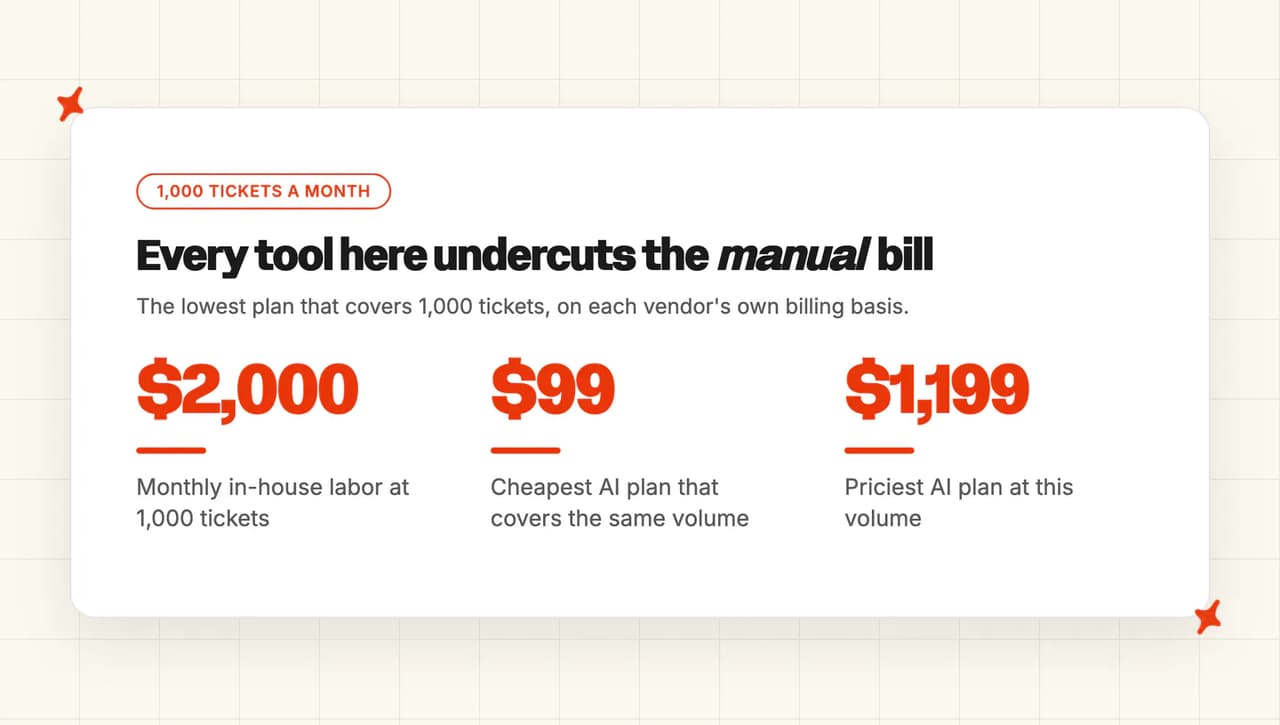
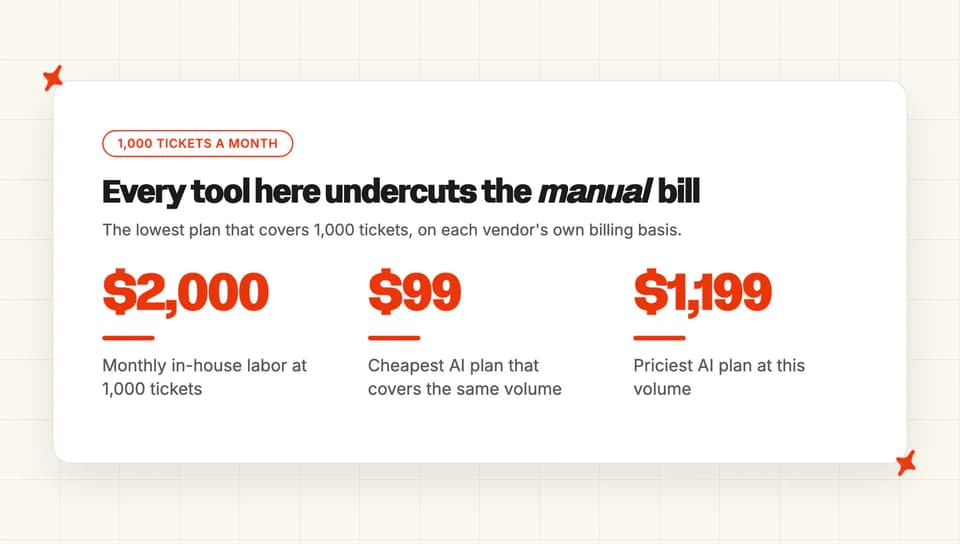
- Cost at 1,000 tickets a month. The lowest plan that covers 1,000, monthly, on the basis each vendor bills.
One fact explains why criteria two and six exist at all. Gorgias supports WooCommerce as a helpdesk while its AI Agent and Shopping Assistant are scoped to Shopify stores, so "the helpdesk supports my platform" and "the AI supports my platform" turn out to be separate questions.
How do the 7 AI chatbots for WooCommerce compare at a glance?
| (scores out of 10) | My AskAI | Tidio (Lyro) | Alhena AI | Chatwoot | Tawk.to | Zipchat | Wizybot |
|---|---|---|---|---|---|---|---|
| Getting it onto your site | 4 | 10 | 3 | 5 | 9 | 6 | 6 |
| Pulling up a customer's order | 7 | 6 | 10 | 5 | 9 | 3 | 2 |
| Understanding your order statuses | 5 | 5 | 4 | 4 | 3 | 2 | 2 |
| Making the change, not just describing it | 9 | 6 | 4 | 5 | 3 | 2 | 2 |
| Order access, and how easily you revoke it | 7 | 6 | 8 | 10 | 7 | 6 | 2 |
| Works with your helpdesk, or replaces it | 9 | 6 | 9 | 2 | 1 | 4 | 1 |
| Cost at 1,000 tickets a month | 8 | 3 | 2 | 9 | 8 | 5 | 6 |
| Overall | 49 | 42 | 40 | 40 | 40 | 28 | 21 |
Three vendors tie on 40, and no two of them get there the same way:
| My AskAI | Tidio (Lyro) | Alhena AI | Chatwoot | Tawk.to | Zipchat | Wizybot | |
|---|---|---|---|---|---|---|---|
| Getting it onto your site | Script embed, no plugin | 70,000+ installs, cache filter | Script embed, no plugin | Plugin, from GitHub only | 100,000+ installs, well rated | Official plugin, very new | Official plugin, very new |
| Pulling up a customer's order | Your endpoint, your key | Catalog synced, orders custom | Calls WooCommerce for orders | Build it as a tool | Guided key setup, documented | Shopify only, build your own | Claimed, no published mechanism |
| Understanding your order statuses | Raw store payload, taught | Mapped from your response | Order agent, statuses unstated | Mapped by response template | Retrieval asserted, vocabulary unstated | Status withheld by design | Nothing published |
| Making the change, not just describing it | Tasks execute the change | Custom action can write | Returns handed to partners | POST with a template | Creates orders only | Nothing against WooCommerce | Cart only, never orders |
| Order access, and how easily you revoke it | Auth header, tested first | Authorized, but read/write only | Authorized, revocable, no keys | Four auth modes, verified header | You choose read or write | API key, merchant-built endpoint | Nothing published |
| Works with your helpdesk, or replaces it | Runs inside your helpdesk | Available on higher plans | Runs inside your helpdesk | It is the helpdesk | It is the inbox | Zendesk only | It is the inbox |
| Cost at 1,000 tickets a month | $199, Pro covers it | $700, top of ladder | $1,199 on Scale | ~$117 on Startups | $99 on Business | ~$347 on Pro | ~$213 with overage |
| Overall | Highest total, leads write-back | Best WordPress citizen | Guided orders, top price | Second-cheapest, own servers | Free platform, paid AI | Sales agent, not support | One plan, no helpdesks |
We take 49 on the strength of the two rows that decide whether a ticket actually closes. Write-back scores 9, because our Tasks carry out a refund or cancellation in your own store, and nobody else in this set publishes an example of actually changing a WooCommerce order.
Helpdesk layering scores 9 too, alongside Alhena, because both of us run inside the inbox your store already has. On the plugin row we take a 4, and Tidio's 10 there is earned outright, so Tidio is the one to beat on WordPress behavior.
Chatwoot at 40 is the answer for a store that chose WooCommerce because it wanted to self-host. Its 10 on order access is the only 10 in that row, because it is the one vendor that tells you to check the customer really is who they claim to be before your store hands their order over.
Tawk.to also lands on 40 by a completely different route, scoring 9 on order lookup for a documented, step-by-step key setup that costs $99 a month.
Where does AI support break on a WooCommerce store?
None of the three throws an error. They surface in a deflection number that looks healthy until you split it by ticket type.
Every one of them has turned up on a call with me, months after go-live.
Failure mode 1: the agent reads your catalog but never your orders
Most tools sync your products the moment you install them. Getting to your orders is a separate step, and on several of the tools here it is a manual one somebody has to remember to finish.
Because the catalog turns up on its own, the tool looks connected. The store goes live, deflection looks healthy on FAQ traffic, and every WISMO ticket still lands on a human.
I have seen that gap run for weeks before anyone connects the two numbers. What good looks like: the tool refuses to call itself connected until a real order read succeeds, and tells you which access it asked for.
Failure mode 2: "processing" answered as "shipped"
WooCommerce defines "processing" as "Payment has been received (paid), and the stock has been reduced. The order is awaiting fulfillment." according to its order statuses documentation. A shopper hears that word as "shipped".
The same page adds the part that makes it bite: "processing" is the store owner's cue to ship, and then to mark the order completed by hand. So an order can sit there for days while an agent raised on hosted-platform vocabulary cheerfully tells the customer it is on its way. That is my favorite example of what a resolution rate will count as a win.
Then a subscriptions or shipping extension adds a status the agent has never seen, and it either reports it as unknown or guesses. Look for a tool that handles the native list explicitly, lets you teach it your extension statuses, and has a defined behavior for one it does not recognize.
Failure mode 3: a cache or consent plugin eats the widget
The chat script is injected into a WordPress page that a caching or optimization plugin then minifies, defers or strips out, or that a consent banner blocks until the visitor opts in, and no error is raised anywhere.
The widget simply never appears for a slice of your traffic. The only symptom is fewer conversations than you expected, which looks like low adoption. The first thing I check on a quiet widget is the cache plugin.
The same surface bites again on a WordPress or WooCommerce major version bump, because you own the upgrade. Ask for a documented cache-exclusion path, stated WordPress and PHP support, and a plugin maintained against current WordPress.
On r/woocommerce, the recurring worry is dependency:
"if you rely on a third-party Saas instead of talking directly to the OpenAI API you have an extra potential point of failure (that Saas might go down one day and that happens even with Microsoft and Amazon stuff!)." u/mariusvetrici, who builds one of the plugins being discussed, in r/woocommerce
Can My AskAI actually run support on a WooCommerce store?
We are an AI support agent that lives inside the helpdesk you already run. WooCommerce gives you no inbox at all, so whatever your tickets land in today is the thing we have to fit into.
The order side is the part people ask about first.
How My AskAI handles a WooCommerce store end-to-end
You connect knowledge first: your help center, your website, your PDFs and policies, and your historic tickets. Then you wire up live data, and there are three routes depending on what the ticket needs.
For a signed-in customer asking about their own orders, you use the User Data API. You point us at your store, and a test button shows you a real order coming back before you switch anything on.
For a shopper in the widget who has not signed in, an Action asks for an order number and a postcode and reads back where that order has got to. For anything multi-step, a Task strings the Tools together in plain English.
All three point at the same place: your own store. We can read what is in it and we can change what is in it, and we fit around however your store already works, so nobody has to build something special for us.
So a refund actually goes through, and a cancellation actually cancels. What the AI does with that power is your call, per action: propose the refund for an agent to approve, or run it autonomously once you trust it. You set that level yourself, and you can change it.

It reads your store's own order statuses back, and you teach it what your extension-added ones mean in Guidance. Wiring any tool into a WooCommerce store takes a developer at some point, so on Scale and Enterprise our CTO does that build with you.
For the ticket channel itself, we install as an approved app in your helpdesk's marketplace: Zendesk, Intercom, Freshdesk, Freshchat, Gorgias or HubSpot. On the storefront, our widget goes on any WordPress theme as a script embed.
Security is SOC 2 Type II and GDPR, with AES-256 at rest, TLS in transit, isolated containers per customer, and no customer data used for model training.
Capabilities covered (out of 6)
| Criterion | My AskAI |
|---|---|
| Getting it onto your site | ❌ |
| Pulling up a customer's order | ✅ |
| Understanding your order statuses | ⚠️ |
| Making the change, not just describing it | ✅ |
| Order access, and how easily you revoke it | ✅ |
| Works with your helpdesk, or replaces it | ✅ |
Who's using My AskAI?
Two live stores back that up. Neither runs on a hosted platform, so both had to solve order lookup the way you will on WooCommerce.
YouGarden is a UK online garden center handling around 12,000 tickets a month in Freshdesk. They worked with us and their site builder to build a custom User Data API surfacing recent orders, purchases, tracking and delivery information.
They run at 66% AI resolution with 965 hours saved a month, and 78% AI CSAT across 11,785 tickets. Their Head of Customer Service, Mamunur Rahman, put it this way:
"My AskAI has fundamentally changed how we support our customers. The quality and consistency of responses are extremely high, and it's allowed us to scale support without compromising the experience we're known for at YouGarden."
Edel Optics is a European eyewear retailer on Zendesk doing 4,000 or so tickets a month. They started on their help center alone and sat at 20 to 30% resolution.
Adding the User Data API to surface order, delivery, return and tracking information took them to 75 to 79%, with 92% AI CSAT across 4,067 tickets. That jump is the clearest number I have for what order access is worth on an ecommerce ticket mix.

Both figures count a conversation as resolved when the AI handled it without escalating to a human, and escalation is deliberately easy to trigger.
What My AskAI costs at WooCommerce volume
Pro is $199 a month and includes 1,000 credits, then $0.12 a credit above that, covering roughly 1,000 tickets depending on channel: a chat ticket usually costs about a credit, an email ticket with follow-ups about one and a half. You pay per ticket the AI works on whether or not it resolves, so the bill does not climb as the agent gets better.
Pro includes 5 team seats, so a bigger support team crosses to Scale.
And the usage-based features bill on top on every plan, Pro included: AI Actions are $0.02 per reply where a tool fires and Tasks are $0.02 a step, so a WooCommerce order lookup is not free. The trial is 30 days, all features unlocked, unlimited tickets, no card.
To go deeper, our ecommerce industry page walks the WISMO and returns workflows end to end, and the User Data and Tasks and Tools feature pages cover the order-lookup wiring in detail.
Can Tidio (Lyro) actually run support on a WooCommerce store?
Tidio is the SMB live-chat tool most WooCommerce stores have already heard of, and Lyro is its AI agent. Of the seven here, it is the one that behaves most like a citizen of the WordPress ecosystem.
How Tidio handles a WooCommerce store end-to-end
The plugin is maintained, listed in the WordPress.org directory and sitting on 70,000+ active installations.
Tidio is the only vendor here that has publicly gone after failure mode 3. It changed the way its widget loads specifically so that consent and caching plugins stop swallowing it, and it gives you a setting to tune that yourself if your stack still misbehaves. My 10 on the plugin row rests on exactly that: a published fix, and a dial to adjust it, for the one thing that kills a widget without raising an error anywhere.
The connection itself is WooCommerce's own approve-and-connect flow rather than a pasted key pair, and the plugin refuses to call itself connected unless your store actually answers. The access is fixed at read and change, so you are not offered a read-only option.
What flows over that connection is product data: the product sync keeps Tidio's list current every time you add, remove or update an item, and the WooCommerce-specific extra is sending product cards into the conversation.
Order status is a custom Lyro Action you build against an address you supply. Tidio's own walkthrough uses order status as its worked example, and is clear that what you get out of it is informational: it tells the customer where the order is and cannot change it, unless you build a second Action that writes.
The pre-built order template targets a hosted platform, so on WooCommerce you build the Action yourself (the one manual step in an otherwise plug-and-play setup). For statuses, you click the field you want in Tidio's test result and it becomes something Lyro can use.
That means the agent knows whatever your store sends back and whatever you tell it that means, and nothing more. On helpdesks, Lyro Connect can put the agent into a desk you already run, on the higher plans, priced against Lyro's monthly AI-conversation allowance.
Capabilities covered (out of 6)
| Criterion | Tidio (Lyro) |
|---|---|
| Getting it onto your site | ✅ |
| Pulling up a customer's order | ⚠️ |
| Understanding your order statuses | ⚠️ |
| Making the change, not just describing it | ⚠️ |
| Order access, and how easily you revoke it | ⚠️ |
| Works with your helpdesk, or replaces it | ⚠️ |
Who's using Tidio?
Tidio publishes named customers with numbers attached. Monster Tires is written up as cutting hours of weekly phone calls with the AI agent, and Suitor is published as hitting 85% customer service automation with Lyro.
Neither story says the store runs on WooCommerce, so take the read-across to your own setup with a grain of salt.
What Tidio costs at WooCommerce volume
Lyro bills per conversation, and a conversation is any customer interaction with at least one AI reply, however many times Lyro replies inside it. So 1,000 tickets is 1,000 Lyro conversations, one for one, with no multiplier.
The self-serve pack ladder starts at $39 a month for 50 Lyro AI conversations and rises with the conversation count to $700 for 1,000, above which Tidio moves you onto a custom plan through sales.
Human replies are billed separately again as billable conversations, so a team handling the escalations pays on top. I hold the cost row to 3 on that combination: two bills for the same ticket, at the top of the self-serve ladder.
For more on Tidio, read our complete guide to Tidio's AI, the head-to-head with My AskAI, or our roundup of Tidio Lyro alternatives.
Can Alhena AI actually run support on a WooCommerce store?
Alhena sells the multi-platform story to non-Shopify stores, and its own documentation backs that up on order lookup. That documentation is what earns the 10 in that row.
How Alhena AI handles a WooCommerce store end-to-end
Connecting is an approve-and-connect redirect: you log into your own store, approve the access, and there is no key pair to copy anywhere. Disconnecting takes the access straight back. A connection you can pull from your own admin screen is worth 8 to me on order access.
The moment you connect, two agents switch on by name, one of them an order agent covering order questions, tracking and order-related support. Alhena is also the only vendor here whose documentation says outright that it goes and asks your store for a customer's order when someone asks about it. Your catalog is a different story: it refreshes once a day, so if you change prices or stock through the morning your shopper may hear yesterday's answer.
There is no WordPress.org listing, only a script you paste into your theme, so no published version floor to check your install against and my plugin row stops at 3. Write-backs are the soft part: returns and exchanges get handed off to partner tools, and the agent itself never carries them out.
The helpdesk row is where Alhena ties with us at 9. It runs inside Zendesk, Intercom, Freshdesk, Gorgias and HubSpot, plus Salesforce Service Cloud, Kustomer, Gladly, Re:amaze, Zoho Desk and Zoho SalesIQ. Freshchat is the one helpdesk we cover that it does not. It also publishes SOC 2, ISO 27001, HIPAA and PCI-DSS badges.
Capabilities covered (out of 6)
| Criterion | Alhena AI |
|---|---|
| Getting it onto your site | ❌ |
| Pulling up a customer's order | ✅ |
| Understanding your order statuses | ⚠️ |
| Making the change, not just describing it | ⚠️ |
| Order access, and how easily you revoke it | ✅ |
| Works with your helpdesk, or replaces it | ✅ |
Who's using Alhena AI?
The published case studies are all ecommerce and all named. Dryrobe is written up as cutting combined sizing returns by 36%.
Tatcha and Victoria Beckham are the other two, the latter credited with 10% revenue growth from the AI stylist. None of the three states the store runs on WooCommerce. I score the order row on what the documentation says.
What Alhena AI costs at WooCommerce volume
The ladder on monthly billing is Free at 25 conversations, Essentials $239 at 200, Growth $599 at 550, Scale $1,199 at 1,200 and Enterprise on request. Additional credits are $1.20 each.
The lowest plan covering 1,000 tickets is Scale at $1,199. Growth plus 450 overage credits comes to $1,139, inside $60 of Scale and with no headroom left, so Scale is the row I model.
At $1,199 it scores 2, both because it is the most expensive route to this volume and because the plan bundles AI-visibility tooling a support workload does not need.
For more on Alhena AI, read our complete guide to the platform, the comparison with My AskAI, or our roundup of Alhena AI alternatives.
Can Chatwoot actually run support on a WooCommerce store?
If you chose WooCommerce because you wanted the code on your own servers, Chatwoot is the only tool in this review whose deployment model matches yours. Its AI layer is called Captain.
How Chatwoot handles a WooCommerce store end-to-end
Install is a real first-party plugin, distributed as a zip from GitHub, outside the WordPress.org directory: you download the latest release, upload it in the admin and connect. That route works, though you lose the directory's update prompts.
That gap is the difference between a 5 and a 9 on this row for me. A directory search for Chatwoot returns only a third party's client-portal plugin.
There is no WooCommerce integration today. Chatwoot's own integrations page lists WooCommerce under what is coming.
Captain's Custom Tools is the route instead, and it starts on the Business plan. You point it at your store, choose how it signs in, and decide whether it may only read or also change things, and one of those sign-in options is exactly how WooCommerce's own access travels. It is a build, though, and somebody on your side has to sit down and do it.
Chatwoot earns the only 10 I gave on order access. It tells you to check the customer really is who they say they are before your store hands over their orders, points out that otherwise a visitor can simply type somebody else's email address into the widget, and separately warns that text sitting in your own content, a review or a forum post, can tell the agent what to do next.
Nobody else in this review warns you about either. On helpdesk layering it scores 2, by design: Chatwoot is the inbox, so adopting it means moving your tickets.
Capabilities covered (out of 6)
| Criterion | Chatwoot |
|---|---|
| Getting it onto your site | ⚠️ |
| Pulling up a customer's order | ⚠️ |
| Understanding your order statuses | ⚠️ |
| Making the change, not just describing it | ⚠️ |
| Order access, and how easily you revoke it | ✅ |
| Works with your helpdesk, or replaces it | ❌ |
Who's using Chatwoot?
Chatwoot's published case studies are FairDee, described on its own page as one of Thailand's leading insurance platforms, and Ponea Health. Neither is an ecommerce store, so I read them as evidence for the platform itself.
What Chatwoot costs at WooCommerce volume
The plans run Hacker at $0 a seat, Startups at $19, Business at $39 and Enterprise at $99, all on annual billing. The AI credits attach to the account rather than to each seat, at 300 a month on Startups and 500 on Business, with extra credits at $20 per 1,000 and one credit spent for every reply the AI sends.
At roughly 3.3 AI replies per ticket, our declared modeling basis, 1,000 tickets is about 3,300 credits. Three Startups seats plus 3,000 topped-up credits lands around $117 a month; at two seats it is closer to $98 and at one seat $79, so the ranking against Tawk.to's $99 turns on the team size you model. I still give Chatwoot the 9, because both numbers are published and you can run them against your own volume without a sales call.
Captain is excluded from the free cloud Hacker plan and from the self-hosted Community Edition.
Can Tawk.to actually run support on a WooCommerce store?
Tawk.to is the incumbent in this category whether or not anyone shortlisted it. A very large number of WooCommerce stores already have the widget sitting on their theme.
How Tawk.to handles a WooCommerce store end-to-end
The plugin sits on 100,000+ active installations. It is only the widget, though: the WooCommerce connection itself is set up in the tawk.to dashboard.
That connection comes with the clearest walkthrough in the review, and the 9 on order lookup is for exactly that. Tawk.to's AI Assist guide names every screen in order and finishes with a real order coming back. This is the manual route, so somebody on your side creates the access and pastes it in, but nobody else writes that down half as well.
The choice of read-only or read-and-change is yours to make, and it matters: hand a chat vendor the second one and it can change orders in your store. The documented behavior when a product or order search comes back empty is a fallback to the agent's other knowledge sources.
Beyond that, the depth thins. Creating orders is the only documented write, so refunds, cancellations and address changes go to a human (which, at 1,000 tickets a month, is most of the interesting work).
On statuses, retrieval is asserted and the only reference to specific states is a testing suggestion to try canceled orders and see how the agent responds. Tawk.to keeps its resolution and deflection figures to itself, so there is no automation number for you to weigh.
And Tawk.to is itself the inbox, marketed as one free inbox for all your channels, with no connector into Zendesk, Intercom, Freshdesk, Freshchat, Gorgias or HubSpot. That is the 1 I gave it on the helpdesk row.
Capabilities covered (out of 6)
| Criterion | Tawk.to |
|---|---|
| Getting it onto your site | ✅ |
| Pulling up a customer's order | ✅ |
| Understanding your order statuses | ⚠️ |
| Making the change, not just describing it | ⚠️ |
| Order access, and how easily you revoke it | ✅ |
| Works with your helpdesk, or replaces it | ❌ |
Who's using Tawk.to?
Tawk.to publishes customer stories under its own brand: Pescatore Seafood Company and Gap Personnel are two of them. Neither is published as a WooCommerce store.
What Tawk.to costs at WooCommerce volume
The platform is free with unlimited seats and unlimited chats. AI Assist is the paid layer, running Hobby free at 100 messages, Growth $29 at 1,000, Business $99 at 5,000 and Enterprise $399 at 20,000.
Growth technically touches 1,000, but at around 3.3 AI replies per conversation your 1,000 tickets are nearer 3,300 messages, and your order lookups eat into a second allowance on top. That is what pushes my modeled row to Business at $99, and what holds the lowest monthly figure in the table to an 8 on cost. Order lookup needs a paid AI Assist plan either way, so the free tier cannot reach an order at all.
For more on Tawk.to, read our complete guide to its AI Assist, our look at how it compares with My AskAI, or our roundup of Tawk.to alternatives.
Can Zipchat actually run support on a WooCommerce store?
Zipchat is built to sell, and its own reporting says so: the dashboard leads on sales, conversion and average order value.
How Zipchat handles a WooCommerce store end-to-end
The plugin is official and maintained, though very new at 60+ active installations. Setup is pasting a token in from the Zipchat dashboard.
What the plugin does is listed in its own readme, and looking up an order is not on the list. You get the chat bubble, a way to recognize signed-in customers, and a sales pixel that tells Zipchat when a conversation ended in an order. The order information travels out of your store for attribution, and none of it comes back into the conversation.
Zipchat's order tracking is written for a hosted platform, where it reads order details straight out of the store. For every other platform, including yours, the documented instruction is to have your developer build and host something for Zipchat to call. Its marketing page calls the WooCommerce plugin a native integration with full data sync, which is a broader claim than its own readme and docs support, and the readme is what I scored.
Statuses are withheld from the agent on purpose. Zipchat's own instructions tell you to keep status out of what the AI sees and to say only whether the order was found, so whatever a customer hears about status is text you wrote yourself.
Write-backs against WooCommerce are not documented, and anything more ambitious than answering is yours to build. On helpdesks, Zendesk is the only connector, which is the 4 I gave that row.
Capabilities covered (out of 6)
| Criterion | Zipchat |
|---|---|
| Getting it onto your site | ✅ |
| Pulling up a customer's order | ❌ |
| Understanding your order statuses | ❌ |
| Making the change, not just describing it | ❌ |
| Order access, and how easily you revoke it | ⚠️ |
| Works with your helpdesk, or replaces it | ⚠️ |
Who's using Zipchat?
Finnmark Sauna and Burger Motorsports are the two published stories, and both lead on revenue and return on spend. Neither story states which ecommerce platform the store runs on.
What Zipchat costs at WooCommerce volume
The plans are Starter $49 at 500 replies, Growth $129 at 1,500, Pro $249 at 3,000 and Scale $499 at 6,000. A reply is any response the AI sends, in the widget, by email or in a connected messaging channel, and each outbound AI message counts as one.
That basis is what decides this row. Zipchat's own Finnmark Sauna page publishes a month of both numbers, and they come out at 3.29 AI replies per customer chat.
Apply that to 1,000 tickets and you need about 3,290 replies, which is more than Pro's 3,000 and more than Pro plus one $49 pack of 250, so I model two packs. That is $249 plus $98, around $347, against $499 for Scale's 6,000 replies. Those packs work out at $0.196 a reply against Pro's $0.083, roughly 2.4 times the plan rate.
For more on Zipchat, read our complete guide to the sales agent, our My AskAI comparison, or our roundup of Zipchat alternatives.
Can Wizybot actually run support on a WooCommerce store?
Wizybot is the simplest proposition here: one self-serve plan, a real plugin, and a strong channel story on WhatsApp, Instagram and Messenger. It is also the thinnest documented. That is what my 21 reflects.
How Wizybot handles a WooCommerce store end-to-end
The plugin is real, and very new: fewer than 10 active installations, and you upload the folder yourself to install it. Its integrations page says it has native apps for Shopify, VTEX and WooCommerce for a higher level of integration and quality of responses, and at the install level that holds up.
Wizybot's AI chat page lists products, inventory, policies, terms and orders as the store information it connects to, and says nothing anywhere about how it gets to any of it. That is the difference between the 2 I gave this row and Tawk.to's 9, which rests on a connection a store owner can actually follow, step by step, to a real order.
Write-backs are cart-side only: a shopper can add a suggested product to their real cart or buy it from the widget, and returns and exchanges go to a third-party tool. Statuses are not addressed at all.
On helpdesks, Wizybot answers in channels. Its own FAQ covers Instagram DMs, Facebook Messenger, website, WhatsApp and social comments, and none of Zendesk, Intercom, Gorgias or Freshdesk appears anywhere.
If your tickets live in one of those today, adopting Wizybot means moving them (worth flagging before you install anything).
Capabilities covered (out of 6)
| Criterion | Wizybot |
|---|---|
| Getting it onto your site | ✅ |
| Pulling up a customer's order | ❌ |
| Understanding your order statuses | ❌ |
| Making the change, not just describing it | ❌ |
| Order access, and how easily you revoke it | ❌ |
| Works with your helpdesk, or replaces it | ❌ |
Who's using Wizybot?
Wizybot's customers are not named publicly, and there are no case studies on the site. It positions around small and mid-sized ecommerce stores selling through WhatsApp, Instagram and Facebook.
What Wizybot costs at WooCommerce volume
There is one self-serve plan, Basic at $69.99 a month, including 1,250 AI messages, with $0.07 per message after that and a contact-sales tier above it. Wizybot bills per message the AI sends, so a five-turn conversation bills five times.
At around 3.3 AI replies per conversation, 1,000 tickets is roughly 3,300 messages: 1,250 included, 2,050 over at $0.07 adds about $143.50, so the real figure is around $213 a month. That is what my 6 on the cost row measures.
What does an AI agent actually save a WooCommerce store? (worked example)
One basis, applied to every row: 1,000 support tickets a month, about 5 minutes of agent time each, at roughly $0.40 a minute loaded. That is $2,000 a month of labor.
Where a vendor bills per AI message or per AI reply, I have converted at 3.3 AI replies per conversation, the reply-to-chat ratio Zipchat reports for one customer on its own success-story page. Every row is the cheapest plan that covers 1,000 tickets. For the same exercise outside WooCommerce, our roundup of the cheapest AI customer service tools prices eight of them at 10,000 tickets.
| Scenario | Plan modeled | Monthly cost | Effective $/ticket | Notes |
|---|---|---|---|---|
| Manual (in-house) | Human agents | $2,000 | $2.00 | 1,000 tickets at ~5 min each, ~$0.40/min loaded |
| My AskAI | Pro | $199 | $0.20 | 1,000 credits included in the base, $0.12 a credit above it; 5 team seats |
| Tawk.to | AI Assist Business | $99 | $0.10 | 5,000 messages; order lookups draw on a separate 5,000 API-call allowance |
| Chatwoot | Startups, 3 seats | ~$117 | ~$0.12 | Three seats at $19, plus 3,000 credits at $20 per 1,000; the 300 free credits come with the plan, not the seat |
| Wizybot | Basic | ~$213 | ~$0.21 | $69.99 plus 2,050 AI messages over the 1,250 included, at $0.07 |
| Zipchat | Pro plus two reply packs | ~$347 | ~$0.35 | ~3,290 AI replies needed; Pro covers 3,000 and packs are $49 per 250 |
| Tidio (Lyro) | Lyro 1,000-conversation pack | $700 | $0.70 | One conversation per ticket; human replies billed separately |
| Alhena AI | Scale | $1,199 | $1.20 | 1,200 conversations included; extra credits $1.20 each |
Our own row carries the Actions and Tasks charges on top of the $199, at $0.02 each, so an order lookup adds to it.
With us you still pay per ticket the AI works on, resolved or not, so the price per ticket does not climb as the agent gets better.
A plan that cannot reach your orders costs you more than a dearer one that can, because the WISMO tickets keep landing on a person at $2 each.
Work out which tools can actually answer your top ticket type first, then compare the ones that pass on price. If you want to check the numbers on your own volume before committing, our trial runs 30 days with all features unlocked, unlimited tickets and no card.
So which AI chatbot is best for a WooCommerce store?
We take the top spot on two rows more than anything else. Our agent makes the change itself, so a refund or cancellation actually goes through in your store, and it works inside Zendesk, Intercom, Freshdesk, Freshchat, Gorgias or HubSpot. That is where a WooCommerce store's tickets already are.
We give up the plugin row and the cost row to do that.
Tidio is the runner-up and wins a clear sub-segment: the store with no helpdesk, a busy WordPress install and a healthy fear of the cache plugin. It is the only vendor here that has publicly done the work on making its widget survive your other plugins, and a store whose only support channel is storefront chat should weight that heavily.
Chatwoot is the right answer for a specific reader: the one who chose WooCommerce because they wanted to own the stack and will happily run the inbox on their own servers. At around $117 a month it is the second-cheapest route to this volume, behind Tawk.to's $99, with the strongest security documentation of anyone in the review.
Captain is in neither free tier, and adopting Chatwoot means your tickets move.
Whichever you pick, roll it out the way our best-performing stores did. Both YouGarden and Edel Optics started with the AI drafting replies as internal notes, watched the quality against their own agents for a few weeks, and only then flipped it to reply directly.
YouGarden ran a full month in notes mode before going live. It costs nothing, and it shows you what the agent says about an order still sitting in processing before a customer finds out.
If you want to try that on your own store, our free trial runs 30 days with every feature unlocked, unlimited tickets and no card, and our ecommerce industry page walks through the WISMO and returns workflows in more detail.
FAQs
Can AI be used in WooCommerce?
Yes, in two separate ways that people tend to run together. Any chat widget can drop onto a WordPress theme and answer questions from your content (paste, save, done). That part takes minutes.
Reading a customer's actual order needs a real connection to the store itself. Some tools set that up by sending you into your own store to approve it; others need somebody to create the access in your WooCommerce settings and paste it into the tool.
What are the best chatbots for WordPress?
The seven scored above are the ones worth shortlisting for a store: My AskAI, Tidio, Alhena AI, Chatwoot, Tawk.to, Zipchat and Wizybot. If you are running a plain WordPress site with no shop, the criteria change completely, because four of the seven criteria here are about reaching your orders, and a fifth is about the helpdesk your tickets land in.
Can an AI chatbot look up WooCommerce orders?
It can, if you give it access to your store. Any tool that will connect to a store you point it at can pull up a real order, whether it does that through WooCommerce's own approve-and-connect flow or through access you create and paste in.
The ones that cannot are usually syncing your catalog and calling that "connected". I would ask to see a real order come back before you sign anything.
Do I need a WordPress plugin, or can I just paste a script?
A maintained plugin from the WordPress.org directory has been checked against the directory's guidelines and updates itself from your admin screen. A pasted script goes live in minutes and gets none of that.
The helpdesk side has its own version of this, and there we install as an approved marketplace app: it has passed the marketplace and helpdesk approval process, the helpdesk knows it is there, it is more stable, and it is less likely to be taken down.
Will an AI chatbot slow my WooCommerce site down?
A chat widget is one more third-party script next to your theme, and vendors load it so it does not hold your page up. The more common problem is your optimization stack breaking the chat: a caching plugin strips the widget, or a consent banner blocks it until the visitor opts in, and it never appears for part of your traffic while nothing anywhere reports an error.
Check the vendor publishes a cache-exclusion path, and test the widget on a page you have already cached.
Which AI customer service platforms work with both Shopify and WooCommerce?
Several in this review cover both, but the depth differs by platform. My AskAI has a pre-built Shopify connection and reaches WooCommerce orders through a Tool or the User Data API pointed at your store. Alhena connects to both, and Wizybot has native apps for Shopify and WooCommerce, while Zipchat's order tracking is written for Shopify, so a WooCommerce store builds its own endpoint.
Can the AI issue a refund in WooCommerce, or only tell a human to?
It can issue it, as long as the tool you pick can change things in your store and not only read them. In WooCommerce a refund is its own separate action, and it needs access with permission to change orders. Read-only access simply gets refused.
With us that is a Task, and the autonomy is yours to set per action: have it draft the refund for an agent to approve, or let it run on its own once you trust the guardrails.
Is there a free AI chatbot for WooCommerce?
There are free chat widgets, and the AI layer on top of them is paid. Tawk.to's platform is free with unlimited seats and chats, but AI Assist is a paid layer and WooCommerce integrations require a paid AI Assist plan, so the free tier cannot reach an order.
Chatwoot lands in the same place: the self-hosted Community Edition and the free cloud plan both exclude Captain, its AI.