My AskAI vs Tawk.to AI Assist: Features, Pricing, and Results (2026)
My AskAI vs Tawk.to: Tawk.to is cheaper and takes 3 of the 11 categories we scored. We take 5 and publish a 72%+ resolution rate. They publish none.
Summarize with AI
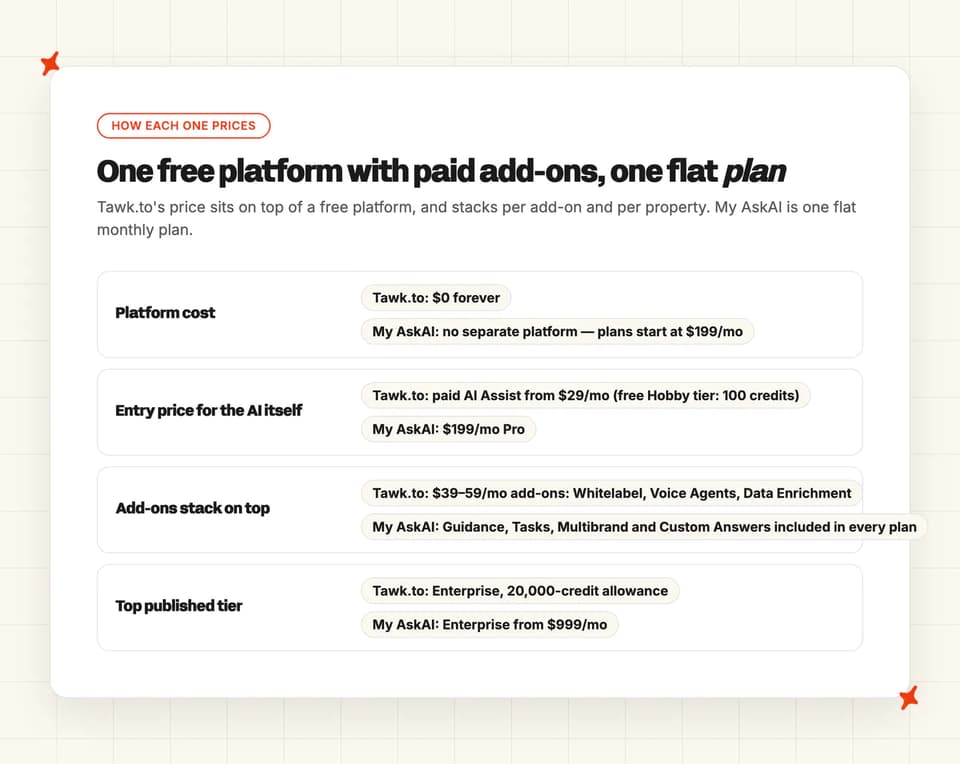
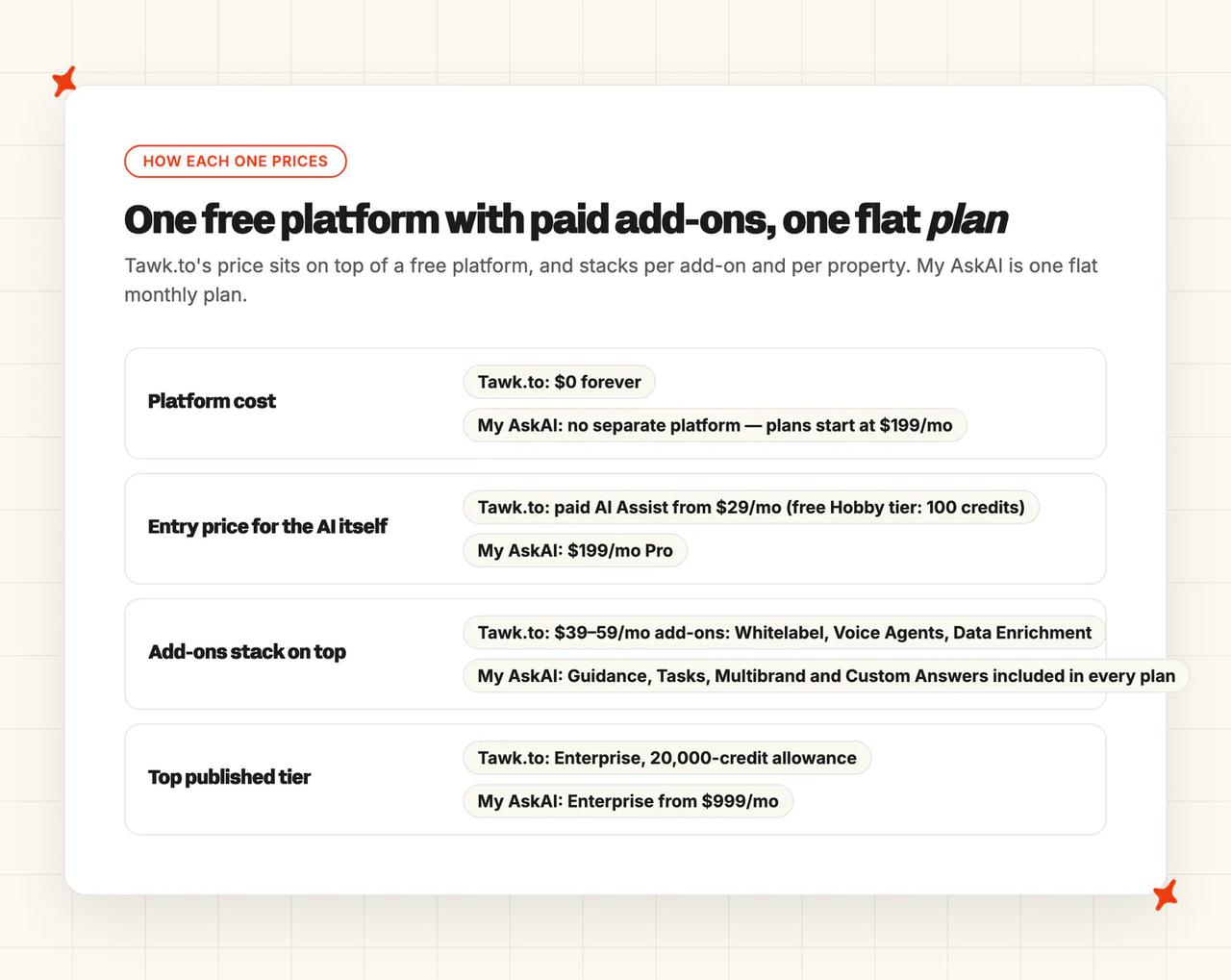
Tawk.to hands you an AI agent for almost nothing: the platform is free forever and paid AI Assist starts at $29/mo per property, so a one-site team with no helpdesk should take it. AI Assist reads only what you build inside Tawk.to, and its reporting stops at credit usage. Our agent earns its $199/mo entry once that knowledge already sits in past tickets, a help center or another helpdesk, and someone expects a number.
The catch is that Tawk.to publishes no resolution rate, no deflection rate and no answer-quality reporting of any kind. You can run its AI for a year and still not know what share of your chats it finished.
You buy an AI agent to take work off your team. Without a number, you cannot tell whether it did.
I'm Mike, co-founder of My AskAI. We help 200+ ecommerce and SaaS businesses run AI customer service inside their existing helpdesk, so I obviously can't be completely impartial here.
Tawk.to's free tier is real and permanent, with no countdown on it. AI Assist is an autonomous agent stack, and Tawk.to beats us on setup, breadth and price for a one-site team with no helpdesk.
Every Tawk.to claim below comes from Tawk.to's own add-ons page, product pages, security page and help center. I have linked the page each one sits on.
My AskAI vs Tawk.to at a glance
| My AskAI | Tawk.to | |
|---|---|---|
| What it is | AI agent inside your helpdesk, or its own website widget | Free live chat and ticketing platform with a paid AI add-on |
| Headline price | $199/mo Pro, $499/mo Scale, from $999/mo Enterprise, about $0.10 a chat ticket | Platform $0 forever, AI Assist from $29/mo on the add-ons page |
| How you buy it | Self-serve, 30-day free trial, all features, no card | Self-serve, no card, permanent free AI tier of 100 message credits |
| Best for | Teams with a help center, past tickets and a helpdesk worth keeping | One-site teams with no helpdesk and a hard $0 budget |
| Not a fit for | Teams wanting one tool for chat, ticketing, knowledge base and CRM | Teams that need to measure what the AI resolved |
| Enough on its own | Yes: AI layer on your existing helpdesk, or a standalone widget | Yes for one site, modest volume, once support moves into Tawk.to |
| Biggest limitation | Priced from $199/mo, with a 30-day trial as the free route in | The AI reads only knowledge that lives inside Tawk.to |
| Scorecard | 5 category wins of 11, 3 tied | 3 category wins of 11, 3 tied |
What AI can I use for customer support: Tawk.to or My AskAI?
More than 7 million businesses across 190+ countries run Tawk.to, and they get live chat, ticketing, a knowledge base and a CRM without paying for any of it. Its own why-free page puts the product at around 20% of the live chat market. Our full Tawk.to guide goes through the platform and its add-on ladder in detail.
The AI is one of four paid add-ons, and Tawk.to's add-ons page is blunt about the split: "Four things we charge for. Everything else is free."
The same page puts a number on it: "99% of businesses use tawk.to entirely for free. The other 1% pay for these add-ons."
Our agent installs into Zendesk, Intercom, Freshdesk, Gorgias or HubSpot, answers in that helpdesk's own channels, and hands the conversation over to your team when it should. Where a team has no helpdesk, it runs as our own embeddable website widget instead.
There is no My AskAI app inside Tawk.to, and Tawk.to has no app inside Zendesk, Intercom, Freshdesk, Gorgias or HubSpot. A third-party AI agent installs either as an approved marketplace app or as an API integration, and Tawk.to offers neither route.
So if you are on Tawk.to with no helpdesk behind it, the comparison is their widget against ours. If you already run Zendesk or Intercom, adopting AI Assist means moving your support into Tawk.to first.
Both products review well on G2:
| My AskAI | Tawk.to | |
|---|---|---|
| Rating | 4.5/5 | 4.5/5 |
| Reviews | 21 | 203 |
| Reviews page | G2 profile | G2 profile |
How does an AI customer service agent work in a live chat widget?
Both agents work the same way underneath. A customer asks something, the agent looks up your knowledge, then writes an answer in its own words.
A flow-builder chatbot picks a pre-written branch from a decision tree. That is the tooling we set out to replace.
Tawk.to is open about the engine. Its model documentation says new agents use GPT-4.1 mini by default, with GPT-4o mini selectable if you want faster and cheaper replies. You pick the model per agent.
On retrieval, Tawk.to's data-source documentation says AI Assist selects up to five chunks of your content per question.
We run on a suite of models instead (predominantly OpenAI, with Google and Anthropic where they do a specific job better). We A/B test the mix against real tickets.
Our own AI resolution rate benchmark study puts the field median at 70% across 195 rated deployments from 38 vendors. Take that aggregate with a grain of salt: it is not apples to apples between vendors, and the teams who publish tend to be the ones doing well.
What are the different ways I can use an AI agent with Tawk.to or My AskAI?
Direct replies
Tawk.to lets you build up to ten named AI agents, each with its own avatar, instructions and model. Its channel documentation says AI Assist can "Support multiple channels, including Live Chat, Tickets, Facebook Messenger, SMS, Telegram and WhatsApp."
Tawk.to's multi-agent article states that once an agent is assigned to a channel, no other agent can take that channel. Ten agents means at most one agent per channel per property.
We reply directly in whatever channels your connected helpdesk routes to us, or in our own widget. The agent answers, and when it should not answer it summarizes the conversation and hands control to a human in the same inbox.
Copilot replies
Smart Reply sits next to Reply and Whisper in the composer and drafts a suggested response in seconds. There are also around ten slash commands that rewrite and summarize inside chats, tickets and knowledge base articles.
Our copilot is the AI Copilot Chrome Extension. It works inside any of our integrated helpdesks, drafts replies and looks knowledge up without your agents leaving the ticket. It carries no seat charges, so the whole team can use it (yes, even the person who only covers support at weekends).
Tawk.to's Smart Reply and slash commands draw on the same message-credit pool as the customer-facing agent.
Internal note replies
This is the one mode Tawk.to has no equivalent for. We can draft every reply as an internal note, so nothing reaches a customer until your team is happy with the quality.
It is the cheapest way to evaluate an AI agent, ours or anyone else's. You run it alongside your current setup for a week, read what it would have said, and decide from real tickets.
Which is easier to set up, Tawk.to or My AskAI?
Tawk.to wins this one. You drop a JavaScript snippet on your site, or use the one-click Shopify or WordPress install, and the widget is live (no card, no sales call).
AI Assist is a separate wizard on top of that. You toggle it on under Add-ons, then walk a build, train, deploy and refine flow that asks for your business details, industry and objectives. The free Hobby tier gives you 100 message credits with no card.
We take about ten minutes and need no developer. You sign up, connect your knowledge sources, install our app in your helpdesk or drop in our widget, and you are answering tickets the same day.
There is no $0 entry point on our side, and signup asks for a business email. A team starting from nothing also has less to point us at, because our advantage is reading knowledge that already exists.
Its own setup article notes that "The instructions below are for desktops and laptops only", so AI Assist cannot be configured from the mobile apps. The crawler also takes 24 to 48 hours to re-scan a site after you change it (so a price change can sit stale for two days).
How do My AskAI and Tawk.to differ in what they can be trained on?
| Source type | My AskAI | Tawk.to AI Assist |
|---|---|---|
| Public website crawl | ✅ | ✅ (server-rendered HTML only) |
| Documents (PDF, DOCX, CSV) | ✅ | ✅ (images and tables inside files unreliable) |
| Q&A pairs built in-product | ✅ (Custom Answers) | ✅ (255-character question, 1,000-character answer) |
| Canned replies and shortcuts | ✅ | ✅ |
| Structured tables | ✅ (via Tools and User Data) | ✅ (50 MB, fixed column types) |
| The vendor's own hosted knowledge base | ✅ | ✅ |
| A help center behind a login | ✅ | ❌ |
| An external help center or another helpdesk's knowledge base | ✅ (11 connectors) | ❌ |
| Past support tickets | ✅ (Train on Historic Tickets) | ❌ |
| Notion, Confluence, Google Drive | ✅ | ❌ |
| Salesforce | ✅ (knowledge pages) | ❌ |
| Shopify | ✅ | ✅ (via API integration, paid add-on) |
| Images inside content | ✅ (Image Reading) | ❌ |
'Static' content
Tawk.to gives AI Assist seven source types: FAQs, plain text, documents, tables, shortcuts, knowledge base articles and websites. File uploads are included alongside the crawl. The automation page shows a Documents source alongside Website, FAQs and Shortcuts.
Everything the agent reads must be built inside Tawk.to or crawled from a public page, and the crawler cannot reach anything behind a username and password. Its own documentation also says the crawler skips images, videos and interactive elements, and reads only server-rendered HTML.
We read 11 connectors, including Zendesk, Intercom and Freshdesk help centers with their behind-login articles, plus Google Drive, Notion, Confluence, SharePoint, OneDrive, Dropbox, Salesforce and Shopify. Add website sync, direct PDF and DOCX uploads, and Custom Answers for wording you want returned word for word.
'Dynamic' content
If you have no written documentation at all, our Train on Historic Tickets reads your last 5,000 past tickets by default (more on request) and drafts starter knowledge articles from how your agents actually answered.
That gives a team with no help center somewhere to start on day one, without spending a week writing FAQs first. With Tawk.to you write that starter knowledge yourself, in the Instructions box and the FAQ editor.
On live data, we connect to a backend system through an API so the agent can answer order and account questions with real values. Tawk.to documents Shopify under an API calls heading, and API integrations are a feature of the paid AI Assist add-on.
Which has better answer quality, Tawk.to or My AskAI?
We publish a resolution rate of 72%+ on a rolling 30-day basis across the whole customer base, with more than 1,000,000 tickets resolved by our agents. We count a conversation resolved when the AI handled it without escalating to a human.
Tawk.to publishes no resolution, deflection, containment or automation rate on any surface. Its product pages sell AI Assist purely on capability, and the only AI reporting documented anywhere is credit usage.
The nearest thing to a result is the gap personnel story, which cites 4,211 queries. That number covers the agent bot and two human teams together, with no denominator and no period, so it says nothing about what the AI resolved on its own.
The other half of answer quality is being able to check a reply. You can ask Echo, our in-dashboard assistant, why the agent gave any answer and which knowledge source it used. Tawk.to shows per-answer sources in the test preview only, so once the agent is live you are reading transcripts.
A reviewer on Tawk.to's G2 profile names the same limitation the documentation confirms: the agent cannot learn from documentation or a knowledge base that lives outside Tawk.to.
This one is a tie. A rate we publish about our own customers says nothing about how either agent would perform on yours.
Which AI agent is easier to improve over time: Tawk.to or My AskAI?
Tawk.to's improvement loop is manual from end to end. You edit the Instructions box, add Scenarios, fix shortcuts and FAQs, then re-crawl your site (a step that takes 24 to 48 hours to take effect, so a fix does not land the same day). Its troubleshooting article walks exactly that path.
AI Assist does not learn from conversations at all. Tawk.to's documentation says the agent "processes only the current conversation and any connected data sources, without retaining past interactions". It learns only from data you supply, "deliberately excluding information from visitor conversations" to avoid picking up bad information.
That privacy choice is deliberate on Tawk.to's part. Nothing in the product flags which answers went wrong, so every improvement starts with you noticing something in a transcript.
Our self-learning compares what our agent said to what your human agent actually sent on handed-over tickets, then drafts a new knowledge article for review. Custom Answers let you fix a specific reply word for word, and our Guidance rules let you write in plain language so the same class of mistake stops.
Which has more features, Tawk.to or My AskAI?
| Feature | My AskAI | Tawk.to |
|---|---|---|
| Live chat widget | ✅ | ✅ |
| Ticketing inbox | ❌ | ✅ (free) |
| Hosted knowledge base | ❌ | ✅ (free) |
| Contacts, CRM and pipeline | ❌ | ✅ (free) |
| Unlimited agent seats | ✅ (Scale and above) | ✅ (free) |
| Autonomous AI agent | ✅ | ✅ |
| Multi-step tasks | ✅ (Tasks) | Coming soon (Workflows) |
| Live back-end data lookups | ✅ (User Data APIs) | ✅ (paid plans) |
| Prebuilt ecommerce tools | ✅ (Shopify) | ✅ (Shopify, via API integration) |
| Natural-language behavior rules | ✅ (Guidance) | ✅ (Instructions, 2,000 characters) |
| Separate agents per brand | ✅ (Multibrand) | ✅ (per property) |
| Verbatim answers | ✅ (Custom Answers) | ✅ (Shortcuts and FAQs) |
| Internal-only knowledge | ✅ (Private mode) | ❌ |
| Image reading | ✅ | ❌ |
Count the platform and Tawk.to wins this one outright. A free ticketing system, knowledge base, CRM, pipeline, chat pages, desktop and mobile apps and unlimited agent seats is a lot of product for $0, and 24/7 support comes with it.
The add-ons page sells AI Assist as "AI agents & AI workflows", while the automation product page marks Workflows as coming soon. Voice Agents and Data Enrichment are both waitlist entries you cannot switch on yet.
On the AI itself we go deeper, and none of it is locked to a higher tier. Tasks run multi-step procedures like refunds and cancellations in natural language, either fully autonomously or proposing an action for an agent to approve, whichever you configure per action.
Tools call your own APIs, User Data reads live order and account records, and our Shopify integration acts as a sales agent that recommends products as well as tracking orders. Guidance, Custom Answers and Image Reading are all available on Pro.
For a small team weighing how much product it gets for the money, Tawk.to's answer includes an entire helpdesk at no cost.
Is it easy to customize My AskAI and Tawk.to?
Tawk.to's knobs are concrete and easy to find. Each agent gets a name, an avatar and its own completion model (GPT-4.1 mini unless you change it). You write a base prompt in the Instructions box, add Scenarios for specific situations, and set how verbose the replies should be.
Four limits to plan around:
- Instructions cap at 2,000 characters.
- Response verbosity does not apply to SMS or Facebook Messenger.
- Instructions cannot force the agent to look at a particular data source.
- Shortcut matches beat your Instructions.
If AI Assist finds a strong match with one of your shortcuts, the shortcut wins over your Instructions, so a welcome question or a lead-capture flow written into Instructions can silently fail to run.
Our control surface is written in plain English. Guidance comes in three types, covering communication and style, context and clarification, and handover and escalation, each kept under 75 words. You write the rule the way you would brief a new agent.
Multibrand gives each brand, region or product its own agent, and Custom Answers return your exact wording where the reply has to be word perfect. Triage runs through those guidance rules or through AI Tagging, depending on how you want tickets routed.
Call this one a tie. Tawk.to's per-agent model choice is a control we do not expose, and our natural-language rules reach further across behavior.
What about vendor lock-in?
Tawk.to's AI runs on Tawk.to's platform. There is no Zendesk app, no Intercom app, no Freshdesk, Gorgias or HubSpot integration for AI Assist (that list is exactly where our agent installs). Adopting it means migrating your support.
Everything the agent knows was hand-built inside Tawk.to or crawled from your public site, so there is nothing trained to take out with you if you leave.
Operators looking for a way out find that quickly: one r/selfhosted thread hunting for a self-hosted Tawk.to alternative ends up working out what it would take to rebuild the whole thing from scratch.
Our trained agent, custom answers, guidance and tasks carry across Zendesk, Intercom, Freshdesk, Gorgias and HubSpot. You typically run it in one helpdesk at a time, and if you change helpdesk later you keep the agent you trained.
A smaller lock-in sits inside Tawk.to's own wording. The add-ons page bills AI Assist per property, and the help center is blunter about what that costs you:
"Add-ons aren't shared across properties. When you buy an add-on, it only applies to the property you purchased it for. To use an add-on on multiple properties, you'll need to buy it separately for each one."
Run three sites and you buy AI Assist three times, with three separate credit pools that cannot be shared.
Does Tawk.to or My AskAI have any other AI features?
Tagging
Our AI Tagging reads the incoming message and classifies it, so a frustrated or canceling customer can be routed straight to a human and the rest sorted by topic. You pay $0.05 per attribute per ticket, so you only pay for the tags you switch on.
Tawk.to has no comparable AI classification layer for routing. Its tagging is the manual kind you apply yourself in the inbox.
Agent translation
We answer in 95 languages, auto-detected per message. On Intercom, our Live Translation goes a step further for your team, translating a conversation both ways at $0.05 per ticket, so an agent who does not read the customer's language can still take the ticket.
Tawk.to lists multilingual AI responses as a key feature and has an enable-multilingual-support toggle, but it publishes no language count for the AI. The widget's own count is given as both 27 and 50+ on different vendor pages, so do not assume the AI matches the widget.
Voice and transcription
Tawk.to's AI Transcription is a full loop. A customer sends a voice message, the agent transcribes it, generates a response and sends it back, across 99+ languages with auto-detection.
It costs one credit per started minute of transcription, capped at five credits, plus one more credit for the AI-generated reply. A maxed-out voice note runs six credits total (a 25 MB, five-minute file uses every one of them).
Voice Agents are a waitlist entry on the add-ons page, so you cannot buy them today.
We read images instead: screenshots, photos of receipts and error messages, at $0.02 per AI reply where an image is processed. That covers most of what a support customer attaches.
Another tie. Whether you want transcription or image reading comes down to what your customers send.
What about security, is Tawk.to more secure than My AskAI?
We are SOC 2 Type II certified and GDPR compliant. Data is encrypted with AES-256 at rest and TLS in transit, each customer's data sits in isolated containers, and your data is never used to train models or sold on. Our live trust center publishes the controls, and the SOC 2 report itself comes with the Scale plan.
Tawk.to's security page is clear about its role: "tawk.to operates as a data processor on behalf of our clients." On encryption it says "Chats and tickets are encrypted over SHA-256 SSL. Data is encrypted in transit and at rest."
Its compliance block lists EU-U.S. DPF, the UK Extension and Swiss-U.S. DPF, all self-certified, plus ICO registration in the UK, GDPR and data processing agreements with its vendors.
Self-certified means the company attests to the framework itself (no outside auditor tests the controls or issues a report).
There is no SOC 2 report to request, no trust portal, and no choice of data residency. Chats and tickets stay on Tawk.to's servers indefinitely until you delete them (a 90-day backup retention caveat applies on compromised accounts). Infrastructure runs on Google Cloud, AWS and Digital Ocean with a published sub-processor list.
Its AI security article states that data is never shared with a third party. The model-selection article names an OpenAI model as the default and allows advanced external ones.
Both statements sit on the same help center, so I would ask which one governs your chat data before you sign anything.
Tawk.to is a free product for small businesses (more than 7 million of them), and its position is proportionate to that. If your reviewer wants an audited report, that difference decides it.
Which costs more, Tawk.to or My AskAI?
The pricing model
The Tawk.to platform is $0 forever, and I mean forever: unlimited agents, no time limit, no card. There is no dedicated pricing page any more: the old pricing URL now leads to the founder's essay on why the product is free instead. The only published prices sit on the add-ons page and in two help center articles.
AI Assist is metered in message completions. One completion is one AI generation, so a five-turn chat burns several. Our credit is a bigger unit than a single AI generation.
Smart Reply and the slash commands draw on that same pool, so agent-side use eats the budget you bought for customers.
Tawk.to's message-credits article lists the included allowances: Hobby 100 credits, Growth 1,000, Business 5,000 and Enterprise 20,000. Paid AI Assist starts at $29/mo. Overage is a flat rate: "You can purchase additional message credits at any time for $30 USD per 1,000 credits", sold in blocks of 1,000, and purchased credits roll over.
Hobby's escalation setup (the shortcuts that hand a chat to a human agent) is a paid-plans-only configuration, and Hobby cannot buy credits: purchases are "available only with paid AI Assist plans". When credits run out the agent finishes the conversations it is in and stops joining new ones (your human team picks up from there).
The same add-ons page lists the other three: Whitelabel at $29/mo, Voice Agents from $49/mo plus usage on a waitlist, and Data Enrichment from $59/mo, also on a waitlist. All of them bill per property.
We charge a monthly plan with credits included, then a per-credit rate beyond it. Pro is $199/mo with 1,000 credits and $0.12 a credit after that.
Scale is $499/mo with 2,000 credits at $0.10, branding removal included and up to three agents or brands. Enterprise starts at $999/mo with all usage at $0.10 (annual billing takes 33% off the base on every plan).
A credit stretches differently by channel. Two AI replies in a helpdesk chat is one credit, which works out at about $0.10 a ticket. An email ticket is one credit for the first reply and half a credit per follow-up, so around $0.15.
In our own widget, a full hour-long session with unlimited messages is a single credit. That is the number to use when you compare against Tawk.to's widget.
We charge per ticket. Your bill stays flat as the AI gets better, because we never bill you more for a success. You can test the whole thing first on a 30-day trial with every feature unlocked and no card.
The overall cost
| Scenario | Tawk.to | My AskAI |
|---|---|---|
| One site, ~300 AI-answered messages a month | $0 platform + $29 entry-tier paid AI = $29/mo | Pro at $199/mo, widget sessions at 1 credit an hour |
| Five sites at real volume | 5 × $29 entry-tier paid AI = $145/mo before overage, five separate 1,000-credit pools | Scale at $499/mo with 2,000 credits, Multibrand covering the brands |
A single-property store answering a few hundred messages a month pays $29 with Tawk.to, and there is no arrangement in which our $199 beats that. If that is your situation, take the $29.
At five properties, the units stop matching. You buy AI Assist five times, and each property keeps its own credit pool that the others cannot draw on. Overage arrives in $30 blocks of 1,000 credits, per property.
That still does not settle into a neat crossover point, because the two meters count different things. A Tawk.to credit is one AI generation, ours is two helpdesk chat replies or a one-hour widget session, and the gap between those depends entirely on how long your conversations run.
If you already run a helpdesk, Tawk.to's $0 platform costs you a support migration, retraining your team and rebuilding your knowledge inside a new tool. At one site, the two AI bills are $170 a month apart. Every article behind a login and every past ticket has to be rebuilt inside Tawk.to by hand, because AI Assist reads neither.
Conclusion - should I choose Tawk.to or My AskAI?
If you have no helpdesk, one website and no budget, Tawk.to is the right call. We are the better fit once your knowledge already lives somewhere else and you need to report what the AI resolved.
The eleven categories are modes, ease of setup, training and integrations, answer quality, improving over time, features, price, customization, lock-in, other AI features and security. Scores rest on each side's published documentation, pricing and product pages, and Reddit threads from operators running Tawk.to.
| My AskAI | Tawk.to | ||
|---|---|---|---|
| Modes | 8/10 | 7/10 | My AskAI win |
| Ease of setup | 7/10 | 9/10 | Tawk.to win |
| Training/Integrations | 9/10 | 5/10 | My AskAI win |
| Answer Quality | 7/10 | 7/10 | Tie |
| Improving | 9/10 | 4/10 | My AskAI win |
| Features | 7/10 | 8/10 | Tawk.to win |
| Price | 6/10 | 9/10 | Tawk.to win |
| Customization | 8/10 | 8/10 | Tie |
| Lock-in | 9/10 | 3/10 | My AskAI win |
| Other AI features | 7/10 | 7/10 | Tie |
| Security | 9/10 | 4/10 | My AskAI win |
Tawk.to's three wins are all things you can check before you commit: cheapest to start, most product for the money, and live the same afternoon. That is a strong position. For a founder running support out of their own inbox, it often settles the question.
Our five wins sit after launch: reading knowledge that already exists, running silently as internal notes while you judge the answers, improving itself from your agents' replies, keeping the trained agent when you change helpdesk, and giving a security reviewer an audited report to read.
If that last point is what stopped you, we install into Zendesk, Intercom, Freshdesk, Gorgias or HubSpot at a per-ticket rate from $0.10 on Scale ($0.12 on Pro), and run as our own website widget if you have no helpdesk to install into.
An operator two weeks into running Tawk.to, on r/smallbusiness:
"I implemented Tawk.to because it was very fast to implement, has a fairly solid UI, and it was free (though, that's not a requirement). Now that I've been using it for a couple of weeks it lacks a few features, which I'm finding irritating."
Either way, if you are also weighing Tawk.to against the paid live chat tool you are on now, our Crisp comparison and Tidio comparison cover that side of it.
FAQs
Can My AskAI replace Tawk.to's AI Assist?
Not inside Tawk.to. There is no My AskAI app for the Tawk.to platform, so we cannot swap out AI Assist the way we swap out a helpdesk's native AI.
We replace the whole front end. Either you run our website widget in place of the Tawk.to widget, or you move to a helpdesk we integrate with and run the agent there.
What can each AI agent be trained on?
Both read your public website, uploaded documents, in-product Q&A pairs and their own hosted knowledge base. My AskAI also reads knowledge stored outside it: a help center behind a login, past tickets, Notion, Confluence and Google Drive.
| Source | My AskAI | Tawk.to |
|---|---|---|
| Public website crawl | ✅ | ✅ |
| Uploaded documents | ✅ | ✅ |
| Help center behind a login | ✅ | ❌ |
| Another helpdesk's knowledge base | ✅ | ❌ |
| Past support tickets | ✅ | ❌ |
| Notion, Confluence, Google Drive | ✅ | ❌ |
If you have no written documentation at all, we can draft starter articles from your last 5,000 past tickets, which gives a team with no help center somewhere to begin.
How long does setup take, and do we need developers?
Neither needs a developer. Tawk.to is a script tag on your site, or a one-click Shopify or WordPress install, then a separate wizard to switch AI Assist on. AI Assist can only be configured from a desktop.
We take about ten minutes: sign up with a business email, connect your knowledge sources, then install the helpdesk app or drop in the widget.
How do Tawk.to and My AskAI pricing compare, and what would we actually pay?
Tawk.to is cheaper in absolute terms for one site. The unit each one meters is different, so compare the monthly totals.
| My AskAI | Tawk.to | |
|---|---|---|
| Pricing model | Monthly plan with credits included, then flat overage | Free platform, AI metered in message completions |
| Headline rate | ~$0.10 a chat ticket, $0.12 or $0.10 a credit over plan | Paid AI from $29/mo, $30 per 1,000 extra credits |
| One site, ~300 AI messages a month | $199 (Pro) | $29 (entry paid tier) |
| Billing unit | 2 chat replies, or a 1-hour widget session, per credit | 1 AI generation per credit |
| Multiple sites | One plan, Multibrand covers the brands | Bought per property, credit pools not shared |
| Free route in | 30 days, all features, no card | Permanent free tier, 100 credits, escalation setup paid-only |
Tawk.to explains exactly how message credits and overages work on the AI Assist plan, if you want the mechanics behind that row.
Can they handle multilingual support and agent translation?
We answer in 95 languages, auto-detected per message, and on Intercom, Live Translation lets an agent work a ticket in a language they do not read for $0.05 a ticket.
Tawk.to lists multilingual AI responses as a key feature but publishes no language count for the AI. Its AI Transcription covers 99+ languages for voice messages specifically. Its agent-side help is Smart Reply and around ten slash commands.
How do Tawk.to and My AskAI compare on security and compliance?
We hold SOC 2 Type II and are GDPR compliant, with AES-256 encryption at rest, isolated containers per customer, a live trust center and the SOC 2 report available on the Scale plan.
Tawk.to's security page says it self-certifies under the EU-U.S. Data Privacy Framework, its UK Extension and the Swiss-U.S. framework, is registered with the ICO and states GDPR compliance. There is no SOC 2 report, no trust portal and no data-residency choice.
Is Tawk.to's AI Assist good enough, or do I need a dedicated AI agent?
For a one-site team with a public help page and a modest chat volume, AI Assist is good enough: an autonomous agent across live chat, tickets, Messenger, SMS, Telegram and WhatsApp, with tool calls, model choice and escalation to a human.
You need a dedicated AI agent like ours when one of three things is true:
- Your knowledge lives outside Tawk.to, in a help center, past tickets or another helpdesk.
- You need to report a resolution rate to someone.
- You already run a helpdesk you have no intention of leaving, in which case moving your whole support operation to get an AI agent is the expensive way to buy one.