HubSpot Breeze vs Freshdesk Freddy AI agent: Features, Pricing, and Results (2026)
HubSpot Breeze vs Freshdesk Freddy: Breeze bills $0.50 per resolution, Freddy $0.49 per session after 500 free. My AskAI: $0.10 a ticket.
Summarize with AI
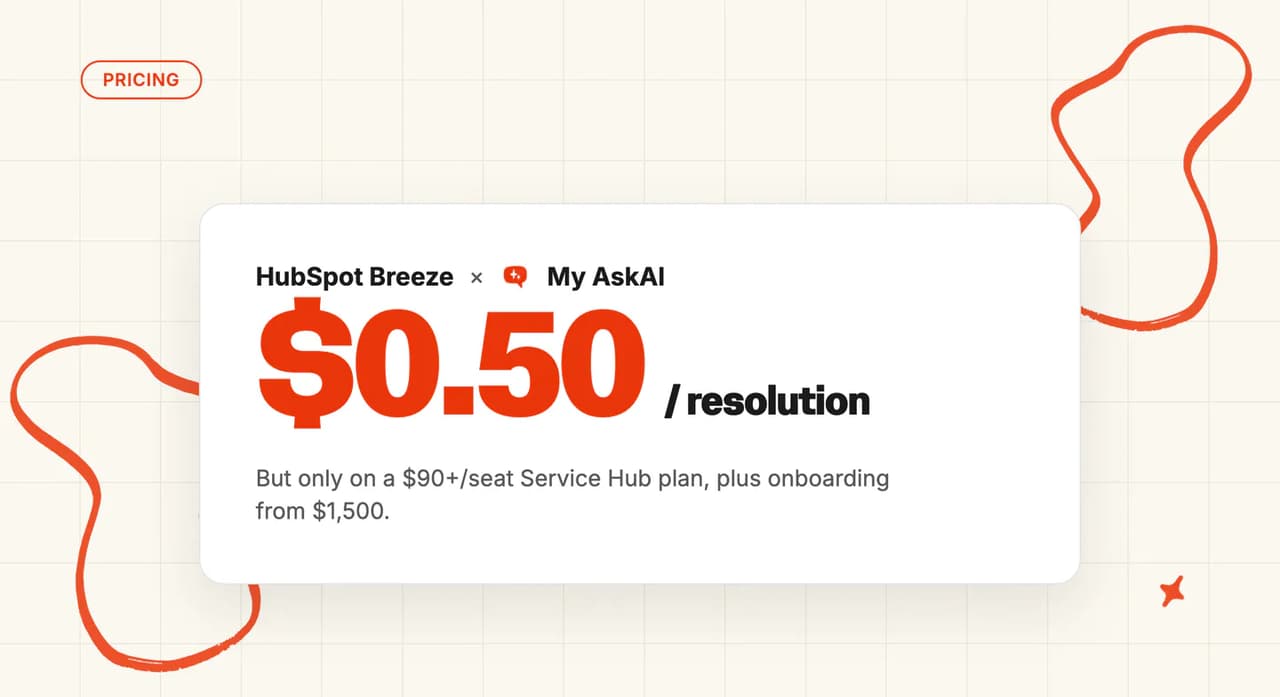
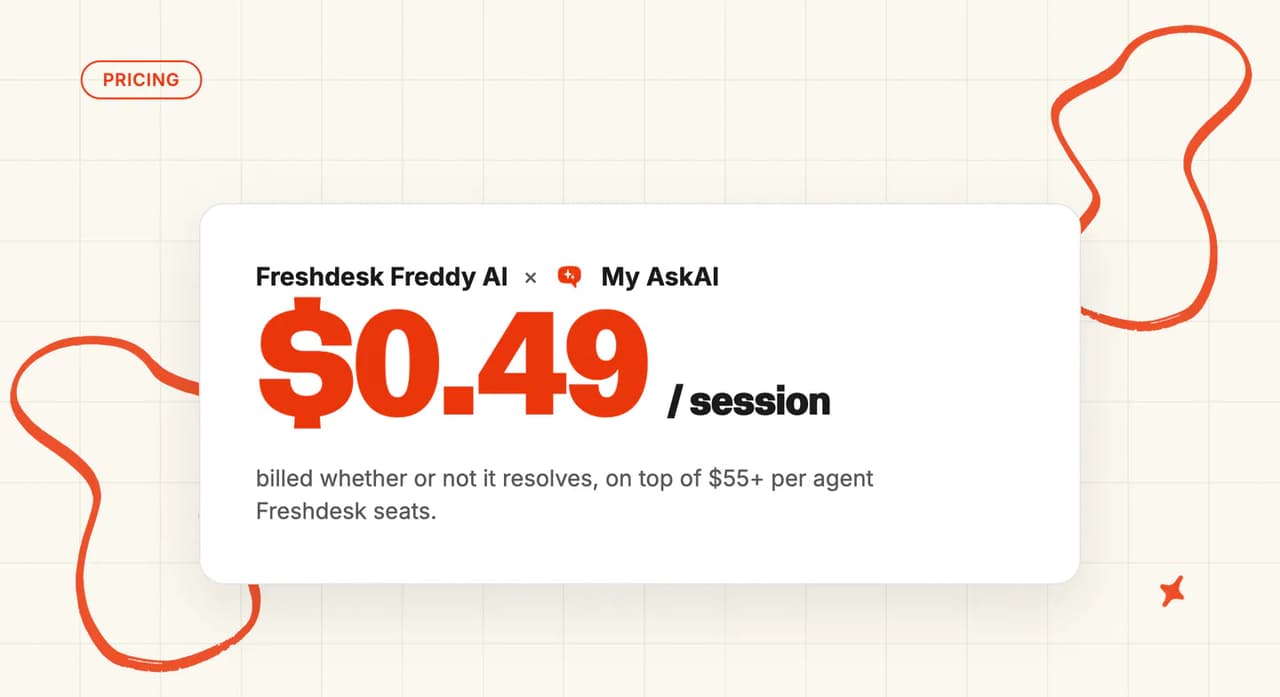
HubSpot's customer agent bills $0.50 per resolution, and it counts a resolution as a conversation no human rep took over for 72 hours, so its bill climbs as the agent gets better. Freddy AI Agent bills $0.49 a session after the first 500, with no resolution condition anywhere in Freshworks' session pricing. That fixes Freshworks' bill and leaves your resolution rate to decide what each landed answer costs.
Find that rate before comparing a single feature. Most of the teams I ask have never measured it, and the guesses run high.
Two meters priced a penny apart, and at the same monthly volume they produce bills hundreds of dollars apart.
The feature scorecard is the tie-break. The meter is the decision (and your own rate settles which meter costs less).
HubSpot Breeze vs Freshdesk Freddy at a glance
| HubSpot Breeze (customer agent) | Freshdesk Freddy AI Agent | |
|---|---|---|
| What it is | CRM-native autonomous support agent | Helpdesk-native autonomous support agent |
| Headline price | $0.50 per resolution | $0.49 per session after 500 included |
| How you buy it | Professional or Enterprise, credits, seat | In Growth, $19 per agent annually |
| Best for | Teams already on HubSpot Professional or Enterprise | Cost-sensitive teams already on Freshdesk |
| Not a fit for | Any team not on HubSpot | Any team not on Freshworks |
| Biggest limitation | No agent at all on Free or Starter | 500 sessions included, then $49 per 100 |
| Scorecard | 4 category wins of 11, 2 tied | 5 category wins of 11, 2 tied |
What AI can I use to reply in HubSpot and Freshdesk?
HubSpot has changed the name, and you will still see the old one on its marketing pages.
The umbrella brand in HubSpot's own help documentation is now Agent Hub, and the old Breeze article redirects there. Breeze survives on the marketing pages and as the name of the rep-facing assistant.
The thing you deploy at customers is called the customer agent, lowercase, with no Breeze in the name. HubSpot describes the layer around it as "Agent Hub (BETA)".
Freshworks splits its AI into three products that share one name:
- Freddy AI Agent answers customers on its own. It is available from the Growth entry plan at $19 per agent on the annual term, with a one-time 500 sessions, then $49 per 100.
- Freddy AI Copilot helps your human agents. It needs Pro or above and costs $29 a seat, billed annually.
- Freddy AI Insights is the analytics layer. It comes with Enterprise, and a single Copilot license unlocks it on Pro (one license, whole account).
HubSpot meters the autonomous agent at 50 credits per conversation resolved, with Breeze Assistant sitting alongside it as the rep-facing surface. Freshworks bundles the autonomous agent's first sessions and charges per seat for the copilot.
That is the structure under both price tags. I had to draw it on paper before the two price lists made sense to me. Each side also has a guide of its own: the HubSpot Breeze AI agent complete guide, and the Freshdesk Freddy AI agent complete guide.
How does an AI customer service agent work inside a CRM versus inside a helpdesk?
HubSpot's setup documentation describes it as "a customer agent powered by HubSpot's AI, to automatically respond to customer questions using your existing content". That existing content is the records your reps already work in, so there is no separate store to fill first.
It reads deal stage, lifecycle stage, ticket history, custom properties and record owner without a connector in between (the records are the same ones your reps edit). It also inherits the permissions model, so its reach stops where the assigned user's reach stops.
Freddy starts on the helpdesk side. It reads the ticket and the knowledge base, then reaches out to systems through AI Agent Studio.
Studio carries more than 50 agentic workflows and pre-built connections to Shopify, Stripe, PayPal and FedEx. Refunds, order updates, inventory checks and appointment reschedules all run from there.
Both hand off when they are unsure, which is the first thing I test on any agent demo. HubSpot's agent will answer from a source, ask a clarifying question, or reassign the thread to a human. Freddy holds multi-turn context and escalates with the conversation attached.
The practical difference is which context comes for free. HubSpot's agent already knows who it is talking to, so every action beyond replying is a build on top of that.
What are the different ways I can use these AI agents?
Direct replies
HubSpot's deployment article is specific about where the agent can go. You can assign it "to WhatsApp, Facebook, calling (BETA), live chat, forms, email channels, or custom channels."
Custom channels sit behind a separate opt-in beta. Treat that last one as a preview until it leaves beta.
The deploy screen carries a percentage control. You can "enter the percentage of conversations you want your agent to handle."
The percentage control lets you start on 10% of chat and raise it from there. On other vendors you build the same ramp out of routing rules.
Freddy comes in two flavors: a Chat AI Agent and an Email AI Agent. The chat one is only available in Freshdesk Omni (a separate product from plain Freshdesk, and a separate line on the quote).
Check which of the two you are on before you plan a chat rollout, because plain Freshdesk will not run the chat agent.
Copilot replies
Breeze Assistant is the rep-facing half on the HubSpot side. HubSpot's AI trust center describes it as "a conversational assistant that supports sales, marketing, and service teams in HubSpot", and HubSpot does not publish which plans carry it or what it costs.
Freddy AI Copilot needs Pro or above, priced at $29 a seat a month billed annually. You can license a subset of your team, so a 20-agent desk can put five people on it (five licenses at $29 each, $145 a month). Licensing a subset is useful, because the copilot is where the sentiment, translation and summary tools live.
Voice
Both vendors qualify their voice story. HubSpot's documentation marks calling as BETA. Freshworks puts voice inside Freshdesk Omni (that separate product, again).
If voice is a launch requirement, both of these need a conversation with the vendor before you sign.
Which is easier to set up, HubSpot Breeze or Freshdesk Freddy?
HubSpot's setup wizard is two required fields, an agent name and a personality, with a live preview of the reply bubble.
BabelQuest had a customer agent live in under an hour, against a week for the chatbot it replaced. RevPartners launched theirs inside 30 days.
Getting to that wizard is the work. I think it is where most teams lose their launch date. The setup article lists its requirements in four blocks:
- Plan. Professional or Enterprise on any of seven subscriptions, which HubSpot lists as Marketing, Sales, Service, Data, Content, Smart CRM and Revenue. Free and Starter cannot run the agent on any of them.
- Credits. HubSpot's wording is exact: "HubSpot Credits are required to deploy the customer agent to channels."
- Permission. Also exact: "Customer agent editor permissions are required to create, edit, and manage the customer agent."
- Seat. And: "An assigned seat is required to create, edit, and manage the customer agent."
An admin with full portal access still cannot edit the agent without a seat assigned to them (portal permissions and seat assignment are separate in HubSpot).
Freddy has one gate, and it is the plan you are probably already on. AI Agent is available from Growth at $19 per agent per month billed annually, with a one-off 500 sessions and $49 per 100 after that.
AI Agent Studio comes with ready-to-launch vertical agents for ecommerce, travel, fintech, logistics and HR (pick the closest one and edit it). New accounts get "a one-time complimentary 500 Freddy AI Agent sessions with the purchase of Growth, Pro, or Enterprise plan."
Previewing your agent spends sessions on the Freshworks side: "Previewing AI Agents will consume sessions, regardless of whether the AI Agent is published or unpublished."
Once those 500 complimentary sessions are gone, tuning an agent against 200 test conversations costs $98 (two 100-session packs at $49). That is before a single customer sees it.
One disclosure before I go further: My AskAI is our own product. It installs into the HubSpot or Freshdesk account you already run, so you can put a different agent on your tickets and stay on the plan you have. We have a full walkthrough for adding AI to Freshdesk without Freddy.
How do HubSpot Breeze and Freshdesk Freddy differ in what they can be trained on?
'Static' content
HubSpot's content sources article lists its own knowledge base articles, website pages, landing pages and blog posts. Add file uploads in around 20 formats, external public URLs, and short question-and-answer pairs you write by hand (the fastest fix for a question your docs never answered).
The crawl allowance is large: "Up to 5,000 URLs within the domain will be automatically crawled and synced". If your product documentation lives on your own website, that covers it comfortably.
Freshworks publishes its caps as hard numbers. You get 50 AI Agents across chat and email, and on the chat side 150 workflows per account with 20 per agent.
You also get 100 files, 50 parent URLs and 3,000 child links per parent. That is a lower crawl ceiling than HubSpot's and a higher file allowance. I can plan against either set of numbers, because both vendors publish them.
| HubSpot Breeze | Freshdesk Freddy | |
|---|---|---|
| Vendor's own help center | ✅ | ✅ |
| Website and blog pages | ✅ | ✅ (50 parent URLs) |
| External public URLs | ✅ (5,000 URL crawl cap) | ✅ (3,000 child links per parent) |
| File uploads | ✅ (~20 formats) | ✅ (100 files) |
| Manual question-and-answer pairs | ✅ | ✅ |
| Notion, Google Drive, Confluence, SharePoint | ❌ | ❌ |
'Dynamic' content
Freshness is where the two diverge. HubSpot syncs knowledge base edits immediately and everything else weekly: "re-synced on a weekly basis". Each source has a manual refresh button if you cannot wait.
Uploads are frozen at the moment you upload them, so a changed PDF means a re-upload (worth a calendar reminder if your price list is a PDF).
Neither agent reaches a wiki. HubSpot's content-sources documentation names no Notion, Google Drive, OneDrive, Confluence, SharePoint or Zendesk connector.
Freddy's knowledge page takes URLs, files, solution articles and manual pairs. If your real answers live in an internal wiki, both agents need you to copy them somewhere else first, and keep copying them every time the wiki changes.
My AskAI connects to Notion, Google Drive, Confluence, SharePoint, Dropbox and OneDrive alongside each helpdesk's own help center, and it can also train on your historic tickets. That is the route in for teams whose answers were never written up at all.
Which has better answer quality, HubSpot Breeze or Freshdesk Freddy?
HubSpot has the bigger evidence pile and the more comparable metric. Its case study library carries customer outcomes with dates on them, which is rarer than it should be. The service-side ones are specific.
Sticos, a Visma company in financial services, reports its agent handles 91% of all initiated chats, at a 75% resolution rate. Nutribees cut human-handled tickets by 77% (both numbers come from HubSpot's own library, so read them as best case).
Soundstripe brought first-response time on email down 54% and resolution time down 36%. Lepermislibre reports 94% of conversations resolved without a human.
That is the highest figure either vendor publishes. I read a number that high as a description of the question mix as much as of the agent.
Freshworks publishes named customers too, and its agent-only stories keep the copilot out of the numbers. iPostal1 automates key customer support tasks with Freddy AI Agent agentic workflows. Freshworks reports that this saved up to 12 minutes per customer interaction, with critical steps completed in as little as 7 seconds.
Abdulrahman Al-Thekair, Customer Experience Director at Upayments, reports the same kind of saving: "Freddy AI Agent automatically routes every query to the right team, cutting a full manual step and saving us real time every day". And Cineworld reports that "Freddy AI Agent transformed lost-item handling… This single automation now resolves over 700 tickets monthly across the UK operation of Cineworld".
HubSpot's numbers are resolution rates, while Freshworks reports minutes saved and tickets handled. I can put a resolution rate next to any other vendor's number and learn something from it.
Our own AI resolution rate benchmark study covers 195 rated deployments across 38 vendors. The field median is 70%, with the middle half landing between 56% and 80%.
It is an aggregate of self-reported deployments, and vendors define resolution differently. Teams who report tend to be the ones doing well.
Most public commentary on Breeze covers the sales and marketing side. One example from r/hubspot:
"I've used Breeze from a marketing perspective and I'm really surprised how much it does NOT understand what I'm asking it for." — /u/Alert_Debt_7992, r/hubspot, October 2025
On the Freshworks side, one support team told me about their Freddy email agent. It answered the first message in a thread, then escalated as soon as the customer replied.
That report came in June 2026, a month after Freshworks shipped multi-turn email conversations with full context retention in its May 2026 release cycle. Test it on your own threads before you plan around either version.
Which AI agent is easier to improve over time: HubSpot Breeze or Freshdesk Freddy?
HubSpot's Knowledge Base Agent writes the missing articles for you. It watches resolved tickets and the questions the customer agent flagged as unanswered.
It then drafts new articles through a four-stage pipeline: detection, analysis, generation and validation. Fun fact: the technology came from HubSpot's acquisition of Frame AI in December 2024.
Setup is two dropdowns (which knowledge base, which ticket pipelines). It then scans for updates weekly. It is still in beta, so someone has to read what it writes before it publishes.
Freshworks gives you the better test bench (a real one, before any customer sees the agent). In AI Agent Studio you open an agent, go to the Test tab and add queries. There is a ceiling on each run: "You can add up to 100 test queries to be executed in a single run."
There is a shortcut too. You can "click Generate sample queries to have Freddy AI generate a list of 50 sample queries based on the configured knowledge sources for the AI agent."
The Improve tab then flags missing or incomplete knowledge and the queries the agent did not handle well, "prioritized based on impact". I wish more vendors ranked their gap lists that way.
Copilot Resolution Insights and Executive Overview Insights arrived in the May 2026 cycle. Freddy AI Insights adds root-cause analysis on top.
Improving costs money on both sides, in different places. I find the Freshworks version harder to swallow: on Pro, Freddy AI Insights needs at least one Copilot license at $29 a seat billed annually, though that single license then unlocks Insights across the account. Enterprise bundles Insights instead.
HubSpot's Knowledge Base Agent draws on the same credit pool the customer agent deploys from, so a month of heavy article drafting eats deployment credits.
And on Freshworks, iterating bills directly, because preview consumes sessions.
One r/hubspot commenter is willing to wait:
"You will be disappointed with Breeze if that is the goal, but it's improving a lot month by month so sooner or later we may end up there :)" — /u/martinaakra, r/hubspot, September 2025
Which has more features, HubSpot Breeze or Freshdesk Freddy?
Agent Hub is a roster of agents. The customer agent sits alongside an AEO agent, a data agent, a prospecting agent and a deal-progression agent (only the first of those answers your customers).
Breeze Studio lets you build your own without code. Both Studio and the Breeze Marketplace are in public beta.
For a support team the useful part of that breadth is multi-brand (the rest of the roster is a sales and marketing story). HubSpot lets you run a separate agent per brand, each with its own tone and knowledge. A two-brand company does not have to average its voice.
Freshworks puts its build effort into one agent. AI Agent Studio is the whole story: "With the AI Agent Studio, you're in control. Go live instantly with ready-to-launch Vertical AI Agents that come with 50+ Agentic Workflows and integrations with Shopify, Stripe, PayPal, FedEx and more."
The MCP Gateway added in May 2026 gives outside AI tools live access to tickets, assets, configurations and knowledge (useful if your team already runs its own AI tooling).
Multi-product is the Freshworks counterpart to HubSpot's multi-brand. You get up to five products on Pro and unlimited on Enterprise, with no per-product license.
Session packs are shared between every Freddy AI Agent and chatbot in the account, so a busy brand can spend the quiet brand's budget on a bad Monday. Freshworks documents no per-brand session cap.
Is it easy to customize HubSpot Breeze and Freshdesk Freddy?
HubSpot's Guidelines editor is four plain text boxes, and HubSpot describes them simply: "Guidelines provide instructions for how the customer agent communicates."
- Tone. "Describe the tone you want the customer agent to use."
- Response style. "Enter guidelines for how your agent should structure and format responses."
- Scripted responses. "Enter reusable lines, such as greetings, apologies, or follow-ups."
- Guardrails. "Enter topics your agent should avoid and specify how it should respond if a customer raises them."
Each one is a free-text field with an optional template you can apply or ignore. HubSpot publishes no character or count limit. The five personalities in the setup wizard (Friendly, Professional, Casual, Empathetic and Witty) are a starting point you can override.
HubSpot publishes no per-scenario policy routing, so branching by refund value or account type sits outside Guidelines.
AI Agent Studio is where Freshworks puts its customization: 20 workflows per chat AI Agent and 150 per account. Its ready-to-launch vertical agents ship with more than 50 prebuilt workflows of their own. MCP Gateway handles tool access.
You also configure persona, tone, avatar and primary language. The persona field takes 500 characters, plus 2,000 characters of additional instructions (enough room for a real policy, and tight enough to force you to edit it).
Ask your team which of the two they would rather spend an evening tuning, the wording or the workflow.
What about vendor lock-in?
HubSpot's customer agent runs inside HubSpot and nowhere else. It cannot be deployed into Zendesk, Intercom, Freshdesk, Help Scout, Gorgias or Front. The helpdesk apps in HubSpot's marketplace sync tickets and users, and the agent cannot work inside those desks.
There is a smaller lock inside the big one, and it caught me out. Straight from the setup docs: "once a customer agent is created, it can't be deleted."
You can edit it or pause it, and it stays on the account. A custom agent you build in the agent builder is a different object. That one can be deleted permanently, so do not read one as the other.
Turning the agent off also lives somewhere unexpected, under Account and Billing, then Usage and Limits, then Credit Agent usage (nowhere near the agent itself). What off means is documented: "If you turn the customer agent off, it'll continue to handle existing threads until the conversation is resolved, but won't be assigned to any new threads."
Freddy is Freshworks-only in the same way. It does not integrate with Zendesk, Intercom, HubSpot or any other helpdesk.
When sessions run out, behavior depends on where you deployed it. Chats hand over to live agents. An agent deployed through the self-service widget stops responding, with no handover (test that path before launch).
HubSpot's Conversations API scopes are marked as available on any account. A Free or Starter portal can still read conversation data through the API, even though it cannot run the agent.
HubSpot now labels private apps as legacy, along with the automatic updates they push to your systems. In HubSpot's language legacy still means supported for now. It is worth knowing before you build anything on private apps.
My AskAI runs inside both HubSpot and Freshdesk as a native integration, so putting a different agent on your tickets is a configuration change. The trained agent then comes with you if you change helpdesk later.
Do HubSpot Breeze or Freshdesk Freddy have any other AI features?
Tagging
HubSpot generates ticket names automatically and detects language for routing, both included. AI ticket enrichment (where language and sentiment attach to the record) is gated to Enterprise.
Freshworks categorizes and routes with Ticket dispatch, which its pricing page describes as "Categorize, prioritze, and route tickets to the rights teams by creating your own business rules" and marks Included. It sits in the plan rather than in the Copilot add-on (yes, that typo is the vendor's own).
Agent translation
This is the Freshworks feature I like most. Live Translate covers more than 60 languages in real time across inbound messages, outbound replies and notes.
Read the allowance before you plan around it. The doc states "The ticket limit per license per month is 100", and the pool is calculated as "Ticket Limit = Number of Copilot licenses × 100".
Five Copilot licenses gives the account 500 translated tickets a month, shared across everyone (worth modeling against your real multilingual volume). There is also a length cap: "Live Translate can process up to 50,000 characters per translation, whether it's an inbound message, outbound reply, or a public or private note."
HubSpot has no equivalent agent-facing translation tool. It detects the customer's language automatically and routes on it, and the customer agent answers in the languages HubSpot supports.
Sentiment and summaries
HubSpot's call summaries break a conversation into its purpose, the key discussion points, the decisions made, sentiment and next steps, and conversation summaries do the same for tickets. Those summaries are useful at handover. They stop short of what a dedicated sentiment product reports.
Freshworks' Copilot carries sentiment analysis, a response assistant that suggests replies, and a resolution assistant that surfaces similar tickets and solution articles (it points you at articles you already have, it does not write new ones). Every one of those sits behind the $29-a-seat Copilot license.
| HubSpot Breeze | Freshdesk Freddy | |
|---|---|---|
| Ticket and conversation summaries | ✅ Included | ✅ Copilot add-on |
| Automatic language detection | ✅ Included | ✅ Copilot add-on |
| Agent-facing live translation | ❌ | ✅ Copilot add-on (100 tickets per license per month) |
| Sentiment on the record | ✅ Enterprise only | ✅ Copilot add-on |
| Rule-based categorize and route | — (routing rules) | ✅ Ticket dispatch, included |
HubSpot's marketing page lists voice and social flat, while the deployment documentation marks calling as BETA and names two social channels.
Where the two disagree, plan against the documentation.
What about security, is HubSpot Breeze or Freshdesk Freddy more secure?
Freshworks wins on paperwork by a distance. Its trust center lists SOC 2 Type 2, SOC 1 Type 2, SOC 3, ISO/IEC 27001:2022, ISO/IEC 27701:2019 and an ISO/IEC 27001 SoA. It adds CSA STAR Level 1, TX-RAMP, Cyber Essentials, Cyber Essentials Plus, CCPA, EU-US DPF, Swiss-US DPF and the UK Extension to EU-US DPF.
The most recent dated item is "Freshworks Achieves SOC 1 Type II Attestation", published 24 December 2025 and covering the period from 1 October 2024 to 31 October 2025. Its security page adds the encryption detail your reviewer will ask for: "AES 256-bit encryption when data is encrypted at rest and HTTPS with TLS 1.2 encryption for data in transit."
HubSpot's AI trust center publishes three model cards, for Agents, Assistant and AI Features, which is what an AI-specific review asks for. The customer agent sits under Agents, whose named models include OpenAI's GPT 4.1, GPT 4.1 mini and GPT 5 Mini alongside Anthropic's Claude Opus 4.5.
Each card carries a checklist that includes Model Zero Data Retention and No Customer Data Used For Third Party Model Training. Naming which models see your tickets is more than most vendors publish.
I count that as a real point in HubSpot's favor. Ask for the zero-retention wording in your agreement anyway, because a model card is a checklist rather than a contract term.
The agent also inherits HubSpot's permissions model, so its access is already scoped to whatever the assigned user can reach. That shortens the conversation about sensitive records.
I've sat in both kinds of security review, and they ask completely different questions. Freshworks' list clears more boxes on a standard B2B or ecommerce form. A review aimed at the AI itself gets more out of HubSpot's model cards.
Which costs more, HubSpot Breeze or Freshdesk Freddy?
The pricing model
HubSpot lists "$0.50 per resolution", metered as 50 HubSpot Credits per conversation resolved against the credits your plan includes, and it defines resolution tightly. Verbatim: "A resolution means support was provided by the agent, and the conversation was not handed to a human rep for 72 hours."
Lead capture counts too. HubSpot adds that "A resolution can also occur if customer agent qualifies a lead."
Freshworks charges by session. The pricing page reads "First 500 sessions included. $49 per 100 sessions", which works out at $0.49 a session beyond the allowance (and those first 500 are one-time per account, so do not budget for them every month).
A session is a window of time, and every reply inside it counts once. The documentation is precise: "In Freddy AI Agent Studio, an Email AI Agent session is defined as a 72-hour window starting from the customer's first email."
Chat uses a 24-hour window, and chat lives in Freshdesk Omni.
Freshworks attaches no resolution test to a session anywhere in its pricing, and previewing an agent spends sessions too. I put the preview runs into the first month's budget for exactly that reason.
HubSpot bills on the resolutions it counts. Freshworks bills the session.

Take the session price on its own, after the first 500 and before seats. At an assumed 50% resolution rate, Freddy works out at $0.98 per resolved session, two sessions billed for every one that lands. HubSpot's stays at $0.50 per resolution.
New accounts pay the published session rate (we still meet desks sitting on the old numbers). Freshworks says customers who signed up before the cut-off date keep their existing provisions, including legacy contracts that carry 2,000, 3,000 or 5,000 sessions a month.
The overall cost
Both unit prices sit on top of a plan (the seats, the tier floor, the onboarding fee), and the plan is the larger number.
Service Hub Professional starts at $90 per seat per month on annual billing, $100 paying monthly, plus a required one-time $1,500 onboarding fee. Service Hub Enterprise is $150 per seat with a $3,500 fee, both US list prices on HubSpot's service pricing page.
Starter, Professional and Enterprise include 500, 3,000 and 5,000 HubSpot Credits, and the customer agent spends 50 of them per conversation resolved. Run the pool dry and HubSpot's own wording is plain. The agent "will temporarily stop being assigned to new conversations across all connected channels until your next reset date or until you purchase more credits" (worth knowing before a busy month).
Freshworks is far cheaper to start: Growth at $19 per agent per month billed annually, Pro at $55 and Enterprise at $89. Those three published plans start at $19, though the same page still advertises a free program for 2 users, and Copilot adds $29 per agent on Pro and above.
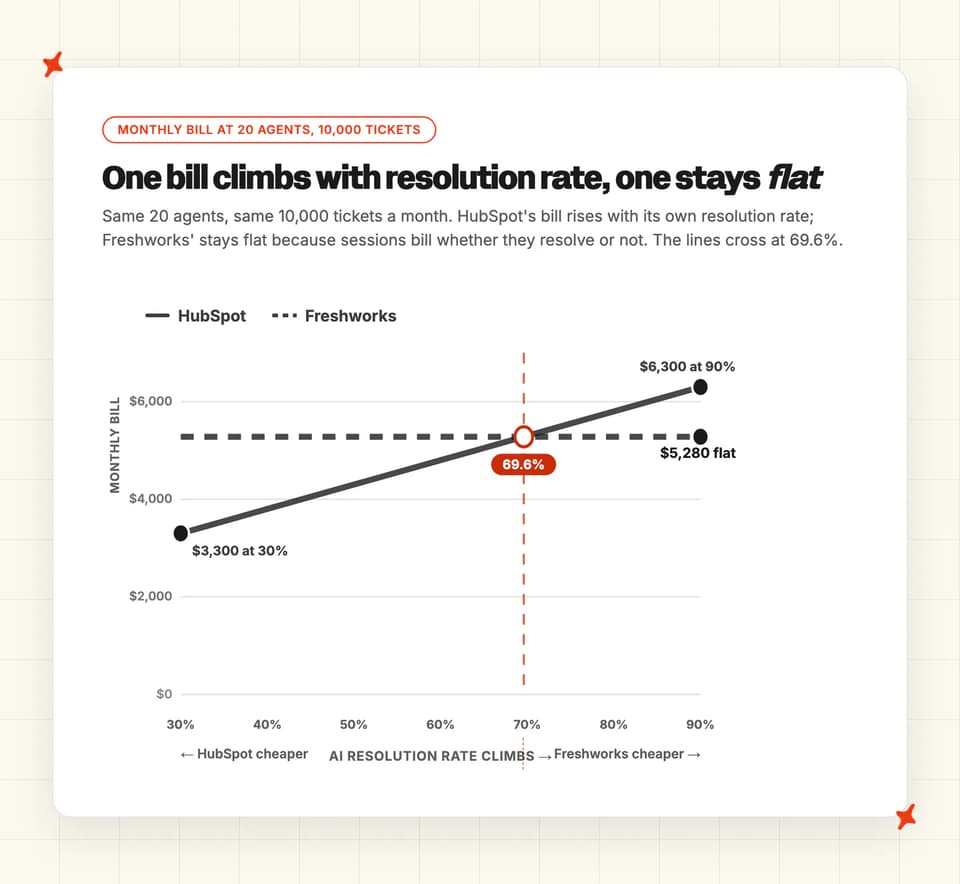
One worked example, at 10,000 tickets a month with a 50% resolution rate and 20 agents, all of it on annual billing. HubSpot bills 5,000 resolutions at $0.50, which is $2,500, plus 20 Professional seats at from $90 each, which is $1,800. That lands at roughly $4,300 a month, or about $0.86 for every conversation the agent resolved.
That $0.86 is the number I'd take into a budget meeting. The Freshworks column below assumes one session per ticket. That is our own modeling call, and Freshworks publishes nothing to that effect.
| HubSpot Breeze | Freshdesk Freddy | |
|---|---|---|
| Seats for 20 agents | $1,800 a month (20 seats at $90) | $380 a month (20 seats at $19) |
| AI line at 50% resolution | $2,500 (5,000 resolutions at $0.50) | $4,900 (10,000 sessions at $0.49) |
| Monthly total at 50% resolution | ≈$4,300 | $5,280 |
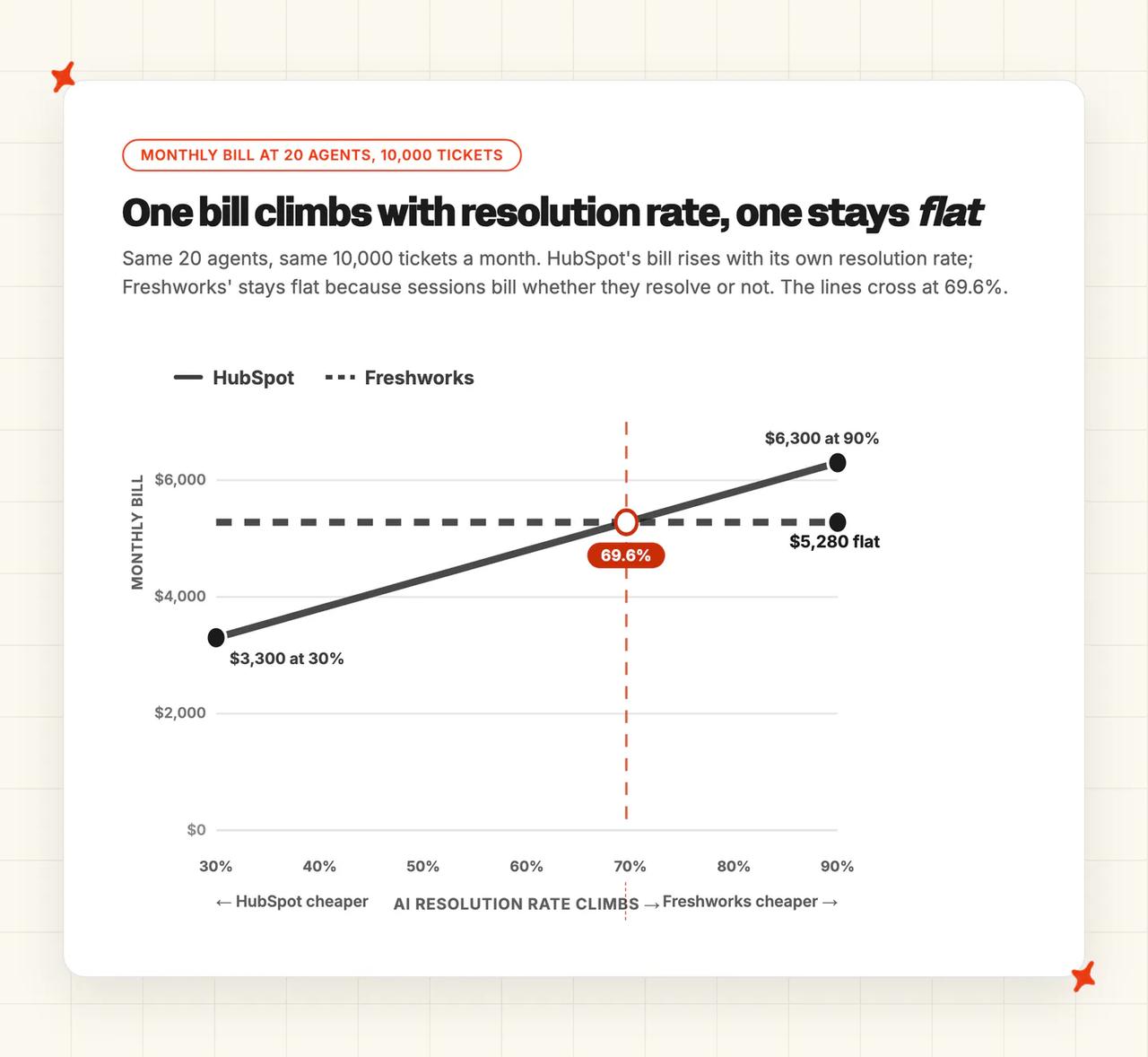
| Monthly bill at 70% resolution | ≈$5,300 | $5,280 |
| Monthly bill at 90% resolution | ≈$6,300 | $5,280 |
Freshworks' bill never moves. Sessions bill whether or not the agent lands them, so 20 Growth seats plus 10,000 sessions comes to $5,280 at every resolution rate on that table (a flat number finance can forecast).
The two monthly bills cross at 69.6% on these assumptions. Below that line HubSpot costs less even carrying $90 seats. Above it Freshworks costs less.
None of those totals carry HubSpot's one-time $1,500 onboarding fee. Amortized over twelve months it adds $125 a month on the HubSpot side, which pulls the crossover down to about 67%; divide it over your own contract length if you sign for longer.
Work out which side of that crossover your desk sits on before you shortlist on features at all. It is the first number we ask a team for on a pricing call, because it decides the answer more often than any feature row does.
HubSpot's 14 days free come with a condition the marketing page leaves off. The pricing page carries it: "When you purchase at least 1 Service Professional or Enterprise Seat, use Customer Agent free for 14 days."
During that window the agent "does not use HubSpot Credits", while the seat keeps billing.
Freshworks gives you a 14-day Enterprise trial plus those 500 one-time sessions. The sessions do not stack: "Once you purchase an additional Freddy AI Agent session pack, the complimentary sessions are removed and replaced by the purchased sessions."
HubSpot's model scales your bill with your success. Outcome pricing taxes your work, and finance teams cannot forecast it month to month.
My AskAI charges a core rate per ticket, about $0.10 rather than a per-resolution rate, and that core rate does not move when the agent resolves more. Usage-based add-ons are priced per use and billed only when you use them. The 30-day trial unlocks every feature with unlimited tickets and no card, so you can price it against your own volume before committing.
Three meters, and they count three different things. HubSpot's $0.50 per resolution buys an outcome, Freshworks' $0.49 per session buys a window of time, and our $0.10 buys a ticket. Convert all three to your own cost per landed answer before you compare them, and remember you keep paying your helpdesk seats whichever one you run.
The full price lists live in our pricing explainers for HubSpot Breeze and Freshdesk Freddy, and in our side-by-side of Freshdesk and HubSpot AI pricing. There are ROI calculators for HubSpot Breeze and Freshdesk Freddy too.
One r/CRM thread that tested a batch of agents put Freddy in a narrow box:
"Freshworks Freddy AI — Best value pick for smaller teams but I mean small. … Just don't expect it to keep up if your support operation gets complex." — /u/Far_Character4888, r/CRM, March 2026
How do I work out which of these two is cheaper for us?
Paste this into any AI assistant with your own numbers in the brackets. It runs the same three lines on your real seat count and volume and returns your own crossover rate.
You are helping me compare two AI support agents on cost only.

My numbers:
- Human agents (seats): [e.g. 20]
- Support conversations per month: [e.g. 10,000]
- Current or expected AI resolution rate: [e.g. 55%]

Option A: HubSpot Breeze customer agent
- Seats: $90 per seat per month (Service Professional; Enterprise is $150)
- One-time onboarding fee: $1,500 (Professional) or $3,500 (Enterprise)
- AI charge: $0.50 per RESOLVED conversation only

Option B: Freshdesk Freddy AI Agent
- Seats: $19 per agent per month (Growth; Pro $55, Enterprise $89)
- Copilot add-on, only if my agents need it: $29 per licensed seat per month
- AI charge: $0.49 per SESSION, resolved or not, so every conversation bills

Do this:
1. Work out each option's total monthly bill at my resolution rate. Show the seat line and the AI line separately.
2. Repeat at 30%, 50%, 70% and 90% resolution and put the results in one table.
3. Solve for the resolution rate at which the two total bills are equal, and say which option is cheaper below it and which is cheaper above it.
4. Show the cost per RESOLVED conversation for each option at my rate, and label it clearly as excluding seats.
5. Amortize the HubSpot onboarding fee over 12 months as a separate line, and say how much it moves year one.

Rules: use only the figures above. If something I gave you is missing or ambiguous, write "unverified, ask the vendor" instead of assuming a number. Do not add discounts, annual commitments or session packs I have not given you.
Conclusion - should I choose HubSpot Breeze or Freshdesk Freddy?
Neither agent finishes far enough ahead of the other to pay for a migration, so for most teams the answer the eleven categories point to is to stay put. In the switches we have watched, rebuilding macros, routing and knowledge on the new desk is the cost teams underestimate.
Read the eleven categories below for what each side gives up.
The eleven categories are modes, ease of setup, training and integrations, answer quality, improving, features, price, customization, lock-in, other AI features and security. Scores come from each vendor's own product documentation and published pricing pages, dated release notes, named customer stories on both vendors' sites, and public Reddit threads.
| HubSpot Breeze | Freshdesk Freddy | Winner | |
|---|---|---|---|
| Modes | 8/10 | 7/10 | HubSpot win |
| Ease of setup | 7/10 | 8/10 | Freddy win |
| Training/Integrations | 7/10 | 7/10 | Tie |
| Answer Quality | 8/10 | 6/10 | HubSpot win |
| Improving | 8/10 | 7/10 | HubSpot win |
| Features | 8/10 | 7/10 | HubSpot win |
| Price | 6/10 | 7/10 | Freddy win |
| Customization | 7/10 | 8/10 | Freddy win |
| Lock-in | 5/10 | 5/10 | Tie |
| Other AI features | 7/10 | 8/10 | Freddy win |
| Security | 7/10 | 8/10 | Freddy win |
Your resolution rate moves the bill more than any row in that table. On unit price alone, before seats: Freddy bills the sessions it fails as well as the ones it finishes, so at 50% every resolved conversation costs $0.98 against HubSpot's $0.50.
Run the worked example above at other rates (same 20 seats, same 10,000 tickets) and the monthly bills, seats included, cross at about 70% resolution. Below that, HubSpot comes out lower even with $90 seats under it.
That crossover sits almost exactly on the field median I cited earlier: 70% across our 195 rated deployments. A team parked at the median is sitting within half a point of the crossover, so small movements in their rate flip which vendor is cheaper.
Take that number from your own tickets. Pull last month's closed tickets, count the ones a first-line agent answered straight from something already written in your help center, and divide by the total. That share is the ceiling on what either agent can resolve for you.
Everything you build into either agent (the guidelines, the workflows, the knowledge) stays behind if you change helpdesk.
My AskAI installs into both HubSpot and Freshdesk at a core per-ticket rate. It reads the wikis and shared drives your answers live in, which is the one source neither vendor's agent reaches. YouGarden runs it on Freshdesk at 66% AI resolution, saving around 965 hours a month.
For the wider field on either side, the HubSpot Breeze alternatives roundup and the Freshdesk Freddy alternatives roundup cover what else is out there.
FAQs
Is HubSpot Breeze or Freshdesk Freddy the better AI agent?
Our scorecard ends five categories to four for Freddy, with two level. That is close enough that the scorecard should not decide it for you.
Neither one can replace the other, because neither runs outside its own vendor's product. Swapping HubSpot's customer agent for Freddy means moving your whole helpdesk across to Freshdesk.
If you want to change the AI without changing the desk, My AskAI installs into either one. The 30-day trial runs on your own tickets, so you can measure its resolution rate before you decide.
Is Freddy AI cheaper than HubSpot Breeze?
Freddy's unit price is a penny lower after the first 500 sessions, before seats. What you pay depends on your resolution rate, because Freddy charges for every session, so at an assumed 50% each resolved session works out at $0.98. With seats in, the two monthly bills cross at about 70% resolution, and which one is cheaper flips above and below that line.
| HubSpot Breeze | Freshdesk Freddy | |
|---|---|---|
| Pricing model | Per conversation resolved | Charged per session |
| Headline rate | $0.50 for each resolution counted | $0.49 a session past the first 500 |
| Plan floor | Service Hub Professional from $90 per seat per month on annual billing, plus a one-time $1,500 onboarding fee | Growth from $19 per agent per month, billed annually |
| At 10k tickets and 50% resolution | ≈$4,300 a month with 20 seats | $5,280 a month with 20 seats, at any rate |
| Free to try | 14 days, on a purchased Professional or Enterprise seat | 500 one-time sessions, plus a 14-day Enterprise trial |
Full workings for each side live in our pricing explainers for both agents, and in the side-by-side of Freshdesk and HubSpot AI pricing.
What's the difference between AI chatbots and AI agents for customer support?
A chatbot follows a flow you drew. An agent reads your content, decides what to answer and takes actions through connected systems.
Both vendors sell both halves under one name (Breeze on one side, Freddy on the other), which is where the naming confusion starts.
HubSpot's autonomous half is the customer agent, and Breeze Assistant is the assistive one. On the Freshworks side those two are Freddy AI Agent and Freddy AI Copilot.
HubSpot meters the agent by resolution, at 50 credits a resolved conversation. Freshworks folds a one-time first 500 agent sessions into the plan and bills the copilot separately on Pro and above, at $29 per agent per month billed annually.
What can each AI agent be trained on?
Both are limited to their own vendor's content, files and public URLs. Neither connects to a wiki, so anything living in Notion or Confluence has to be copied out first (and copied again every time someone edits it).
| HubSpot Breeze | Freshdesk Freddy | |
|---|---|---|
| Vendor help center and web pages | ✅ | ✅ |
| Public URL crawl | ✅ Up to 5,000 URLs per domain | ✅ 50 parent URLs, 3,000 child links each |
| File uploads | ✅ ~20 formats | ✅ 100 files |
| Notion, Google Drive, Confluence, SharePoint | ❌ | ❌ |
| Refresh cadence | Knowledge base immediate, other sources weekly | Manual re-sync per source |
HubSpot documents the sources in its content sources article, and Freshworks publishes its caps in the AI Agent Studio limits.
How long does setup take and do we need developers?
Neither needs a developer for a standard install. BabelQuest had a customer agent live in under an hour, and RevPartners launched inside 30 days (both are HubSpot partners, so read those as best-case).
The difference is what stands in front of the wizard. HubSpot needs one of seven Professional or Enterprise subscriptions, HubSpot Credits to deploy the agent to channels, and a seat with editor permission assigned to whoever configures it (portal admin rights are not enough). Freddy is available from the Growth plan and comes with ready-to-launch vertical agents, though previewing it consumes paid sessions once the complimentary 500 are gone.
Can they handle multilingual support and agent translations?
Both answer customers in multiple languages, which every agent in this category now does. Helping your own agents read and reply in one is where they split.
HubSpot detects the customer's language automatically and routes on it, and the customer agent answers in HubSpot's supported languages. It has no agent-facing translation tool (your own team reads and replies in the original).
Freshworks' Live Translate covers more than 60 languages in real time, on inbound messages, outbound replies and notes. On Pro and above it is metered off Freddy AI Copilot licenses, $29 per agent per month billed annually. The allowance is 100 tickets per license per month, pooled across the account (worth checking against your multilingual share before you buy seats).
How do they compare on security and compliance?
Freshworks publishes the longer list. Its trust center carries SOC 2 Type 2, SOC 1 Type 2, SOC 3, ISO/IEC 27001:2022, ISO/IEC 27701:2019 and CSA STAR Level 1.
It adds TX-RAMP, Cyber Essentials, Cyber Essentials Plus, CCPA and the EU-US, Swiss-US and UK data privacy frameworks. Its security page states AES 256-bit encryption at rest and TLS 1.2 in transit (the two lines every security questionnaire asks for).
HubSpot's AI trust center publishes model cards for Agents, Assistant and AI Features. The Agents card names GPT 4.1, GPT 4.1 mini, GPT 5 Mini and Claude Opus 4.5.
Its checklist entries cover zero data retention and no customer data used for third-party model training. The agent also inherits your HubSpot permissions, so it cannot see records the user cannot see.
Does either one offer a free trial?
Both give you 14 days on different conditions. HubSpot's window opens once you buy at least one Service Professional or Enterprise seat, so put $90 against the 14 days before calling it a free trial. It covers the customer agent's credits while that seat keeps billing. We tell teams to open that window on the day their help center is ready, because the 14 days run whether or not anything has been loaded into the agent. Freshworks runs a 14-day Enterprise trial and hands new accounts a one-time 500 Freddy AI Agent sessions, which are removed the moment you buy a session pack.
| HubSpot Breeze | Freshdesk Freddy | |
|---|---|---|
| Trial length | 14 days | 14 days on Enterprise |
| What it costs to start | At least one paid Professional or Enterprise seat | Growth from $19 per agent, billed annually |
| Free AI allowance | No HubSpot Credits consumed during the 14 days | 500 sessions, one time per account |
| What ends it | The 14 days | Buying a session pack replaces the free 500 |
Previewing a Freddy agent spends those sessions whether or not it is published, so budget some of the 500 for tuning before a customer ever sees it.