Aisera: Complete Guide to Features, Pricing & Limitations (2026)
Aisera, owned by Automation Anywhere, runs AI agents for IT, HR and customer service. Its only published customer-service resolution figure is 65%, at LifeScan.
Summarize with AI
A support team may first meet Aisera through the IT department. Your service desk colleagues may already run an Aisera agent in Microsoft Teams for password resets and laptop questions, and sooner or later someone asks whether the same platform could answer your customers too. Aisera's docs invite that question, describing a platform that serves "various business functions such as IT, customer service, HR, and more" in its platform overview.
Aisera publishes detailed product docs (down to the three roles a rollout needs), so you can read most of what a demo would show you before you book one. Pricing comes from the sales call.
Aisera is an enterprise AI agent platform headquartered in Santa Clara, California, and Automation Anywhere now owns it. Aisera's AI customer service agents run on the same platform as its IT and HR agents, inside systems a large company already owns, such as ServiceNow, Salesforce, Zendesk and Microsoft Teams. It suits enterprises that want one AI vendor across several departments and are happy to buy through a sales-led rollout.
I'm Mike, co-founder of My AskAI. We build an AI agent that works inside the helpdesk you already run, and 200+ ecommerce and SaaS businesses use it, so I'm not a neutral party here.
Aisera at a glance
| Fact | Detail |
|---|---|
| What it is | AI agents for IT, HR and customer service |
| Who owns it | Automation Anywhere, acquired Nov. 4, 2025 |
| Headline price | Not on Aisera's website; quoted by sales |
| G2 rating | 4.4/5 from 146 reviews |
| Best for | Enterprises buying one AI platform across departments |
| Not a fit for | Teams that want a price before sales calls |
| Biggest limitation | Sales-led pricing; trial only on AWS Marketplace |
| Our verdict | 5.5/10 |
What is Aisera?
Aisera describes its business in one line of its getting-started docs: "Aisera sells Gen AI/Agentic applications/bots." Those bots work inside the tools your company already pays for, because "Aisera products are deployed within Enterprise applications that your company already owns."
The product line has grown well past a single bot. The Aisera homepage lists four products:
- Aisera Assistant - the AI agent that answers employees or customers and takes actions on its own
- Aisera Agent Assist - help for your human agents inside the ticket, with summaries and suggested answers
- Agent Composer - where your team builds new agents by describing them in plain language
- Aisera Unify - lets Aisera's agents work alongside the other AI agents and tools your company runs
The docs still call the configurable bot AiseraGPT, so you'll see both names when you read them.
On the company side, Aisera's company page puts its headquarters in Santa Clara, with teams in Greece, India, Canada, the UK and France, and names Abhi Maheshwari as CEO. Automation Anywhere announced it had acquired Aisera on Nov. 4, 2025, without disclosing the terms. It now markets the product as "Aisera for ITSM" on its Aisera page (ITSM is IT service management, the service desk work the platform grew up on).
Customer service is in scope for the platform, though most of the connectors and most of the named results come from IT. One G2 reviewer describes the customer-helpline side:
G2: Aisera scores 4.4/5 from 146 reviews on G2. "Aisera has reduced the volume of calls to the Customer helplines, allowing agents to work on more complex items, reducing wait times and enabling some head-count reductions." A verified user in medical devices (Enterprise), via G2.
How easy is it to set up Aisera?
Aisera documents two ways to get started in its prerequisites guide. Either the Aisera team builds your deployment, or you build it yourself in the Aisera admin console "with some assistance from your Aisera Onboarding Team".
Either way, the who-does-what page names three people who need to be involved:
- An Aisera administrator - an Aisera employee who sets up your tenant, the private Aisera workspace your company's bots run in
- Your enterprise administrator - whoever owns ServiceNow, Salesforce, Zendesk or SharePoint at your company, and issues the access Aisera needs
- You - the person who builds the bot and keeps it working after launch
The docs single out the middle role, calling the enterprise administrator "the most important person (and sometimes the hardest to find or access) in the bot builder journey". In a large company that is usually an IT owner with other priorities, so get time on their calendar early.
The build then follows a set order (the docs call it the bot builder journey):
- Connect the systems Aisera will work with
- Add the data sources the bot learns from
- Choose the channels it answers on (web chat is the default)
- Create the bot itself
- Add the workflows it can run (the steps it takes in your other systems)
Email and voice need people outside your team, so plan for them early. Email depends on Aisera, since the email channel docs say you have to ask Aisera's admin team to switch it on. Voice setup needs someone to log into your phone system (the docs describe an on-premise one), which means your telephony owner.
One G2 reviewer summed up the effort in a review that also appears on Aisera's AWS Marketplace listing:
"Aisera is a technically solid approach that demands extensive and detailed fine tuning, which is complex and draining" From sheetal m., a G2 reviewer.
What channels does Aisera work in?
Aisera's channels docs cover a long list of places a bot can run, and the channel picker in the admin console shows a few more. They fall into four groups, by who is on the other end of the conversation:
- Customer-facing - web chat (the default), email, WhatsApp, SMS, Twitter and voice through your automated phone menu
- Employee-facing - Microsoft Teams, Slack, Webex, Google Chat, Zoom Chat and RingCentral Glip
- Inside your helpdesk - Ticket Concierge, which picks up a Zendesk or ServiceNow ticket and acts on it, and Agent Assist for your agents
- Handover to people - live-agent connectors for 8x8 and Amazon Connect, for contact centers that run on them
Voice is a strength for a team whose contacts still arrive by phone in large numbers. Aisera's AI Voice product answers calls through your phone menu (Genesys is among the documented phone systems).
On the helpdesk side, the docs list connectors for ServiceNow, Zendesk, Salesforce, Freshdesk, Jira Service Desk, HappyFox, Ivanti and SAP Cloud for Customer. There is none for Gorgias, Intercom or HubSpot, so a team on one of those helpdesks would be running Aisera alongside it, with handover between the two to plan.
What are the limitations of Aisera?
Each of these weighs more on a support team than on IT, which already owns most of the systems Aisera connects to.
The price comes from sales
Both Aisera's website and its new owner's Aisera page send buyers to a demo request, and the Automation Anywhere sales team takes it from there. The only trial is a 30-day AWS Marketplace listing (for up to 50 users).
Setup leans on people outside your team
An Aisera employee creates your workspace, Aisera's admin team switches on email, and every connected system needs its owner to hand over access. One person managing an Aisera bot described it on Reddit:
"I dont see it as a full alternative as of now. It doesnt work like a GPT and requires quite the set up" From a Reddit user who manages an Aisera bot for their organization, on r/microsoft_365_copilot.
The connector list leans toward IT
The docs list connectors for identity and device tools such as Okta, Active Directory, Azure AD, Intune, SailPoint and Duo, and for monitoring tools such as Dynatrace, Splunk and NexThink. I think a customer support team would leave most of that depth unused.
Ticket Concierge doesn't fulfill Zendesk email tickets
Ticket Concierge, the feature that picks up a Zendesk ticket and acts on it, has a stated gap in its docs: "TC does not support the email channel for fulfillment" (TC is Ticket Concierge). If most of your Zendesk tickets arrive by email, ask how Aisera would handle them before you plan around this feature.
Connected tools share one login, up to 10 at a time
When Aisera's agent connects to outside tools, the limits page says "Tenants can register a maximum of 10 tools at one time" (a tenant is your company's Aisera workspace). Aisera also reaches all of those tools through one shared account. That means every action runs with the same permissions whoever the customer is, so your security team will want a say in what that account can touch.
What knowledge sources can I train Aisera on?
Knowledge comes into Aisera as data sources, each added in the admin console and each refreshed on a schedule you set, as the integrations and data sources docs explain. The named connectors cover most places a large company keeps what it knows:
- Documents and wikis - Confluence, SharePoint, Google Drive, Box, Notion, Office 365, Simpplr and Veeva Vault
- Helpdesks and CRMs - Zendesk articles and community posts, Freshworks articles, Salesforce and ServiceNow
- Everything else - Slack, company databases, cloud storage and file uploads
The Zendesk connector can learn from tickets as well as help center articles, so the AI can pick up answers your agents give every day that never made it into an article. Aisera's homepage goes further, saying its agents "generate knowledge, and create automation playbooks from past resolutions, end-user feedback, and insights from experts".
Access controls decide which articles each bot can serve, and you can filter results by channel. That is what lets one knowledge base feed an internal IT bot and a customer-facing bot without customers ever seeing the internal content.
What features does Aisera have?
Aisera sells an AI agent that answers customers and employees, Agent Assist for your human agents, and builders for the workflows behind each request.
The AI agent
Aisera's bots can follow fixed scripts, let the AI answer freely, or mix the two, and the docs cover each design. I like that mix for support, because you can script a sensitive path such as an account closure word for word and let the AI handle the long tail of simple questions.
The agent can also act. Ticket Concierge picks up a Zendesk or ServiceNow ticket and pushes the request through to fulfillment, and AI Voice handles the same kind of request over the phone.
Agent Assist
Agent Assist works inside Zendesk and ServiceNow, next to the ticket your agent is reading. It predicts field values, summarizes the ticket, recommends answers and actions, and gives the agent a chatbot to ask questions of.
It suits a team that wants AI help on hard tickets before letting AI reply to customers directly. Our roundup of agent-assist tools and our explainer on AI copilots cover the wider field.
Workflows and new agents
Aisera says you can build agents "using natural language through Agent Composer", and several workflow builders back it up, such as AI Workflow Studio, so a request can run as a set of steps across your systems. Our guide to agentic workflows explains how that kind of multi-step process works.
How do I improve Aisera responses?
The docs put the ongoing work on you, since the who-does-what page names you as the person who builds the bot and maintains it. The tools for that job are in Aisera's AI Workbench:
- Unresolved, Reviews and Health - views of conversations the bot did not resolve, reviews of its answers and the overall health of the bot
- Test Suites - saved sets of test questions you run against the bot, with a debug panel that shows how it reached each answer
- Prompts Studio - where you edit the instructions behind the AI's answers
The toolset needs someone who owns the bot. When nobody does, my worry is that the tools go unused and the answers drift out of date as your products and policies change.
One G2 reviewer, broadly positive about the product, gave this warning:
"it’s not something you can just plug in and forget about" From Aditya A.'s G2 review.
What resolution rate can I expect from Aisera?
Aisera's best evidence for customer service comes from LifeScan (the company behind the OneTouch brand). The LifeScan story says it "auto-resolves 65% of customer inquiries, saves $2.2M+, and delivers faster, 24/7 patient support with AI-powered self-service."
Each vendor defines auto-resolution for itself, so I'd ask Aisera what it counts as resolved before setting that 65% beside another vendor's figure.
Aisera's other headline results come from IT. The City and County of Denver auto-resolves 81% of IT tickets, for example, and those are employee requests, a different kind of work from a customer asking about an order or a refund.
Our AI resolution rate benchmark study puts the median of published AI-handling rates across vendors at 70%, with caveats:
- It describes the field - the median gives you no basis for ranking two vendors against each other
- Labels differ - vendors count resolution, automation, deflection and containment differently, so the figures are directional
- They are best cases - vendors publish their strongest results, so the typical rate is likely lower
What AI model does Aisera use?
Aisera builds domain-specific models, starting from open-source models and training them for IT, HR, financial services, banking, insurance and clinical-trial work. It can also use third-party models (Azure OpenAI is a documented option).
All of these run through a central gateway that routes each request to a model. For a buyer, that means Aisera can change the model underneath without your team rebuilding anything, and one release note says so: "The underlying model provider for Conversational AI has been updated. No action is required and no changes to product functionality are expected." The note did not name the new provider.
Put the provider switching on your security review, and ask in writing which provider processes your customers' conversations, how you will hear about a change, and whether your data is used to train any shared model.
What languages does Aisera work in?
Aisera's multi-language docs show a single setting on the bot, "Support all 85+ languages", next to a default language and a list you can narrow down. Translation uses an outside engine you choose for your workspace: Google by default, with AWS and Azure OpenAI as options.
Web chat bots start in their default language unless you switch on the option to match the visitor's browser (worth doing for any customer-facing bot). After that, test the quality of Aisera's answers in your top languages during any pilot.
How secure is Aisera?
Aisera's AWS Marketplace announcement states: "Aisera Assistant is certified by ISO IEC 27001, SOC 2 Type II, GDPR, CCPA, CSA Star Level 1, HIPAA/BAA". A healthcare support team should check the HIPAA line first (a BAA is the contract a healthcare company needs before a vendor can handle patient information).
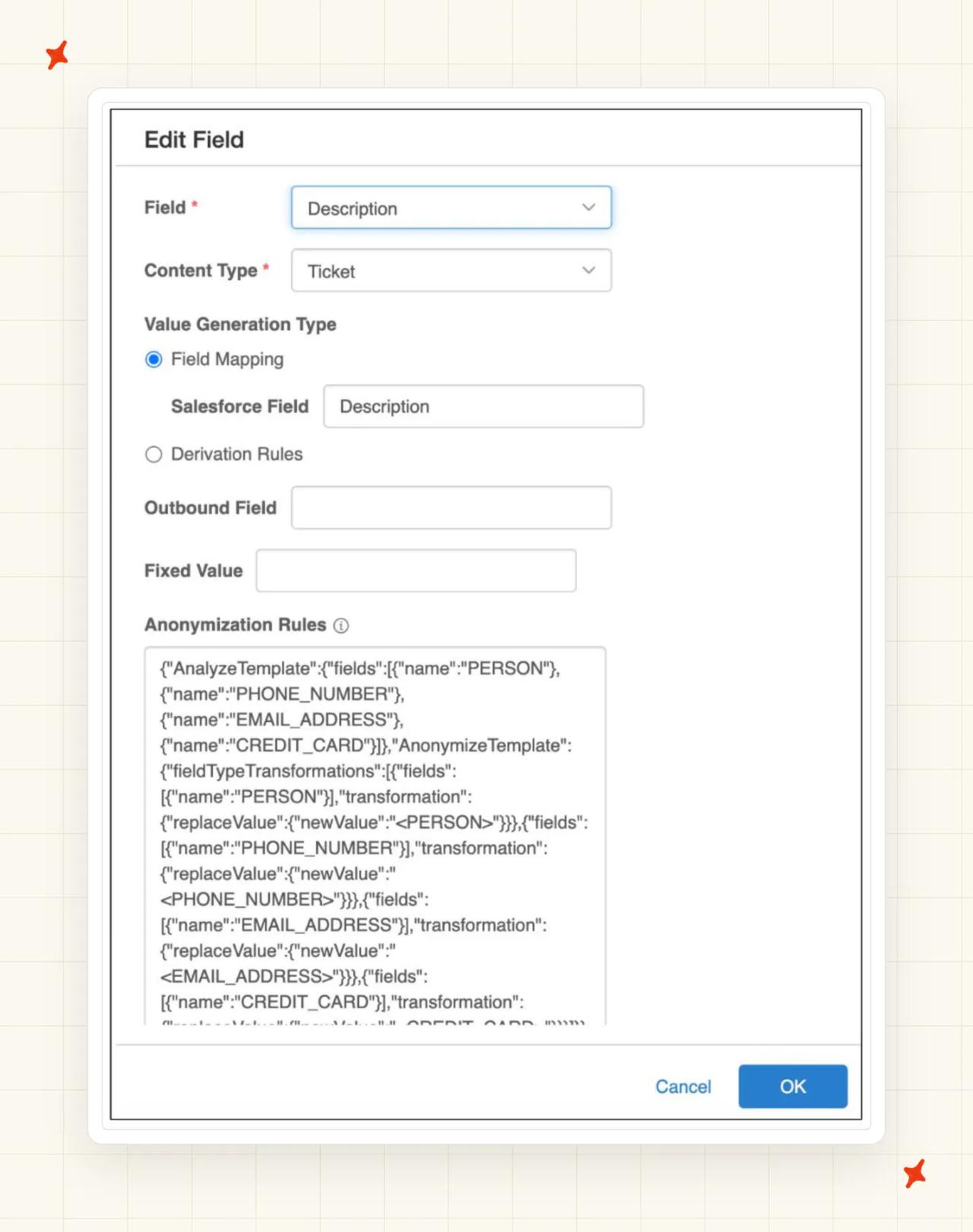
Inside the product, the docs describe rules that mask names, phone numbers, email addresses and card numbers in ticket fields, access rules based on who the user is, an audit trail and single sign-on.
With the change of owner, check which certificates cover the Aisera product you are buying. Automation Anywhere's security page lists the parent company's certifications.
Who is using Aisera?
Aisera's named customers span healthcare devices, local government and professional services. Three of them publish results you can check:
- LifeScan - Aisera's case study reports a 65% auto-resolution rate for OneTouch customer care and more than $2.2M in savings
- City and County of Denver - its IT support saves 79,000 user hours with an 81% auto-resolution rate
- Grant Thornton - reports an 84% auto-resolution rate on IT support requests in Microsoft Teams
LifeScan is the one customer-facing deployment of the three.
How much does Aisera cost?
Aisera's pricing model
Automation Anywhere now sells Aisera, both directly and through AWS Marketplace (the listings there read "Sold by: Automation Anywhere, Inc."). The listings offer 12-, 24- and 36-month contracts, and a two-year contract is advertised as saving up to 50%. Each per-user tier there lists $1.00, and the listing asks buyers to email Aisera to discuss a private offer.
Automation Anywhere's acquisition announcement says it charges for the work its software does, with unused seats left out of the bill. One G2 reviewer calls the pricing murky, with extra charges for things like setup.
The public pages leave these parts of the bill open:
- What you pay for - per user, per conversation, per resolution, or a platform fee
- What counts - how a resolved or automated request is defined in the contract
- What costs extra - voice, Agent Assist, generative AI features and implementation services
- How long you commit - the contract term, and what happens to the price at renewal
Our explainers on outcome-based pricing and on per-conversation versus per-resolution pricing show how each model behaves as your volume grows.
The cost of 10,000 conversations a month
Take a support team handling 10,000 customer conversations a month:
| Option | How it is priced | Monthly cost |
|---|---|---|
| No AI (baseline) | Your team answers all 10,000 conversations | Your current staffing cost |
| Aisera | Quoted per deal after a demo, on a 12- to 36-month contract | Set by the sales quote |
| My AskAI Scale | $499 with 2,000 tickets included, then $0.10 × 8,000 | $1,299 |
Fill in the baseline with your own staffing cost.
Does Aisera have a free trial?
Aisera's website sends buyers to a demo, so the usual first step is a call with Automation Anywhere's sales team through its Aisera page.
On AWS Marketplace, the Aisera Assistant listing offers a "30 day free trial up to 50 users", priced per user after that. You'll need an AWS account to accept it, and the trial still runs in an Aisera tenant, so the same setup roles apply.
Either way, bring a test set from your inbox. Export last month's tickets, let an AI tool group them into your top 20 or 30 question types in a few minutes, and run those through the bot.
Is Aisera worth it?
I think Aisera suits a large company that is ready to buy through sales and staff a rollout. It covers employee and customer requests in one place, including by phone, and works inside ServiceNow, Salesforce and Zendesk. It also has a customer helpline result to point to.
If your IT team already runs Aisera, extending it to customer service can make sense, since the knowledge sources and the admin team are already in place. Ask for the LifeScan reference and a pilot on real customer questions before you commit.
If you are comparing, Capacity is the closest peer. Salesforce Agentforce and Ada are the other enterprise options. We have written full guides to Salesforce Agentforce and Ada's AI agent, and our roundup of the best AI customer service for enterprise teams compares them side by side.
What are the Pros and Cons of Aisera?
For a customer support team, I see three strengths and four weaknesses:
Pros
- One platform for IT, HR and customer service - one set of agents, knowledge and admin across departments, with voice included.
- Public docs and release notes - setup roles, channels, connectors and limits are all documented, so you can read most of the product before a demo.
- A published customer-service result - LifeScan auto-resolves 65% of customer inquiries, alongside strong IT results at Denver and Grant Thornton.
Cons
- No price on Aisera's website - you get a quote per deal after a demo, on a contract of up to 36 months.
- Trial only on AWS Marketplace - the 30-day option needs an AWS account and an Aisera tenant.
- Heavy setup - Aisera staff, your system owners and your team all have roles, and users describe ongoing tuning.
- Built IT-first - most of the documented connectors serve IT service desks.
Our rating of Aisera
The product and its evidence score well ahead of how you buy and set up Aisera:
- Product, 7/10 - a broad platform with agents, Agent Assist, voice, test suites and regular releases, though most of its depth serves IT
- Price and trial, 3/10 - no price on Aisera's website and only an AWS Marketplace trial
- Setup and fit, 5/10 - a staffed rollout that needs Aisera and your system owners, and a connector list that leans toward IT
- Evidence, 7/10 - public docs, release notes and named results, with one customer-facing figure and the rest from IT
Scored on the sections above, from Aisera's own pages; gaps are stated as gaps. Not higher because the price comes only as a per-deal quote from sales. Not lower because you can check the named results at LifeScan, Denver and Grant Thornton, and LifeScan's comes from a customer helpline.
FAQs
What is Aisera?
Aisera is an enterprise AI agent platform that answers and resolves requests for IT, HR and customer service teams. Its agents work inside systems a company already owns, such as ServiceNow, Zendesk, Salesforce and Microsoft Teams. It is headquartered in Santa Clara, California, and the Aisera homepage lists its current products.
What does Aisera do?
Aisera sells AI agents that answer employees and customers and take actions on their own, plus Agent Assist, which summarizes tickets and suggests answers for human agents inside Zendesk and ServiceNow. Its getting-started docs say: "Aisera sells Gen AI/Agentic applications/bots." Teams can also build new agents and workflows in plain language (Agent Composer is the builder for new agents).
Is Aisera acquired?
Yes. Automation Anywhere announced it had acquired Aisera on Nov. 4, 2025 (the terms were not disclosed). Aisera is now sold through Automation Anywhere, including on AWS Marketplace.
Who is the CEO of Aisera?
Abhi Maheshwari is the CEO of Aisera, according to its company page. The company is headquartered in Santa Clara, California, with teams in Greece, India, Canada, the UK and France.
Is Aisera a chatbot?
Aisera's bots run on web chat, email, WhatsApp, SMS, Microsoft Teams, Slack and the phone, and the platform adds Agent Assist for human agents and workflow builders that let the AI take actions. The channels docs list every place a bot can run (web chat is the default).
What is Aisera agentic AI?
It is Aisera's name for AI agents that act as well as answer, such as picking up a ticket and pushing the request through to fulfillment. The Aisera homepage says you can build these agents "using natural language through Agent Composer". Connected tools are capped at 10 per workspace, and they share one account.
Is Aisera good for customer service, or only IT service desks?
It covers both, but most of its connectors and named results are IT. Its customer-service proof is LifeScan (the company behind OneTouch), which auto-resolves 65% of customer inquiries on its helpline. The docs list no connector for Gorgias, Intercom or HubSpot, so it suits enterprise support teams on ServiceNow, Salesforce or Zendesk best.
How much does Aisera cost?
Aisera's website shows no price, so you get a quote after a demo with Automation Anywhere's sales team. Its AWS Marketplace listing offers 12-, 24- and 36-month contracts, and asks buyers to email Aisera to discuss a private offer. For comparison, our Scale plan at My AskAI handles 10,000 tickets a month for $1,299.
Does Aisera have a free trial?
Yes, as a 30-day, $0 option for up to 50 users on AWS Marketplace, which needs an AWS account and an Aisera tenant (Aisera's docs say Aisera staff set tenants up). Otherwise the route in is a demo.
Is Aisera SOC 2 compliant?
Yes. Aisera's AWS Marketplace announcement says Aisera Assistant is certified for SOC 2 Type II, alongside ISO 27001, GDPR, CCPA, CSA STAR Level 1 and HIPAA with a BAA.
What AI model does Aisera use?
Aisera builds its own domain-specific models from open-source models, trained for IT, HR and financial services, and it also uses third-party models (Azure OpenAI is one documented option). It can switch the underlying provider without customer action.
What are the best Aisera alternatives?
For an enterprise platform across customer service and internal teams, Capacity, Salesforce Agentforce and Ada are the closest options. For a support team on Zendesk, Intercom, Freshdesk, Gorgias or HubSpot that wants a public price and a trial on its own tickets, we built My AskAI to add an AI agent inside that helpdesk. Our roundup of Aisera alternatives scores nine of them and prices each on the same 10,000-ticket month.
Aisera vs Moveworks: which is better?
Moveworks fits employee support, and Aisera fits a company that wants one platform for employees and customers. Moveworks calls itself "the AI Assistant platform for your entire workforce" on its homepage and works closely with ServiceNow. Aisera covers IT, HR and customer service, with voice.