SiteGPT: Complete Guide to Features, Pricing & Limitations (2026)
SiteGPT is $39/month billed annually for 4,000 messages, or 400 on the more accurate model. My AskAI starts at $0.10 a ticket. No free tier, no rollover.
Summarize with AI
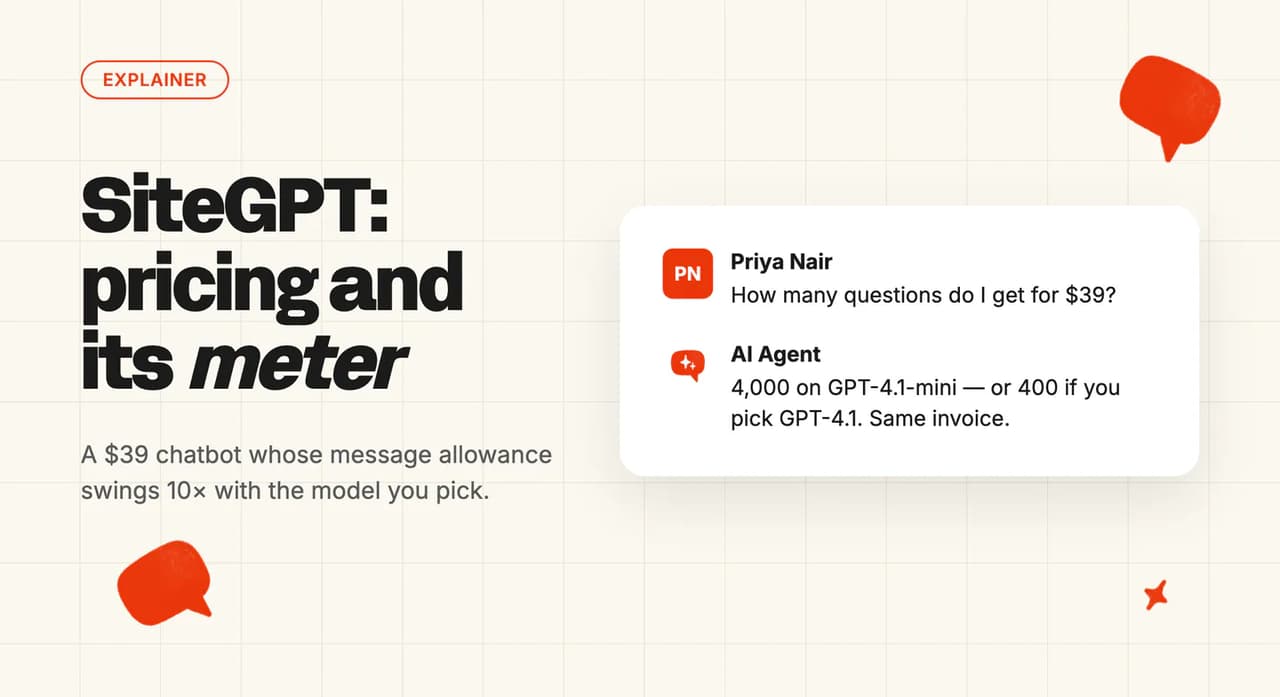
SiteGPT's Starter card headlines 4,000 messages a month. Its own tooltip sets the condition: that's 4,000 on GPT-4.1-mini, or 400 on GPT-4.1. Pick the model that answers better and nine tenths of the allowance goes with it.
If you've ended up on this page, chances are you're weighing up a cheap website chatbot, maybe against Chatbase or Wonderchat. Setup looks like an afternoon's work. The price would go through on a company card without a meeting.
Month three is the expensive one, once real traffic has been spending the meter for eleven weeks.
I'm Mike, co-founder of My AskAI. We help 200+ ecommerce and SaaS businesses run AI customer service, so I can't be impartial here. By the end you'll know what SiteGPT is good at, what its meter costs at your volume, and which teams should buy it.
SiteGPT at a glance
| Fact | Detail |
|---|---|
| What it is | No-code website chatbot builder |
| Founder | Bhanu Teja Pasala, founder-led and bootstrapped |
| Headline price | $39, $79 and $259 a month, billed annually |
| Message allowance | Starter: 4,000 GPT-4.1-mini, or 400 GPT-4.1 |
| Free trial | 7 days, no free tier |
| Best for | Small sites with steady, forecastable traffic |
| Not a fit for | Teams whose support runs on email |
| Biggest limitation | No rollover, overflow only as $59/mo message packs |
| Our verdict | 6.5/10 |
What is SiteGPT?
SiteGPT puts it in one line on the homepage: "Make AI your expert customer service agent". The documentation is more specific about what you get.
"Train a chatbot on your own content. It answers your visitors, captures leads, and hands off to your team when needed." From the SiteGPT docs.
This is a standalone chat widget, with no ticket queue, no email inbox, and no agent workspace beyond the escalation inbox in Chat History. Escalations aren't stuck in that screen either, since your team can reply from Slack, Zendesk, Crisp or four other chat tools. I'd put it in the same slot as Chatbase, Wonderchat and Botsonic.
The docs list six capabilities: training on your content, lead capture, human handoff, multi-platform deployment, scheduled re-crawls, and an API other agents can drive. I didn't expect source citations at this price: "Answers cite their sources so visitors can read further."
The company behind it is founder-led and small. Bhanu Teja Pasala built SiteGPT and launched it in 2023 as a side project with no external funding.
It hit the Show HN front page that April and (fun fact) took #1 Product of the Day on Product Hunt. His own account of the first year covers roughly $10,000 MRR in month one and 50% churn straight after it.
How easy is it to set up SiteGPT?
The quickstart says setup takes "about ten minutes", and I think that's fair for what it describes. It's specific about the code: "No code is needed until the final step, and that step is one copy-paste."
Five steps: create an account, create a chatbot, train it by scraping your site or importing a sitemap, test it in the dashboard preview, install the script. The docs push you to "use the chat preview to ask real questions your visitors would ask" before anyone sees it.
Install instructions cover WordPress, Shopify, Wix, Squarespace and Webflow (no developer needed on any of them).
Joel W., an Implementation Engineer reviewing SiteGPT on Capterra, trained it on a Zendesk help portal:
"It was extremely easy to set up. Training consisted of inputting our Zendesk help portal link and clicking 'go'."
"We had our bot up-and-running publicly within a week."
Ten minutes gets you a first answer. I'd put a week in the plan, which is what a public launch with personas and branding done takes.
The page quota is where this gets complicated. SiteGPT's pages quota docs define a "page" as 2,500 cleaned characters, roughly 400 to 500 words, so "a long document may count as several pages."
The quota is shared across every chatbot in the account, and "Imports and crawls stop when the quota is used up", with affected documents flagged as failed.
1,000 pages on Starter is about 2.5 million characters, by my arithmetic. That's a lot of documentation. The pricing page reads like 1,000 URLs at a glance, and a long document eats several pages of that.
Every trained document carries a live Trained, Pending or Failed badge with error detail. I've used bigger products that leave you guessing.
What channels does SiteGPT work in?
The integrations page is longer than most third-party write-ups suggest. Live today: the website widget, Slack, Zendesk, Crisp, Freshdesk Messaging, Google Chat, Facebook Messenger and Zoho SalesIQ, plus an iOS app from the Growth tier.
Three more sit on that page marked "coming soon": WhatsApp, Intercom and HubSpot. Treat those as roadmap, and buy on what's live today.
The widget itself is generous. The features page offers to embed a chatbot on as many sites as you want, marketing site and help center included (where per-domain competitors charge extra).
There are two Zendesk integrations: a legacy one, and a newer Zendesk AI Agent that appears on the pricing page as a Scale-tier line item at $259 a month.
If a comparison page tells you SiteGPT does Zendesk, ask which one it means. I'd want that answer before Scale money changes hands.
Escalation works across the same surfaces. A visitor clicks a button, types something like "talk to a human", or triggers it by handing over their details.
Your team then replies from Chat History, or from the seven tools the human support docs list: "Slack, Crisp, Zendesk, Freshdesk, Google Chat, Messenger, and Zoho SalesIQ."
During a handover "the AI stays quiet while the conversation is in agent mode", so nothing interrupts your agent mid-reply.
SiteGPT has no email channel. Email appears only as escalation alerts and a daily or weekly digest, so I'd count your email share before going further.
There's no voice or phone, no SMS, and no social DMs beyond Facebook Messenger.
SiteGPT is a web-and-chat product. If half your queue arrives by email, that half stays manual.
What are the limitations of SiteGPT?
The cap doesn't behave the way most metered products do. I'd read the billing docs on the ceiling before the pricing page:
"Your chatbot keeps answering, on a paid plan we never cut off your visitors mid-cycle. (Free-trial chatbots do pause at the trial limit until you upgrade.)"
Same page: "Do unused messages roll over? No. Quotas reset each billing cycle."
There's no graceful degradation and no automatic overage billing. Unused messages don't roll over, so the 5,000-message pack is something you buy in advance if you want more capacity before the next cycle.
SiteGPT knows this is the failure mode. Its usage docs sell the Usage page as the way "surprises never come from the chatbot going quiet", and there's a Limit Messages Per Conversation setting (switch it on) to "cap runaway conversations".
The message allowance is model-weighted, ten to one. Starter's own tooltip on the pricing page spells it out:
"Up to 4k GPT-4.1-mini messages or 400 GPT-4.1 messages per month, with any mix in between (see the pricing calculator below for your exact split). Need more? Packs of 5k additional messages are $59/mo."
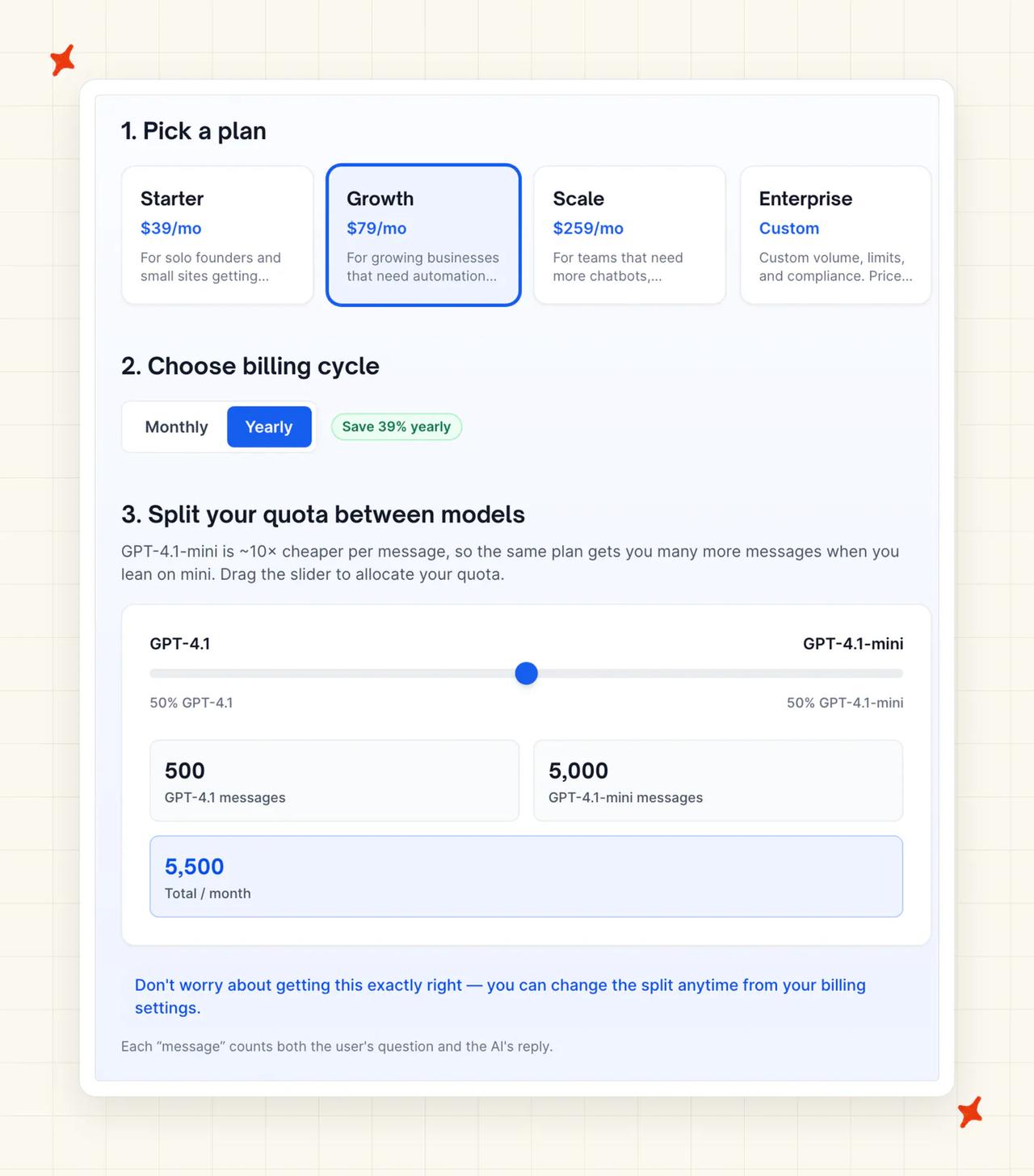
Growth gets 10,000 mini or 1,000 GPT-4.1. Scale gets 40,000 or 4,000. The calculator states the mechanism outright: "GPT-4.1-mini is 10× cheaper than GPT-4.1, so your real message count can vary by 10× on the same plan."
Choosing the model that gives better answers costs you 90% of your allowance, and the tier you sized on the headline number empties ten times faster. I'd size any plan on the GPT-4.1 column.
The meter counts messages from anyone who opens the widget. I'd model that before you sign anything.
Bots, crawlers, competitors and idle browsers all spend the same meter a buyer does. Nobody can forecast how many of them turn up next month, which makes the bill a guess.
The rest of the list is shorter:
- The pages quota bites the same way: every document is chopped into 2,500-character pages, the quota is account-wide across all your chatbots, and imports stop dead when it's used up.
- Chatbot counts are tight, at one, two and three: SiteGPT's own flagship multilingual customer runs five language-specific bots, which no self-serve tier can hold. Agencies and multi-brand operators hit this wall in week one.
- Core capability sits high up the ladder: API access, integrations, rate limiting and the iOS app all start at Growth ($79). Conversation Insights, webhooks and the Zendesk AI Agent are Scale ($259) and above.
- Removing "Powered by SiteGPT" costs $39 a month: the same annual-billing rate as the entire Starter plan, so a $39 product becomes $78 the moment you want it unbranded.
- There's no agent-assist copilot: no copilot or reply-drafting capability appears on the features page, the docs navigation or the machine-readable docs index. SiteGPT's "AI agents" marketing refers to its developer tooling.
- It can't learn from your past tickets: SiteGPT trains on documentation, so the bot never sees how your team has answered before.
Product Hunt carries 4.1/5 across 12 reviews, and the sharpest complaint is three years old. Peter E. wrote in 2023:
"Tried it for a month. Was okay-ish but i wanted to cancel my subscription -> Button does not work. The Button to reach out tu support on the 'Cancel Subscription' Dialogue also didn't work. Now i paid the 2nd month without wanting to ... not cool"
A broken cancel button and a dead support link are why I'd still weigh a review that old. Against that, the current billing docs now state that "Cancellation stops renewal at the end of the paid period; your chatbots keep working until then."
Corrections also happen inside SiteGPT itself. Joel W., in the same Capterra review, puts it this way:
"Corrections currently need to be made directly on SiteGPT.ai and not through any integrated platform."
If your team lives in Zendesk, fixing a bad answer means leaving Zendesk.
Procurement will find gaps too: no SLA below Enterprise, no uptime history, no customer count.
SiteGPT's own WordPress plugin, which ranks on page one for its brand name, sits at version 1.0.0 with 80+ active installations and was last updated a year ago.
What knowledge sources can I train SiteGPT on?
The training docs split ingestion four ways. The first line covers most people's need: "Crawl your site, import a sitemap, paste a list of URLs, or add YouTube videos."
Second, files and connected apps: direct uploads plus native connectors for Notion, Google Drive, Dropbox, OneDrive, Box and GitHub.
The pricing FAQ is specific on formats: "You can upload CSV/TXT/PDF/DOCX/PPTX/MD or any other text based files to train the chatbot. Each file is converted to pages based on its content (2,500 cleaned characters = 1 page)." Anything over 10 MB means emailing the founder.
Third, plain text snippets for policies that don't live at a URL. Fourth, custom responses: exact question-and-answer pairs that override the generated answer (the main fix-it lever in this product).
Processing is standard retrieval: the system cleans the content, then it is "split into passages and indexed so the chatbot can find the right passages".
Refresh cadence is where the tiers bite again. Starter is manual refresh only, Growth re-crawls monthly, Scale runs a weekly refresh plus a daily scan, and Enterprise runs both daily.
On the cheapest plan, keeping answers current is a recurring job in someone's calendar. In my experience that job needs a named owner, or it stops happening.
I'd ask about past tickets before buying. There's no documented way to train on historical conversations, so the bot learns your documentation and nothing about how your team answers.
What features does SiteGPT have?
Most AI support products in this category come in three layers: the autonomous agent, the copilot that drafts for your agents, and the actions layer that does things in other systems. SiteGPT has the first and the third.
The autonomous layer is the widget. I'd call it well built for the money.
Quick Prompts give visitors icebreaker questions to click. Instructions and Personas set tone and behavior as reusable profiles.
Lead Generation captures custom fields and routes them to an inbox, a webhook or a CRM. Custom Responses pin exact answers, and Chat History holds every transcript.
Model choice sits here too (and it moves your bill more than any other setting in the product). From the features page: "Choose between two powerful AI models and switch anytime depending on how you want your chatbot to behave. GPT-4.1-mini prioritizes speed while GPT-4.1 prioritizes depth and accuracy."
Chat modes are a small feature I like. In AI Mode "The chatbot answers every new conversation"; in Agent Mode "Every conversation goes straight to your team; the AI does not answer."
That's a kill switch you can hit without pulling the widget off your site. The chat modes docs let you flip a single conversation mid-flight too.
The actions layer is Functions, described on the features page as a way to "automate tasks just by interacting with your chatbot". One Product Hunt reviewer, Hardik Thakkar, singled it out two years ago, calling SiteGPT "the only chatbot that alows automating customer facing tasks by letting me run code snippets and connect to my database".
The developer surface gets no marketing at all. From the docs: "A full API, CLI, and MCP server let AI agents create and manage chatbots for you, end to end."
The developer overview covers REST API v2 across chatbots, conversations, escalation, knowledge ingestion, personas, custom responses, tags, leads and team management.
An MCP server on a $39 product is unusual. API access starts at Growth, so I'd treat $79 as the real entry price for anything developer-facing.
Before you compare this to anything enterprise: there's no simulation or bulk testing, no A/B testing, no workflow builder with conditional branching, and no copilot for your agents.
How do I improve SiteGPT's responses?
The main lever is Custom Responses. I'd write a few of these on day one, before you have misses to fix.
When the bot gets something wrong, or a question is too important to leave to generation, you write the answer and it overrides the model.
Finding the misses is the part that costs money. Conversation Insights classifies conversations about 30 minutes after they go quiet, surfacing "what visitors asked about, how each conversation ended, and the exact questions that keep coming up". You get Top Topics, Top Questions grouped by meaning, and Conversation Outcomes: "The share of classified conversations that were resolved by AI, handed off to a human, or ended with negative sentiment."
Each grouped question carries a one-click shortcut to create a custom response, so I'd work the Top Questions list top-down once a week.
It's also Scale only, at $259 a month. On Starter and Growth you're reading raw Chat History and email digests, doing the classification in your own head.
The $220 a month between Starter and Scale is the price of not doing that classification yourself.
Source citations on every answer help too: they tell you which document caused a bad reply, so you're not guessing. Auto-sync keeps answers tracking your content, from Growth up.
Content quality is still the dominant variable, as it is with every retrieval product we've worked on. One independent editorial verdict puts it as "Answers can be inaccurate if your content is thin".
SiteGPT publishes no optimization playbook or knowledge-structuring guidance, and the docs are thinner here than on setup or billing.
What resolution rate can I expect from SiteGPT?
There is no "resolves up to X%" claim on the homepage, the features page, the pricing page or the documentation. The use-cases page, where a number like that would sit, carries no headline percentage either.
In a category where nearly every competitor leads with 80%, publishing nothing is either restraint or the absence of a defensible number. I don't know which.
SiteGPT publishes three self-reported customer case studies instead. They carry business outcomes: a $5,000 a month outsourced chat contract replaced by a roughly $500 a month tool, a job board with 30% more applications, an ecommerce group with 33% fewer phone calls.
Those are useful numbers. They measure something other than "percentage of conversations resolved without a human", and converting one into the other would be bad arithmetic.
For context, our aggregate of 195 rated deployments across 38 vendors puts the median AI handling rate at 70%, with a range from 15% to 98%.
The metric label moves the number, with "resolution" deployments at 72.5% and "automation" ones at 61%.
Published vendor figures are also self-selected wins, so the true field average probably sits below the median.
SiteGPT has claimed no number of its own. Treat 70% as where the category sits.
What AI model does SiteGPT use?
Two models, both from OpenAI, selected in the chatbot's model settings. GPT-4.1-mini is the default for speed, and GPT-4.1 is the one you switch to when answers need to be better.
There's no Anthropic or Google option, and no automatic routing between the two.
I'd treat the model dropdown as a pricing control as much as a quality one. The usage docs show "how many chatbot answers you have used this cycle, tracked separately for GPT-4.1 Mini and GPT-4.1".
Limit Messages Per Conversation lives in the same settings screen for that reason.
Architecture is standard retrieval augmented generation. Content is cleaned, split into passages, indexed, and answers carry citations back to the document they came from.
Infrastructure runs on Cloudflare Workers at the edge, with Prisma Accelerate in front of the database. Data handling gets a two-part answer (the vendor's own use, and OpenAI's).
From the security page: "Your conversations, training data, and customer interactions are never used to train or fine-tune any AI models. Period." Separately, the page confirms that messages sent to OpenAI for processing aren't used for training either.
Four things go undocumented: context-window size, retrieval configuration, whether model versions auto-upgrade, and any published accuracy or hallucination testing.
What languages does SiteGPT work in?
The features page is unambiguous: "Your chatbot is ready to chat in 95 languages." Footers elsewhere on the site say "95+ languages supported".
The docs frame it as automatic, with one chatbot serving a multilingual audience and no separate setups. Because the models underneath are GPT-4.1 and GPT-4.1-mini, a visitor can ask in Spanish against English documentation and get a Spanish answer.
SiteGPT publishes no per-language quality data, no list of the 95, and no statement about which are tested versus inherited from the model. I'd want all three answered before you sell this internally.
A Language and Region settings page configures the widget's own chrome, but only the answer layer carries the 95-language claim.
On multilingual setup, the docs and the customer story disagree (and the customer story is the one running in production).
SiteGPT's flagship multilingual customer runs five separate language-specific bots across five markets, named Mateo, Lucas, Gaston, Thiagho and Tom. Five bots exceeds every self-serve tier, which tops out at three.
One bot serving every language fits inside any tier. Per-language personas or scoped knowledge mean one bot per language, and above three bots you are pricing Enterprise.
How secure is SiteGPT?
Security surprised me. It's stronger than the price would lead you to expect. From the security page:
"Completed a SOC 2 Type II examination covering security, availability, and confidentiality trust service criteria. Audited by an independent CPA firm with zero exceptions noted across all tested controls."
Type II is the harder of the two, audited over time, and the report itself goes to Enterprise customers. GDPR is certified by DPLMC International, so a third party rather than a self-declaration, with a DPA for Enterprise and a published subprocessor list.
HIPAA is assessed by the same firm, and a signed BAA is available on the Enterprise plan (so price it in). It's implemented in the product too: in a HIPAA workspace, Conversation Insights classification is never switched on automatically by your plan, and once you enable it, conversations file only against topic labels your own team defines.
The basics check out: all data encrypted in transit with TLS 1.2+ and at rest, role-based permissions over chatbot settings and conversation history, a security questionnaire published for procurement, and a trust portal. On data rights: "Export or delete your data anytime. No lock-in, no data hostage situations."
The public material is missing ISO 27001, any data residency or region-pinning option, specific retention periods, penetration-test results, SSO and SAML, and any uptime SLA below Enterprise. Residency is the one I'd expect to stall an EU enterprise review, given the GDPR certification sitting right next to it.
Who is using SiteGPT?
All three case studies sit on SiteGPT's customer case studies page, with names and figures attached.
CBS Bahamas, the largest home-improvement retailer in The Bahamas, has run SiteGPT for over two years through implementation partner Starfish Web Ventures.
They replaced a $5,000 a month outsourced UK chat contract with SiteGPT at roughly $500 a month: a 90% cost reduction, around $54,000 a year, and a move from partial hours to 24/7 cover. They attribute roughly $10,000 a month in sales to the chatbot.
The person quoted is Brent Burrows II. SiteGPT's marketing pages call him Vice President of Retail and Sales at CBS Bahamas; the case study calls him co-founder of Starfish Web Ventures. I'd take the title with a grain of salt and the numbers at face value.
"We've got the bot dialled in - we're using GPT-4, have an avenue for escalations to Zendesk, and so far I have no complaints."
The SaaS Jobs is a SaaS careers job board running daily sitemap sync across 7,000 dynamic listings, reporting 30% more job applications and 255% more email subscriptions from around 75 conversations a month. Founder Will Steward, in the long-form case study:
"SiteGPT didn't just suggest relevant roles from our live listings - it mapped out a clear learning and progression pathway tailored to their background."
The third is an unnamed multilingual lighting and electrical-components ecommerce group, running five bots across five markets and reporting 33% fewer phone calls and 12% year-on-year revenue growth. Their own description: "we've expanded our team with five new virtual colleagues who work 24/7".
The homepage logo bar adds five names with no testimonial or metric attached: GrowthX, Scope, Valant, Savory Institute and Sagacity. Valant is a behavioral-health EHR, Savory Institute works in regenerative agriculture, and the other three are logos and nothing more.
Seventy-five conversations a month is a small deployment, and SiteGPT publishes no total customer count, ticket volume or aggregate savings figure anywhere.
How much does SiteGPT cost?
These are the figures on SiteGPT's pricing page today, and each one is an annual-commitment rate, because the page never displays a month-to-month price. Several 2026-dated aggregator pages still claim SiteGPT lacks Slack, lacks an API, or trains only on websites. All three claims are wrong.
SiteGPT plans (message-capped)
| Tier | Price | Billed | Chatbots | Messages (GPT-4.1-mini) | Messages (GPT-4.1) | Pages | Members |
|---|---|---|---|---|---|---|---|
| Starter | $39/mo | $468/yr | 1 | 4,000 | 400 | 1,000 | 1 |
| Growth | $79/mo | $948/yr | 2 | 10,000 | 1,000 | 10,000 | 4 |
| Scale | $259/mo | $3,108/yr | 3 | 40,000 | 4,000 | 50,000 | 10 |
| Enterprise | Custom | Custom | up to 10,000 | Custom | Custom | 500,000 | 10,000+ |
Growth adds integrations, API access, rate limiting, the iOS app and monthly auto-refresh. Scale adds weekly refresh, daily scanning, webhooks, the Zendesk AI Agent and Conversation Insights.
Enterprise adds custom integrations, a signed DPA on request, HIPAA eligibility and a signed BAA. Prices exclude tax, and checkout runs through Paddle, so I'd expect the charge on your card to read Paddle.
SiteGPT add-ons
There are two add-ons, and one of them is priced twice on the same page.
- Remove SiteGPT branding, +$39/mo: listed in the add-ons block as billed $468 yearly.
- Extra 5,000 messages, +$39/mo: also billed $468 yearly in the add-ons block. The per-plan tooltips on the same page say "Packs of 5k additional messages are $59/mo."
I'd get the number in writing before budgeting on either one.
What a message actually costs you
The pricing page doesn't total this up. Divide each plan by its two message allowances and the effective rate moves by a factor of ten.
| Tier | Monthly | All-mini messages | Per message (mini) | All GPT-4.1 messages | Per message (GPT-4.1) |
|---|---|---|---|---|---|
| Starter | $39 | 4,000 | ~$0.0098 | 400 | ~$0.0975 |
| Growth | $79 | 10,000 | ~$0.0079 | 1,000 | ~$0.079 |
| Scale | $259 | 40,000 | ~$0.0065 | 4,000 | ~$0.065 |
That arithmetic is ours, worked from SiteGPT's own tooltip figures. $39 divided by 4,000 is just under a cent, and $39 divided by 400 is just under ten cents.
The pricing calculator defines the unit: "Each "message" counts both the user's question and the AI's reply."
One message is roughly one answered exchange, and a single support conversation eats several. So Starter on GPT-4.1 buys 400 answered exchanges a month, which by my count is about 13 a day across your entire site before you're paying for a $59/mo overflow pack to keep going.
At a cent a message, steady low-volume traffic makes this a good deal. Double that traffic for a product launch or a Black Friday and a quota sized for a normal month runs out halfway through it.
What a public-site widget costs once bots and browsers count
Here's the sum the pricing page never does. The last two columns are SiteGPT's own allowances and prices, and the first three are my model, flagged as such so you can put your own numbers in.
I've assumed five messages a conversation, and that half the people who open a public widget were never going to buy. Bots, crawlers, competitors doing research and browsers who bounce all spend the same meter a customer does. Nobody publishes that split, SiteGPT included, so treat my 50% as a dial rather than a finding.
Five per conversation follows from the unit SiteGPT defines above: one message is one exchange, so five back-and-forths spend five of them. Turn either assumption down and the message column shrinks with it.
| Buyer conversations a month (my input) | Total widget conversations at a 50% non-buyer share (my assumption) | Messages at 5 per conversation (my assumption) | Cheapest tier on GPT-4.1-mini (SiteGPT's allowances) | Cheapest tier on GPT-4.1 (SiteGPT's allowances) |
|---|---|---|---|---|
| 100 | 200 | 1,000 | Starter, $39/mo | Growth, $79/mo |
| 400 | 800 | 4,000 | Starter, $39/mo | Scale, $259/mo |
| 1,000 | 2,000 | 10,000 | Growth, $79/mo | Enterprise, quoted |
| 4,000 | 8,000 | 40,000 | Scale, $259/mo | Enterprise, quoted |
I'd read the last two columns side by side, because that's the whole decision. The same 400 buyer conversations sit inside Starter on GPT-4.1-mini, and cost $259 on Scale for GPT-4.1: a 6.6x swing on one dropdown.
Past 4,000 GPT-4.1 messages there's no self-serve tier left, so a 1,000-conversation month on the better model becomes an Enterprise call. I'd rather find that on a spreadsheet than in month three.
Does SiteGPT have a free trial?
The trial runs seven days on all four plans, paired with "Cancel anytime" in the site footers. There's no permanent free plan, which sets SiteGPT apart from Chatbase and Wonderchat, both of which have one.
Two things SiteGPT doesn't document: whether the trial needs a credit card, and what happens when it expires. Several aggregator sites assert the first one, and none of them is the vendor, so ask before you assume.
Seven days is short for this kind of product, so I'd plan the week before you start it. Get your sitemap ready, know your ten test questions, and treat day one as install day.
You can sample it without starting the clock. The public demo bot is trained on SiteGPT's own website content, so you can ask the product about itself.
The free tools library has around thirty standalone utilities, including an AI FAQ generator and a chat-with-your-PDF tool, all of which run without an account.
Is SiteGPT worth it?
SiteGPT builds website chatbots. Our agent lives inside a helpdesk, so the two only compete once you have a helpdesk to put an agent in.
The same independent verdict rates SiteGPT 4.2/5 and concludes: "If you need a fast, affordable way to add an AI-powered chatbot to your website, SiteGpt is a strong choice."
Where the ROI evidence exists, it's good. Two years in production and a $5,000 a month contract replaced is a specific claim with a named customer attached.
The weakness is volume: three case studies, all self-reported, none carrying a resolution rate.
On GPT-4.1-mini at Scale volume, SiteGPT costs about two thirds of a cent per message, a low number by any measure in this category. We don't undercut that on unit price.
If you want to see the wider field before you commit, our Chatbase alternatives roundup covers this same kind of product in more detail.
What are the pros and cons of SiteGPT?
Pros
- Cheap entry price, published in full: $39 a month on annual billing for Starter, with the whole ladder visible below Enterprise.
- Broad ingest surface for the money: URLs, sitemaps, YouTube, plain text, six file formats and six cloud connectors including Notion, Drive and GitHub.
- A developer surface above its weight: REST API v2, a CLI and an MCP server from the $79 Growth plan, plus 95 languages on every tier with no gate.
Cons
- Message caps with no rollover: unused messages disappear at each reset, and going over means buying a $59/mo 5,000-message pack. There's no published per-message overage rate, so the pack is the only way to add capacity mid-cycle.
- The headline allowance is the cheap-model number: picking GPT-4.1 cuts Starter from 4,000 messages to 400, a 90% reduction on the same $39 invoice.
- No email channel: and no voice, no SMS and no social DMs beyond Messenger, with WhatsApp, Intercom and HubSpot still marked coming soon.
- The improvement tools sit behind the $259 tier: Conversation Insights, webhooks and the Zendesk AI Agent are Scale only, and API access and integrations start at Growth.
FAQs
What is SiteGPT?
SiteGPT is a no-code AI chatbot builder. You train it on your own website, documentation and files, and it answers visitor questions from a widget you embed on your site.
In the vendor's own words, it will "Train a chatbot on your own content. It answers your visitors, captures leads, and hands off to your team when needed." It's a widget with no ticket queue of its own, so it sits alongside your support stack.
Is SiteGPT free?
No. There's no free tier, only a 7-day free trial on every plan, and paid plans start at $39 a month on annual billing. SiteGPT does run a library of around thirty free standalone tools (an AI FAQ generator and an AI answer generator among them), but none of them is a free version of the chatbot product.
How much does SiteGPT cost per month?
$39 for Starter, $79 for Growth and $259 for Scale, with Enterprise on request. Those displayed figures are the annual-commitment rates, billed $468, $948 and $3,108 a year.
I'd check the message allowance alongside the price, because it's model-weighted: Starter buys 4,000 GPT-4.1-mini messages or 400 GPT-4.1 messages, and the same 10:1 split applies on every tier.
Who is the founder of SiteGPT?
Bhanu Teja Pasala, an indie hacker based in Nellore, Andhra Pradesh, India. He launched SiteGPT in 2023 as a side project after selling a previous product, and it has stayed bootstrapped with no external funding. His own account of the launch covers the early revenue and the churn that followed it.
Does SiteGPT have an API?
Yes: a full REST API v2, a CLI and an MCP server, documented in the developer overview. It covers chatbots, conversations, escalation, knowledge ingestion, personas, custom responses, tags and leads.
I'd check the tier before you buy: API access starts on the Growth plan at $79 a month, so Starter has none.
What is the SiteGPT answer generator?
It's one of SiteGPT's free standalone tools, sitting alongside the AI FAQ Generator and AI Reply Generator in the free tools library, and you use it in the browser without an account. It isn't the paid chatbot product. SiteGPT uses the free tools to acquire customers who then buy the chatbot.
Does SiteGPT work with Zendesk?
Yes, in two different ways, and your tier decides which one you get. There's a legacy Zendesk integration, and a newer Zendesk AI Agent that appears on the pricing page as a Scale-tier ($259/mo) line item.
Escalated conversations can be handled from Zendesk either way, though corrections still have to be made inside SiteGPT itself.
How many languages does SiteGPT support?
The features page says 95, with no tier gate: "Your chatbot is ready to chat in 95 languages." Some footers on the site say "95+".
I'd treat it as model capability, since SiteGPT publishes no list of the 95 and no per-language quality data.
What happens if I go over my SiteGPT message limit?
Your chatbot keeps answering. From SiteGPT's own billing docs: "Your chatbot keeps answering, on a paid plan we never cut off your visitors mid-cycle." (Free-trial chatbots do pause at the trial limit until you upgrade.)
There's no automatic overage billing, so nothing gets charged to your card without you buying it. Unused messages don't roll over either, and the 5,000-message pack is something you buy in advance. I'd budget for that pack rather than assume the bot will simply stop.
Can SiteGPT hand a conversation over to a human agent?
Yes. A visitor clicks a button, types something like "talk to a human", or triggers handover by leaving their details. Your team then replies from Chat History, or from Slack, Crisp, Zendesk, Freshdesk, Google Chat, Messenger or Zoho SalesIQ.
A CONVERSATION_ESCALATED webhook covers custom systems on Scale and above (the top self-serve tier), and during handover "the AI stays quiet while the conversation is in agent mode".
What are the best SiteGPT alternatives?
It depends which limit you hit. If you want the same thing SiteGPT is, the nearest peers are the other website-chatbot builders: Chatbase, Wonderchat and Botsonic, all in the same slot with similar ingest and similar meters.
If support already runs through a helpdesk, you want an agent inside Zendesk, Intercom, Freshdesk, Gorgias or HubSpot, which is a different comparison entirely. Our Chatbase alternatives roundup covers that first category.
Does SiteGPT have a free trial?
Yes, 7 days on every plan, including Enterprise, with no free tier underneath it. Whether a credit card is required isn't stated on any SiteGPT page, and neither is what happens when the trial expires, so ask before you start the clock.
To try the technology without starting it, the public demo bot is trained on SiteGPT's own site and will answer questions about the product itself.