8 Best AI Omnichannel Customer Service Software Tools (2026)
We scored 8 AI omnichannel customer service software tools on chat, email, WhatsApp and SMS. My AskAI leads. Pro: $199 a month, 1,000 tickets, then $0.12 each.
Summarize with AI
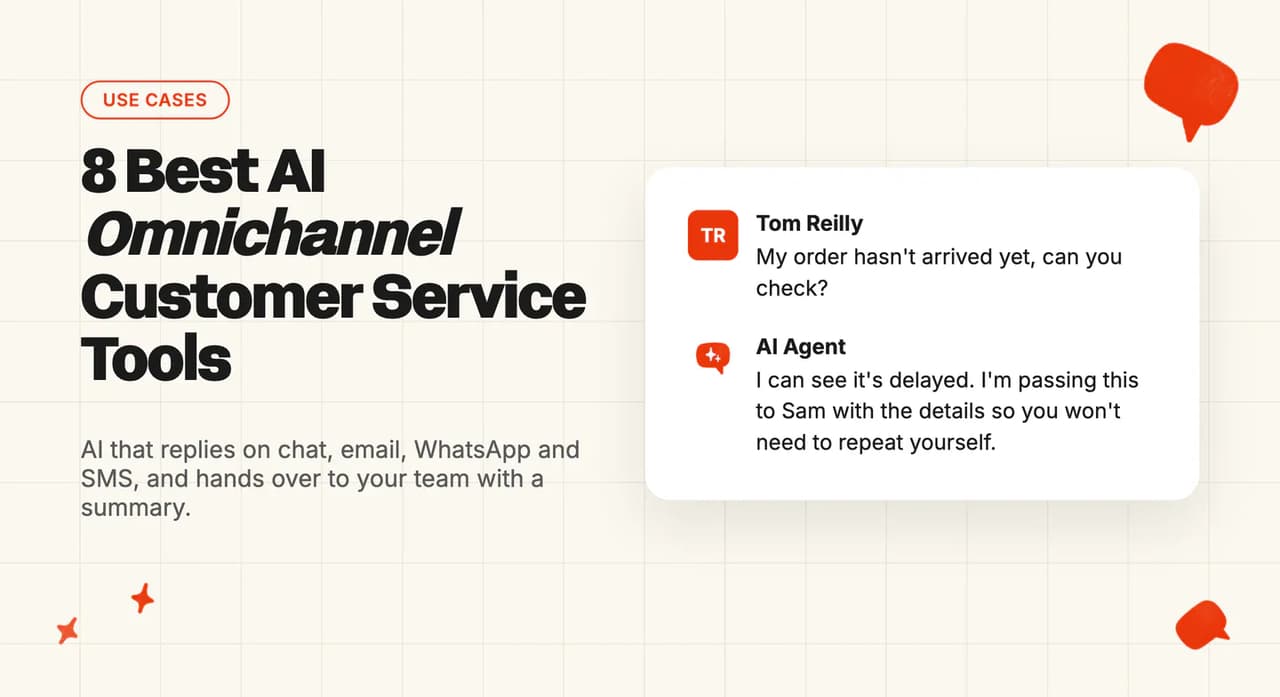
Your customers write in wherever it is easiest for them at the time. That might be the chat widget on your site, a reply to an order email, a WhatsApp message from the bus or a text, and every one of those channels ends up with the same team. With the right omnichannel customer service software, the AI answers on each of those channels itself, so your team only picks up the conversations it hands over.
Every channel you add means more replies for that team to write.
Vendor pages don't make the choice any easier, since they all say "omnichannel" whether the AI answers the message or passes it to a person. So the first decision is easy to blur: move to a new platform that does everything, or put AI across the channels your current helpdesk already runs.
I'm Mike, co-founder of My AskAI. We help 200+ ecommerce and SaaS businesses run AI customer service inside the helpdesk they already have, so I'm not a neutral party, and My AskAI is one of the eight tools below.
I scored eight tools against the six jobs an AI has to do to cover every channel, then priced each one at 2,000 conversations a month next to what that month costs with no AI at all. I use TravelJoy's rollout as the model: direct AI replies on its busiest messaging channel first, with email kept in internal-note mode.
Quick answer: the best AI omnichannel customer service software
What does omnichannel AI customer service actually require?
On most software pages, "omnichannel" means every channel arrives in one inbox for your team. A support lead put the problem well in a thread asking what the term even means:
"Every vendor claims omnichannel support but actual meaning varies wildly."
The same post describes platforms where "each channel is basically separate with no shared context". Here are the six jobs I checked every tool against.
1. It replies itself on every channel your customers use
That covers the chat widget, email, WhatsApp, text messages and DMs on social.
The check I ran is whether the AI replies on that channel, on the plan you would buy, because coverage differs by plan and by helpdesk. Freshdesk's AI answers email on its paid plans from Growth up, while chat and WhatsApp need its Omni plan, and Intercom's Fin covers fewer channels when your helpdesk is something other than Intercom.
2. It works inside the inbox your team already uses
Your team needs one place to see every conversation, whether the AI handled it or not. If adopting the AI means moving everyone to a new helpdesk, or running a second tool beside the first, that is a much bigger project than switching on an AI agent.
3. It knows the customer when they switch channels
A customer who chatted this morning and emails this afternoon should not have to explain the problem twice. Of the eight tools I scored, only Kustomer and Fin document the AI doing this itself. Most only see the conversation they are replying to, while the helpdesk shows your team the customer's other conversations.
4. It replies in a way that suits each channel
A full answer works on email, and a short one works on chat, WhatsApp or SMS. The AI also has to keep going when the customer replies to its email, and I marked tools down where only the first message gets an answer, because the follow-up is then left waiting for a person.
5. It hands over to a person on every channel, with a summary
Handover that works on chat and stalls on WhatsApp or email leaves customers stuck with nobody told. The person picking it up should get a summary, so they don't open by asking the customer to start again.
6. One setup covers every channel, switched on one at a time
You want to train the AI once and have the same knowledge and rules apply everywhere. Then you want to switch channels on individually, and test each one in draft or internal-note mode before customers see a reply.
How did I score these tools for omnichannel support?
I scored a tool low on any channel where it only routes the conversation to a person. I also scored working in your current helpdesk, because each tool asks you either to switch to an all-in-one platform or to add AI to the stack you already run.
The eight criteria, each out of 10:
- Channels it answers on - which of chat, email, WhatsApp, SMS and social messages the AI replies on, and on which plans.
- Works in your current helpdesk - whether the AI works inside the inbox your team already uses.
- Remembers the customer across channels - whether the AI itself sees earlier conversations on other channels.
- Replies suited to each channel - reply length and format per channel, and whether it answers follow-ups in an email thread.
- Handover to your team on every channel - handover with a summary, on every channel the AI answers.
- One setup, rolled out channel by channel - one set of knowledge and rules, switched on per channel, with a way to test before customers see it.
- Setup effort - time and people needed to go live on the first two channels.
- Monthly cost at 2,000 conversations - the lowest plan that covers the volume, monthly.
The scores come from each vendor's own help-center documentation and pricing pages, and from its homepage where a claim appears nowhere else. Where a vendor doesn't document one of the six jobs, the tables say so, and that row scores lower.
For setup effort I've assumed your team uses AI for the legwork. Pulling last month's most common questions for each channel into a test list takes minutes if you paste the export into an AI tool. A person still has to connect the accounts, check the answers and decide when to go live.
The 8 AI omnichannel customer service tools at a glance
Here is how the eight tools scored, with the top mark in each row in bold:
| (scores out of 10) | My AskAI | Intercom Fin | Aissist | Ada | HubSpot customer agent | Freshdesk Freddy AI | Kustomer | Zendesk AI agents |
|---|---|---|---|---|---|---|---|---|
| Channels it answers on | 9 | 9 | 8 | 9 | 7 | 7 | 9 | 7 |
| Works in your current helpdesk | 10 | 8 | 9 | 6 | 5 | 5 | 3 | 5 |
| Remembers the customer across channels | 4 | 6 | 4 | 7 | 6 | 3 | 9 | 4 |
| Replies suited to each channel | 7 | 8 | 5 | 8 | 6 | 8 | 6 | 7 |
| Handover to your team on every channel | 8 | 8 | 7 | 8 | 7 | 7 | 7 | 8 |
| One setup, rolled out channel by channel | 9 | 7 | 7 | 8 | 8 | 6 | 6 | 5 |
| Setup effort | 9 | 8 | 8 | 3 | 6 | 7 | 3 | 7 |
| Monthly cost at 2,000 conversations | 9 | 5 | 7 | 2 | 6 | 6 | 3 | 3 |
| Overall | 65 | 59 | 55 | 51 | 51 | 49 | 46 | 46 |
Same eight criteria, in plain words:
| Criterion | My AskAI | Intercom Fin | Aissist | Ada | HubSpot customer agent | Freshdesk Freddy AI | Kustomer | Zendesk AI agents |
|---|---|---|---|---|---|---|---|---|
| Channels it answers on | All your helpdesk routes | Widest on Intercom | Itemized for Zendesk only | Broadest standalone set | No SMS listed | Chat needs Omni | Full set, own platform | No SMS listed |
| Works in your current helpdesk | Zendesk, Intercom, Gorgias, HubSpot, Freshdesk | Intercom, Zendesk, HubSpot, Freshdesk | Zendesk, Intercom, Gorgias, HubSpot, Freshdesk, Kustomer, Front, Salesforce | Standalone, hands off | HubSpot only | Freshworks only | Platform move | Zendesk only |
| Remembers the customer across channels | Current conversation | Messenger and email | Not documented | Claimed in marketing | Claimed in marketing | New ticket starts fresh | One customer timeline | History at handover |
| Replies suited to each channel | Thread or first message | Per-channel formats | Not documented | Per-channel setup | Not documented | Separate chat, email agents | Not documented | Email follow-ups answered |
| Handover to your team on every channel | Summary on every channel | Handover on every channel | Handovers not billed | Handover on every channel | Handover per channel | Handover per channel | Routing, partly documented | History passed on |
| One setup, rolled out channel by channel | Internal notes by default | Live tests by segment | Simulator before launch | Simulations before launch | Preview, coverage percentage | Separate agents per channel | Not documented | Tests use up resolutions |
| Setup effort | Marketplace app, no migration | Quick on Intercom | Self-serve connect | Sales-led | Professional plan needed | Omni for chat | Whole-platform move | Advanced for email |
| Monthly cost at 2,000 conversations | $319 on Pro | $1,980 per outcome | Up to $760 on Growth | Sales only | $970 in credits | $1,040 with Omni | $1,200 plus seats | $3,950 per resolution |
| Overall | 65 | 59 | 55 | 51 | 51 | 49 | 46 | 46 |
My AskAI leads because it wins the rows about fitting into what you already run. It works inside Zendesk, Intercom, Freshdesk, Freshchat, Gorgias and HubSpot, it can be switched on channel by channel with internal notes as the default, and it costs the least of the priced options at this volume. It loses on remembering the customer across channels, where Kustomer's single timeline takes a 9 against our 4.
Intercom Fin comes second. It publishes the widest channel list of any tool on its own platform, and its cost is what pulls it down. Ada and Kustomer both score 9 on channels, then lose most of that lead on setup and cost: Ada sells through a demo, and Kustomer asks you to move your whole team onto its platform.
Where does omnichannel AI support go wrong?
A chat-only demo hides all three, so each one below comes with a test to run during your trial, before you sign anything.
Failure mode 1: The AI never answers a connected channel
WhatsApp or SMS messages arrive in the inbox, and every one of them goes to a person. Usually it's because the AI only replies on chat, or because that channel needs a plan the team doesn't have.
Freshdesk is the clearest example I know of. Its documentation puts the chat AI agent on the Freshdesk Omni plan, so on plain Freshdesk the AI answers email and your team answers every WhatsApp message. To test it, ask the vendor to show the AI replying on that channel, in the trial, on the plan you will buy.
Failure mode 2: The customer has to start again when they switch channels
In one contact-center survey, 34% of consumers said context is lost whenever they switch channels, which leaves them re-explaining themselves.
I look for history that follows the customer; at minimum, the handover summary should show the person picking it up what already happened. To test it, start a conversation on chat, follow up by email and read what the AI or the handover note knows.
Failure mode 3: Two tools give the customer two different answers
This one comes from running a separate WhatsApp bot beside the helpdesk AI. Each has its own knowledge, so the customer gets one refund policy on chat and another on WhatsApp.
The fix is one setup, with one set of knowledge and rules behind every channel. Ask any vendor where you would edit the refund policy, and whether that one edit changes the answer on every channel.
Can My AskAI answer customers on every channel?
We built My AskAI to answer inside the helpdesk your team already uses: Zendesk, Intercom, Freshdesk, Freshchat, Gorgias or HubSpot. It installs from your helpdesk's marketplace as an approved app, so your team keeps working in the same inbox.
What the AI covers for you depends on which helpdesk you run and which channels you have connected to it.
How does My AskAI handle chat, email, WhatsApp and SMS?
Here is where each channel works:
- Chat - in every helpdesk we support, plus the My AskAI chat widget.
- Email - in Zendesk, Intercom, Freshdesk, Gorgias and HubSpot, with a choice to answer every message in a thread or only the first.
- WhatsApp - through Intercom, Zendesk Messaging, HubSpot, Freshchat and Gorgias.
- SMS - in Gorgias, Intercom, Freshchat and HubSpot.
- Social messages - Instagram and Messenger through Intercom, Freshchat and Zendesk Messaging, Messenger through HubSpot, and a per-channel toggle in Gorgias.
- Web forms - on Zendesk, Freshdesk and Gorgias contact forms.
You also choose per inbox whether the AI sends direct replies, drafts internal notes or makes copilot suggestions, and by default it only ever replies in an internal mode until you switch a channel live. So each channel can be tested on its own, with one set of knowledge behind all of them.
The AI answers from the full conversation in front of it, and when it hands over, your team gets a summary of that conversation. Kustomer and Fin do better on remembering the customer, because their AI reads earlier conversations on other channels. Ours takes a 4 there, and we can help you connect customer details from your other systems so the AI knows who it's talking to.
Capabilities shipped (out of 6)
| Job | My AskAI |
|---|---|
| Replies itself on every channel | ✅ whatever your helpdesk routes |
| Works in your current helpdesk | ✅ Zendesk, Intercom, Freshdesk, Freshchat, Gorgias, HubSpot |
| Knows the customer across channels | ⚠️ answers from the current conversation |
| Replies suited to each channel | ⚠️ thread or first-message choice per inbox |
| Hands over on every channel, with a summary | ✅ |
| One setup, switched on channel by channel | ✅ internal-note mode by default |
Who's using My AskAI across channels?
TravelJoy, an all-in-one platform for travel advisors, runs its support in Zendesk and switched on direct AI replies in Zendesk Messaging from day one, while the AI drafted internal notes on email tickets for the team to send. It now resolves 80% of conversations with AI and saves 193 hours a month.
A premium accessories brand on Gorgias took a similar split: chat answered directly, email in copilot mode. Its AI resolution rate is 64%, with 85% AI CSAT. In both cases we count a conversation as resolved when the AI handled it without escalating to a person.
What does My AskAI cost at 2,000 conversations a month?
Pro is $199 a month with 1,000 credits included and 5 team seats, then $0.12 a credit. A chat, WhatsApp or SMS conversation with two AI replies uses one credit, and an email answered once uses one credit. That puts 2,000 conversations at about 2,000 credits: $199 plus 1,000 extra credits at $0.12, or $319 a month.
We charge per ticket the AI works on, resolved or not, so your bill does not climb as the AI gets better. Usage-based features such as AI Actions, Tasks and Live Translation bill on top on every plan. The trial is 30 days with all features unlocked, unlimited tickets and no card, so you can prove it on your own channels before you pay us anything.
To go deeper, our helpdesk integrations page lists every channel per helpdesk, and the pricing page has the full plan table.
Can Intercom Fin answer customers on every channel?
Fin is Intercom's AI agent, and it also works inside Zendesk, Salesforce, HubSpot and Freshdesk, with fewer channels there. Intercom's guide to Fin on other platforms lists email and Messenger on HubSpot, and email plus Freshchat messaging on Freshdesk.
How does Intercom Fin handle chat, email, WhatsApp and SMS?
On Intercom, Fin answers on voice, email, Messenger, WhatsApp, Instagram, Facebook Messenger, SMS, Slack and Discord, and Intercom says each channel is set up for its native format. That, plus answering follow-ups by email, is why I gave Fin a joint top 8 on replies suited to each channel.
On memory, the team side is strong: if a customer starts on Messenger and follows up by email, your team sees the full history. Fin's own memory is narrower, covering Messenger and email for signed-in customers only. Testing happens live, by rolling Fin out to part of your team or customers first, so some real customers see its answers before you have checked them.
Capabilities shipped (out of 6)
| Job | Intercom Fin |
|---|---|
| Replies itself on every channel | ✅ on Intercom; fewer channels elsewhere |
| Works in your current helpdesk | ⚠️ Intercom, plus Zendesk, Salesforce, HubSpot, Freshdesk |
| Knows the customer across channels | ⚠️ Messenger and email, signed-in customers |
| Replies suited to each channel | ✅ |
| Hands over on every channel, with a summary | ✅ |
| One setup, switched on channel by channel | ⚠️ live tests by segment |
Who's using Intercom Fin across channels?
Lightspeed runs Fin across several Intercom workspaces, and its team describes the results in Intercom's Lightspeed story:
"Fin is currently resolving between 45-65% of our support volume across our workspaces."
What does Intercom Fin cost at 2,000 conversations a month?
Fin costs $0.99 per outcome, with a 50-outcome monthly minimum. I've counted every one of 2,000 conversations as an outcome at that base rate, which puts Fin at $1,980 a month on top of the Intercom seats your team already pays for.
Some channels add charges of their own, and none of them are in my $1,980. Under Intercom's usage-based channel terms, every text is charged on top, while inbound WhatsApp conversations are free.
Read more about Fin in our complete guide to Intercom Fin, our Intercom Fin alternatives roundup and our My AskAI vs Intercom Fin comparison.
Can Aissist answer customers on every channel?
Aissist is the other tool here that layers onto an existing helpdesk, the same way we do. Its list of supported helpdesks covers Zendesk, Intercom, Gorgias, HubSpot, Freshdesk, Kustomer, Front and Salesforce, which is why it scores 9 on working in your current helpdesk.
How does Aissist handle chat, email, WhatsApp and SMS?
For Zendesk, Aissist's docs are specific: the Zendesk messaging setup covers web chat, WhatsApp, SMS and social messaging. For the other helpdesks, the docs don't itemize which channels the AI answers.
Before launch you can run conversations through a simulator to see how it responds. Aissist doesn't document how replies change by channel, or whether the AI keeps a customer's history from one channel to another.
I like that Aissist doesn't bill for a conversation the AI hands over to a person.
Capabilities shipped (out of 6)
| Job | Aissist |
|---|---|
| Replies itself on every channel | ⚠️ itemized for Zendesk messaging |
| Works in your current helpdesk | ✅ Zendesk, Intercom, Gorgias, HubSpot, Freshdesk, Kustomer, Front and Salesforce |
| Knows the customer across channels | ⚠️ not documented |
| Replies suited to each channel | ⚠️ not documented |
| Hands over on every channel, with a summary | ⚠️ hands over; handovers not billed |
| One setup, switched on channel by channel | ✅ simulator before launch |
Who's using Aissist across channels?
In its customer story, Aissist says it cut COROS's resolution time tenfold. It also publishes a use case from Holafly.
What does Aissist cost at 2,000 conversations a month?
On Aissist's pricing page, the free tier covers up to 1,000 tickets a month. Growth charges $0.50 a chat ticket and $0.20 an email ticket, and conversations handed over to a person are not charged. I've split the 2,000 conversations as 800 emails and 1,200 chat, WhatsApp and SMS conversations billed at the chat rate. Counting every one as resolved by the AI, that comes to $160 plus $600, or up to about $760 a month.
Read more in our Aissist complete guide, or browse the Aissist alternatives roundup.
Can Ada answer customers on every channel?
Ada is a standalone AI agent aimed at enterprise support teams. It answers customers itself, beside your helpdesk, and hands conversations over to it when a person needs to step in.
How does Ada handle chat, email, WhatsApp and SMS?
Ada's channel list is the broadest of the standalone tools here. Its social and SMS setup guide covers WhatsApp, Facebook Messenger, Twitter DMs, Instagram and SMS, and it also answers email, chat and phone calls.
Ada's homepage says it keeps customer identity and context across every channel. I treat that as a marketing claim, so test it yourself in a trial. Before launch, Ada's simulations let your team see how a change affects answers.
Capabilities shipped (out of 6)
| Job | Ada |
|---|---|
| Replies itself on every channel | ✅ voice included |
| Works in your current helpdesk | ⚠️ standalone, hands off to your helpdesk |
| Knows the customer across channels | ⚠️ claimed on its homepage |
| Replies suited to each channel | ✅ |
| Hands over on every channel, with a summary | ✅ |
| One setup, switched on channel by channel | ✅ simulations before launch |
Who's using Ada across channels?
Cebu Pacific has seen over 50% higher CSAT with Ada since the rollout, according to Ada's case study.
What does Ada cost at 2,000 conversations a month?
Ada's pricing page redirects to a demo request and lists no prices. That leaves me scoring Ada 2 on cost and 3 on setup effort, because buying it starts with booking a demo.
Read more about Ada in our complete guide to Ada, our Ada alternatives roundup and our My AskAI vs Ada comparison.
Can the HubSpot customer agent answer customers on every channel?
HubSpot calls its AI the customer agent now (it used to be called Breeze). It answers inside the HubSpot inbox, so if HubSpot is your helpdesk it's already where your team works, and anywhere else it isn't an option.
How does the HubSpot customer agent handle chat, email, WhatsApp and SMS?
HubSpot's channel guide lets you assign the agent to WhatsApp, Facebook, live chat, forms, email and custom channels. SMS is not on that list.
WhatsApp comes with conditions: HubSpot's WhatsApp setup guide asks for a Marketing or Service Hub Professional or Enterprise plan and a WhatsApp Business account.
I like the rollout controls here. You can preview the agent per channel and batch-test it without spending credits, then send a set percentage of each channel to the AI, which scores 8 on rollout.
Capabilities shipped (out of 6)
| Job | HubSpot customer agent |
|---|---|
| Replies itself on every channel | ⚠️ no SMS listed |
| Works in your current helpdesk | ⚠️ HubSpot only |
| Knows the customer across channels | ⚠️ claimed in marketing |
| Replies suited to each channel | ⚠️ not documented |
| Hands over on every channel, with a summary | ✅ |
| One setup, switched on channel by channel | ✅ per-channel preview and coverage percentage |
Who's using the HubSpot customer agent across channels?
Synergym uses HubSpot's customer agent to resolve 85% of its member support requests without a person stepping in.
What does the HubSpot customer agent cost at 2,000 conversations a month?
The agent runs on HubSpot credits: 50 credits, or $0.50, per resolved conversation. Service Hub Professional is $100 a seat a month on monthly billing and includes 3,000 credits. I've assumed all 2,000 conversations resolve, which means 97,000 extra credits at $0.01, or $970 a month on top of the seats. A team on Starter also pays the Professional upgrade and a one-time $1,500 onboarding fee (neither is in the $970).
Read more in our complete guide to the HubSpot customer agent, our HubSpot customer agent alternatives roundup and our My AskAI vs HubSpot comparison.
Can Freshdesk Freddy AI answer customers on every channel?
Freddy AI is Freshworks' AI agent, and it answers inside Freshdesk. Which Freshdesk plan you're on decides the channels: Freshdesk's email agent guide says standalone Freshdesk accounts only get the email AI agent.
How does Freshdesk Freddy AI handle chat, email, WhatsApp and SMS?
Chat, WhatsApp, Instagram and Messenger need the Freshdesk Omni plan with AI Agent Studio turned on. SMS and voice are not among the AI agent's documented channels.
Email is where I rate Freddy most highly. The email agent reads the full thread history and answers follow-ups, and Freshdesk's chat guidance tells you short, direct answers work better in chat, with separate chat and email agents. That earns the joint top 8 on replies suited to each channel.
Memory is the weak spot. Freshdesk states that context stays within one thread, and a new ticket on the same issue starts fresh. Separate agents per channel also mean more than one setup, although I like that you can bulk-test the email agent without touching live conversations.
Capabilities shipped (out of 6)
| Job | Freshdesk Freddy AI |
|---|---|
| Replies itself on every channel | ⚠️ email on Growth and up; chat and WhatsApp need Omni |
| Works in your current helpdesk | ⚠️ Freshworks only |
| Knows the customer across channels | ❌ a new ticket starts fresh |
| Replies suited to each channel | ✅ separate chat and email agents |
| Hands over on every channel, with a summary | ✅ |
| One setup, switched on channel by channel | ⚠️ separate agents per channel |
Who's using Freshdesk Freddy AI across channels?
In its Freshworks customer story, Hobbycraft says Freddy AI chatbots now answer up to 30% of questions that reach its team.
What does Freshdesk Freddy AI cost at 2,000 conversations a month?
Freddy bills by session, with additional sessions at $49 per 100. The free sessions you start with are a one-time allowance. At 2,000 conversations I count 20 packs, or $980, plus the move from Freshdesk Growth at $23 an agent to Omni Growth at $35 for a five-person team, $60 more. That's about $1,040 a month on top of your seats.
Read more in our complete guide to Freshdesk Freddy AI, our Freshdesk Freddy AI alternatives roundup and our My AskAI vs Freshdesk Freddy comparison.
Can Kustomer answer customers on every channel?
Kustomer is a full customer service platform with AI agents built in. I treat choosing it as a platform decision, because your team, your tickets and your workflows all move with it. That's why it scores 3 on both working in your current helpdesk and setup effort.
How does Kustomer handle chat, email, WhatsApp and SMS?
Kustomer's help center lists chat, email, SMS, WhatsApp, Facebook Messenger and forms for its AI agents.
Its standout is memory: on Kustomer's platform, every interaction across chat, email, voice and social is in one customer timeline. No other tool I scored keeps one timeline across every channel. Kustomer doesn't document how replies change per channel or how a channel is tested before launch.
Capabilities shipped (out of 6)
| Job | Kustomer |
|---|---|
| Replies itself on every channel | ✅ |
| Works in your current helpdesk | ❌ platform move |
| Knows the customer across channels | ✅ one customer timeline |
| Replies suited to each channel | ⚠️ not documented |
| Hands over on every channel, with a summary | ⚠️ routing, partly documented |
| One setup, switched on channel by channel | ⚠️ not documented |
Who's using Kustomer across channels?
APLAZO runs Kustomer across WhatsApp and in-app chat, and Kustomer's customer story reports that customer satisfaction on general-information questions rose by 40%.
What does Kustomer cost at 2,000 conversations a month?
Kustomer's pricing details put its AI agents at $0.60 per engaged conversation, so I've priced 2,000 conversations at $1,200 a month for the AI. Seat pricing goes through sales, and you would be paying for the platform seats on top.
Read more about Kustomer in our complete guide, or browse the Kustomer alternatives roundup.
Can Zendesk AI agents answer customers on every channel?
Zendesk's AI agents are built into Zendesk, so they only fit a team whose helpdesk is Zendesk.
How do Zendesk AI agents handle chat, email, WhatsApp and SMS?
Zendesk's overview of where AI agents run covers messaging and email, including web forms, and voice is available too. WhatsApp and social channels need Zendesk messaging, and SMS is not on the list.
Email takes more setting up: the email AI agent is part of AI agents Advanced, Zendesk recommends connecting only one AI agent to email, and testing an email AI agent in production uses up automated resolutions. Separate agents and paid testing are why I scored rollout 5.
The email agent answers follow-ups in a ticket. At handover, the conversation history goes to the person picking it up.
Capabilities shipped (out of 6)
| Job | Zendesk AI agents |
|---|---|
| Replies itself on every channel | ⚠️ no SMS listed |
| Works in your current helpdesk | ⚠️ Zendesk only |
| Knows the customer across channels | ⚠️ history passed on at handover |
| Replies suited to each channel | ✅ email follow-ups answered |
| Hands over on every channel, with a summary | ✅ |
| One setup, switched on channel by channel | ⚠️ one AI agent per email; tests use up resolutions |
Who's using Zendesk AI agents across channels?
Zendesk's story on ODEON Cinemas reports that the cinema chain took automated conversation deflection from 18 to 60 percent.
What do Zendesk AI agents cost at 2,000 conversations a month?
On Zendesk's monthly pricing, Suite Team is $69 an agent and includes 5 automated resolutions per agent a month, so 25 for a five-person team. The other 1,975 resolutions, at $2.00 each on pay as you go, come to $3,950 a month, or $2,962.50 with a committed rate of $1.50. Email answering needs the AI agents Advanced add-on on top, which isn't in my figure.
Read more in our complete guide to Zendesk AI, our Zendesk AI alternatives roundup and our My AskAI vs Zendesk AI comparison.
What does omnichannel AI save you? (worked example)
The basis for every row is the same: 2,000 conversations a month, split 800 chat, 800 email, 300 WhatsApp and 100 SMS, handled by a five-person team. A conversation takes a person about 5 minutes at $0.40 a minute, which is $2.00 each; that is an assumption, a little above the median wage for customer service representatives of $21.53 an hour.
For the tools that run in a helpdesk you already pay for, each row is the AI charge plus any plan upgrade a channel needs. Kustomer is the exception, because choosing it means paying for new platform seats. Where a tool bills per resolution, I've counted every conversation as resolved, so those rows count the most conversations you could be billed for.
| Scenario | Plan priced | Monthly cost | Effective $/conversation | Notes |
|---|---|---|---|---|
| No AI (team answers everything) | none | $4,000 | $2.00 | 2,000 × 5 min × $0.40 |
| My AskAI | Pro | $319 | $0.16 | 2,000 conversations ≈ 2,000 credits: $199 incl. 1,000 + 1,000 × $0.12; add-ons bill on top |
| Intercom Fin | per outcome, on existing Intercom seats | $1,980 | $0.99 | every conversation counted as an outcome; SMS charged per segment on top |
| Zendesk AI agents | Suite Team, 5 agents, pay as you go | $3,950 | $1.98 | 1,975 resolutions × $2.00 beyond 25 included; email needs the Advanced add-on |
| Freshdesk Freddy AI | Omni Growth upgrade + sessions | $1,040 | $0.52 | 20 × $49 session packs + 5 × $12 upgrade |
| HubSpot customer agent | Service Hub Professional, seats already paid | $970 | $0.49 | 2,000 resolved × 50 credits = 100,000; 97,000 beyond 3,000 included × $0.01 |
| Ada | sales only | not published | not published | pricing only through a demo |
| Kustomer | AI Agents for Customers add-on, on top of seats | $1,200 + seats | $0.60 + seats | platform move; seat price through sales |
| Aissist | Growth | $760 | $0.38 | 1,200 chat, WhatsApp and SMS × $0.50 chat rate + 800 × $0.20 email; every ticket counted as resolved |
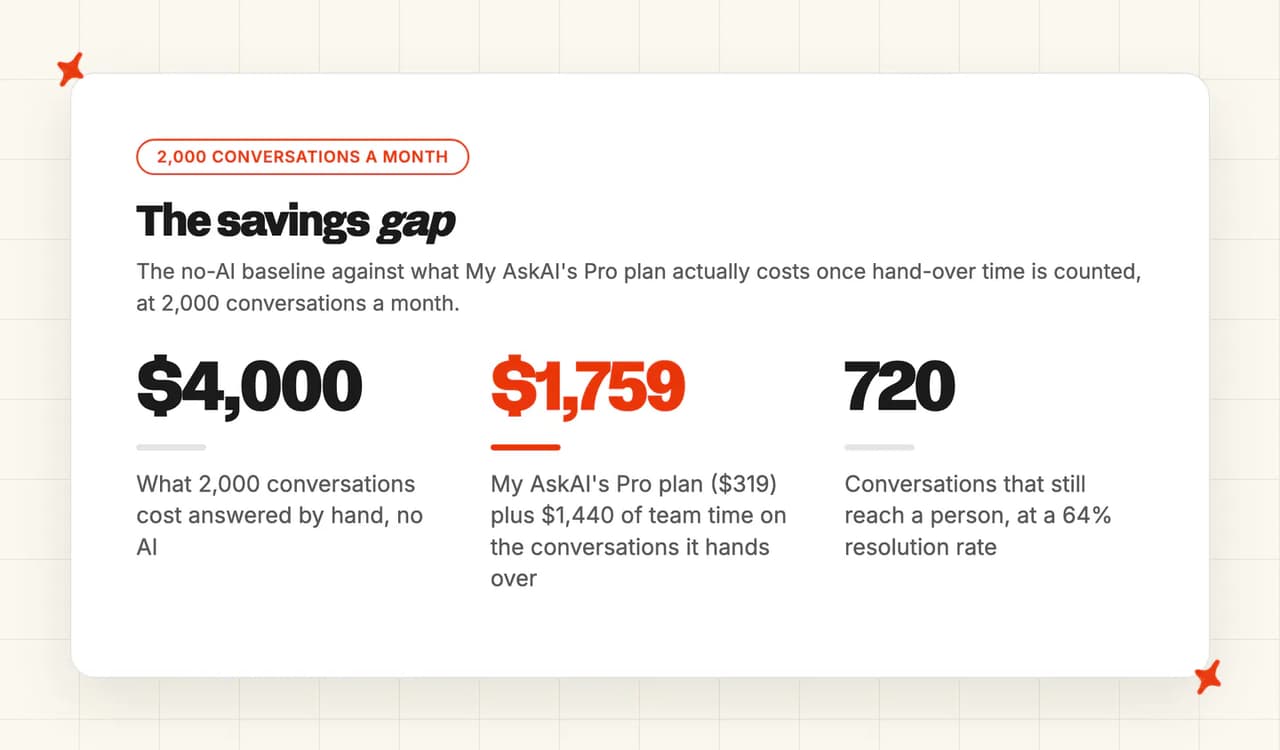
Every AI tool with a full price in the table costs less than answering everything by hand, before add-ons. Zendesk comes closest at $3,950, because $2.00 a resolution is about what a person costs per conversation here. These rows are the AI side of the bill, and your team still answers whatever the AI hands over. At 64%, the lower of the two resolution rates in our rollouts above, 720 conversations still reach a person: $1,440 of team time plus $319 of AI, or $1,759 against $4,000 with no AI. To run the same sum on your own volume, our AI support agent ROI calculator works it out for any vendor.
SMS also costs extra on every option, at your SMS provider's rates, and WhatsApp charges for some messages too.
So which AI omnichannel customer service software is best?
My AskAI leads on 65 of 80 because it works inside the helpdesk you already run, switches on channel by channel with internal notes as the default, and costs the least of the priced tools. Our weakest row is remembering the customer across channels, and if that row decides it for you, look at Kustomer's 9.
Intercom Fin is second on 59. It answers the widest list of channels any tool publishes on its own platform, and you pay for that in per-outcome billing that climbs with volume. Ada is the one to look at if phone calls are part of your mix alongside text, and you're prepared to buy through a sales process. If your helpdesk's own AI already answers every channel you run, and the bill works at your volume, there's no reason to add another tool.
For the rollout, follow the order TravelJoy used:
- Start with the busiest messaging channel - switch on direct AI replies there first, where customers expect a fast answer.
- Keep email in internal-note mode - let the AI draft replies for your team to send for a couple of weeks, and fix the answers it gets wrong.
- Add channels one at a time - switch each one live once its drafts read the way your team would write them.
The 30-day free trial has every feature unlocked and no card, so you can run that first channel live before you pay us anything.
FAQs
What exactly is omnichannel?
Omnichannel customer service means a customer's conversation stays connected across every channel they use, so chat, email, WhatsApp and SMS read as one conversation to the customer and to your team. One helpdesk vendor's definition describes it as connected, consistent interactions across channels. When I apply it to AI, it also means the AI answers on each of those channels itself.
Is omni channel a CRM?
No, a CRM stores the customer record: who they are, what they bought and what happened before. Omnichannel is about connecting the conversations across channels, and some platforms combine the two so every channel writes to the same record.
What does "omnichannel customer service platform" even mean?
Usually it means a helpdesk that brings every channel into one inbox for your team. The support leads asking about it point out that some tools connect the channels and still treat each one as separate. When AI is involved, the second question I ask is whether the AI replies on each channel itself.
What is Zendesk omnichannel?
Zendesk brings its channels into one workspace for your team, and its AI agents answer on messaging and email, including web forms, and voice, with WhatsApp and social channels running through Zendesk messaging. Email AI agents need the AI agents Advanced add-on, and SMS is not on Zendesk's list of AI agent channels.
How do I add AI to my customer support without replacing my helpdesk?
Install an AI agent that answers inside the helpdesk you already have. That's how we built My AskAI: it installs from the marketplace of Zendesk, Intercom, Freshdesk, Freshchat, Gorgias or HubSpot as an approved app, trains once on your help center, website and historic tickets, and answers on the channels your helpdesk routes to it. It starts in internal-note mode, so your team can check its replies before any customer sees one.
Does the AI keep context when a customer moves from chat to email?
Only two tools here document it: Kustomer's single customer timeline, and Fin's memory for signed-in customers on Messenger and email. Ada and HubSpot claim it in their marketing, and the rest, ours included, answer from the conversation in front of them. In most setups your helpdesk shows your team the customer's other conversations, and the handover summary covers what happened in the current one.
Does adding WhatsApp or SMS change the price?
Often, in two ways. Some tools need a higher plan before the AI answers those channels, like Freshdesk Omni for WhatsApp or a HubSpot Professional plan. On top of that, SMS is charged per message segment, which Intercom passes on, and WhatsApp charges for some messages too.