Help Center Audit for AI: 13 Checks to Grade Your Articles
Most teams blame the AI when it answers wrong. The fault is usually the article. Our free audit skill grades every help center article A+ to F.
Summarize with AI
That is an unpopular thing to say to a team who has just bought an AI agent, and the usual advice when answers come back wrong is to pick a better model, write a better prompt, or turn the settings down until it stops. A help center audit for AI grades every article A+ to F on whether an AI agent could answer a customer from it, and puts the busiest, worst-graded pages at the top of your list. Ours is a free skill you can install from GitHub into Claude or ChatGPT and run on your own help center today.
Some of that advice does point at your content. Atlan and the Customer Success Collective both blame data that is old, scattered across too many places, and looked after by nobody.
To my eye it stops one step short. A wrong answer is a reading problem, and the thing being read is one of your own articles. Somebody wrote it, somebody approved it, and it looked fine on the day. The job is to grade it the way the agent reads it, then grade what happens when two of your articles disagree.
I'm Mike, co-founder of My AskAI. We run AI customer service for 200+ ecommerce and SaaS businesses, our agents have resolved over 1,000,000 tickets, and the rolling 30-day resolution rate across our customer base is 72%. Almost every conversation I have about a disappointing number ends up in the same place: somebody's help center. So we built an audit skill that grades it, and this post is the framework behind it.
Why does an AI agent answer wrong when the article is right there?
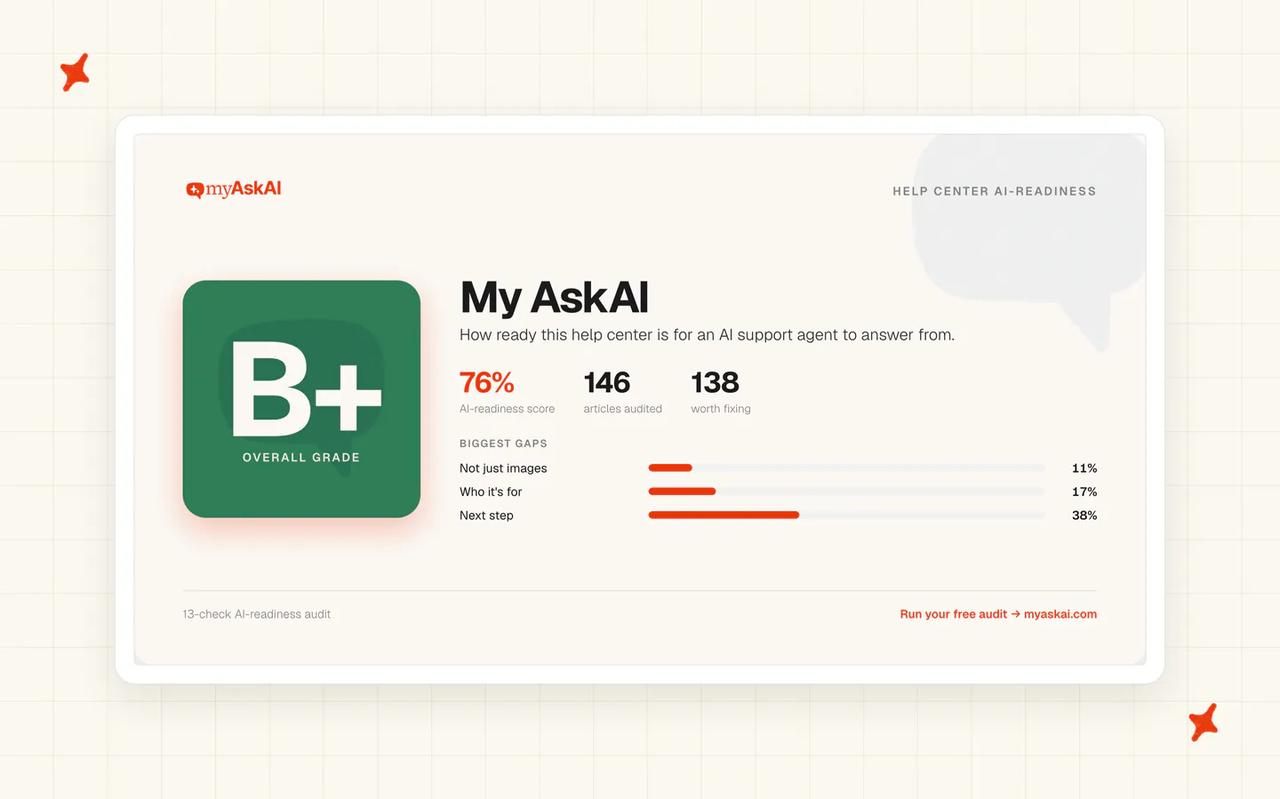
Support AI does fail on content, and the harder part is knowing which article to open on Monday. We ran our audit skill over our help center before anybody else's, and this is the scorecard that came back: B+ overall, which is how the library reads on average, a 76% AI-readiness score across 146 articles, and 138 of the 146 failing at least one check.
When a customer comes to us saying the agent answered incorrectly, the information it was reading has nearly always been out of date, ambiguous, incorrect or in conflict with something else. Fabrication is at the very bottom of my list of causes.
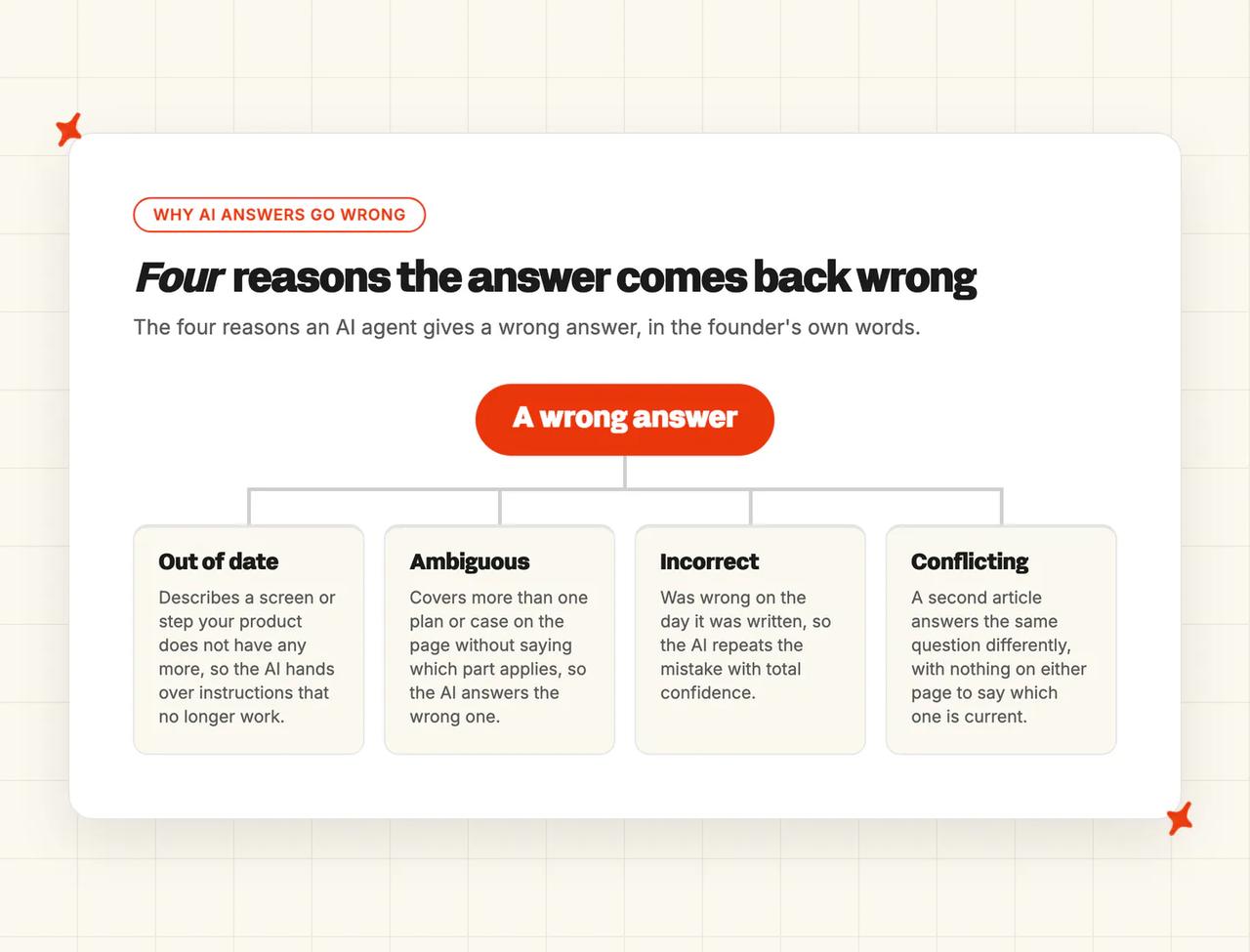
An article is out of date when it describes a screen your product no longer has. It is ambiguous when it covers three plans on one page and never says which paragraph applies to which.
Incorrect means somebody wrote it from memory and nobody checked. Conflict means a second article answers the same question a different way, with nothing on either page to say which one is current.
The out-of-date case is the one teams tell me they have covered. A last-reviewed date only proves somebody opened the article. In an r/CustomerSuccess thread about a deployment that went badly, one support practitioner described what they found when they went looking:
"A lot of our KB content was outdated, duplicated, or missing entirely for newer features. The AI simply amplified the bad knowledge it was retrieving." — u/Automatic-Program936, r/CustomerSuccess
The AI amplified what was already wrong. Further down, another practitioner points to a related case: articles that were technically correct but written before a redesign, so every button name in them was stale.
I count that as an out-of-date article even though every word in it is true, because the customer following it still stops at a button that is not there.
All of this assumes you have a help center to amplify. If yours is thin, or missing outright, start by filling it. The shortest route I know is historical ticket training: the tickets your team has already answered become a first set of ready-to-edit articles. Ours is Train on Historic Tickets, and it needs nothing from you but those tickets.
Out of date, ambiguous and incorrect are all visible on a single page. Conflicting only shows up when you read two articles against each other, which is why a per-article review keeps missing it.
If you want the symptom side of this, we have a whole post on why chatbots give wrong answers. It starts at the bad reply and works back to the article that caused it.
Inside My AskAI, Echo is the assistant your team asks to run the platform. Open any conversation, ask it why our agent gave that answer and which source it used, and an argument about the AI becomes a specific article you can go and read.
Can the AI find it, use it, and trust it?
The framework we grade against is the Find / Use / Trust grade. Thirteen plain-language checks, grouped under three questions, plus a layer that only exists across the whole help center. Every check asks one thing: does this get a customer to an answer when an AI agent is the one reading it?
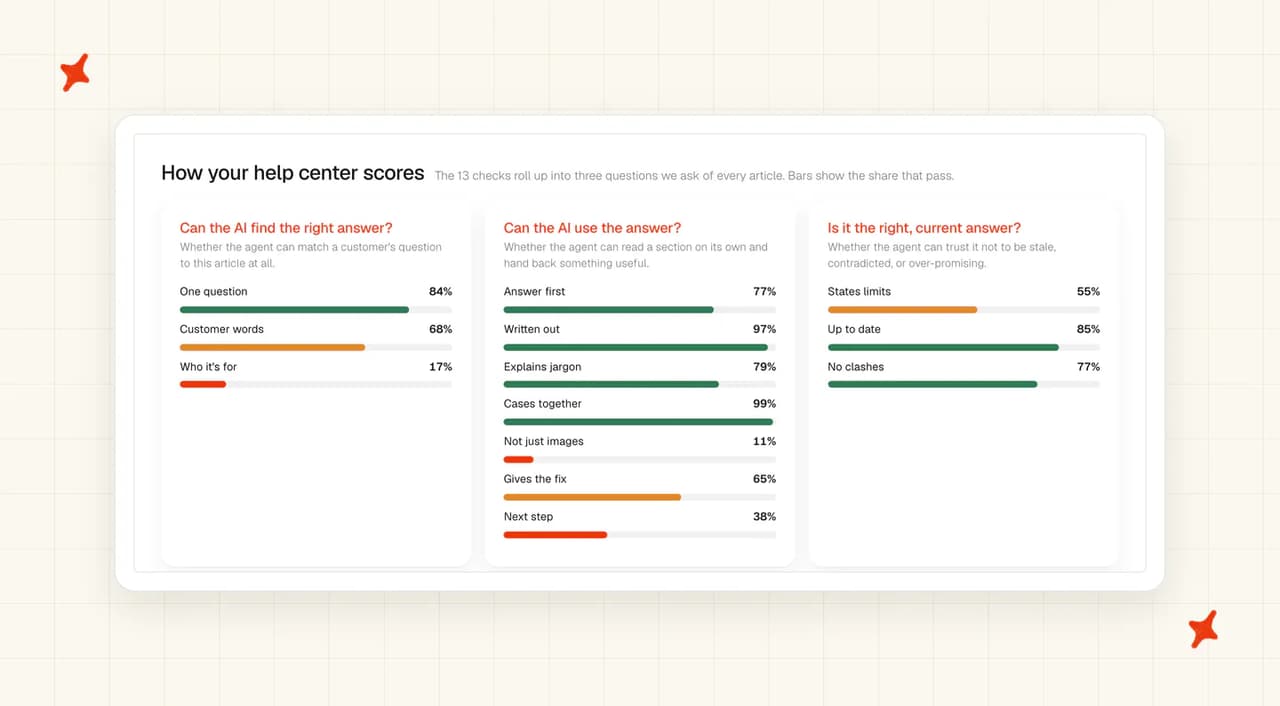
The thirteen checks split three, seven and three across Find, Use and Trust.
| Question | What it asks | Checks |
|---|---|---|
| Find | Can the AI find the right answer at all? | 3 |
| Use | Can it use the answer once it has it? | 7 |
| Trust | Is this the right, current answer? | 3 |
Seven of our thirteen go under Use, because being usable is where most articles fail. The Customer Success Collective's readiness guide covers the being-found side.
Find: can the AI find the right answer at all?
We start with Find, and it holds three checks. Does the article answer one question? Is it worded the way a customer would ask it, in their words? And does it say who it applies to and where, when the answer changes by plan, region or account type?
Failures here are the cheapest to fix. An article that covers six questions gets picked for every one of them and answers each one thinly, and an article titled with your internal feature name never comes up at all, because nobody types that.
Use: can it use the answer once it has it?
Most help centers lose their grade here, across our seven Use checks.
- The answer comes first, and each part stands alone. An answer buried in paragraph five, after the background, may never get read at all.
- The answer is on the page itself. Content hidden in an accordion, a tab or a linked PDF is content the agent cannot hand to a customer.
- Acronyms and product names are explained. Your internal shorthand means nothing to the customer who receives it in a reply.
- Every case lives in one place. If the refund policy is split across four articles by channel, the agent answers with one quarter of it.
- Images, video and tables are spelled out in words. A step that only exists in a screenshot never reaches the customer.
- The actual fix is given, with anything needed first. A prerequisite listed after the steps arrives too late to help.
- It says what to do if that does not work. Otherwise the ticket comes back, and it comes back angrier.
Trust: is this the right, current answer?
Trust has three checks. Does the article say what it does not cover, so the agent knows where to stop? Is it dated and current, where the content is time-bound? And does anything else in the help center contradict it?
Our whole-library pass answers that last one.
What only shows up between the articles?
On top of the per-article grade, we run five passes across the whole help center: coverage gaps, contradictions, near-duplicates, articles that quote a date already gone by, and confusable names your help center never tells apart. Four of those five land on the grade of the article they belong to, so they reach your fix list with everything else. A coverage gap is the exception, because there is no article to put it on.
Another support practitioner describes the same problem from the outside, in a thread about a chatbot answering from messy documents:
"The dangerous state is when two docs disagree and the bot silently picks one. In that case the model did not really hallucinate; the knowledge base gave it a bad choice." — u/Calm-Dimension3422, r/CustomerSuccess
We grade the library as well as the page because a checklist run down one article at a time cannot see a contradiction between two of them.
Near-duplicates behave the same way. Two articles that paraphrase each other leave the agent choosing between two versions of one answer, with no way to tell which of them you meant.
Why do two articles with the same score get different grades?
An article that never gives the fix costs a customer their afternoon. That matters more than an unexplained acronym. So we weight every check 3, 2 or 1, and the grade is the share of that weight an article passes.
Five carry a 3: one question per article, customer wording, the answer first with each part standing alone, the answer on the page itself, and the actual fix with anything needed first. Two carry a 1: explaining acronyms and product names, and saying what to do if the fix does not work. The other six we score at 2.
To grade an article by hand, add up the weights of the checks that apply to it, add up the weights of the ones it passes, and divide the second by the first. A check that does not apply drops out of both totals, so a short policy note is not punished for having no troubleshooting section. That arithmetic is why two articles can each fail five of thirteen and land two grades apart.
Our scale turns that percentage into a letter: A+ at 90, A at 80, B+ at 75, B at 70, C+ at 60, C at 50, D at 40, E at 30 and F at 20. An A+ article answers one question, in the words a customer would use, with the answer in the opening line and every step written out on the page. An F is an article that never gives the fix, or gives it behind a link.
A C is a help center article that works: about half the weight passing and nothing in it broken. I read a first C as the ordinary state of a help center nobody has had time to grade.
For writing the fix, we have a help center optimization guide and a post on the writing patterns that make a knowledge base work for AI agents. If you are building a help center from scratch, write your first ten articles against our thirteen checks and grade them as you go.
What does grading a real help center tell you to fix first?
A grade stops the argument about whether the content is the problem. Once every article carries a letter and a priority, the team has a short list to work through. We rank by how much weight is failing and how busy the article is, so the top of the list is a handful of pages your customers read.
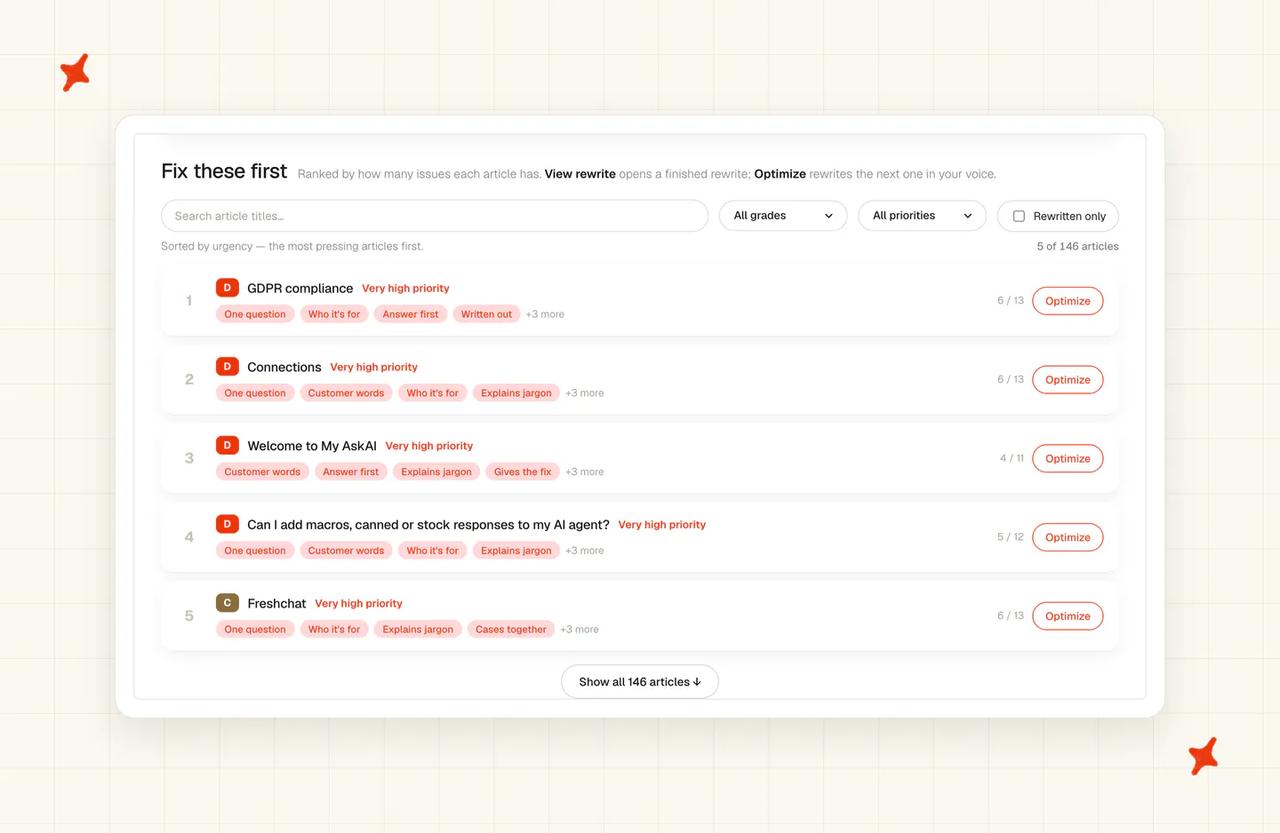
A help center whose failures are spread thinly across the Use checks still works. Put the same count of failures on six of your ten busiest articles, all on the same check, and customers stop getting answers. The average hides which checks failed, so I send teams the ranked list.
TravelJoy, who run their support on Zendesk, got the content and the deployment right together. Their AI resolution rate is 80%, up from 24% before they moved to us, across roughly 2,500 to 2,700 tickets a month. That is 193 hours of agent time back every month, with AI CSAT at 86%.
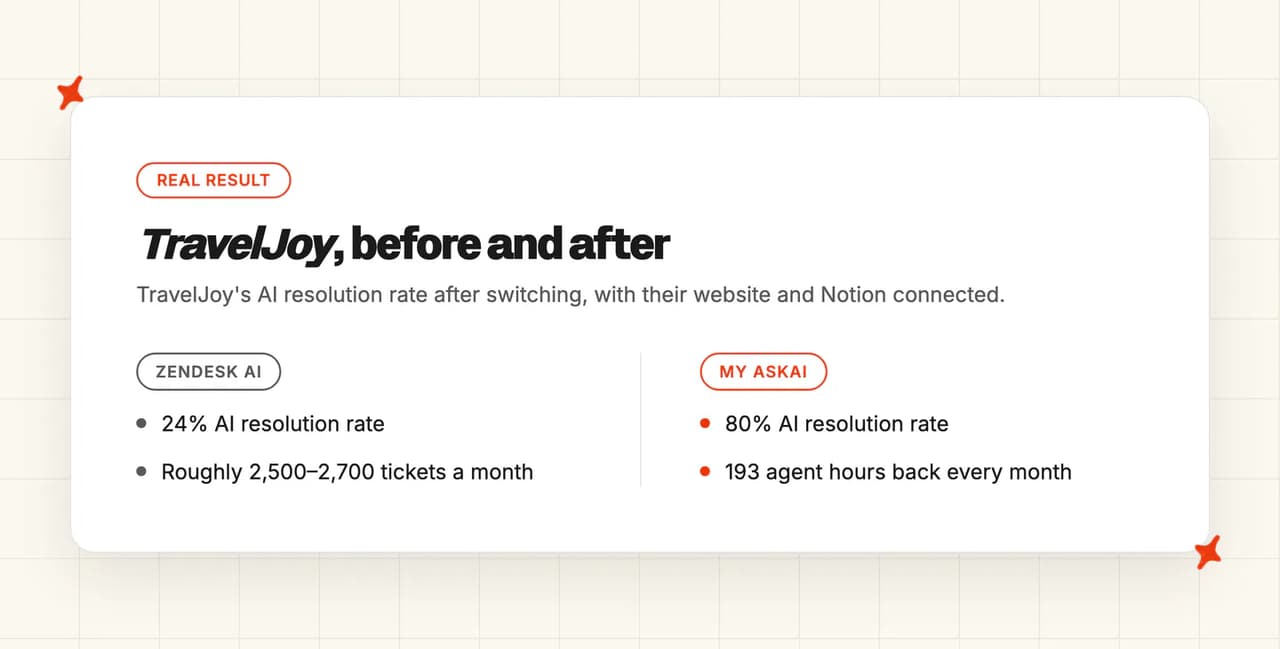
A rate of 24% means three quarters of your tickets still land on a person, and you are paying for an AI agent on top of that. The next thing to spend on is either a better AI or better content.
A grade is the cheapest way I know to settle that, and grading a help center takes an afternoon.
The framework and the grades come from our help center audit skill, which is free on GitHub. It grades every article you have against the same thirteen checks and hands you the ranked list.
What should you do this week?
None of these five needs a tool or an account. Do them in order. They cover four of the thirteen checks, and the audit skill further down grades every article against all thirteen.
- Read your ten busiest articles the way the agent reads them - one at a time, with no memory of the other nine, no scrolling back, no clicking "see also", no looking at the screenshots. You will finish with a count of how many still answer the question they were written for, and my bet is the count is low.
- Check the first line of every section in those ten articles - does it answer, or does it warm up first? Rewrite the ones that warm up: answer-first is one of the five checks we weight heaviest.
- Find the steps that only exist in a picture - go through the same ten articles and look for any instruction that is only in a screenshot and nowhere in the text. Write it out underneath, no rewrite needed, so the agent can hand that step to a customer.
- Check how each article ends - if the fix does not work, does the article say what to do next, or does it stop? Add that line to the ones that stop, and the customer has somewhere to go instead of coming back to you.
- Add the line that says who the answer is for - where the answer changes by plan, region or account type, put that in the opening line. I find this one missing almost everywhere, and without it the AI hands your customer the wrong audience's answer.
How do I run the audit on my whole help center?
Install our free audit skill and give it your help center's URL. Step one on its own is the slow part, and the skill does it for every article at once: each one graded against the same thirteen checks, in the same three groups, with the failures ranked. I still read the output rather than trusting it, because the skill is grading written English and so are you.
You need a Claude or ChatGPT account. The skill needs no My AskAI login, and you do not need to have installed a skill before.
How do I get the skill file?
Both chat apps install a skill from a zip file, and ours is on GitHub. You do not need a GitHub account to download it.
- Download the skill - open the kb-ai-audit page on GitHub, click the green "Code" button, then "Download ZIP".
- Unzip it and find the skill folder - inside, open the "skills" folder. The folder you want is "kb-ai-audit", and it holds everything the skill needs.
- Zip that one folder on its own - on a Mac, right-click it and choose "Compress". On Windows, right-click it and choose "Send to", then "Compressed (zipped) folder". This new zip is the file you upload.
How do I install and run it in Claude?
Skills work on every Claude plan, Free included, in the web app and the desktop app.
- Turn on code execution - go to "Settings", then "Capabilities", and switch on "Code execution and file creation". The skill does its grading in that sandbox. On a Team or Enterprise plan, an owner has to allow skills for the organization first.
- Upload the skill - go to "Customize", then "Skills". Click the "+" button, choose "Create skill", then "Upload a skill", and pick the zip you made.
- Run it - start a new chat and type "Use the kb-ai-audit skill to audit our help center", followed by your help center's URL.
How do I install and run it in ChatGPT?
ChatGPT skills need a paid plan, on the web or the desktop app.
- Upload the skill - open "Plugins" in the sidebar, go to the "Skills" tab, click "Create", then "Upload from your computer", and pick the same zip. ChatGPT scans every uploaded skill first, and most are ready as soon as the scan finishes.
- Run it - start a new chat, type "@" and choose "kb-ai-audit", then ask it to audit your help center and paste in the URL.
What if I use Claude Code?
Claude Code is Anthropic's AI tool that you install on your computer. I find it the most reliable place to run the audit on a big help center, because the first step pulls every article over the internet and a chat app's sandbox can block that. If the chat app says it cannot reach your help center, switch to Claude Code. Add the skill with these two commands, then ask it to audit your help center:
/plugin marketplace add mihelimited/kb-ai-audit
/plugin install kb-ai-audit@kb-ai-audit
What does the audit read and send back?
Check thirteen needs the whole library, and the skill reads every article at once. A single page cannot show you that a second article answers the same question differently, so we read every article against the others to find the near-duplicates and the contradictions. It pulls your published help center pages from Zendesk, Intercom, Freshdesk, HubSpot and Gorgias. The coverage gaps pass is the exception, because finding the questions nothing answers means reading an export of your tickets as well.
What comes back is a live dashboard, a shareable PDF report, a one-page summary and a spreadsheet tracker, plus rewrites in your own voice if you ask for them. If you are already running our agent, Self-Learning is drafting articles from how your team replies to the tickets it hands over, so the coverage gaps close without anybody assigning them.
When is a low resolution rate NOT your help center's fault?
TravelJoy is the case against grading first. Their resolution rate more than tripled, and both the AI and the knowledge behind it changed at once, with their website and a Notion workspace connected as new sources along the way. Grading the content first would have delayed a rollout that worked.
Three other cases are worth ruling out before you start rewriting, and I check them in this order. The agent may never have been given the article, because the source it lives in was never connected. It may have been told not to answer that topic, by an escalation rule doing exactly its job. Or the question may have no article anywhere, which is a coverage problem, and no amount of editing existing pages will touch it.
The deployment itself is the fourth case. The way the agent is set up inside your helpdesk moves the number too.
If your read is that the setup is the problem, our 30/60/90-day plan for a new AI deployment covers what to check and measure at each stage.
Fabrication belongs at the bottom of your list of causes, because swapping the model will not fix an article that never gave the right answer. Work through the other four before you start shopping for a new AI.
The takeaway
Your resolution rate is a grade on your content far more often than it is a grade on your AI. The article that caused the bad answer is usually sitting in your help center right now, looking fine.
Our Find / Use / Trust grade gives you thirteen checks to read it with, plus a whole-library layer for the contradictions and duplicates no per-article review can see.
Start with the one action that needs nothing from anybody: take your ten busiest articles and read them one at a time, with no memory of the others. Then install the free audit skill and grade the rest of the library, contradictions included, so you have the same ranked list we work from.
FAQs
What is a knowledge audit?
A knowledge audit is a knowledge-management exercise, much older than any of this. It is a formal assessment of what an organization knows, who holds that knowledge, how it moves around and where the holes are, explicitly including the knowledge that only lives in people's heads. Gartner carries the standard definition, and David Skyrme and Bloomfire both walk through what one covers in practice. A help center audit for AI asks a narrower question: can an AI agent answer a customer from the things you have already written down?
What does a knowledge audit example look like?
The clearest worked example I know is AASHTO's knowledge audit job aid. It runs as an inventory plus a set of interviews, then a map of how knowledge flows and where it stops. Skyrme's version works the same way. A help center audit for AI reads the text itself, article by article, with nobody interviewed.
What is a knowledge base audit?
A knowledge base audit is the narrower sibling and the closest of the three to what we do. It looks at the content you have documented, so it covers accuracy, duplication, age and structure across your articles. What the whole organization knows is out of its range.
Both Bloomfire and Skyrme draw that line. A help center audit for AI adds one test on top of it: can an AI agent reading a given article answer a customer from it?
Side by side, each of the three is narrower than the one before it, and only the last asks the AI question.
| Audit | What it covers | What it misses |
|---|---|---|
| Knowledge audit | Everything the organization knows, people included | Whether any of it is written down well |
| Knowledge base audit | Your articles: accuracy, duplication, age, structure | Whether an AI agent can answer from them |
| Help center audit for AI | Each article as an AI reads it, and the whole library | What nobody has written down |
How do I tell if my help center is good enough for an AI agent?
Grade it against the three questions we use. Can the AI find the right answer, can it use the answer once it has it, and is it the right and current answer? Those hold thirteen checks between them: three under Find, seven under Use and three under Trust, plus a pass across the whole library for contradictions, near-duplicates and coverage holes. Passing about half of them is a C, and a C is a working help center. Our free audit skill runs all thirteen over every article, and returns rewrites alongside the grades if you want the fixes as well as the diagnosis.
How to make sure AI doesn't give wrong answers to customers
Fix the information: wrong answers come from content that is out of date, ambiguous, incorrect or in conflict with another article, and a conflict never shows up on the page you are reading. Both Atlan and the Customer Success Collective make the same point about content quality driving AI support quality. Start by grading your ten busiest articles, then make sure your team can trace any bad answer back to the source that caused it.
What is an AI customer service bot audit?
The phrase has two live meanings. One is an audit of the AI system itself, covering how it was built, trained, deployed and controlled, which is the reading behind The IIA's AI framework, Collibra's AI audit readiness checklist and The CPA Journal's guide. I have spent this post on the second: an audit of what the bot is reading from. If your bot is answering wrong, check the second first.