7 Best AI Customer Service Agents for Ticket Triage & Routing (2026)
Ticket triage eats ~30s per ticket across thousands a month. We scored 7 AI agents that auto-classify, prioritize and route tickets, accurately.
Summarize with AI
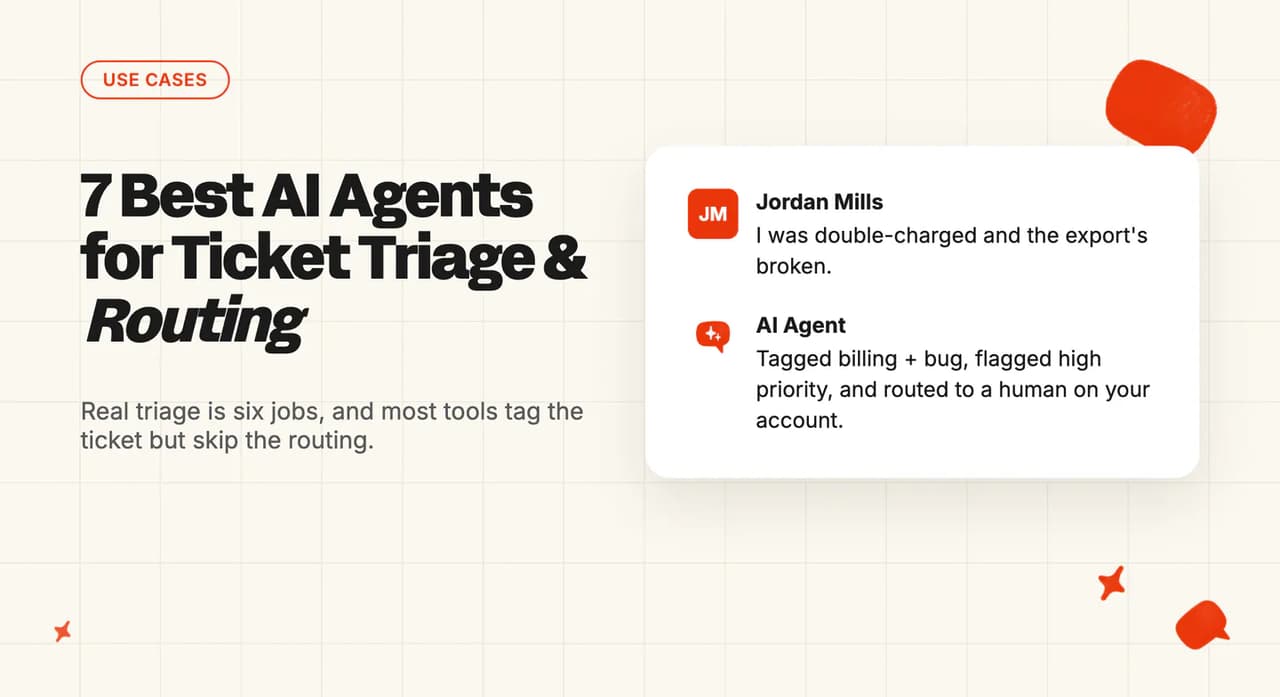
Triage is the invisible tax on every support team. Before anyone answers a single ticket, someone has to read it, work out what it's about, decide how urgent it is, and get it to the right queue.
That's thirty seconds to a minute a ticket. Multiply it across a few thousand tickets a month and it's a job nobody wants and everybody does badly.
You're probably here because one of these happened. I've watched all three play out on customer calls.
- A ticket sat in the wrong queue for two days because it was tagged "billing" when it was really a bug, and the customer churned before anyone looked.
- You switched on auto-tagging somewhere, it was sharp for the first month, then it drifted: 95% accurate at launch, closer to 60% by the time anyone checked.
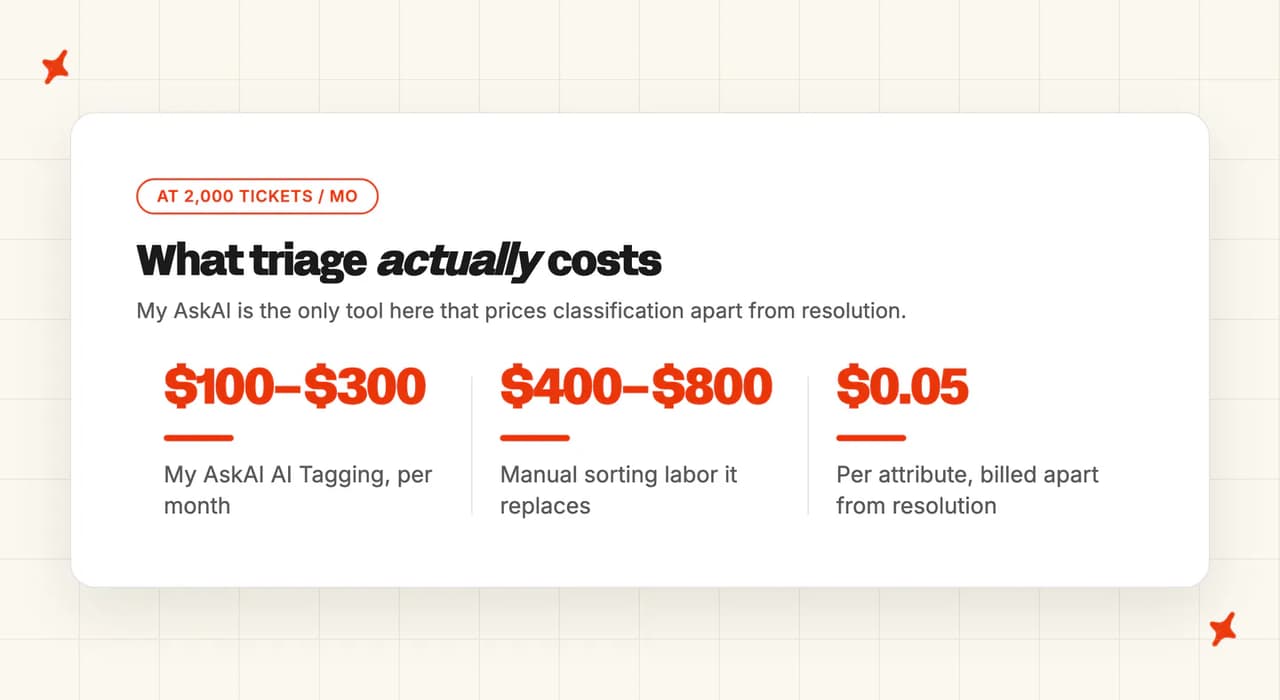
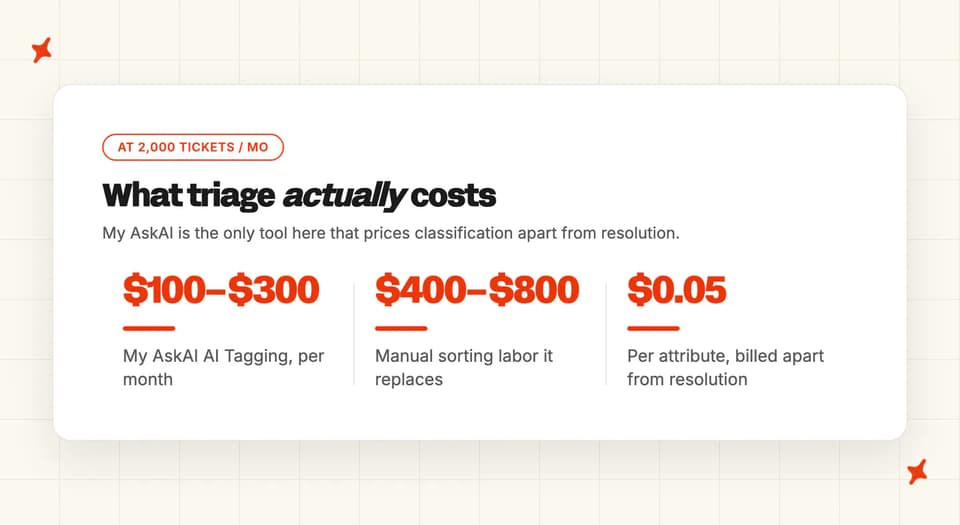
- You're running the numbers on the classification work itself: roughly thirty seconds to a minute per ticket at about $0.40/min loaded, across 2,000 triage tickets a month. Call it $400 to $800 of pure sorting labor before a single ticket gets resolved.
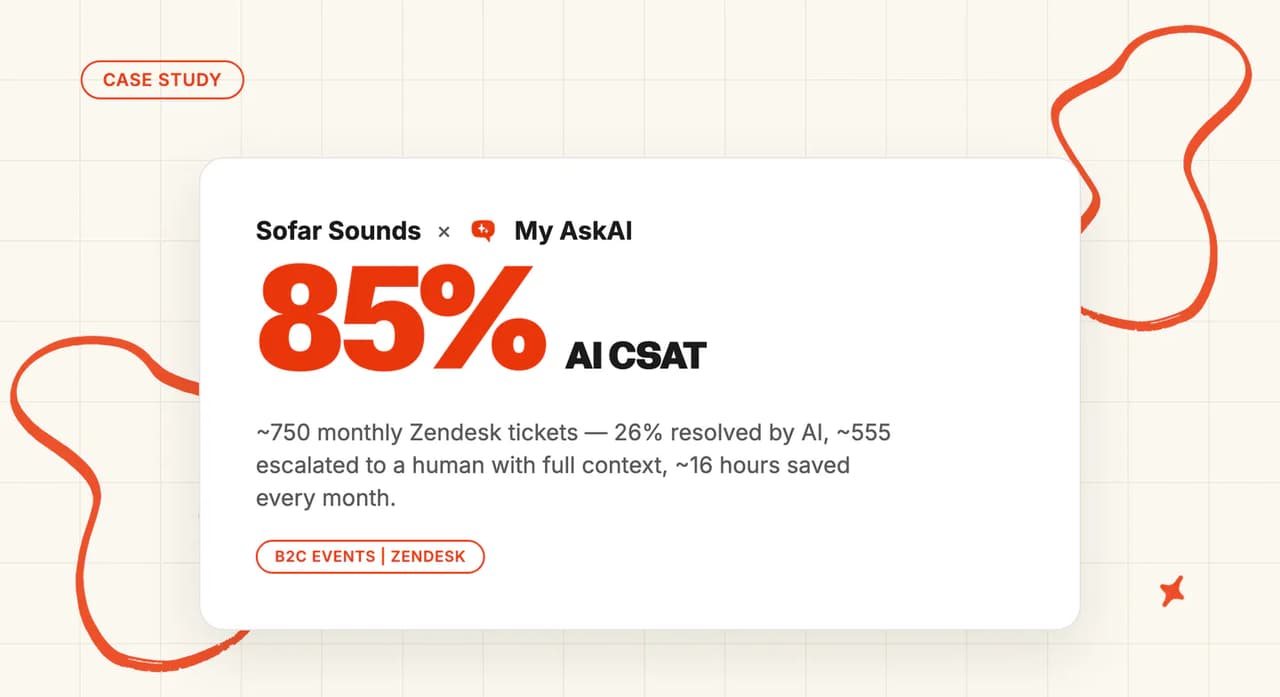
I've scored seven AI agents on whether they triage and route tickets in production or only tag them and walk away. One of our own customers, Sofar Sounds, runs about 750 Zendesk tickets a month through AI triage and deliberately escalates roughly 555 of them to humans with full context. For them, triage works as a routing strategy for getting tickets to the right human with context, and deflection was never the scoreboard.
That distinction runs through the whole post: I'll show you where classification ends, where the routing engine begins, and which of these seven does which.
What does automating ticket triage & routing actually require?
Automating triage is really six jobs, and most tools do the tagging and skip the routing, the learning loop, or the escape hatch. This is the spec I scored every vendor against.
1. Tag taxonomy that matches your helpdesk's existing schema
The AI has to classify against your existing tags and fields, never inventing a taxonomy of its own that nobody on your team recognizes. The hard part is disambiguation: a tag is usually a word or two, and "returns" means something specific to your team. The way we solve it in AI Tagging is to take your existing tags as the categories and have the AI write each one a full, human-readable description, which you can edit if it comes out wrong or not specific enough. Classification is then semantic, based on meaning, and stays consistent across thousands of tickets.
2. Multi-label classification
Real tickets rarely fit one box. A message can be a billing question and a bug report and read as frustrated, all at once. Triage that only assigns a single label is going to be wrong on a large slice of your inbox, so I want the AI classifying across several dimensions on the same ticket (reason, product area, sentiment), which takes semantic classification that keyword rules can't match.
3. Priority / severity inference
The AI should read urgency from the ticket and flag it: cancellation intent, SLA-risk language, a customer who's plainly angry. One boundary worth drawing here: reading priority from the message text is very different from reading it off account metadata like plan tier, revenue, or renewal date.
The first is what a message classifier does. The second is a separate, harder job most tools don't do, so I always make buyers check which one a vendor is selling them.
4. Routing to the right team or view, beyond adding a tag
This is the line most tools fall short of. Adding a label is classification; the ticket still has to move.
On a real helpdesk the mechanical routing (triggers, skills-based assignment, round-robin) is done by the helpdesk's own automation, firing off the tags and fields the AI writes. So the first question I ask any AI layer is whether it feeds a routing engine or claims to be one.
A tool that tags a ticket and leaves it sitting in the same queue has automated nothing.
5. Continuous learning from agent corrections
Classification accuracy decays. Your products change, your policies change, and a model that was 95% accurate at launch drifts toward 60% within ninety days if nothing feeds corrections back in.
What keeps it sharp is a correction loop: editable tag definitions, or a model that retrains when a human reclassifies a ticket. That loop is the capability I see skipped most often; teams build a static model and set it once.
6. Confidence threshold + human-in-the-loop fallback
Low-confidence tickets, and whole categories you don't trust the AI on, have to route to a person before the AI ever force-handles them. That means a per-tag or per-topic control plus escalation rules, the ability to say "this class of ticket always goes to a human." Handoff is the second tier of any triage system: sometimes the right answer is the AI replies, and sometimes it's a person, with the context carried across so they don't start from zero.
For a sense of what "good" looks like once tickets are triaged and answered, our field benchmark data puts the median AI resolution rate around 70% across 195 rated deployments spanning 38 vendors. That's an aggregate, directional figure and no substitute for a clean triage-accuracy comparison, though it's a useful reality check. Take the "90%+ out of the box" claims you'll see on vendor pages with a grain of salt.
A vendor that offers fewer than four of these six capabilities isn't really doing triage. At best it answers questions about triage, or it's a resolution agent that escalates: useful, but it won't take the sorting work off your team's plate. You can set the guardrails and escalation logic that make this safe in Guidance, and route by brand or region with Multibrand.
How did I score these tools for triage & routing?
I scored each of the seven vendors out of 10 on all six capabilities above, plus three cross-cutting criteria that decide whether a triage rollout survives contact with reality: setup effort, cost at a typical triage volume of around 2,000 tickets a month, and security. Where a vendor is a resolution-first agent that happens to escalate, I scored its triage capability alone and left its overall platform out of it.
I've run My AskAI for over three years, and on triage rollouts the tag accuracy on the slide is the easy part; what breaks is everything after it.
Here are the criteria I ranked them on, in priority order for this workflow:
- Classification quality: capabilities 1, 2 and 3. Does it match your taxonomy, multi-label, and read priority from the message?
- Routing: capability 4. Does the ticket actually move, or just get a sticker?
- Durability: capability 5. Does accuracy hold up past ninety days?
- Control: capability 6. Can you block the AI on categories you don't trust it with?
- Setup ease: how long from signing up to tickets being triaged.
- Cost at triage volume: what classifying ~2,000 tickets a month actually costs.
- Security: all seven are SOC 2 Type II and GDPR (eesel's SOC 2 is in progress), so it's a floor here and won't separate them.
The 7 AI tools for ticket triage & routing: at a glance
Scores are out of 10, and Overall is the column sum of the eight rows. My AskAI is reviewed first by section order; that's independent of where it ranks.
| (scores /10) | My AskAI | eesel AI | Fini | Zendesk AI | Intercom Fin | Forethought | Freshdesk Freddy |
|---|---|---|---|---|---|---|---|
| Tag-taxonomy match | 9 | 8 | 5 | 9 | 4 | 8 | 5 |
| Multi-label classification | 8 | 8 | 4 | 9 | 4 | 9 | 5 |
| Priority inference | 6 | 8 | 4 | 9 | 5 | 8 | 7 |
| Routing (not just tagging) | 6 | 8 | 4 | 9 | 5 | 8 | 5 |
| Learning from corrections | 6 | 6 | 4 | 9 | 8 | 6 | 4 |
| Confidence + human fallback | 9 | 8 | 7 | 8 | 8 | 7 | 5 |
| Setup ease | 9 | 9 | 6 | 3 | 7 | 2 | 5 |
| Cost at triage volume | 10 | 5 | 2 | 3 | 4 | 1 | 5 |
| Overall (out of 80) | 63 (79%) | 60 (75%) | 36 (45%) | 59 (74%) | 45 (56%) | 49 (61%) | 41 (51%) |
Same criteria, in plain words:
| (in plain words) | My AskAI | eesel AI | Fini | Zendesk AI | Intercom Fin | Forethought | Freshdesk Freddy |
|---|---|---|---|---|---|---|---|
| Tag-taxonomy match | Tag-definition expansion, your tags | Edits your helpdesk tags | Categorization, Growth tier and up | Unlimited custom intents, native | Insights topics, no tagger | Custom triage models | Suggests fields only |
| Multi-label classification | Up to 3 attributes | Tags plus assignees | No documented multi-label | Intent, sentiment, language, entity | Analytics buckets, not live | Six classification dimensions | Priority, group, status fields |
| Priority inference | Message text, not metadata | Routes, tags, prioritizes | Sentiment in analytics only | Sentiment triggers, queue prioritization | CX Score sentiment | Urgency scoring | Suggests priority, agent-confirmed |
| Routing (not just tagging) | Feeds native routing, not engine | Edits assignees, plain-English rules | Confidence-threshold escalation only | Native skills-based routing engine | Escalate-or-not router | Dedicated classify-prioritize-route | Suggests group; Freshdesk routes |
| Learning from corrections | Editable AI-written definitions | Edits improve; older no-coaching con | Knowledge, not tag correction | Resolution Learning Loop | Optimize dashboard, weekly tips | Models, but constant tweaking | Needs larger data set |
| Confidence + human fallback | Per-tag block plus Guidance handover | Escalation rules plus simulation | Confidence-threshold escalation, context | Escalation blocks, omnichannel | Escalation Router over 98% | Routes, escalates; Solve loops noted | Reactive, basic handoff |
| Setup ease | Live in 10–15 minutes | Minutes, add-on layer | Under a week | Four to eight weeks | Enable in an hour | 30–90 days, 20K tickets | Gated to Pro tier |
| Cost at triage volume | $0.05 per attribute, separate | ~$0.40 per task | $3,600/mo floor | Per-seat plus per-resolution | $0.99 per outcome | ~$74.5K/yr median ACV | $0.49 per session |
| Overall (out of 80) | Best value, upfront layer | Strong dedicated triage | Resolution agent, not triage | Deepest, priciest, Zendesk-only | Escalation, not classification | Powerful, enterprise-gated | Freshworks-only field suggester |
The deepest raw capability sits with the vendor that owns the routing engine (Zendesk, a clean six of six) and the two purpose-built triage agents, Forethought and eesel, at five of six.
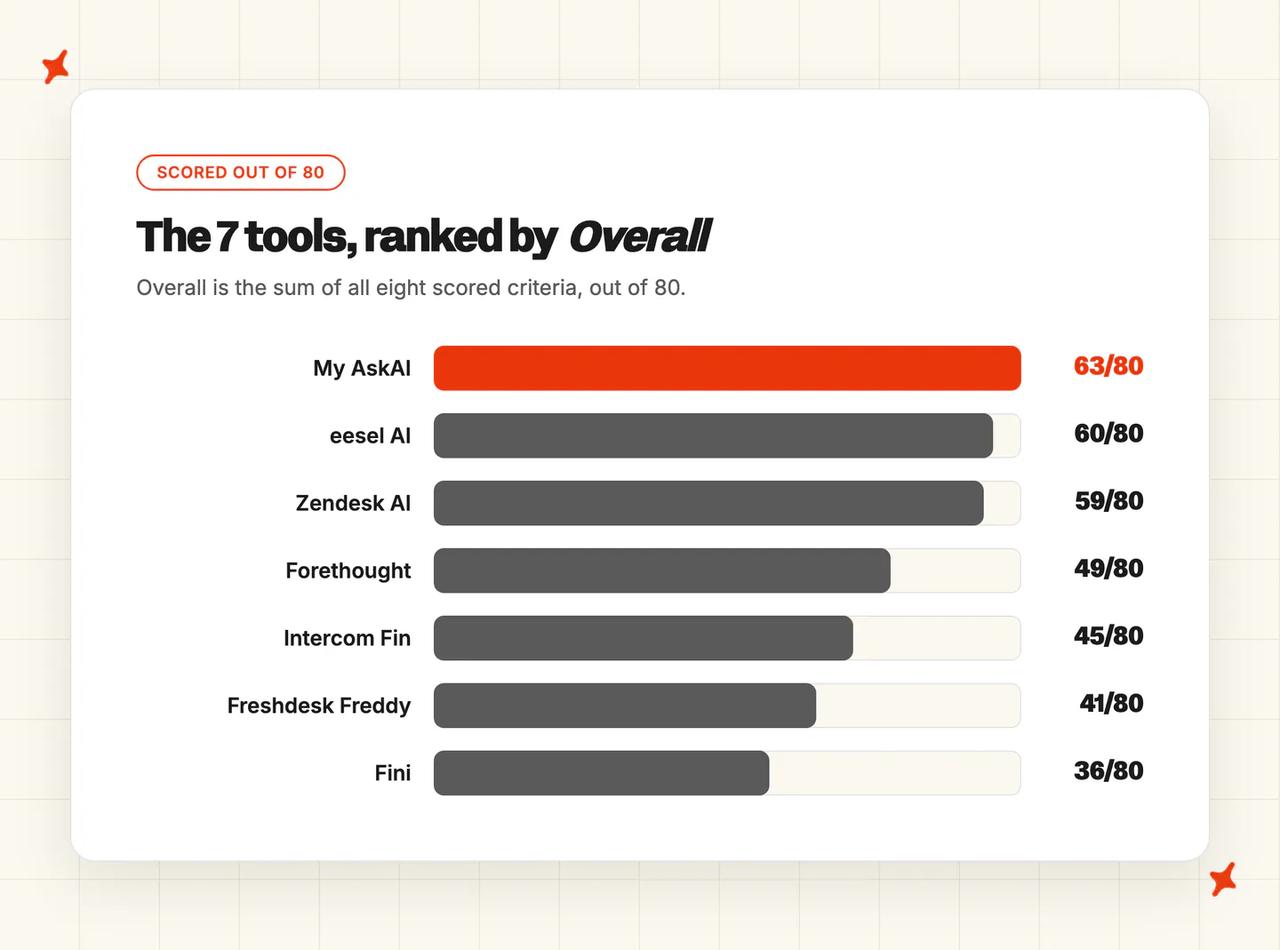
But those are also the priciest and most locked-in: Zendesk's per-resolution pricing and Zendesk-only reach, Forethought's enterprise-only floor, eesel's pay-twice add-on model.
My AskAI tops the composite a different way. Zendesk's native engine out-classifies it, but My AskAI clears three capabilities cleanly and wins on the two axes buyers feel most at 2,000 tickets a month: a five-cent-per-attribute price and a ten-minute setup. At those numbers, it's the combination I'd point most teams to first.
The resolution-first agents (Fini, Intercom Fin, Freddy) have escalation routing but aren't triage specialists. I've included them because buyers cross-shop them, and they score low on pure triage on purpose.
Where does triage & routing automation fail?
Across the rollouts I've sat in on, triage breaks in three predictable ways. Each one is a question to ask in a demo, and a reason to disqualify a tool on the spot.
Failure mode 1: accuracy decay, sharp at launch and drifting by ninety days
This is the one I see most. A tool tags at 95% accuracy in the first weeks, then drifts toward 60% as your products and policies change and nothing feeds corrections back in.
The disqualifier in a demo is blunt: ask how the model relearns when an agent re-tags a ticket, and whether the tag definitions are editable. If the answer is "it's trained, it just works," the drift is coming.
Precision comes from expanding each tag into a reviewable definition and letting the AI learn from reclassifications. A claimed accuracy percentage on a slide won't get you there.
Failure mode 2: it tags the ticket but doesn't route it
The most common gap I run into. The tool "supports tagging," so it adds a label and the ticket sits exactly where it landed, classified but going nowhere.
This is the classify-versus-route line from the capability spec made real: a tag is only useful if something downstream moves the ticket off it.
The demo test I use is to ask to see a ticket change team or view off a tag, live. If the vendor can only show you the label, the routing half of "triage and routing" isn't there.
Failure mode 3: over-triage kills resolution
The over-triage failure is the one teams walk into by accident: they get so enthusiastic about routing that they build so many escalation and triage rules that the AI never gets a chance to attempt the 70% of tickets it could have resolved.
Every rule that says "send this to a human" boxes the AI out. Here the routing ruleset is what breaks: build one so aggressive that your AI agent becomes an expensive tagging engine handing everything off, and the model never gets to show what it can do.
Triage should mark what the AI shouldn't touch and let it attempt the rest.

Can My AskAI actually automate ticket triage & routing?
We built My AskAI as an AI support agent that plugs into the helpdesk you already run: Zendesk, Intercom, Freshdesk, Gorgias or HubSpot. It works on top of that helpdesk and doesn't replace it.
We do the intelligent classification and the handoff, and we set the routing rules. The mechanical queue-assignment is done by your helpdesk's own automation, off the tags and fields we write. We feed your routing engine and don't try to be one.
That's three of the six capabilities cleanly, and I'll spell out the three we mark partial.
How My AskAI handles triage & routing end-to-end
When a ticket arrives, our AI Tagging classifies it against your existing helpdesk tags across up to three attributes or custom fields, natively inside Zendesk, Intercom, Freshdesk, Freshchat and Gorgias. The precision mechanism is tag-definition expansion: we take your existing tags as the categories, the AI writes each one a full description, and you edit any description that's wrong or not specific enough. Classification then reads meaning, stays consistent, and a ticket is assigned as soon as it lands.
The routing lever is per-tag reply control. Every tag carries a setting: the AI can reply directly to everything under that tag, draft an internal note for a human to send, or give no reply at all (blocked).
You tag a class of tickets you don't want the AI answering and route those to a human. Because we bill tagging separately at five cents a tag, you pay only the five-cent tag on tickets you were always going to hand off, skipping the full per-conversation charge. That puts routing and spend control in the same lever.
For priority, the AI reads sentiment and urgency from the message text (frustration, cancellation intent) and can route that tag to a person.
It classifies on what the customer actually wrote; that message-text scope is what the partial marks on priority and routing reflect in the table below. Guidance handover and escalation, plus Multibrand rules, set the routing logic, and your helpdesk's native automation does the mechanical move.
On the learning side, the guard is those editable tag descriptions: when a tag comes back wrong or too vague, you tighten its description and classification follows. And when you want to know why the agent classified or answered something a particular way, you can ask Echo which knowledge source it used and why.
Capabilities shipped (out of 6)
| Capability | My AskAI |
|---|---|
| 1 Tag-taxonomy match | ✅ Tag-definition expansion off your existing tags (native in Zendesk, Intercom, Freshdesk, Freshchat) |
| 2 Multi-label classification | ✅ Up to 3 attributes/fields, semantic |
| 3 Priority inference | ⚠️ Sentiment and urgency from message text; not account metadata |
| 4 Routing to right team | ⚠️ Classifies, sets rules and feeds the helpdesk's native routing; not a standalone engine |
| 5 Learning from corrections | ⚠️ Editable AI-written tag descriptions (you tighten any that drift) |
| 6 Confidence + human fallback | ✅ Per-tag reply control (direct reply / internal-note draft / blocked) plus Guidance handover |
Who's using My AskAI for triage?
Worth knowing first: triage in My AskAI runs through two levers, AI Tagging or Guidance escalation rules, and customers mix them. The clearest triage story we've got is Sofar Sounds on Zendesk, and theirs is the Guidance flavor: about 750 tickets a month through AI triage, roughly 195 resolved by the AI and around 555 deliberately escalated to humans with full context. That's a 26% resolution rate by design: for their tickets the strategy is escalation, and deflection was never the goal.
TravelJoy uses the AI Tagging Zendesk app to auto-classify tickets and replace manual contact-reason tagging, hitting 76% AI resolution against 24% on Zendesk's own AI. Edel Optics uses tagging as a guardrail, auto-classifying tickets and blocking the AI from replying on categories like faulty items, across 4,067 tickets at 79% resolution and 92% CSAT.
I'd also point to YouGarden, which runs Freshdesk tagging to keep reporting consistent and decide which tickets the AI should answer, at 66% resolution (peaking around 82%). And Swytch expanded the AI category by category, the triage-then-automate pattern, to 81% deflection across 4,050+ tickets a month.
How does My AskAI price for triage volume?
AI Tagging is $0.05 per attribute per ticket, billed separately from the conversation rate of around $0.10 a ticket. At 2,000 triage tickets a month that's $100 for a single attribute, up to $300 if you use all three, against the $400 to $800 of manual sorting labor it replaces.
Because the tag is billed on its own, a class of tickets you tag and route to a human costs you five cents and skips the full per-conversation or per-resolution charge. That's the spend-control angle I haven't seen a per-resolution competitor match.
You can test the whole thing first: the 30-day free trial unlocks every feature with unlimited tickets and no card. We're SOC 2 Type II certified and GDPR compliant, with the live report on our trust portal.
For the rollout patterns, see our AI Tagging, Guidance and Multibrand docs, and the full pricing on the pricing page.
Can eesel AI actually automate ticket triage & routing?
eesel is the closest thing on this list to a dedicated, helpdesk-agnostic triage product. Alongside its Agent and Copilot, it runs a distinct AI Triage product, and for triage specifically, that focus shows.
How eesel handles triage & routing end-to-end
Per its documentation, eesel's AI Triage "routes, tags, and prioritizes incoming tickets automatically," including catching spam and low-value "thank you" messages so they don't clog the queue. Its AI Actions can edit tags and assignees, and you write escalation rules in plain English: "if a customer mentions refund three times, assign Tier 2 and add a refund-request tag."
A simulation mode lets you test those rules against your historic tickets before going live. I'd use it hard in any eesel trial; it's the cleanest way to catch the failure modes above before they hit real customers.
The caveat is the learning loop. eesel's current site says every edit improves future responses, but word-on-the-street from an older G2 review is that its copilot couldn't accept edits for coaching, so pressure-test that in a trial. It's also an add-on layer that rides on top of your existing helpdesk, so you keep paying for both, and its SOC 2 certification is still in progress.
Capabilities shipped (out of 6)
| Capability | eesel AI |
|---|---|
| 1 Tag-taxonomy match | ✅ AI Triage edits tags on your helpdesk |
| 2 Multi-label classification | ✅ Tags plus assignees via plain-English rules |
| 3 Priority inference | ✅ "Routes, tags, prioritizes" |
| 4 Routing to right team | ✅ Edits assignees plus plain-English routing rules |
| 5 Learning from corrections | ⚠️ "Edits improve responses" on the current site vs an older no-coaching G2 con |
| 6 Confidence + human fallback | ✅ Escalation rules, simulation, spam/thank-you auto-close |
Who's using eesel for triage?
eesel names EntryLevel, which reports running "3 eesel AI agents in Intercom that triage and respond." That's an actual triage deployment and worth more than a logo on a page. Its broader customer set includes Spooky2, Yellowdig and Ecosa.
How does eesel price for triage volume?
eesel is pay-as-you-go: a Regular task is $0.40 and covers one ticket regardless of how many messages it takes, Light tasks are free, Heavy tasks are $4.00, and there's a $1,000/mo Enterprise base. If each triaged ticket counts as one Regular task, that's roughly $800/mo at 2,000 tickets, and you're still paying for the underlying helpdesk on top, which stacks up faster than I'd like for a pure-classification job.
For more on eesel, read our complete guide, browse the eesel alternatives roundup, or see the My AskAI vs eesel comparison.
Can Fini actually automate ticket triage & routing?
Fini is an action-and-resolution specialist first. Its agent, Sophie, is built to solve tickets end-to-end, and it was never designed to run your triage taxonomy. Buyers cross-shop it, so it's here, and it scores low on pure triage.
How Fini handles triage & routing end-to-end
Sophie escalates on a confidence threshold with a full context transfer, and you can pre-configure topics to always escalate, which is real handoff logic. In Gorgias, Fini uses "Fini-transfer" tags to route escalated tickets.
AI categorization is available on the Growth tier and up, and sentiment shows up in Fini Analytics. But there's no documented tag-taxonomy-match or multi-label triage product the way eesel or Zendesk build one, which is why I mark the classification capabilities partial.
Where Fini is strong is off-topic for this post: action execution across payment rails (Stripe, Adyen, Braintree), KYC flows, and a deep compliance grid (SOC 2 Type II, ISO 27001, ISO 42001, PCI-DSS Level 1, HIPAA). If your real problem is resolving complex fintech tickets, then sorting them is a different post entirely.
Capabilities shipped (out of 6)
| Capability | Fini |
|---|---|
| 1 Tag-taxonomy match | ⚠️ AI categorization (Growth+); "Fini-transfer" tags in Gorgias |
| 2 Multi-label classification | ⚠️ Categorization, no documented multi-label |
| 3 Priority inference | ⚠️ Sentiment in Analytics; no priority output |
| 4 Routing to right team | ⚠️ Confidence-threshold escalation; tag-based route |
| 5 Learning from corrections | ⚠️ Knowledge tooling, not tag correction |
| 6 Confidence + human fallback | ✅ Confidence-threshold escalation with full context |
Who's using Fini for triage?
Fini's public customers (Atlas, DistroKid, Column Tax, LISA, Qogita, Wefunder) are all resolution-framed stories. The docs and case studies describe solving tickets, and none of them describe running a triage taxonomy. There's no triage-specific named customer to point to.
How does Fini price for triage volume?
Fini's pricing starts at a Growth floor of $3,600/mo for 2,000 resolutions ($0.89 overage), with Scale at $9,000/mo and custom Enterprise. It's priced per resolution ("solved end to end, no human handover," with escalations free), so there's no separate triage line to price; you're buying resolution, with escalation routing alongside it.
At the $3,600 floor, it's the most expensive way on this list to solve a pure-classification problem, and I'd only reach for it if resolution were the real goal.
For more on Fini, read our complete guide or browse the Fini alternatives roundup.
Can Zendesk AI actually automate ticket triage & routing?
On raw capability, Zendesk is the one to beat, with the deepest native triage-and-routing engine here, and it's not close. It owns both halves, classification and the routing engine, because it is the helpdesk. The catch is entirely in the price and the lock-in.
How Zendesk handles triage & routing end-to-end
Zendesk's intelligent triage detects intent, sentiment, language and entities on every incoming ticket, and admins can create unlimited custom intents, with personalized intent suggestions surfaced weekly. Because it's native, its ticket routing combines skills-based routing with intent, sentiment and language as trigger conditions. That gives Zendesk a real routing engine of its own, well beyond a layer that just feeds one.
It generates internal notes on negative-sentiment tickets, and its Resolution Learning Loop (now Forethought-powered, after Zendesk's acquisition) detects workflow gaps and tests procedures. An Intelligent Triage dashboard shows intent, sentiment and language distribution alongside accuracy.
Motel Rocks is the most triage-flavored reference I found, using Advanced AI plus Copilot for emoticon-based queue prioritization.
Capabilities shipped (out of 6)
| Capability | Zendesk AI |
|---|---|
| 1 Tag-taxonomy match | ✅ Intent/sentiment/language/entity plus unlimited custom intents |
| 2 Multi-label classification | ✅ Intent, sentiment, language and entity per ticket |
| 3 Priority inference | ✅ Sentiment and entity triggers; queue prioritization |
| 4 Routing to right team | ✅ Native skills-based routing with intent/sentiment/language triggers |
| 5 Learning from corrections | ✅ Resolution Learning Loop |
| 6 Confidence + human fallback | ✅ Escalation blocks and omnichannel routing |
Who's using Zendesk AI for triage?
Zendesk's AI customers include Unity, Liberty London (a 73% drop in first reply time), Best Egg (80% of chats automated), Vagaro (4% to 44%) and Motel Rocks, whose emoticon-based queue prioritization is the most triage-specific of the set. These are vendor-attested figures.
How does Zendesk AI price for triage volume?
Intelligent triage lives in the Copilot add-on at $50/agent/mo, and autonomous resolution now bills purely per outcome at $1.50 to $2.00 per automated resolution, a per-resolution charge that climbs as the AI improves. Zendesk retired the separate AI agents Advanced seat license in mid 2026 and folded those features into the Suite plans. It's Zendesk-only, with a four-to-eight-week implementation, and a 20-agent mid-market team lands around $75,000 to $100,000+ a year all-in.
That's the trade for the deepest engine on the list, and I'd only sign up to it if you're already living in Zendesk.
For more on Zendesk, read our complete guide, browse the Zendesk alternatives roundup, or see the My AskAI vs Zendesk AI comparison.
Can Intercom Fin actually automate ticket triage & routing?
Fin is a resolution-first agent with a strong escalation router, and it isn't a per-ticket triage-classification product. Its routing surface is a decision model about whether to escalate, a narrower thing than sorting your inbox into a taxonomy.
How Intercom Fin handles triage & routing end-to-end
The Fin Escalation Router is a decision model, reported at over 98% accuracy, that decides escalate-or-not. That's the routing surface, and it's good at the one job it does.
Fin Guidance carries escalation categories; Insights offers a Topics Explorer and a Query-Type classification (Informational, Personalized, Action-based, Investigative) plus a CX Score sentiment read; and Fin Audiences gate content by plan, country or spend. But those are analytics and escalation surfaces, and none of them is a live per-ticket tag-taxonomy product, which is why I mark capabilities one to four partial.
The core is autonomous resolution (71% on average across 7,000+ customers, per Fin's own page). Its learning loop, the Optimize dashboard plus weekly recommendations, is strong, the one triage-adjacent capability it scores full marks on. (Worth knowing: Salesforce announced an agreement to acquire Fin, formerly Intercom, in June 2026; it doesn't change the product today.)
Capabilities shipped (out of 6)
| Capability | Intercom Fin |
|---|---|
| 1 Tag-taxonomy match | ⚠️ Topics/Query-Type in Insights; no per-ticket tag product |
| 2 Multi-label classification | ⚠️ Insights buckets, not a live routing surface |
| 3 Priority inference | ⚠️ CX Score sentiment; audiences gate content |
| 4 Routing to right team | ⚠️ Escalation Router (escalate/not); not multi-team routing |
| 5 Learning from corrections | ✅ Optimize dashboard plus weekly recommendations |
| 6 Confidence + human fallback | ✅ Escalation Router over 98%, with a hard resolution cap |
Who's using Intercom Fin for triage?
Fin's marquee customers (Anthropic, Lightspeed, Gamma, WHOOP, Synthesia) are all resolution-framed. There's no triage-specific named customer published.
How does Intercom Fin price for triage volume?
Fin is $0.99 per outcome (renamed from resolution, now including Procedure handoffs) plus seats at $29 to $132/mo; standalone Fin on Zendesk, Salesforce, Freshdesk or HubSpot is $0.99 per outcome with no seats and a 50-outcome monthly minimum. It's per-outcome, so like Zendesk the bill scales with success, and there's no separate triage lever, which is why I wouldn't buy it to sort tickets.
For more on Fin, read our complete guide, browse the Intercom Fin alternatives roundup, or see the My AskAI vs Intercom Fin comparison.
Can Forethought actually automate ticket triage & routing?
Forethought is the one purpose-built triage agent on this list. Its Triage Agent is one of five agents, and classification is what it was designed to do. The barrier here is access, and the capability is there.
How Forethought handles triage & routing end-to-end
The Triage Agent auto-classifies, prioritizes and routes using sentiment detection, language detection, urgency scoring, spam filtering, intent analysis and product-type identification: six dimensions on one ticket. You get custom triage models (three on the Team tier, six on Enterprise), and the numbers are real: Upwork reports 90% ticket-classification accuracy, with platform-level accuracy around 90%.
The caveat on the learning loop is that reviewers report needing to "constantly monitor and tweak intents," so it's not set-and-forget. (Separately, its Solve resolution bot has drawn end-user complaints about loops and weak escalation. That's a resolution-side caveat and not a triage one.)
Capabilities shipped (out of 6)
| Capability | Forethought |
|---|---|
| 1 Tag-taxonomy match | ✅ Custom triage models (product/intent) |
| 2 Multi-label classification | ✅ Intent, sentiment, language, urgency, spam, product |
| 3 Priority inference | ✅ Urgency scoring |
| 4 Routing to right team | ✅ Dedicated classify → prioritize → route |
| 5 Learning from corrections | ⚠️ Per-customer models but "constantly tweak intents" |
| 6 Confidence + human fallback | ✅ Routes and escalates |
Who's using Forethought for triage?
Upwork is the triage-specific reference, at 90% ticket-classification accuracy; Grammarly (87% deflection), Airtable, Datadog and D2L round out the set.
How does Forethought price for triage volume?
This is the wall. Forethought is enterprise-only with no self-serve and no free trial, running proof-of-value engagements only, and it recommends 20,000+ historical tickets plus 2,000/mo of ongoing volume, with a 30 to 90 day setup.
Pricing is opaque and outcome-based: the Vendr marketplace puts the median around $74,500/yr ACV. And it was acquired by Zendesk (the deal closed in March 2026), so I'd think hard about its future on non-Zendesk platforms.
For more on Forethought, read our complete guide or browse the Forethought alternatives roundup.
Can Freshdesk Freddy actually automate ticket triage & routing?
Freddy's triage is a Copilot field-suggester: Freshworks-locked, and agent-confirmed, so an agent signs off before anything moves. It's the lightest triage story on this list.
How Freddy handles triage & routing end-to-end
Freddy AI Copilot's "Auto triage" suggests ticket fields (priority, group and status) with real-time sentiment and similar-ticket context to help the agent. The key word is suggests: an agent confirms the surface, and it doesn't classify autonomously. The actual routing move is done by Freshdesk's own automations and round-robin, and Freddy doesn't do it.
Reviewers note it "needs a larger data set to learn," so accuracy is a function of your volume, and there's no standalone triage product. It's Freshworks-only, running on Azure OpenAI plus Freshworks models. Realistic deflection sits in the 30 to 50% range, which is where I'd set expectations.
Capabilities shipped (out of 6)
| Capability | Freshdesk Freddy |
|---|---|
| 1 Tag-taxonomy match | ⚠️ Copilot "auto triage" suggests fields |
| 2 Multi-label classification | ⚠️ Priority, group and status fields (suggestion) |
| 3 Priority inference | ✅ Suggests priority (Copilot, agent-confirmed) |
| 4 Routing to right team | ⚠️ Suggests group; Freshdesk automations do the move |
| 5 Learning from corrections | ⚠️ "Needs a larger data set to learn" |
| 6 Confidence + human fallback | ⚠️ Reactive; session model; basic handoff |
Who's using Freddy for triage?
Five9 (65% deflection, saving 200 hours a month) and Hinge Health (Copilot for email) are Freddy's public references. Both are resolution- or productivity-framed, and neither is triage-specific, so there's no pure-triage named customer to cite.
How does Freddy price for triage volume?
Freddy Copilot, where the auto-triage suggestions live, is $29/agent/mo on annual billing; the autonomous AI Agent is session-based at $0.49/session (500 free once, no rollover, and previews burn sessions). Triage-as-field-suggestion rides inside the per-seat Copilot cost and isn't separately metered, which is fine if you're already on Freshworks. That's really the only reason I'd land here.
For more on Freddy, read our complete guide, browse the Freddy alternatives roundup, see the My AskAI vs Freddy comparison, or read the Freddy pricing explainer.
What does automating triage save you? (worked example)
Triage is cheap to keep manual on any single ticket and expensive at volume. Here's the money at a representative 2,000 triage tickets a month, the way I'd lay it out for a team.
| Scenario | Monthly cost at 2,000 tickets | Effective cost per ticket | Notes |
|---|---|---|---|
| Manual (in-house) | $400–$800 | $0.20–$0.40 | ~30–60s per ticket at ~$0.40/min loaded, pure classification labor |
| My AskAI AI Tagging | $100–$300 | $0.05–$0.15 | $0.05 per attribute per ticket (1–3 attributes), billed separately from resolution |
| eesel AI | ~$800 | ~$0.40 | $0.40 per Regular task, if each triaged ticket is one task |
| Zendesk AI | Per-seat | n/a per ticket | Intelligent triage bundled into Copilot at $50/agent/mo, not per ticket |
| Freshdesk Freddy | Per-seat | n/a per ticket | Auto-triage rides inside Copilot at $29/agent/mo |
My AskAI is the only tool here that prices classification separately from resolution. It's also the cheapest pure-classification lever. On every per-resolution or per-outcome model above, the sorting work gets bundled into a charge you only pay when the AI resolves.
With a separate five-cent tag, you can classify a ticket, route it to a human, and pay only the nickel. That's what turns tagging into a spend-control lever on top of being a classification feature.
For a wider view of what AI resolution is worth once tickets are triaged, our field benchmark data and a quick ROI check for a Zendesk rollout carry the full picture.
So which AI tool is best for ticket triage & routing?
The most capable raw triage engine is Zendesk's: six of six, native, and deep, if you can accept the per-seat-plus-per-resolution pricing and the Zendesk-only reach. If you're an enterprise that can clear a 20,000-ticket floor and a ~$74.5K ACV, Forethought is the purpose-built classification specialist with proven 90% accuracy. And eesel is the best helpdesk-agnostic dedicated triage product if you're happy to run and pay for an add-on layer on top of your helpdesk.
My AskAI is the value pick that tops the composite: precise semantic classification through tag-definition expansion, a uniquely cheap per-attribute price that doubles as a spend-control routing lever, and handoff that feeds your existing helpdesk's routing engine. It's reviewed first, and we've been clear it's an AI layer that feeds a routing engine and isn't one itself. The resolution-first agents (Fini, Intercom Fin, Freddy) are the wrong tool if triage is your actual problem; they solve and escalate, they don't sort.
However you roll out, do it the careful way. I'd start tag-only, or in Copilot / internal-notes mode, and watch the classification accuracy for two to four weeks before letting it route directly. Then open it up.
And resist the urge to over-triage. Every routing rule you add is a ticket the AI never gets to attempt, and the fastest way to a disappointing resolution rate is a ruleset so aggressive the AI is boxed out of the 70% it could have handled.
Block the AI on the categories you don't trust it with, and let it attempt everything else; that's where the 70% comes from.
How do I score these tools on my own tickets?
If you want to run the same scoring on your own shortlist, here's the prompt I use. It maps one-to-one to the six capabilities above and tells the model to flag what desk research can't settle, so you get a scorecard you can act on instead of a vendor-page summary.
You are helping me evaluate AI ticket-triage vendors. I'll paste a shortlist and my setup; score each vendor and flag anything you can't verify.

My setup:
- Helpdesk: [e.g. Zendesk / Intercom / Freshdesk / Gorgias / HubSpot]
- Monthly ticket volume for triage: [e.g. 2,000]
- Vendors to score: [paste shortlist]

Score each vendor 0–10 on these six triage capabilities:
1. Tag-taxonomy match — does it classify against my existing tags, not invent its own?
2. Multi-label classification — can it put one ticket in several categories at once?
3. Priority inference — does it read urgency from the message text?
4. Routing — does the ticket actually change team/view, or just get a tag?
5. Learning from corrections — does accuracy hold past 90 days when agents re-tag?
6. Confidence + human fallback — can I block the AI on categories I don't trust it with?

Then score three cross-cutting criteria 0–10: setup effort, cost at my volume, and security (SOC 2 / GDPR).

Rules:
- If you can't verify a capability from public docs, write "unverified, ask the vendor" instead of guessing.
- Desk research can't judge classification accuracy on my data. Say so, and list the demo tests I should run: (a) send a ticket that spans two categories and check it multi-labels, (b) ask to see a ticket change team off a tag, live, (c) ask how the model relearns when an agent re-tags a ticket.

Output a table: one row per vendor, one column per criterion, an Overall out of 90, and a one-line verdict per vendor.
You can try all of it free for 30 days on us: every feature, unlimited tickets, no card, starting with AI Tagging.
FAQs
What is ticket triage?
Ticket triage is the front-of-queue loop that reads every inbound ticket, classifies it by reason, topic, sentiment and priority, and gets it to the right destination: the right team, view, or the AI-versus-human queue. It's distinct from resolution, which is answering the ticket. Triage decides where a ticket goes and who or what handles it, which is upstream of whether it gets resolved.
Does the AI route tickets or just tag them?
This is the question I'd test hardest. Most AI layers (My AskAI, eesel, Fini) classify the ticket, set the routing rules, hand off, and feed the helpdesk's native routing, which does the mechanical move. A native helpdesk AI like Zendesk intelligent triage, or a purpose-built agent like Forethought, owns the routing engine itself. The failure mode to watch for is a tool that adds a tag and leaves the ticket where it landed, so ask to see a ticket change team or view off a tag, live, in the demo.
How accurate is AI ticket triage after 90 days?
Accuracy decays without a correction loop: 95% at launch drifting toward 60% by ninety days is the classic failure. What holds it up is editable tag definitions, or a model that retrains when a human reclassifies a ticket, and a static model won't. The best tools classify intent around 90% out of the box, but I'd treat that as a starting point, and the durable number depends entirely on whether corrections feed back in.
Can I stop the AI from auto-tagging or auto-routing high-risk categories?
Yes. With My AskAI, per-tag reply control lets the AI reply directly to everything under a tag, draft an internal note for a human, or give no reply at all, so you tag a high-risk class and route it to a human at only five cents a tag. Edel Optics does exactly this, blocking the AI from replying on faulty-item tickets. Zendesk and Forethought handle the same need through confidence thresholds and escalation rules.
Does AI triage work with my helpdesk (Zendesk, Intercom, Freshdesk, Gorgias)?
It depends on the tool. My AskAI's tagging runs natively inside Zendesk, Intercom, Freshdesk, Freshchat and Gorgias; on HubSpot, Guidance, human-escalation rules and ticket-owner routing handle the same triage outcomes without AI Tagging. eesel, Fini and Forethought are broader add-on layers that connect to many helpdesks, while Zendesk AI and Freddy are native only to their own platforms.
Can AI triage handle tickets that span multiple categories (multi-label)?
The good ones can; it's capability two on my spec above. My AskAI classifies across up to three attributes or fields; Zendesk reads intent, sentiment, language and entity on one ticket; Forethought covers six dimensions. The trap is a single-label classifier that forces a two-topic ticket (billing and bug) into one wrong tag, so send a deliberately mixed ticket in the demo and watch whether it multi-labels.
What are the best practices for rolling out AI ticket triage?
Roll it out in stages. Start tag-only, or in Copilot and internal-notes mode, and watch classification accuracy for two to four weeks before you let the AI route anything directly. Block the AI on the categories you don't trust it with, let it attempt everything else, and keep a correction loop running so accuracy holds past ninety days.
Is AI triage worth it for an MSP or IT service desk?
Partly, but check the category. The vendors in this post are customer-support-first; an MSP or IT service desk is better served by ITSM-native tools (SysAid, ScienceLogic, Autotask, TeamDynamix) or an enterprise agent like Forethought, all of which are built around ITSM workflows, SLAs and asset context. The triage principles are the same, but the tooling and integrations differ enough that the ITSM-native category is usually the better fit for a service desk.
How is per-ticket AI tagging priced versus per-resolution AI?
My AskAI's AI Tagging is $0.05 per attribute, billed separately from the conversation rate of around $0.10 a ticket, so you can classify a ticket and route it to a human for five cents without paying any per-resolution charge. Per-resolution models are the opposite bundle, and you only pay on resolved tickets, but at 7 to 40 times the tag price and with no way to price the sorting work on its own.
| Pricing model | Unit price | You pay when |
|---|---|---|
| My AskAI AI Tagging | $0.05 per attribute | Every ticket tagged |
| Fini | $0.69–$0.89 per resolution | Ticket resolved |
| Intercom Fin | $0.99 per outcome | Outcome delivered |
| Zendesk | $1.50–$2.00 per resolution | Ticket auto-resolved |